
Understanding H.264, HEVC, and ProRes codecs is essential for anyone involved in video production or streaming. H.264 is widely recognized for its compatibility and efficiency, while HEVC offers superior compression rates, and ProRes is favored for high-quality editing. This article will break down the differences, advantages, and ideal use cases for each codec, helping you choose the right one for your needs.




Overview of Video Codecs

A video codec is a software or hardware tool that compresses and decompresses digital video files, allowing for efficient storage and transmission. The role of a codec in video compression is crucial, as it determines how video data is encoded to save space without sacrificing quality. This is especially important in a world where high-definition content is the norm, and managing file sizes while maintaining visual clarity is essential.
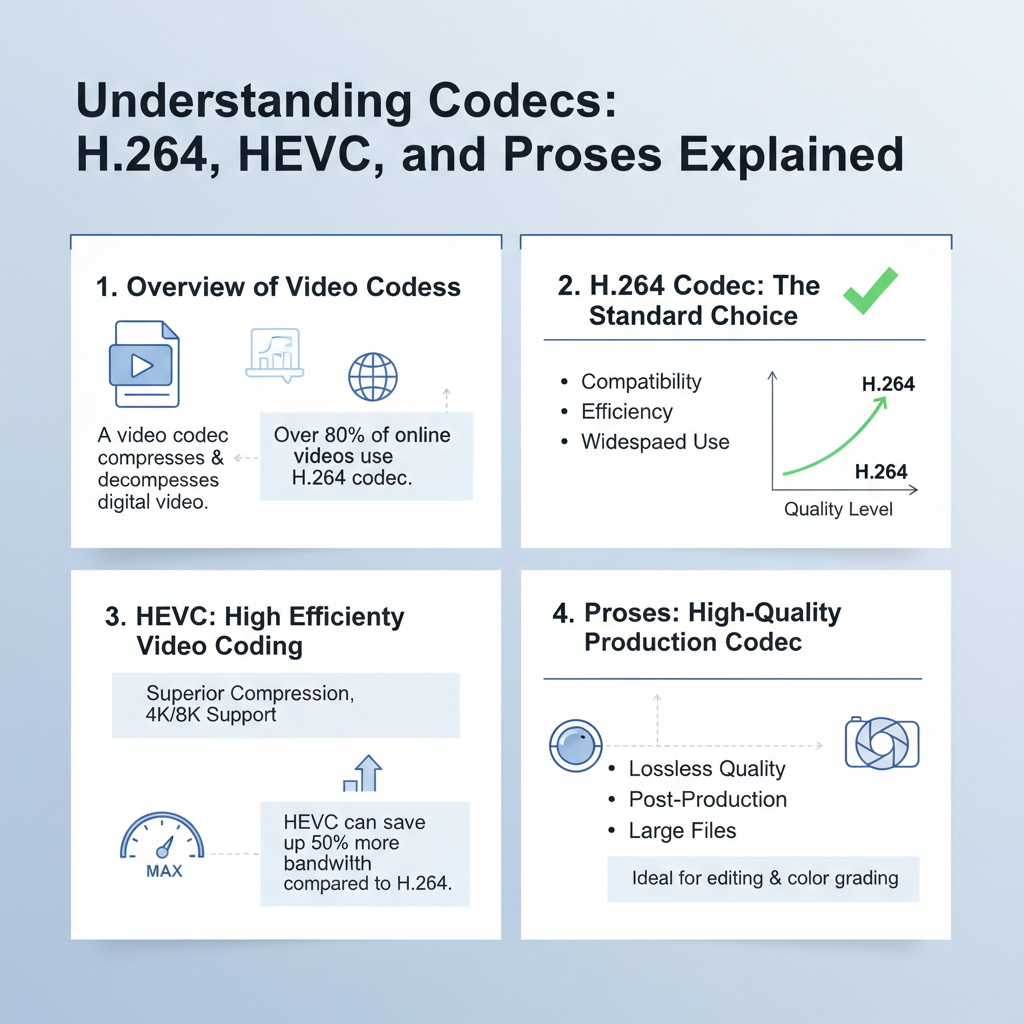
The importance of codecs in video quality and file size management cannot be overstated. Different codecs utilize various algorithms to compress video data, impacting the clarity, detail, and overall fidelity of the final product. As such, understanding the functionality and characteristics of each codec can help video professionals make informed decisions that align with their production and distribution needs.
H.264 Codec: The Standard Choice

H.264, also known as AVC (Advanced Video Coding), is one of the most widely used video codecs today. Its features include excellent compression efficiency and compatibility across a multitude of devices and platforms. This codec can encode high-quality video at lower bitrates, which is why it’s often the go-to choice for streaming services like YouTube, Netflix, and Vimeo.
The benefits of H.264 are apparent in its versatility; it provides a good balance between file size and video quality, making it ideal for encoding everything from online videos to Blu-ray discs. Moreover, its ability to maintain quality while minimizing data size means it’s particularly well-suited for mobile devices and bandwidth-constrained environments.
In practical terms, if you’re creating content for social media platforms or planning to upload videos to websites, H.264 is likely the best choice. Its universal compatibility ensures that your videos will play smoothly on almost any device, from smartphones to smart TVs.
HEVC: High Efficiency Video Coding
HEVC, also known as H.265, is the successor to H.264 and offers significant improvements in compression efficiency. This codec can deliver video quality that is comparable to H.264 but at about half the bitrate, making it especially beneficial for high-resolution videos such as 4K and HDR content. This advanced compression technique leverages more sophisticated algorithms and coding structures, resulting in high-quality images even at lower file sizes.
HEVC excels in scenarios where storage space is at a premium or when streaming high-resolution content over limited bandwidth. For instance, if you’re working on projects that require stunning visuals—like feature films, documentaries, or high-end streaming services—HEVC is worth considering. It allows for the delivery of visually rich content without overwhelming network capacities.
However, it is important to note that while HEVC offers impressive compression rates and quality, not all devices and platforms support it yet, which can be a limitation when distributing your content. Therefore, it’s essential to ensure that your target audience can access HEVC-encoded videos without issues.
ProRes: High-Quality Production Codec
ProRes is a family of video codecs developed by Apple, designed primarily for high-quality video editing and production workflows. One of its standout characteristics is its ability to retain high fidelity during editing, which is crucial for professionals working on projects that demand the utmost quality. ProRes supports higher bit rates and color depths, making it a favorite among filmmakers and video editors who prioritize detail and color accuracy.
Situations where ProRes is preferred include professional editing environments, where filmmakers require a codec that allows for extensive manipulation of footage without losing quality. For instance, when working with complex visual effects or color grading, ProRes provides the necessary quality to ensure that the final product looks polished. Additionally, ProRes is a popular choice for archiving projects, as its high-quality output ensures that the original essence of the footage is preserved over time.
While ProRes files can be larger than those encoded with H.264 or HEVC, the trade-off in file size is often justified by the superior quality and flexibility it offers during the editing process.
Comparing Compression and Quality
When comparing compression rates and quality retention among H.264, HEVC, and ProRes, it’s clear that each codec serves different needs and project requirements. H.264 generally offers good compression and quality balance, making it suitable for most everyday applications. HEVC, however, shines in scenarios that require high-resolution content, as it retains quality at lower bitrates, which can be a game-changer for streaming 4K video.
In contrast, ProRes focuses on quality and editability rather than compression. While it results in larger file sizes, the retention of detail and color fidelity makes it invaluable for post-production work. Each codec impacts the final product differently, and choosing the right one will depend on your project’s specific requirements, including the desired output quality, distribution method, and storage capabilities.
Choosing the Right Codec for Your Project
Selecting the right codec for your project involves considering several factors, such as the distribution method, target audience, and specific project requirements. For instance, if your primary focus is online streaming, H.264 or HEVC may be your best bets. H.264 offers widespread compatibility, while HEVC provides better quality for high-res content.
On the other hand, if your project involves intricate editing, color grading, or requires a high-quality archival format, ProRes is the ideal choice, despite the larger file sizes.
Practical tips for balancing quality and file size include assessing your target platform’s codec support and understanding your audience’s viewing capabilities. Additionally, consider your workflow—if extensive editing is involved, opt for a codec that prioritizes quality over compression.
In summary, codec selection should align with your project goals, audience needs, and distribution plans.
Understanding the key differences among H.264, HEVC, and ProRes codecs will empower you to make informed decisions for your video projects. Whether you prioritize compatibility, compression, or quality, grasping these codecs is crucial for successful video production. By exploring each codec’s specifications, you can tailor your approach to enhance your video content and ensure it reaches your audience in the best possible format.
Frequently Asked Questions
What are the main differences between H.264, HEVC, and ProRes codecs?
H.264, HEVC (H.265), and ProRes are all video codecs used for compressing and encoding video files, but they serve different purposes. H.264 is widely used for streaming and is known for its good balance between quality and file size, making it ideal for online content. HEVC offers better compression efficiency than H.264, allowing for higher quality video at lower bitrates, which is especially useful for 4K and HDR content. ProRes, on the other hand, is a high-quality codec commonly used in professional video editing, providing less compression and preserving more detail for post-production work.
How does compression affect video quality in H.264 and HEVC codecs?
Compression in video codecs like H.264 and HEVC directly impacts video quality and file size. Both codecs use lossy compression techniques, which means some data is discarded to reduce file size. H.264 can lose more detail at higher compression levels, leading to artifacts in the video, while HEVC is designed to maintain higher quality even at lower bitrates, making it more suitable for high-resolution formats. Ultimately, the choice of codec and compression settings will depend on your specific use case, such as streaming versus professional editing.
Why should I choose ProRes over H.264 or HEVC for video editing?
Choosing ProRes over H.264 or HEVC for video editing is primarily due to its higher quality and minimal compression. ProRes retains more detail and color information, which is critical during the editing process as it allows for greater flexibility in color grading and effects. While H.264 and HEVC are optimized for delivery and playback, ProRes is engineered for professional workflows, making it the best choice for filmmakers and editors who require high fidelity and ease of handling during post-production.
Which codec is better for streaming video, H.264 or HEVC?
For streaming video, H.264 is generally preferred due to its compatibility and widespread support across various devices and platforms. However, HEVC offers superior compression, allowing for better video quality at lower bitrates, which can be advantageous for high-resolution content like 4K streaming. Ultimately, the choice depends on your target audience and the platforms you are delivering content to; if you prioritize quality and have the infrastructure to support HEVC, it can be a better option, but for broad compatibility, H.264 remains the go-to choice.
How can I convert video files between H.264, HEVC, and ProRes codecs?
To convert video files between H.264, HEVC, and ProRes codecs, you can use video conversion software like HandBrake, Adobe Media Encoder, or FFmpeg. These tools allow you to select the desired codec and adjust settings such as bitrate and resolution. When converting, it’s essential to consider the intended use of the video, as different codecs are optimized for various applications, such as streaming or editing. Always test the output to ensure that the quality meets your expectations and requirements.
References
- Advanced Video Coding
- High Efficiency Video Coding
- https://www.techhive.com/article/3296404/h-264-vs-hevc-vs-prores.html
- https://www.pcgamer.com/what-is-hevc/
- https://www.streamingmedia.com/Articles/What-Is-HEVC-H265-128239.aspx
- https://www.filmora.wondershare.com/video-editing-tips/prores-vs-h264-vs-hevc.html
- https://www.hdmi.org/manufacturer/hdmi_2_0/faq/faq.aspx
- https://www.ncbi.nlm.nih.gov/pmc/articles/PMC7464217/