

To achieve a well-balanced sound from your speakers, it’s essential to adjust the bass, treble, and midrange frequencies according to your listening environment and personal preferences. Fine-tuning these elements ensures a richer audio experience, allowing you to enjoy music or movies as intended. In this article, you’ll learn effective techniques for balancing these frequencies for optimal sound, transforming your listening experience from ordinary to extraordinary.
Understanding Frequency Ranges
To truly appreciate the music or audio content we consume, it’s vital to understand the roles of bass, treble, and midrange frequencies. Bass frequencies, generally ranging from 20 Hz to around 250 Hz, provide the depth and power to music; think of the thumping beats in your favorite hip-hop track or the rumble of a bass guitar. Treble frequencies, on the other hand, range from about 2 kHz to 20 kHz and add clarity and brightness to the sound, highlighting vocals and intricate details like cymbals and high strings.
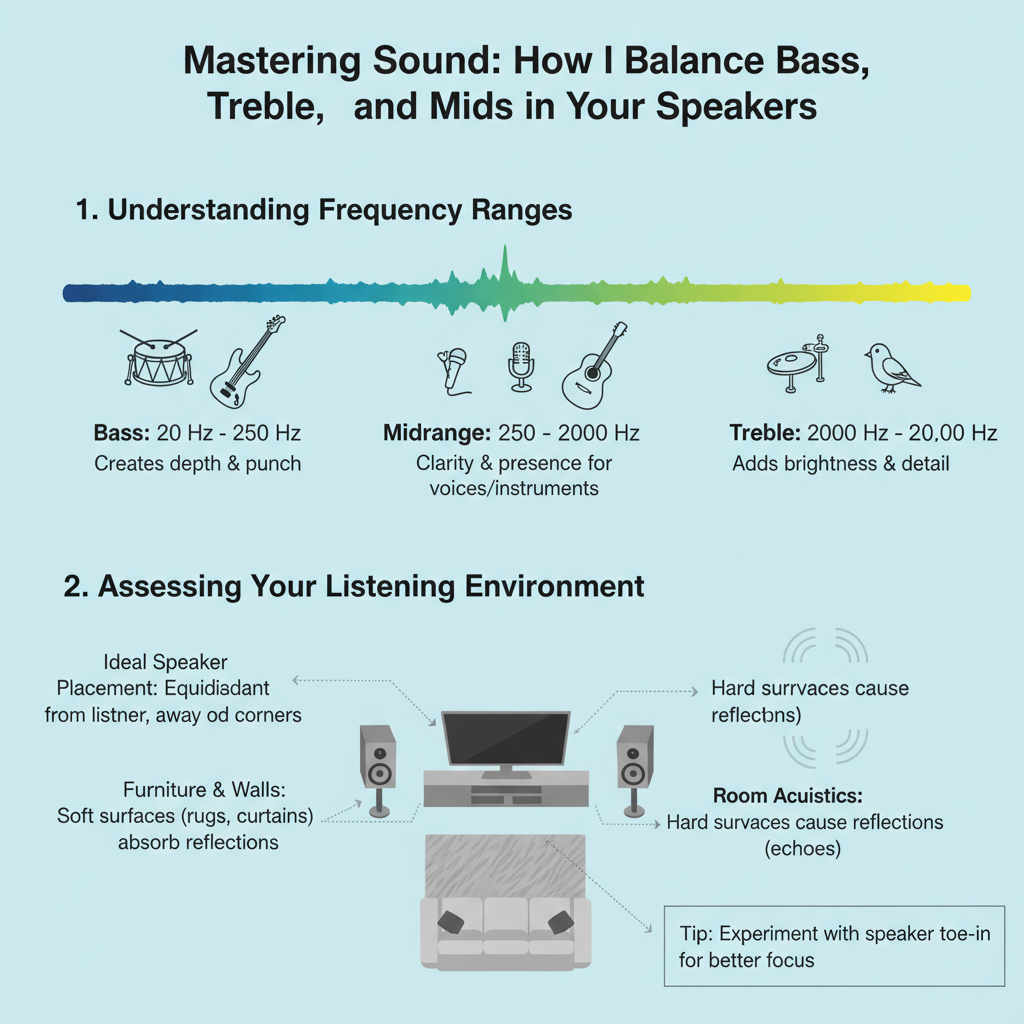
The midrange frequencies, which lie between 250 Hz and 2 kHz, are where the magic happens. This range is crucial because it encompasses the frequencies where most vocals and instruments reside. A well-balanced sound means that no frequency range overpowers the others, creating a harmonious mix that allows you to experience every element of the audio clearly.
Assessing Your Listening Environment
Your listening environment plays a significant role in how sound is perceived. Factors such as room size, shape, and furnishings can all affect how bass, treble, and mids are balanced. For instance, a small room with hard surfaces might amplify bass frequencies, making the sound muddy, while a spacious room with soft furnishings can help absorb sound and create a more balanced audio experience.
To evaluate sound quality in your space, consider using tools like a smartphone app designed for acoustics evaluation or sound level meters. You can also conduct simple tests by playing familiar tracks and listening for any distortions or imbalances. Moving your speakers to different locations and adjusting their angles can also make a noticeable difference in how sound travels and is perceived in the room.
Tools for Adjusting Sound
Equalizers (EQs) are your best friends when it comes to adjusting sound. They allow you to boost or cut specific frequency ranges, helping you tailor the audio to your liking. Most modern audio systems come with built-in EQ settings, but for more advanced adjustments, consider using dedicated equalizer hardware or software.
Beyond EQs, other equipment options like sound processors can provide additional control over your audio, allowing you to manage different aspects of sound, including dynamic range and spatial effects. Many speakers also come with built-in controls for bass, treble, and midrange adjustments, making it easier to find your ideal sound.
Techniques for Balancing Frequencies
Here’s a step-by-step guide to help you balance bass, treble, and mids:
1. Start with Flat Settings: Begin by setting your EQ to flat, meaning all frequencies are at the same level. This gives you a neutral starting point.
2. Adjust Bass: Listen to a track you know well and gradually increase the bass level. Be careful not to overdo it, as excessive bass can overwhelm the other frequencies. Aim for a punchy sound that still allows mids and treble to shine through.
3. Tweak Mids: Next, focus on the midrange. Increase or decrease the mids while listening to vocals or instruments. A well-balanced midrange will enhance clarity and detail, making vocals more pronounced without overshadowing the bass or treble.
4. Fine-tune Treble: Finally, adjust the treble. Boosting the treble can add brightness and clarity to the sound, but too much can lead to harshness. Listen for a natural sound that allows high-frequency details to come through without causing ear fatigue.
5. Listening Tests: After making adjustments, conduct listening tests with various genres of music. This will help ensure that your settings work well across different audio types.
Common Mistakes to Avoid
When it comes to adjusting sound settings, it’s easy to make mistakes that can negatively impact audio quality. One common error is overcompensating in one frequency range, leading to an unbalanced sound. For instance, cranking up the bass too high can drown out vocals and other important elements.
Another mistake is neglecting the listening environment. Failing to account for room acoustics can lead to inaccurate adjustments. Lastly, many people forget to revisit their settings after making changes to furniture layout or acoustics, which can dramatically alter sound quality.
Tips for Personalizing Your Sound
Personalizing your sound is all about experimentation. Start by identifying what you love about your favorite music genres. Do you enjoy the deep, powerful bass of electronic music, or do you prefer the crisp, clear highs in classical? Use this knowledge to guide your adjustments.
Consider creating specific playlists or using particular tracks as references during your adjustments. This way, you can consistently evaluate how well your settings enhance your listening experience. Don’t hesitate to make minor tweaks based on what you’re currently listening to, as different genres may require different balances.
By embracing the process of trial and error, you’ll discover the perfect sound for your tastes, making your listening sessions even more enjoyable.
As you embark on your audio balancing journey, remember to take your time and listen carefully. Finding the perfect balance between bass, treble, and mids can transform your entire listening experience. Experiment with your speaker settings today to discover the sweet spot that enhances your enjoyment of music and movies. And don’t hesitate to revisit these techniques as your preferences or equipment change; sound is as dynamic as the experiences it accompanies.
Frequently Asked Questions
How do I know if my bass, treble, and mids are balanced in my audio setup?
To determine if your bass, treble, and mids are balanced, listen to a variety of music genres that you are familiar with. Pay attention to whether any particular frequency range feels overpowering or lacking. Ideally, vocals and instruments should be clear, and no frequency should overshadow another, ensuring a smooth and cohesive sound experience.
What are the best practices for adjusting bass, treble, and mids on my speakers?
Start by setting all frequency levels to a neutral position, typically at the midpoint on the equalizer. Gradually adjust the bass to add warmth and depth, the mids for clarity and presence, and the treble for brightness and detail. Make small adjustments and listen critically to find the ideal balance that suits your taste and the acoustics of your space.
Why is it important to balance bass, treble, and mids in my music listening experience?
Balancing bass, treble, and mids is crucial for achieving a well-rounded audio experience that accurately represents the music. An unbalanced sound can lead to listener fatigue, muddiness, or a lack of clarity, making it difficult to enjoy the nuances of your favorite tracks. Properly balanced frequencies enhance musical enjoyment and provide a more immersive listening experience.
Which tools can I use to help me balance bass, treble, and mids in my speakers?
You can use a graphic equalizer, a digital audio workstation (DAW), or sound calibration software to assist in balancing frequencies. Many modern audio systems and apps come with built-in EQ settings that allow you to visualize frequency levels and make precise adjustments. Additionally, sound level meters and microphone calibration tools can help ensure accurate tuning in your listening environment.
How can room acoustics affect the balance of bass, treble, and mids in my speakers?
Room acoustics can significantly impact how bass, treble, and mids are perceived in your audio setup. Hard surfaces can reflect sound waves, amplifying certain frequencies, while soft furnishings can absorb them, leading to a loss of clarity. Positioning your speakers correctly and using acoustic treatments like rugs, curtains, or wall panels can help achieve a better balance and improve overall sound quality.
References
- Audio frequency
- https://www.soundonsound.com/techniques/balancing-sound-mixing
- https://www.thebalancecareers.com/bass-treble-and-mid-range-sounds-2460510
- https://www.musictech.net/guides/essential-guide/mixing-bass-treble-mids/
- https://www.izotope.com/en/learn/mixing-bass-treble-and-mids.html
- https://www.prosoundweb.com/understanding-the-frequency-spectrum-in-audio/