

Choosing the best laptop for video editing boils down to understanding your unique needs and the essential technical specifications that will empower your creative process. High performance, excellent display quality, and sufficient storage are crucial elements that can significantly enhance your editing experience. In this guide, you will discover how to identify the right features and specifications that align with your video editing requirements, ensuring your investment is both wise and impactful.




Performance Specifications
When it comes to video editing, performance is king. The processor is the heart of your laptop, and for smooth multitasking, you should aim for a powerful CPU. Look for a minimum of an Intel i7 or AMD Ryzen 7 processor. These processors can handle demanding tasks like rendering and exporting videos without causing frustrating lags. For instance, the Intel Core i9 series is even better, providing additional power for those who work with 4K footage or complex effects.
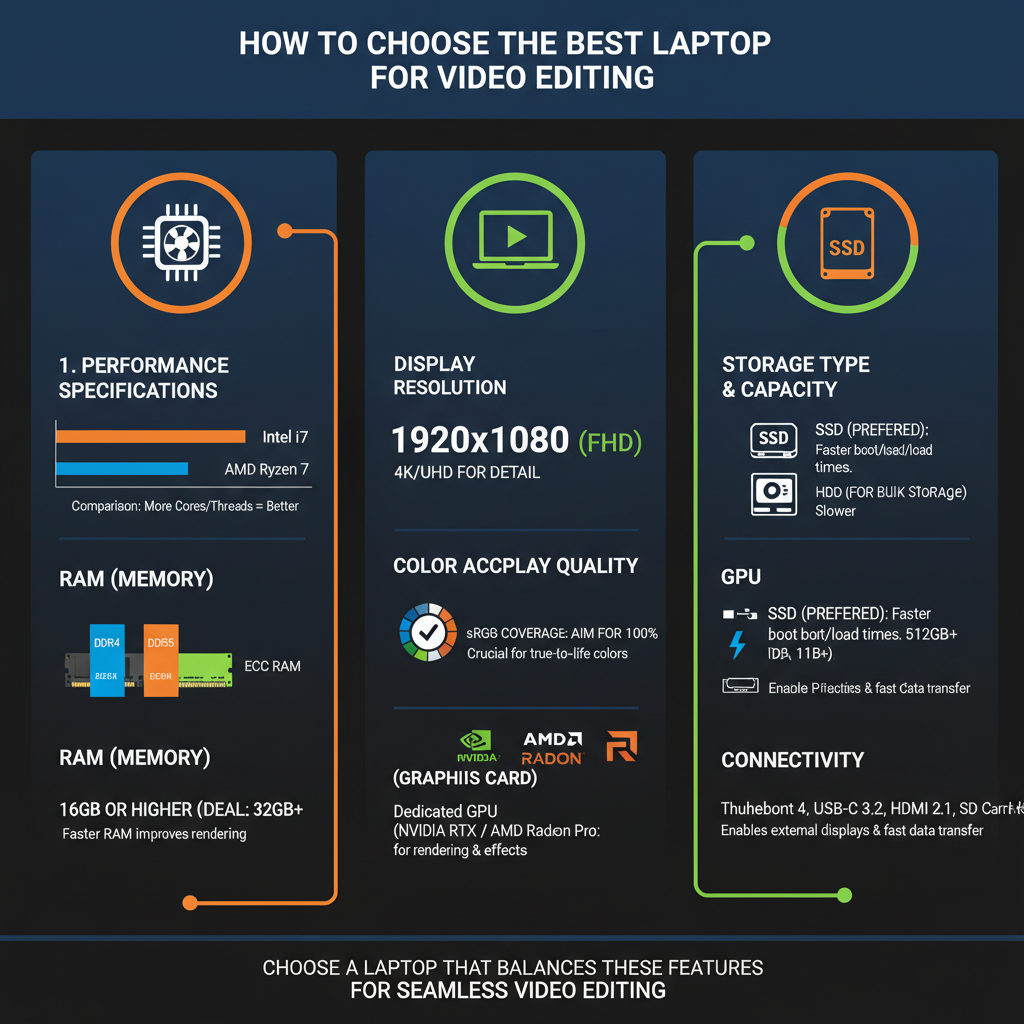
Equally important is RAM; at least 16GB is essential for efficiently managing large video files and running heavy editing software like Adobe Premiere Pro or DaVinci Resolve. This amount of RAM allows for seamless multitasking, meaning you can run your editing software alongside other applications without experiencing slowdowns. If you’re processing high-resolution videos or working with multiple layers in your projects, consider upgrading to 32GB of RAM for an even smoother experience.
Graphics and Display Quality
An excellent graphics card is vital for video editing. A dedicated GPU, such as the NVIDIA GTX or RTX series, can significantly improve your rendering speeds and playback performance. For instance, an RTX 3060 or 3070 can handle high-resolution video editing much better than integrated graphics. This is particularly important when working with effects-heavy projects or real-time rendering, where a powerful graphics card can save you hours of waiting.
Display quality is equally critical. Opt for a high-resolution display, with a minimum of 1080p (Full HD). However, if your budget allows, consider a 4K display for the best clarity and detail. Additionally, color accuracy should not be overlooked. Look for laptops that cover a wide color gamut, such as Adobe RGB or DCI-P3. This ensures that the colors you see while editing match what will be produced in the final video, which is crucial for color grading and correction tasks.
Storage Options
Storage is a key factor that often gets overlooked. For video editing, SSD storage is a game-changer. Solid State Drives (SSDs) provide much faster load times and data transfer speeds than traditional Hard Disk Drives (HDDs). Aim for at least 512GB of SSD storage to comfortably accommodate your software, projects, and files. Additionally, consider laptops that offer M.2 NVMe SSDs, as these can deliver even faster performance.
For those working on larger projects or who need additional space for backups, an external HDD can be a wise investment. These drives provide ample storage at a lower cost, allowing you to save your completed projects and free up space on your laptop for new work. A good practice is to keep your active projects on your SSD and archive completed ones on your HDD, ensuring optimal performance without sacrificing storage space.
Battery Life and Portability
As a video editor, you often find yourself needing to work on the go, whether at a café or during travel. Therefore, battery life is a significant consideration. Look for a laptop that offers a minimum of 6-8 hours on a single charge. This ensures that you can edit videos without constantly searching for an outlet. Some excellent options in the market boast impressive battery performance, such as the MacBook Pro or Dell XPS series, which balance power and longevity effectively.
Portability is another essential factor. A lightweight and thin design will make it easier to carry your laptop around, especially if you’re traveling for shoots or client meetings. Aim for a laptop that weighs no more than 4-5 pounds for comfortable travel. Consider options with a robust build quality, as this will protect your device from the rigors of being on the move.
Connectivity and Upgradeability
In the world of video editing, connectivity is paramount. Ensure that the laptop has multiple USB ports, HDMI output, and Thunderbolt support for connecting external devices like monitors, cameras, and hard drives. This variety of ports will enhance your workflow, allowing you to set up a multi-monitor editing station or quickly transfer files from your camera.
Upgradeability is another aspect to consider when selecting your laptop. Look for models that allow you to upgrade RAM and storage in the future. This flexibility can extend the lifespan of your laptop, allowing you to keep pace with evolving software requirements without needing to invest in a completely new device. Brands like ASUS and MSI often offer laptops with easy access to internal components, making upgrades a breeze.
Software Compatibility
Your choice of laptop should also align with the video editing software you plan to use. Popular options like Adobe Premiere Pro, Final Cut Pro, and DaVinci Resolve each have specific system requirements that your laptop must meet to function optimally. Before making a purchase, verify that the laptop you’re considering supports the latest version of your preferred software. This will ensure you have the best experience with features and performance tailored to your editing needs.
Additionally, check for compatibility with plugins and extensions that you may want to use. Having a laptop that can smoothly run all the necessary tools will significantly enhance your editing workflow and reduce frustration.
Budget Considerations
Finally, consider your budget. Setting a clear budget based on the features most important to your workflow will help you narrow down your options. While it’s tempting to go for the highest-end model, often you can find excellent laptops that balance performance and cost effectively within various price ranges. Brands like Acer and Lenovo offer great value without compromising performance, making them excellent choices for budget-conscious buyers.
Explore options across different price points, and don’t hesitate to check for sales or refurbished models that can provide significant savings. Remember, investing a little more upfront can save you money in the long run by reducing the need for future upgrades or replacements.
In summary, choosing the best laptop for video editing is about understanding your specific needs and the specifications that matter most. By considering performance, display quality, storage options, battery life, connectivity, and software compatibility, you can make an informed decision. Whether you’re just starting your editing journey or are a seasoned professional, having the right laptop will enhance your productivity and unleash your creative potential. Happy editing!
Frequently Asked Questions
What specifications should I look for in a video editing laptop?
When choosing a video editing laptop, focus on several key specifications: a powerful multi-core processor (like Intel i7 or i9, or AMD Ryzen 7 or 9), at least 16GB of RAM (32GB or more is ideal for heavy editing), and a dedicated graphics card (such as NVIDIA GeForce GTX or RTX series). Additionally, a high-resolution display (preferably 4K) with good color accuracy will enhance your editing experience, allowing you to see fine details in your footage.
How much RAM do I need for video editing on a laptop?
For basic video editing, 16GB of RAM is usually sufficient, but if you’re working with 4K footage, complex projects, or using multiple applications simultaneously, 32GB or more is recommended. More RAM allows for smoother multitasking and faster rendering times, which can significantly improve productivity and efficiency in your video editing workflow.
Why is a dedicated graphics card important for video editing?
A dedicated graphics card is crucial for video editing because it enhances the laptop’s ability to process graphics-intensive tasks, such as rendering and encoding videos. Unlike integrated graphics, dedicated GPUs (like those from NVIDIA or AMD) can offload heavy processing from the CPU, resulting in faster rendering times, smoother playback, and better performance with high-resolution video files and effects.
Which laptop brands are best for video editing?
Some of the best laptop brands for video editing include Apple (MacBook Pro), Dell (XPS series), ASUS (ROG and ZenBook series), and Lenovo (ThinkPad and Legion series). These brands offer powerful hardware configurations, excellent display quality, and reliable performance, making them popular choices among professional video editors and content creators.
How do I determine the best budget for a video editing laptop?
The best budget for a video editing laptop depends on your specific needs and the complexity of your projects. For entry-level video editing, you can expect to spend between $800 and $1,200, while more advanced setups suitable for professional work can range from $1,500 to $3,000 or more. Prioritize investing in key specifications like CPU, RAM, and GPU to ensure your laptop can handle your editing tasks efficiently.
References
- Video editing
- The Best Laptops for Video Editing We’ve Tested in 2026 | PCMag
- Best video editing laptop of 2025: Top picks for filmmakers and content creators | TechRadar
- https://www.huffpost.com/entry/best-laptops-for-video-editing_n_5b7d0f02e4b0e3b6b7a83b61
- https://www.makeuseof.com/tag/best-laptops-video-editing/
- Laptops – Expert Reviews, Best Lists, and Pro Tips – CNET
- https://www.wired.com/story/best-laptops-for-video-editing/

[…] clarity, 480Hz can offer an incremental advantage over 360Hz. If your system targets consistent high performance but not always near 480FPS, a well-tuned 360Hz monitor with excellent response time and low latency […]