VRR (Variable Refresh Rate) significantly boosts gaming performance by reducing screen tearing and input lag, resulting in a smoother and more immersive gaming experience. This innovative technology synchronizes your display’s refresh rate with the frame rate of your game, providing a seamless visual flow that enhances gameplay. In this article, we will explore how VRR works, its benefits, and how it can elevate your gaming sessions to new heights.



What is VRR?

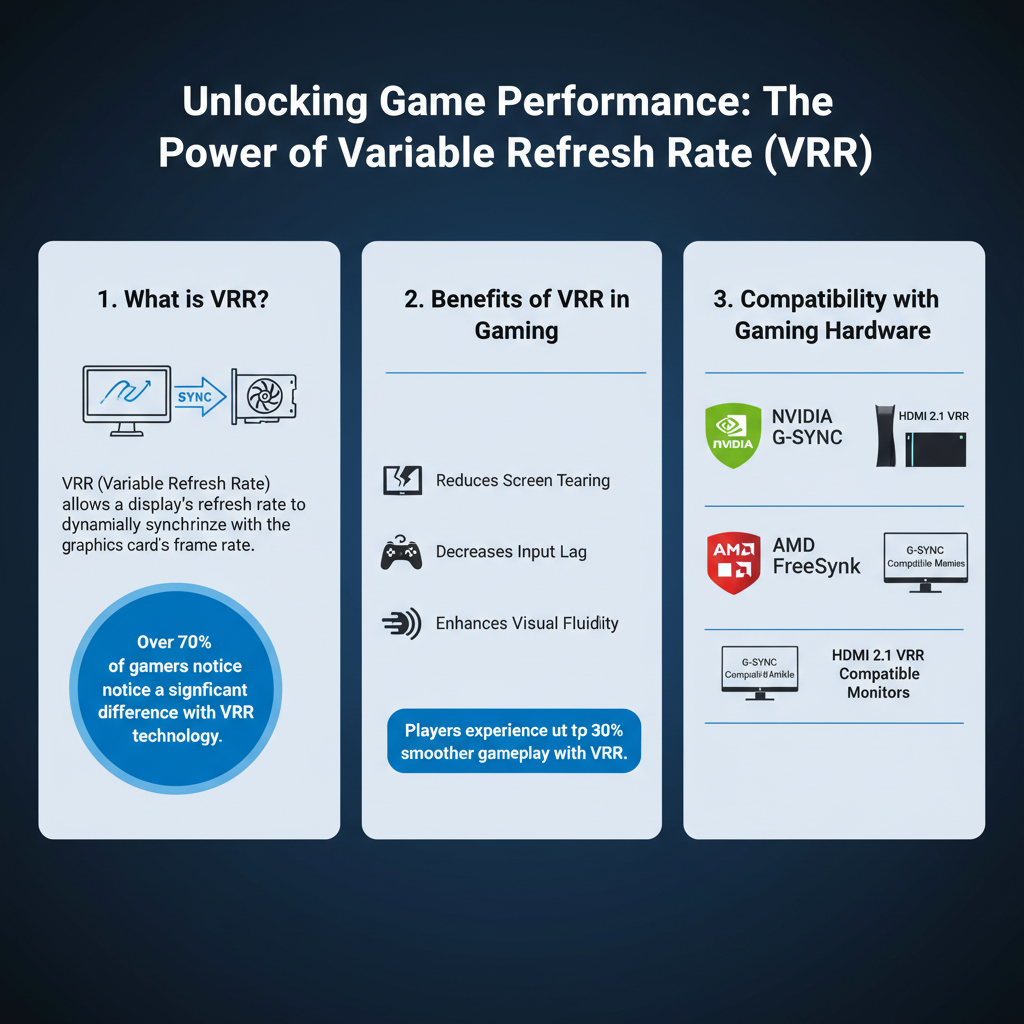
Variable Refresh Rate (VRR) is a technology designed to enhance the gaming experience by allowing a display to dynamically adjust its refresh rate to match the frame rate output of the graphics card. In simpler terms, if your game is running at 60 frames per second (fps), the monitor will refresh at that same rate, eliminating the mismatch that often leads to visual artifacts like screen tearing. This synchronization is achieved through a communication protocol between the GPU and the display, ensuring that every frame is rendered and displayed perfectly in sync, which is particularly valuable in fast-paced gaming scenarios.
The technical basis of VRR lies in its ability to modify the refresh rate on-the-fly, unlike traditional fixed refresh rates. This flexibility means that whether your game dips to 45 fps during intense action or soars up to 120 fps in quieter moments, your display will adapt accordingly, providing a consistently smooth experience without interruptions or distortions.
Benefits of VRR in Gaming
One of the standout benefits of VRR is its ability to eliminate screen tearing and stuttering. Screen tearing occurs when the display shows information from multiple frames in a single screen draw, leading to a jarring experience where parts of different frames are displayed simultaneously. With VRR, this issue is virtually eradicated, allowing for a seamless visual experience where the action flows smoothly across the screen. This enhancement is particularly noticeable in fast-paced games, where every millisecond counts, and any visual disruption can significantly impact your performance.
Additionally, VRR reduces input lag, which is the delay between your actions (like pressing a button) and the corresponding on-screen response. High input lag can make games feel sluggish and unresponsive, particularly in competitive environments. With VRR, the synchronization between frame rate and refresh rate contributes to a more responsive gameplay experience, allowing you to react quicker and more accurately to in-game situations. This responsiveness can be a game-changer in genres like first-person shooters (FPS) or fighting games, where timing is everything.
Compatibility with Gaming Hardware
As VRR technology has gained popularity, many gaming consoles and PC hardware have incorporated support for it. Consoles like the PlayStation 5, Xbox Series X, and Xbox Series S all feature VRR capabilities, allowing players to take advantage of smoother graphics and enhanced performance. On the PC side, both NVIDIA and AMD have their own implementations—NVIDIA’s G-Sync and AMD’s FreeSync—ensuring that gamers can enjoy VRR regardless of their preferred platform.
To check if your monitor or TV is VRR-compatible, look for specifications that mention G-Sync or FreeSync support. Additionally, many modern displays now feature HDMI 2.1, which includes VRR support as part of its specifications. You can also navigate through your display’s settings menu to see if VRR options are available. If you’re unsure, a quick online search for your monitor or TV model can provide clarity on its capabilities.
Comparing VRR with Other Synchronization Technologies
While VRR stands out for its adaptability, it is essential to understand how it compares to other synchronization technologies, such as V-Sync and G-Sync. V-Sync (Vertical Synchronization) is a traditional method that locks the frame rate of a game to the refresh rate of the display. While it can reduce tearing, it may introduce input lag and stuttering when the frame rate drops below the refresh rate.
G-Sync, developed by NVIDIA, is a proprietary technology that allows for dynamic refresh rates, much like VRR. However, G-Sync requires specific hardware, including a compatible NVIDIA graphics card and G-Sync certified monitors, which can be a barrier for some gamers. On the other hand, AMD’s FreeSync is open-source and generally more accessible, as it works with a wider range of displays and graphics cards.
In various gaming scenarios, the choice between these technologies can depend on your specific needs. For instance, VRR and G-Sync are preferred for competitive gaming due to their real-time adaptability, while V-Sync might be suitable for single-player experiences where input lag is less of a concern.
Setting Up VRR for Optimal Performance
Enabling VRR on your gaming platform is a straightforward process, but it can vary depending on your system. Here’s a step-by-step guide for different platforms:
For Consoles (PlayStation 5 and Xbox Series X/S):
1. Access Settings: Navigate to the settings menu on your console.
2. Display Settings: Go to the ‘Screen and Video’ or ‘Display’ settings.
3. Enable VRR: Toggle the VRR option to ‘On’.
4. Game Updates: Ensure your games are updated to the latest version, as VRR support may vary by title.
For PC (NVIDIA and AMD Graphics Cards):
1. NVIDIA Control Panel: Right-click on your desktop, select ‘NVIDIA Control Panel.’
2. Set up G-Sync: Click on ‘Set up G-Sync’ and enable it for your preferred display.
3. AMD Radeon Settings: Right-click on your desktop, select ‘AMD Radeon Settings.’
4. Enable FreeSync: Navigate to ‘Display’ and enable FreeSync.
Recommended Settings:
– Refresh Rate: Set your display to the highest refresh rate available.
– Game Mode: Enable game mode on your TV or monitor if available to reduce input lag.
– Resolution: Play at a resolution that maintains a high frame rate to maximize VRR’s benefits.
VRR and Game Genres
VRR technology offers distinct advantages across various game genres, enhancing the overall experience for players. In fast-paced shooters like “Call of Duty” or “Apex Legends,” the ability to maintain fluid motion without tearing or stuttering gives players a competitive edge, allowing for precise aiming and quick reactions.
On the other hand, slower-paced games such as role-playing games (RPGs) like “The Witcher 3” or “Final Fantasy XV” can also benefit from VRR. While these games may not demand the same level of responsiveness as shooters, the smooth visuals enhance immersion and storytelling, making cutscenes and exploration more enjoyable.
Many popular games, including “Forza Horizon 5” and “Resident Evil Village,” have implemented VRR support, showcasing its versatility across genres. By exploring titles that leverage this technology, gamers can fully appreciate the smoothness and responsiveness that VRR brings to their gaming experience.
Future of VRR in Gaming
The future of VRR technology appears bright as gaming hardware continues to evolve. Upcoming gaming consoles and graphics cards are likely to integrate more advanced VRR capabilities, expanding support and improving performance. As manufacturers focus on creating hardware that can handle higher resolutions and frame rates, we can expect VRR to become a standard feature in gaming setups.
Moreover, potential new features could include improved algorithms for frame rate prediction and even more seamless integration with virtual reality systems, enhancing the immersive experience for players. As developers continue to embrace VRR, we can anticipate a new wave of games designed to exploit its benefits fully, further elevating the gaming landscape.
In summary, VRR is a game-changing technology that enhances gaming performance by synchronizing frame rates to refresh rates, thus reducing tearing and lag. To experience these benefits, ensure your gaming setup supports VRR, and consider exploring games that fully utilize this feature for an upgraded gaming experience. Whether you’re a casual player or a competitive gamer, VRR can transform your gaming sessions into a smoother, more enjoyable adventure.
Frequently Asked Questions
What is Variable Refresh Rate (VRR) and how does it improve gaming performance?
Variable Refresh Rate (VRR) is a technology that synchronizes the refresh rate of a display with the frame rate output of a gaming console or PC. This synchronization minimizes screen tearing and stuttering, leading to smoother gameplay and enhanced visual fidelity. By adapting to changes in frame rates, VRR ensures a more immersive gaming experience, especially in fast-paced titles.
How does VRR compare to traditional V-Sync in gaming?
Unlike traditional V-Sync, which caps the frame rate to match the monitor’s refresh rate, VRR allows for a dynamic adjustment of the refresh rate in real-time. This means that when frame rates drop, the display can lower its refresh rate to match, preventing input lag and preserving visual quality during gameplay. As a result, VRR provides a superior experience with less noticeable artifacts compared to V-Sync.
Why is VRR important for competitive gaming?
In competitive gaming, every millisecond counts, and VRR plays a critical role in maintaining a consistent and responsive gaming experience. By reducing input lag and eliminating screen tearing, VRR allows players to react more swiftly to in-game events, giving them a competitive edge. This improved performance can be crucial in fast-paced games where precision and timing are vital for success.
Which gaming platforms support VRR technology?
Many modern gaming platforms support VRR technology, including consoles like the PlayStation 5, Xbox Series X/S, and gaming PCs equipped with compatible graphics cards (NVIDIA G-SYNC or AMD FreeSync). Additionally, many high-end monitors and TVs also feature VRR capabilities, making it easier for gamers to take advantage of this technology for improved performance and graphics.
What are the best settings to enable VRR for optimal gaming experience?
To enable VRR for the best gaming experience, first ensure that your display and graphics card both support VRR technology. Next, enable VRR in the graphics card control panel (NVIDIA Control Panel or AMD Radeon Software) and within the in-game settings. Adjust your game settings to prioritize frame rate over resolution, ensuring that your system can consistently deliver frames within the VRR range, typically between 30 to 120 FPS, depending on your setup.
References
- Variable refresh rate
- https://www.nytimes.com/2021/07/21/technology/variable-refresh-rate-gaming.html
- https://www.techradar.com/news/what-is-variable-refresh-rate-and-why-is-it-important-for-gaming
- https://www.tomshardware.com/reviews/variable-refresh-rate-gaming,5886.html
- https://www.sciencedirect.com/science/article/abs/pii/S1877050920302548
- https://www.digitaltrends.com/gaming/what-is-variable-refresh-rate/
- https://www.theverge.com/2020/12/31/22197927/variable-refresh-rate-gaming-ps5-xbox-series-x
- https://www.cnet.com/tech/gaming/what-is-variable-refresh-rate-and-why-it-matters-for-gaming/




One thought on “How VRR Enhances Gaming Performance: Key Benefits”