A good display for video editing should offer high resolution, accurate color reproduction, and sufficient screen size to enhance your workflow. These features are essential for ensuring that your editing process is both efficient and effective. In this article, we will explore the key features that define an excellent video editing monitor, helping you select the best display for your editing needs.




Resolution Matters
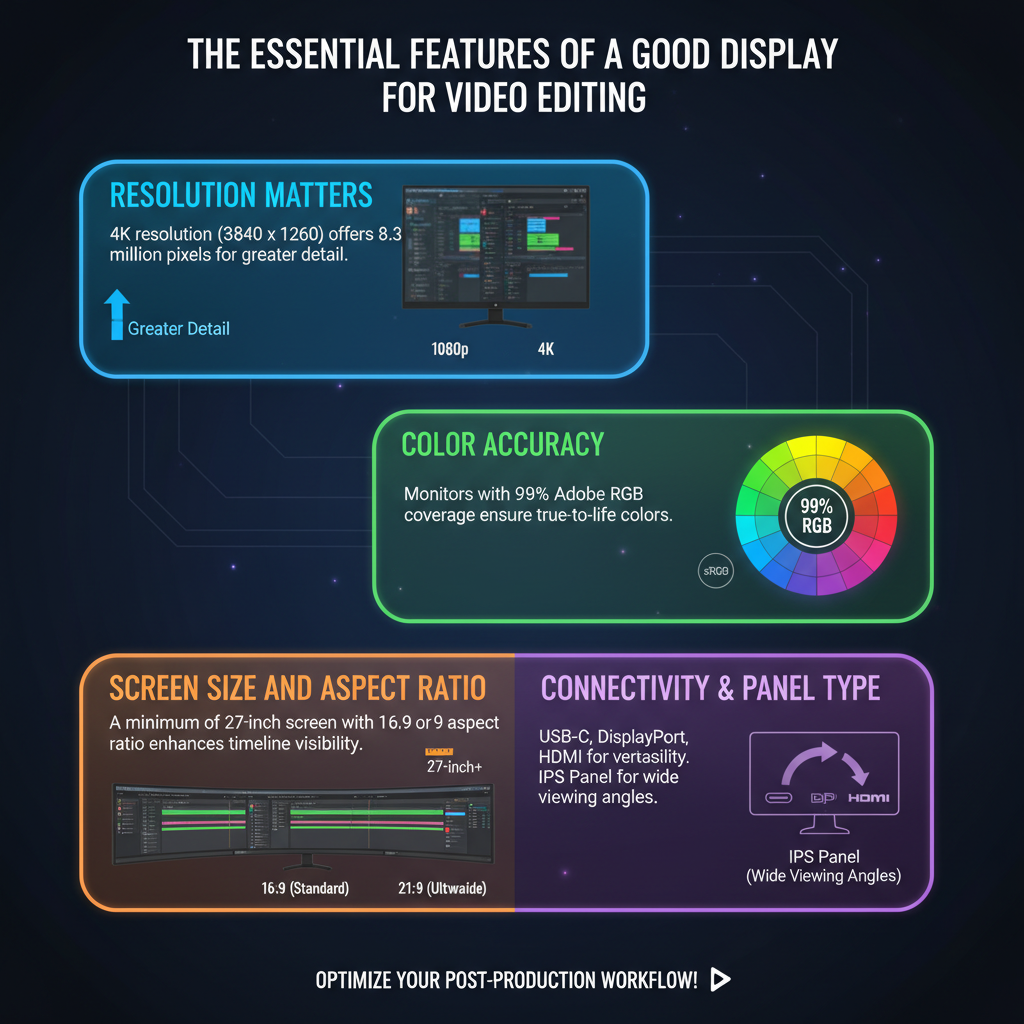
When it comes to video editing, resolution is paramount. Higher resolutions, such as 4K (3840 x 2160), provide more detail and clarity, which is essential for precise editing. With 4K, you can see finer details in your footage, allowing for more accurate cuts and color grading. A larger pixel count means that you can zoom in on your footage without losing quality, which is particularly beneficial when working with intricate graphics or effects.
Moreover, higher resolutions enable better scaling of images and smoother playback. For instance, if you are editing 4K footage, having a 4K display allows you to view your work in its native resolution, preventing issues that can arise from downscaling. Whether you’re adjusting color settings or trimming clips, the clarity provided by a high-resolution monitor can greatly enhance your editing experience.
Color Accuracy
Color accuracy is another critical factor to consider when selecting a display for video editing. Displays that support a wide color gamut, such as sRGB and Adobe RGB, enable you to see true-to-life colors. This is particularly important if you’re working on projects that require precise color matching, like product videos or cinematic films.
Calibration capabilities are crucial for maintaining color fidelity over time. Many high-quality monitors come with built-in calibration tools or can be calibrated using external devices. Regular calibration ensures that your display reflects the correct colors, avoiding discrepancies between what you see on the screen and what appears in the final output. For example, the EIZO ColorEdge series is renowned for its color accuracy and comes with built-in calibration sensors, making it a favorite among professional editors.
Screen Size and Aspect Ratio
Screen size plays a vital role in your editing workflow. A larger screen, typically 27 inches or more, provides ample workspace for timelines, tools, and previews. This extra real estate allows you to see more of your project at a glance, making it easier to manage multiple aspects of your editing simultaneously.
Additionally, consider the aspect ratio of the display. While the standard 16:9 ratio is common, ultra-wide monitors (21:9 or wider) can offer a more immersive editing experience. These displays allow you to work with multiple windows side-by-side, which can significantly enhance multitasking. For instance, using an ultra-wide monitor, you can have your video preview on one side while keeping your editing tools open on the other, streamlining your workflow and increasing productivity.
Refresh Rate and Response Time
The refresh rate and response time of a display are also important for a smooth editing experience. A refresh rate of at least 60Hz is ideal as it ensures smooth playback of your footage, which is particularly important when dealing with high frame rate videos. Higher refresh rates (such as 120Hz) can provide even smoother visuals, making it easier to spot frame drops or stuttering in your edits.
Lower response times are crucial as well, especially when editing fast-paced video content such as sports or action scenes. A response time of 5ms or lower can help reduce motion blur, ensuring that you can see fast movements clearly. This clarity is essential when you’re making split-second decisions during editing or reviewing action sequences.
Connectivity Options
In today’s digital workspace, connectivity options are vital for a seamless editing experience. Look for displays that come with multiple inputs like HDMI, DisplayPort, and USB-C, as these allow you to connect various devices, including cameras, external drives, and other peripherals.
Moreover, consider displays that offer daisy chaining capabilities, which enable you to connect multiple monitors using a single cable. This feature is especially useful if you want to create a multi-monitor setup, enhancing your workspace without cluttering it with too many cables.
Ergonomics and Design
Ergonomics is an often-overlooked aspect of selecting a good display for video editing. Adjustable stands that allow you to change the height, tilt, and rotation of the monitor can help you find a comfortable viewing angle and reduce strain during long editing sessions.
Additionally, VESA compatibility makes it easier to mount the display on a wall or monitor arm, further optimizing your workspace. A well-designed workspace can significantly improve your comfort level, allowing you to focus on your editing without being distracted by discomfort or awkward viewing angles.
Budget Considerations
Lastly, budget considerations cannot be ignored. Determine your budget ahead of time, balancing features with price. While it may be tempting to go for the cheapest option, investing in a quality display can significantly impact your editing efficiency and output quality.
You don’t need to break the bank to find a good monitor, but it’s worth allocating a reasonable portion of your budget for a display that meets your needs. Research specific models that fit within your budget and read reviews to find the perfect monitor tailored to your requirements. Brands like Dell, BenQ, and ASUS offer a range of monitors catering to various price points, ensuring that you can find something that fits both your needs and budget.
In summary, when searching for a good display for video editing, prioritize high resolution, color accuracy, screen size, refresh rate, connectivity options, ergonomics, and budget. By focusing on these key features, you can enhance your video editing experience and produce better content. Take the time to research specific models and read reviews, ensuring you find the perfect monitor tailored to your needs. Happy editing!
Frequently Asked Questions
What features should I look for in a display for video editing?
When selecting a display for video editing, prioritize features such as color accuracy, resolution, and screen size. A monitor with 100% sRGB coverage and a high-resolution (preferably 4K) ensures that you can view your footage in true colors and fine detail. Additionally, a larger screen (27 inches or more) enhances your workflow by providing ample space for timelines and editing tools.
How does color accuracy impact video editing on a display?
Color accuracy is crucial in video editing because it ensures that the colors you see on your display are true to life and consistent across different devices. A monitor with a high color gamut and factory calibration helps prevent discrepancies in color grading, allowing you to create visually appealing content. Without accurate colors, your final output may look different on other screens, affecting the overall quality of your video.
Why is screen resolution important for video editing displays?
Screen resolution directly affects the clarity and detail of your video footage. Higher resolutions, such as 4K (3840 x 2160), allow you to see fine details and make precise edits, which is especially important for high-definition content. Additionally, a higher resolution lets you view multiple windows side by side without sacrificing visibility, significantly enhancing your editing efficiency.
What is the best type of display technology for video editing?
The best display technology for video editing is typically IPS (In-Plane Switching) due to its superior color accuracy and wide viewing angles. IPS panels provide consistent colors from various angles, making them ideal for collaborative work where multiple people view the screen. While OLED displays also offer exceptional color performance and contrast, they may not have the same longevity as IPS monitors, making IPS a more reliable choice for long-term video editing tasks.
Which aspect ratio is optimal for video editing displays?
The optimal aspect ratio for video editing displays is typically 16:9, which is the standard for most video content. However, ultrawide monitors (21:9 or 32:9) are becoming increasingly popular among video editors, as they provide a wider workspace for timelines and multiple video clips. An ultrawide display allows for a more immersive editing experience, reducing the need for multiple monitors while enhancing productivity.
References
- Display device
- https://www.color.org/standards/index.xalter
- https://www.techradar.com/news/what-to-look-for-in-a-video-editing-monitor
- https://www.pcgamer.com/how-to-choose-the-best-monitor-for-video-editing/
- https://www.adobe.com/creativecloud/video/discover/video-editing-monitors.html
- https://www.digitaltrends.com/computing/best-monitors-for-video-editing/
- https://www.cnet.com/tech/computing/best-monitors-for-video-editing/
14 thoughts on “What Makes a Good Display for Video Editing?”