
Understanding the relationship between GPU performance and display quality is crucial for any gamer aiming for an immersive experience. A powerful GPU directly enhances graphics rendering, leading to smoother gameplay, higher resolutions, and improved frame rates. In this article, we’ll explore how GPU capabilities influence various aspects of display quality in gaming, ensuring you have the knowledge to make informed decisions for your gaming setup.
The Role of GPU in Gaming Graphics
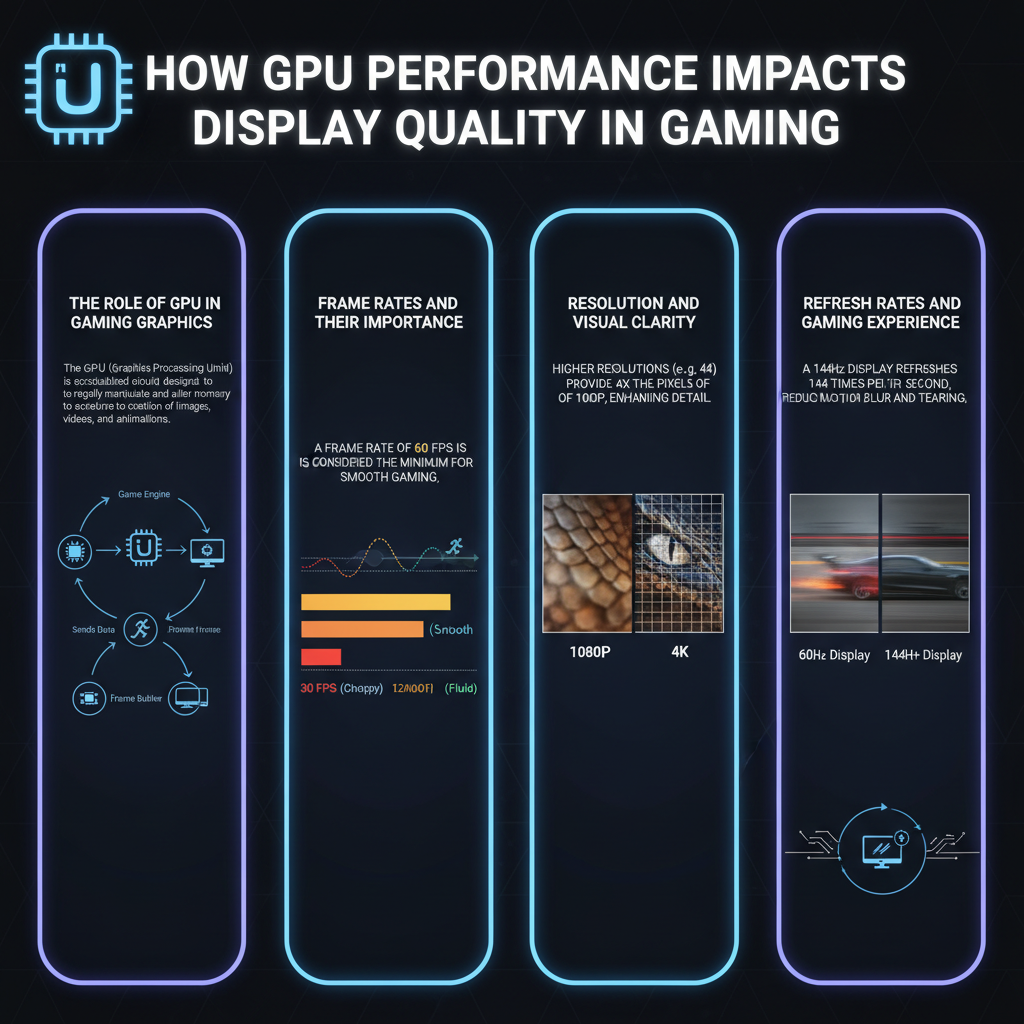
At the heart of every stunning gaming experience is the Graphics Processing Unit (GPU), which is responsible for processing and rendering the images you see on your screen. The GPU’s power significantly impacts visual fidelity, allowing games to display intricate details, realistic lighting, and vibrant colors. For instance, when playing a game like “Cyberpunk 2077,” a strong GPU can handle the intricate textures and dynamic lighting effects, bringing the neon-drenched streets to life.
Higher GPU performance allows developers to incorporate more complex textures and richer colors, enhancing the overall visual appeal. This means that you can experience lifelike environments, detailed character models, and immersive animations. As games continue to evolve, GPU power becomes increasingly vital in delivering the graphics quality that players expect. Gamers who prioritize visual fidelity should consider upgrading their GPUs to ensure they can experience the latest titles as intended by the developers.
Frame Rates and Their Importance

Frame rates, often measured in frames per second (FPS), are critical for smooth gameplay. A higher FPS results in a more responsive and fluid gaming experience, allowing players to react quickly and accurately during intense moments. For example, in fast-paced shooters like “Call of Duty,” maintaining a high frame rate is essential for competitive play, as even a slight delay can mean the difference between victory and defeat.
A capable GPU can maintain high frame rates even in graphically intense scenes, significantly reducing motion blur and stuttering. This is particularly important in games that involve a lot of fast movement, such as racing games or action-adventure titles. A smooth frame rate not only enhances enjoyment but also contributes to a more immersive experience, making you feel like you’re truly part of the game world. For optimal performance, gamers should aim for a GPU that can consistently deliver 60 FPS or higher for the best experience.
Resolution and Visual Clarity
Resolution plays a significant role in visual clarity, with higher resolutions allowing for more detailed and sharper images. A more powerful GPU enables gamers to enjoy higher resolutions, such as 1440p or 4K, which can dramatically enhance the level of detail on screen. For instance, playing “Red Dead Redemption 2” in 4K will reveal stunning landscapes and intricate character details that are lost at lower resolutions.
However, it’s essential to understand that higher resolutions require significantly more GPU resources compared to standard 1080p gaming. This means that if you’re aiming for a 4K gaming experience, investing in a high-end GPU becomes a necessity. Not only does a powerful GPU ensure that you can run games at these higher resolutions, but it also maintains smooth performance without sacrificing frame rates.
Refresh Rates and Gaming Experience
Refresh rate, measured in hertz (Hz), determines how often the image is updated on your screen. Higher refresh rates, such as 144Hz or 240Hz, provide significantly smoother motion, which is especially beneficial in fast-paced games. A strong GPU is essential to take full advantage of high-refresh-rate monitors, enabling you to enjoy the benefits of reduced motion blur and improved responsiveness.
For example, in competitive gaming, where every millisecond counts, a 240Hz monitor paired with a robust GPU can give you a noticeable edge over opponents using standard refresh rates. The combination allows for ultra-smooth gameplay, making it easier to track fast-moving targets and react swiftly to in-game events. Gamers should ensure that their GPU can handle the refresh rate of their monitor to fully maximize their gaming experience.
Anti-Aliasing and Visual Smoothness
Anti-aliasing techniques are used to reduce the jagged edges that can appear on curved lines and diagonal edges, a common issue in digital graphics. This process helps make graphics appear smoother and more realistic, significantly enhancing the overall visual experience. A robust GPU can handle advanced anti-aliasing settings without sacrificing performance, allowing gamers to enjoy the best possible graphics quality.
Using a game like “The Witcher 3,” for instance, you can see how anti-aliasing enhances the beauty of the landscapes and character models, providing a more immersive experience. With a capable GPU, you can enable more advanced techniques like Temporal Anti-Aliasing (TAA) or Super Sampling Anti-Aliasing (SSAA), which can dramatically improve image quality while maintaining fluid performance. Gamers who want the best in visual quality should prioritize GPUs that support these advanced features.
VR and Immersive Experiences
Virtual reality (VR) gaming demands high GPU performance to ensure fluid motion and prevent latency, which is critical for user comfort and immersion. A powerful GPU enhances the overall immersive experience by improving graphical detail and responsiveness, making you feel like you’re truly part of the game world. Games like “Half-Life: Alyx” demonstrate how essential a strong GPU is for delivering a seamless and immersive VR experience.
In VR, even minor stutters or frame drops can lead to discomfort or motion sickness, so having a GPU capable of delivering consistently high frame rates is essential. Additionally, VR requires rendering two images simultaneously (one for each eye), which places even more strain on the GPU. Therefore, investing in a high-performance GPU will not only enhance your VR gaming experience but also ensure that it remains comfortable and enjoyable.
In summary, GPU performance is a vital component that significantly affects display quality in gaming. Understanding how it influences frame rates, resolution, refresh rates, anti-aliasing, and VR experiences can help gamers make informed choices when upgrading their systems. If you want to enhance your gaming experience, consider investing in a powerful GPU that can meet your gaming needs. With the right GPU, you can fully immerse yourself in the stunning worlds of your favorite games and enjoy every detail they have to offer.
Frequently Asked Questions
How does GPU performance impact frame rates in gaming?
GPU performance is crucial for determining the frame rates in gaming, as it processes the graphics and visual effects that render on your screen. A more powerful GPU can handle higher resolutions and more complex graphics settings, resulting in smoother gameplay with higher frame rates. When frame rates are stable and high, players experience less lag and smoother motion, enhancing overall gaming performance.
What is the relationship between GPU performance and display resolution?
The relationship between GPU performance and display resolution is significant, as higher resolutions (like 4K) require more graphical power to render images effectively. A robust GPU can support higher resolutions without compromising frame rates, while a weaker GPU may struggle, leading to lower frame rates and poorer display quality. Therefore, for gamers aiming for high-resolution gaming, investing in a high-performance GPU is essential.
Why is VRAM important for GPU performance in gaming?
VRAM (Video Random Access Memory) plays a critical role in GPU performance, especially in gaming, as it stores textures, graphics data, and frame buffers. Sufficient VRAM allows the GPU to access this data quickly, reducing loading times and improving frame rates, particularly in graphically intensive games. Low VRAM can lead to stuttering and lower quality visuals, so having an adequate amount of VRAM is essential for a seamless gaming experience.
Which GPU specifications should I consider for optimal display quality in gaming?
To achieve optimal display quality in gaming, consider key GPU specifications such as clock speed, CUDA cores (for NVIDIA GPUs), and VRAM size. A higher clock speed generally translates to better performance, while more CUDA cores enhance parallel processing capabilities. Additionally, aim for at least 6GB of VRAM for 1080p gaming and 8GB or more for higher resolutions, ensuring your GPU can handle modern games at high settings.
How does GPU performance affect visual features like Ray Tracing and Anti-Aliasing?
GPU performance significantly influences advanced visual features such as Ray Tracing and Anti-Aliasing, which enhance realism in games. Ray Tracing simulates realistic lighting and shadows but requires a high-performance GPU to maintain playable frame rates. Similarly, Anti-Aliasing smooths out jagged edges in graphics, but if the GPU is not powerful enough, enabling these features can result in dropped frame rates and a less enjoyable gaming experience.
References
- Graphics processing unit
- https://www.sciencedirect.com/science/article/pii/S187705091931561X
- https://www.nytimes.com/2020/09/23/technology/graphics-cards-gaming.html
- https://www.techradar.com/news/how-gpu-power-affects-gaming-performance
- https://www.nbcnews.com/technology/what-gpu-n1275713
- https://www.researchgate.net/publication/329858123_The_Impact_of_Graphics_Cards_on_Gaming_Performance
- https://www.theguardian.com/technology/2021/jan/11/gaming-graphics-cards-gpu-explained
- https://www.wired.com/story/how-gpus-are-changing-the-gaming-landscape/