Choosing the best display is essential for graphic designers and content creators, as it can significantly affect their workflow and the quality of their output. A great monitor not only provides vibrant color accuracy and high resolution but also ergonomic features that enhance productivity during those long hours of creative work. In this article, we will explore top display options, key features to look for, and recommendations that will guide you in making an informed decision tailored to your creative needs.
Essential Features for Graphic Design Displays
When it comes to displays for graphic design, a few features stand out as absolutely essential.
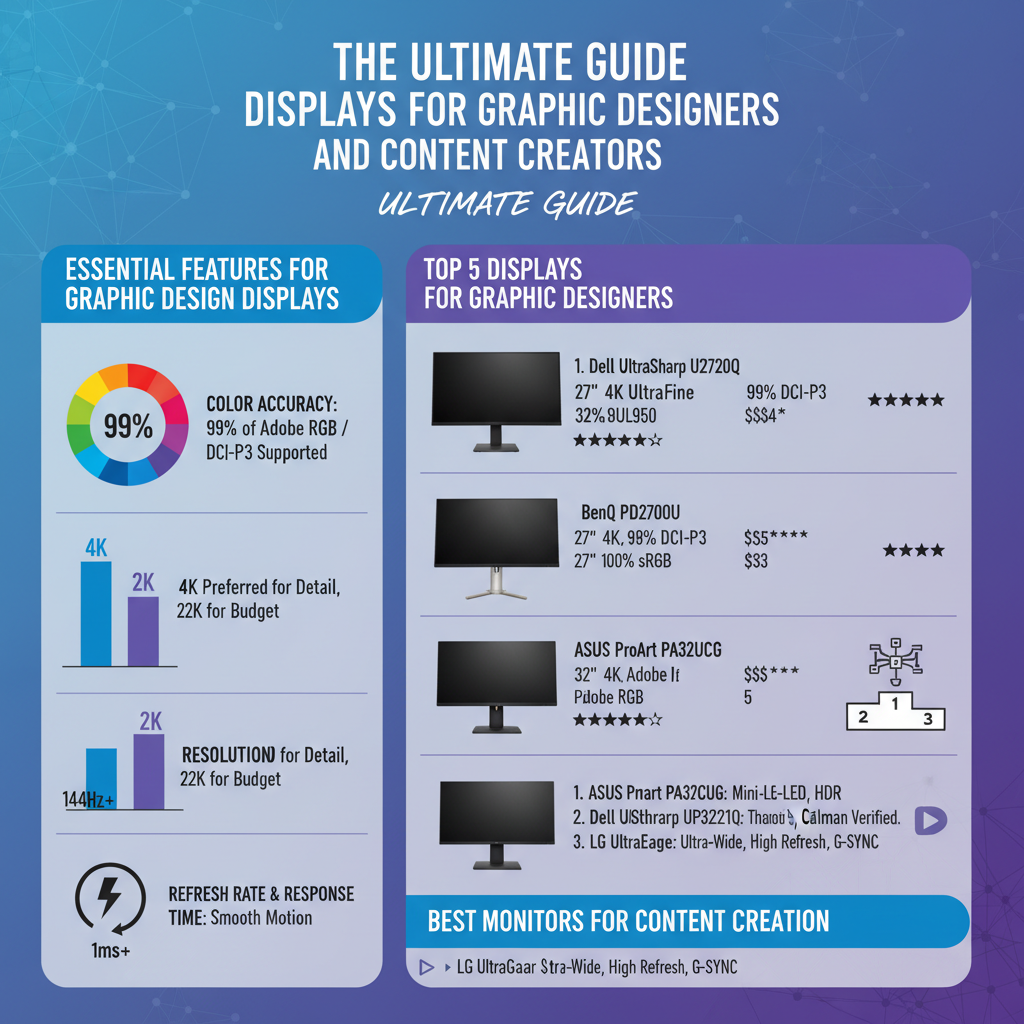
– Color Accuracy: This is arguably the most critical feature for any graphic designer. Monitors that support 99% of Adobe RGB or DCI-P3 color spaces ensure that the colors you see on screen closely match what will be printed or displayed elsewhere. This level of precision is vital for tasks such as photo editing, logo design, and any work where color fidelity is paramount.
– Resolution: The resolution of your display affects how sharp and detailed your images will appear. Higher resolutions like 4K (3840 x 2160 pixels) or even 5K provide that extra level of detail that is crucial for graphic design work. A higher pixel count allows for finer lines and more intricate designs, making it easier to spot issues that might be invisible at lower resolutions.
By prioritizing these features, you can significantly enhance your design process and output quality.
Top 5 Displays for Graphic Designers

Here are our top picks for displays that excel in color accuracy and resolution, making them ideal for graphic designers:
– BenQ PD3220U: This 32-inch 4K display is a favorite among professionals for its excellent color precision. It covers 95% of the DCI-P3 color space and features HDR10 support, which means it can display a broader range of colors and brightness levels. The monitor also has dual-view functionality, allowing designers to work in different color modes simultaneously, making it a versatile choice for those who juggle multiple projects.
– Apple Pro Display XDR: If you’re looking for industry-leading performance, the Apple Pro Display XDR is hard to beat. With a stunning 6016 x 3384 resolution and a peak brightness of up to 1600 nits, it offers incredible color accuracy and detail. This monitor is particularly well-suited for high-end video editing and graphic design, making it a worthwhile investment for serious professionals.
Best Monitors for Content Creation
For content creators, having a monitor that supports both graphic design and video editing is crucial. Here are two standout options:
– LG UltraFine 5K: This display is a dream for anyone in video editing or photography. Its 5120 x 2880 resolution provides fantastic image clarity, and it supports a wide color gamut, ensuring that your colors are vibrant and true to life. The monitor also includes Thunderbolt 3 connectivity, making it easy to connect to various devices.
– Dell UltraSharp U2720Q: A versatile option, this 27-inch monitor offers a 4K resolution and comes equipped with USB-C connectivity, which is a boon for those who need to connect multiple devices. The ultrathin bezels give it a modern look, and it also features excellent color accuracy, making it a great choice for multitasking and creative work.
Ergonomics and Adjustability
When working long hours, ergonomics becomes a vital consideration. A monitor that can be easily adjusted to your preferred height and angle can help prevent strain and improve comfort.
– Height Adjustable Stands: These are essential for maintaining proper posture. Many high-quality displays come with stands that allow you to adjust the height, tilt, and swivel. This feature can help you achieve a more comfortable viewing position and reduce the risk of neck or back pain.
– VESA Mount Compatibility: If you’re looking to create a multi-monitor setup or simply want to free up desk space, VESA mount compatibility is a must. This feature allows you to mount your monitor on an adjustable arm or wall mount, enabling flexible positioning and a cleaner workspace.
Budget-Friendly Options
Not every designer needs to break the bank to get a quality display. Here are two budget-friendly options that still deliver great performance:
– ASUS ProArt PA278QV: This 27-inch monitor is a great option for budding designers who don’t want to compromise on color accuracy. It covers 100% of the sRGB color space and offers a 2560 x 1440 resolution, striking a perfect balance between cost and performance. The monitor also features extensive connectivity options, including DisplayPort and HDMI.
– Acer R240HY: If you’re really pinching pennies, the Acer R240HY is a solid choice. With a 24-inch full HD resolution and an IPS panel, it provides good color reproduction and viewing angles at an affordable price. While it lacks some of the advanced features of higher-end models, it’s perfect for entry-level graphic design work.
Accessories to Enhance Your Display Experience
To get the most out of your display, consider investing in a few accessories that can improve your overall experience.
– Calibration Tools: Accurate color representation is crucial in graphic design. Using hardware calibration tools can ensure that your monitor displays colors as intended. This is especially important for professionals who work across various media formats.
– Monitor Hoods: If you often work in bright environments, a monitor hood can reduce glare and improve color accuracy. These hoods help shield your monitor from ambient light, allowing you to focus on your designs without distractions.
Future Trends in Display Technology
As technology evolves, so do the options available for graphic designers and content creators.
– OLED Displays: These monitors are gaining popularity due to their superior contrast ratios and color vibrancy. OLED technology allows for deeper blacks and more vivid colors, making them an exciting option for creative work that demands the highest visual quality.
– 32:9 Ultra-Wide Monitors: Ideal for multitasking, these monitors offer a lot of screen real estate. They allow you to have multiple applications open side by side without the need for a multi-monitor setup. This can be particularly useful for video editing, graphic design, and any task that requires a lot of screen space.
By selecting the right display tailored to your specific needs, you can significantly enhance your design and content creation process. The options listed above range from high-end to budget-friendly, ensuring that every graphic designer or content creator can find the perfect fit. Explore these recommendations and take your work to the next level!
Frequently Asked Questions
What features should I look for in the best displays for graphic designers and content creators?
When selecting the best displays for graphic designers and content creators, prioritize features like color accuracy, resolution, and screen size. Look for monitors with at least 99% sRGB coverage and professional-grade IPS panels to ensure vibrant colors and wide viewing angles. Additionally, consider a resolution of 4K or higher for detailed work, and a screen size of 27 inches or larger to provide ample workspace for multitasking.
How does color calibration affect a display’s performance for graphic design?
Color calibration is crucial for ensuring that the colors you see on your display are accurate and consistent, which is essential for graphic design work. A well-calibrated monitor will reproduce colors true to life, helping you avoid discrepancies when printing or sharing your designs. Look for displays that support hardware calibration or come with calibration tools to maintain color fidelity over time.
Why is screen resolution important for content creators?
Screen resolution is important for content creators because it directly impacts the clarity and detail of your work. Higher resolutions, such as 4K (3840 x 2160), allow for finer details and sharper images, which is especially beneficial when working on intricate designs or video editing. A higher resolution also provides more screen real estate, enabling you to work with multiple windows and tools simultaneously without sacrificing visibility.
What are the best brands of monitors for graphic designers in 2023?
Some of the best brands of monitors for graphic designers in 2023 include Dell, BenQ, and Eizo, known for their exceptional color accuracy and build quality. Dell’s UltraSharp series often features high-resolution displays with great color coverage, while BenQ offers specialized monitors with built-in calibration tools. Eizo is renowned for its professional-grade monitors that deliver outstanding performance in color-critical environments.
Which monitor size is ideal for graphic design work?
The ideal monitor size for graphic design work typically ranges from 27 to 32 inches. A larger screen allows for better visibility and more workspace, which is beneficial for multitasking and detailed design work. However, the choice also depends on your workspace and personal preferences—consider how far you sit from the screen and the resolution; higher resolutions can compensate for smaller sizes, while larger screens can enhance productivity and comfort.
References
- Display device
- https://www.wired.com/story/best-monitors-for-designers/
- https://www.creativebloq.com/advice/best-monitors-for-graphic-design
- https://www.techradar.com/news/best-monitor-for-graphic-design
- https://www.digitalartsonline.co.uk/buying-guides/best-monitor-for-graphic-design/
- https://www.howtogeek.com/720500/the-best-monitors-for-graphic-design/
- https://www.pantone.com/color-intelligence/the-importance-of-color-in-design
- https://www.adobe.com/creativecloud/design/discover/best-monitors-graphic-design.html