

When it comes to video editing and rendering, the right GPU can dramatically enhance your workflow and overall performance. In 2023, investing in a high-quality graphics card can lead to faster rendering times, improved playback quality, and a smoother editing experience. In this article, we’ll explore the top GPUs available today, their key features, and how to choose the best one tailored to your needs.
Understanding GPU Importance in Video Editing

GPUs (Graphics Processing Units) play a pivotal role in video editing. Unlike CPUs, which can handle a variety of tasks, GPUs are specifically designed to manage complex graphics computations. This specialization allows them to accelerate rendering processes, significantly reducing wait times when exporting videos or applying effects. For editors working with high-resolution footage or multiple layers of video, a powerful GPU can enhance real-time playback, ensuring that your editing timeline runs smoothly without lag. This efficiency not only saves time but also enhances creativity, allowing you to focus on crafting your masterpiece instead of waiting for renders to complete.
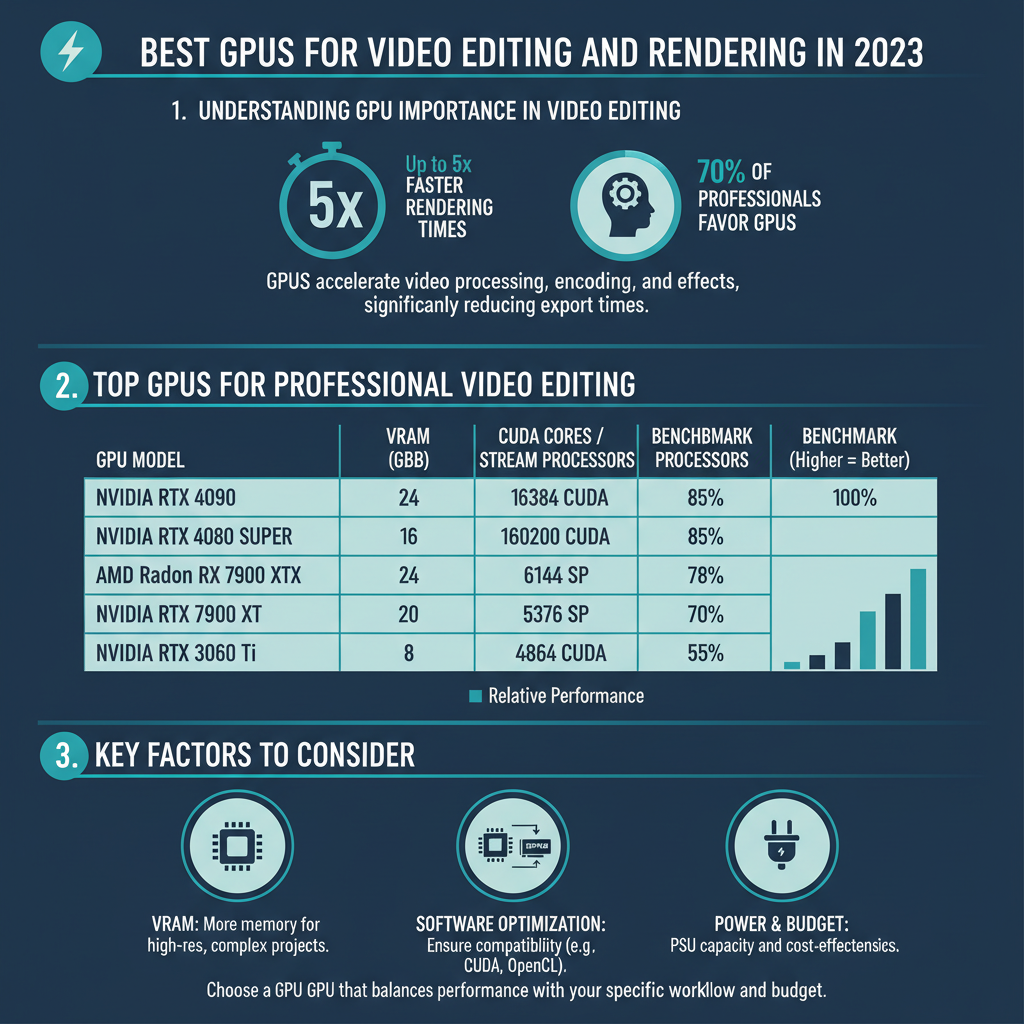
Top GPUs for Professional Video Editing

When it comes to professional-grade video editing, a few GPUs stand out due to their power and features.
– NVIDIA GeForce RTX 4090: This flagship GPU is an absolute powerhouse, boasting unparalleled performance that makes it ideal for 4K video editing and rendering. With its ray tracing capabilities and DLSS (Deep Learning Super Sampling) technology, the RTX 4090 not only handles demanding tasks effortlessly but also enhances the visual quality of your projects. Its 24GB of GDDR6X VRAM ensures that you have plenty of memory for complex edits, making it a top choice for professionals in the film and video industry.
– AMD Radeon RX 7900 XTX: For those who seek excellent performance at a more competitive price point, the AMD Radeon RX 7900 XTX is a fantastic option. It excels in high-resolution editing tasks and provides remarkable performance in color grading and effects rendering. The 20GB of GDDR6 VRAM allows for smooth multitasking, making it a solid choice for content creators who require both power and value.
Best Mid-Range GPUs for Video Editing
If you’re looking for a balance between performance and affordability, mid-range GPUs offer great options for video editing.
– NVIDIA GeForce RTX 3060 Ti: This GPU strikes an impressive balance of performance and price, making it a favorite among many editors. With 8GB of GDDR6 VRAM, the RTX 3060 Ti can handle 1080p and even 1440p editing tasks with ease. Its support for NVIDIA’s Studio Drivers provides enhanced compatibility with popular video editing software, ensuring that you can take full advantage of its capabilities without any hiccups.
– AMD Radeon RX 6700 XT: Another strong contender in the mid-range category, the RX 6700 XT offers a competitive price and solid performance for 1440p editing. With 12GB of GDDR6 VRAM, it provides ample memory for most editing tasks, including those that involve multiple effects layers. The card’s architecture also improves power efficiency, making it a great choice for users who want a solid performance without breaking the bank.
Budget-Friendly GPUs for Video Editing
For beginners or those on a tighter budget, there are still viable options that can handle basic video editing tasks.
– NVIDIA GeForce GTX 1660 Super: This GPU is a fantastic entry-level option for budding video editors. Priced affordably, the GTX 1660 Super offers decent editing power with 6GB of GDDR6 VRAM. It’s capable of handling 1080p editing comfortably, making it a great starting point for those just getting into video production or editing.
– AMD Radeon RX 6500 XT: Another budget-friendly option, the RX 6500 XT is suitable for entry-level video editing tasks. While it may not handle heavy projects or high resolutions as well as its more powerful counterparts, it provides basic performance for those just beginning their editing journey. With 4GB of GDDR6 VRAM, it can manage simple edits and light effects without much trouble.
Key Features to Consider When Choosing a GPU
When selecting a GPU for video editing, several key features should guide your decision:
– VRAM Capacity: Video editing often involves large file sizes and high-resolution footage. More VRAM (Video RAM) allows your GPU to handle larger data sets, making it essential for projects that require multiple video layers or high-resolution textures. As a rule of thumb, aim for at least 6GB of VRAM for 1080p editing and 8GB or more for 4K projects.
– CUDA Cores vs. Stream Processors: Understanding the difference between CUDA cores (NVIDIA) and Stream Processors (AMD) is crucial. CUDA cores are designed for parallel processing tasks, which are common in video rendering, while Stream Processors perform similar functions for AMD cards. More cores generally translate to better performance in rendering tasks, so consider this metric when evaluating your options.
Compatibility and Future-Proofing Your Setup
Before purchasing a GPU, ensure it’s compatible with your current system. Check your motherboard’s PCIe slots, and make sure your power supply can handle the GPU’s requirements. It’s also wise to consider future upgrades; investing in a more powerful GPU now can save you from needing to upgrade again shortly. Furthermore, as software demands evolve, selecting a GPU with longevity in mind will pay off in the long run, allowing you to keep up with the latest editing technologies and standards.
Choosing the right GPU for video editing and rendering can make a significant difference in your workflow. Evaluate your budget, performance needs, and specific tasks to select the best option for you. Whether you’re a professional or a hobbyist, upgrading your GPU can enhance your editing experience. Explore the options discussed and invest wisely to boost your video production capabilities.
Frequently Asked Questions
What are the key features to look for in a GPU for video editing and rendering?
When selecting a GPU for video editing and rendering, focus on features such as memory size (at least 6GB of VRAM is recommended), CUDA core count (for NVIDIA cards) or Stream processors (for AMD), and support for hardware acceleration in software like Adobe Premiere Pro or DaVinci Resolve. Additionally, consider the GPU’s compatibility with your CPU and RAM, as a balanced system will ensure optimal performance during intensive editing tasks.
Which GPUs are considered the best for 4K video editing in 2023?
As of 2023, some of the best GPUs for 4K video editing include the NVIDIA GeForce RTX 3080 and RTX 3090, as well as the AMD Radeon RX 6800 XT and RX 6900 XT. These graphics cards offer powerful performance, ample VRAM, and excellent support for ray tracing and other advanced rendering technologies, making them ideal for handling high-resolution projects efficiently.
How does a powerful GPU impact video editing and rendering performance?
A powerful GPU significantly enhances video editing and rendering performance by accelerating the processing of visual effects, transitions, and color grading. This leads to faster rendering times and smoother playback during editing, especially with high-resolution footage or complex projects. Moreover, many editing software applications leverage GPU power for real-time rendering, allowing editors to work more efficiently without lag.
Why is VRAM important for video editing GPUs?
VRAM, or video RAM, is crucial for video editing because it stores the textures, images, and video data that the GPU needs to access quickly while processing. More VRAM allows the GPU to handle larger files and more complex projects with ease, which is particularly beneficial when working with 4K or 8K footage. Insufficient VRAM can lead to sluggish performance and longer render times, ultimately hindering your workflow.
What is the price range for high-quality GPUs suitable for video editing and rendering?
The price range for high-quality GPUs suitable for video editing and rendering can vary widely, typically starting around $300 for mid-range options and soaring up to $1,500 or more for top-tier models like the NVIDIA RTX 4090 or AMD RX 7900 XT. While budget-friendly options can serve basic editing needs, investing in a higher-end GPU can yield substantial time savings and improve overall editing efficiency, especially for professional-grade projects.
References
- Graphics processing unit
- https://www.pcgamer.com/best-graphics-cards-for-video-editing/
- https://www.techradar.com/news/best-graphics-card-for-video-editing
- https://www.tomshardware.com/reviews/best-gpu,5775.html
- Cineversity
- https://www.creativebloq.com/advice/the-best-gpus-for-video-editing
- 8 of the best GPUs I recommend after 200 hours of testing – Digital Trends
- https://www.pcgamesn.com/best-gpu-for-video-editing
- https://www.lifewire.com/best-graphics-cards-for-video-editing-4778952