
The key to improving esports performance lies in the refresh rates of your display. Monitors with 240Hz and 360Hz capabilities provide smoother visuals and more responsive gameplay, leading to improved reaction times and an overall competitive edge. These high-refresh-rate displays can be game-changers, especially in fast-paced gaming environments where every millisecond counts. In this article, we’ll explore how these advanced displays can transform your gaming experience, elevating your skills and immersing you deeper into the competitive world of esports.
Understanding Refresh Rates
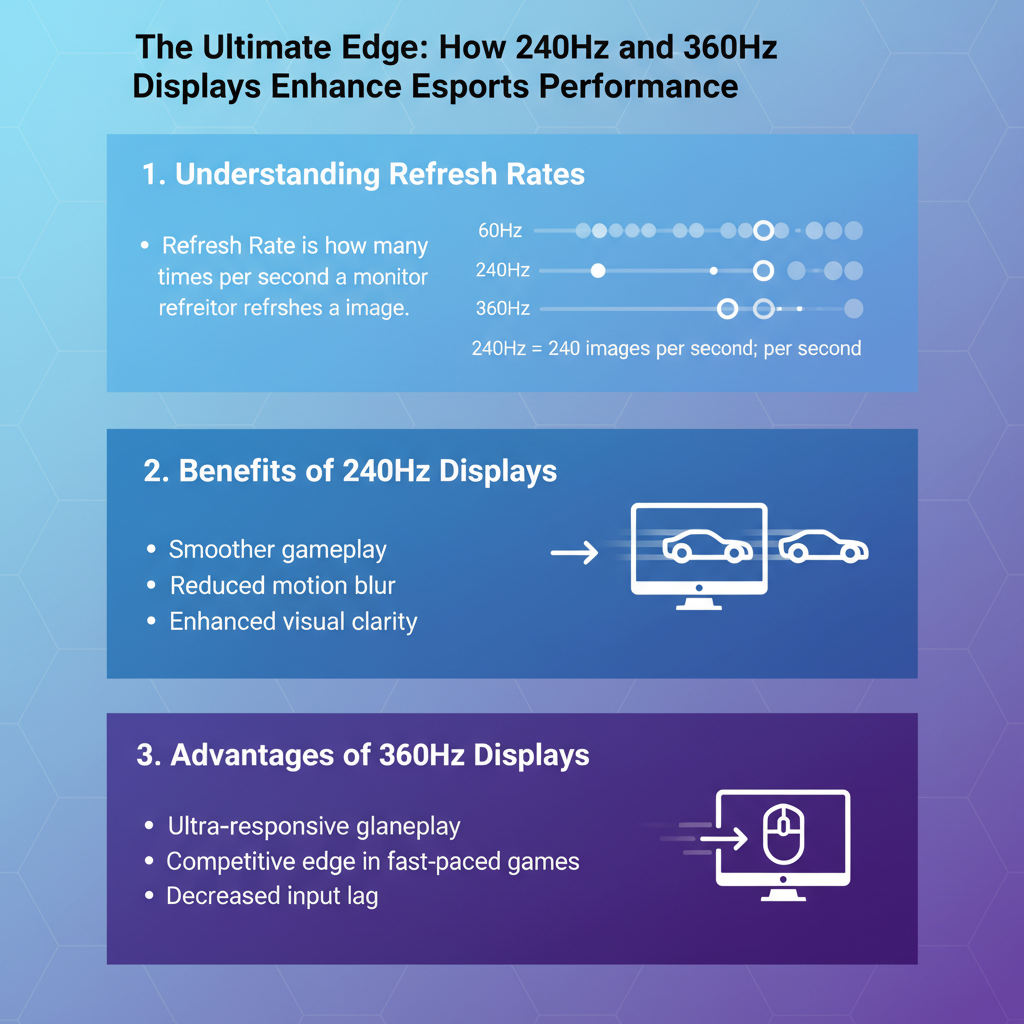
When we talk about refresh rates, we refer to how many times per second a monitor can redraw the image displayed on the screen. Measured in Hertz (Hz), a refresh rate of 60Hz means the image refreshes 60 times per second, while a 240Hz display refreshes the image 240 times. For gaming, a higher refresh rate translates to smoother motion and enhanced playability. This is particularly crucial in fast-paced games, where every movement and shot matters. Higher refresh rates significantly reduce motion blur, which can obscure quick action sequences and make it difficult to track opponents. By minimizing this blur, players can react more quickly and accurately, translating to better performance in competitive situations.
Benefits of 240Hz Displays
240Hz displays offer an impressive level of fluidity that is often crucial for high-stakes gaming scenarios. In fast-paced games like “Call of Duty” or “Fortnite,” where split-second decisions can mean the difference between victory and defeat, the lag reduction offered by a 240Hz monitor can be a game-changer. Players experience less input lag, meaning their on-screen actions respond almost instantaneously to their commands. This fluency can be a potent weapon in a player’s arsenal, allowing for quick turns, accurate shooting, and seamless maneuvers.
Moreover, the enhanced visual clarity provided by 240Hz displays can also help players spot opponents who might otherwise blend into the background. Whether it’s noticing a subtle movement in the corner of the screen or recognizing an enemy’s position behind cover, these displays give players an edge by ensuring they see what others might miss.
Advantages of 360Hz Displays
If 240Hz is impressive, 360Hz takes it even further, offering an ultra-responsive gameplay experience that appeals particularly to professional gamers and serious esports enthusiasts. The transition from 240Hz to 360Hz is not just a number; it represents a significant leap in performance. Players can enjoy even faster frame rates, which translates to smoother animations and less stuttering, especially when playing highly competitive games like “Counter-Strike: Global Offensive” or “Valorant.”
The difference in performance is particularly evident in esports tournaments, where top-tier players often compete under the most demanding conditions. With a 360Hz display, every frame is rendered with precision, allowing for the most accurate aiming and rapid response to in-game events. This capability can enhance a player’s overall performance and is often the secret ingredient that separates the best from the rest.
The Impact on Reaction Times
Statistics show that higher refresh rates can significantly impact player response times. Research indicates that players using a monitor with a refresh rate of 240Hz can react up to 20% faster than those using a standard 60Hz display. In competitive gaming, where every millisecond counts, this can be a decisive advantage. Real-world examples abound, with many professional esports players attributing their success to the enhanced responsiveness provided by high-refresh-rate monitors.
Take, for example, the story of a renowned “League of Legends” pro who switched from a standard monitor to a 240Hz model. He reported a noticeable improvement in his ability to execute complex maneuvers and react to enemy actions, resulting in a series of wins that propelled him to the top of the leaderboard. Such anecdotes highlight the tangible benefits of investing in high-refresh-rate displays.
Choosing the Right Display for Esports
When considering a display for esports, refresh rate is just one piece of the puzzle. Other key features to look for include resolution (ideally 1080p, 1440p, or even 4K), response time (aim for 1ms or lower), and adaptive sync technologies like G-Sync or FreeSync, which help eliminate screen tearing. Each of these elements contributes to a more immersive and responsive gaming experience.
As for recommendations, brands like ASUS, Acer, and Dell offer excellent options in the 240Hz and 360Hz categories. Models such as the ASUS ROG Swift PG259QN (360Hz) and Acer Predator XN253QX (240Hz) have garnered praise for their performance and features. Ultimately, the right choice will depend on individual preferences, gaming styles, and budget.
Other Factors Affecting Esports Performance
While a high-refresh-rate display is crucial, it’s essential to remember that overall gaming performance hinges on a variety of factors. Hardware compatibility plays a pivotal role; a powerful GPU and CPU are necessary to ensure that your system can output high frame rates, making the most of your monitor’s capabilities. If your graphics card can only support low frame rates, even the best monitor won’t provide the desired impact.
Additionally, peripherals matter too. High-quality keyboards and mice designed for gaming can enhance your response times and overall performance. For instance, a mechanical keyboard with customizable key binds can help you execute commands faster. Similarly, a gaming mouse with adjustable DPI settings can facilitate precision aiming. All these elements work together to create an optimized gaming setup.
Future Trends in Display Technology for Gaming
As we look ahead, advancements in display technology promise exciting developments for gamers. The ongoing evolution of refresh rates is likely to continue, with predictions suggesting that we may see displays pushing beyond 360Hz in the near future. Technologies like OLED and Mini-LED are also gaining traction, offering improved contrast ratios and vibrant colors, which can enhance the gaming experience even further.
Moreover, the potential integration of Virtual Reality (VR) and Augmented Reality (AR) into esports could revolutionize the way we perceive refresh rates. These technologies demand even higher performance from displays, paving the way for innovations that could redefine gaming as we know it.
Summarizing the advantages of 240Hz and 360Hz displays, it becomes evident that investing in high-refresh-rate monitors can significantly enhance your esports performance. By providing smoother visuals and quicker response times, players can elevate their game. If you’re serious about improving your skills, consider upgrading your display and exploring the options available tailored to your gaming needs. With the right equipment and a commitment to practice, you’ll be well on your way to dominating the esports arena.
Frequently Asked Questions
What are the main differences between 240Hz and 360Hz displays for esports gaming?
The primary difference between 240Hz and 360Hz displays lies in their refresh rates, which directly affects how smoothly motion is rendered on-screen. A 360Hz display refreshes the image 360 times per second, providing an edge in fast-paced esports games by reducing motion blur and enhancing responsiveness. This can lead to a competitive advantage, especially in titles that require quick reflexes, such as first-person shooters and battle royale games.
How do higher refresh rates like 240Hz and 360Hz impact gaming performance in competitive esports?
Higher refresh rates significantly enhance gaming performance by delivering smoother visuals and reducing input lag. With a 240Hz or 360Hz display, gamers experience less ghosting and motion blur, allowing for clearer images during fast movements. This clarity helps players react more quickly to in-game situations, improving aim accuracy and overall performance in competitive esports environments.
Why should esports players consider upgrading to a 360Hz display over a 240Hz model?
Esports players should consider upgrading to a 360Hz display because it offers the highest level of fluidity and responsiveness available in gaming monitors. The increased refresh rate can make a noticeable difference in how quickly players can perceive and react to fast-moving objects, which is crucial in competitive gaming scenarios. While 240Hz displays are excellent, the 360Hz option may provide that critical edge needed to outperform opponents in high-stakes matches.
Which esports games benefit the most from 240Hz and 360Hz displays?
Esports games that benefit the most from 240Hz and 360Hz displays include fast-paced titles like “Counter-Strike: Global Offensive,” “Valorant,” and “Call of Duty.” These games involve rapid movements and require precise aiming, making higher refresh rates essential for optimal performance. Additionally, competitive racing games can also see improvements in visual clarity and response times with these high-refresh-rate monitors.
What factors should I consider when choosing between a 240Hz and 360Hz display for esports?
When choosing between a 240Hz and 360Hz display, consider your gaming habits, the types of games you play, and your hardware capabilities. Ensure that your graphics card can consistently deliver high frame rates to take full advantage of the higher refresh rates. Additionally, think about your budget, as 360Hz monitors tend to be more expensive, and assess whether the performance gains justify the investment based on your competitive gaming requirements.
References
- Refresh rate
- https://www.sciencedirect.com/science/article/pii/S0360132319300859
- https://www.researchgate.net/publication/343264834_The_impact_of_display_performance_on_gaming_experience
- https://www.technologyreview.com/2021/05/04/1023993/gaming-monitor-refresh-rate-240hz-360hz/
- https://www.pcgamer.com/240hz-vs-360hz-monitors/
- https://www.tomshardware.com/reviews/240hz-vs-360hz-monitors,6136.html
- https://www.digitaltrends.com/computing/what-is-refresh-rate/
- https://www.nytimes.com/2021/05/01/technology/esports-gaming.html