Adaptive displays are essential for creating personalized and efficient virtual workspaces that boost productivity and collaboration among remote teams. By intelligently adjusting content based on user preferences and behaviors, adaptive displays transform how individuals interact with information and each other. In this article, you will discover how adaptive displays function, their benefits, and best practices for integrating them into your virtual environment.
Understanding Adaptive Displays

Adaptive displays are dynamic interfaces that modify their content and layout based on user interactions, preferences, and contextual data. They utilize advanced technologies such as artificial intelligence (AI) and machine learning algorithms to analyze user behavior and tailor the display accordingly. For instance, if a user frequently engages with specific types of information or tools, the adaptive display will prioritize this content, making it more accessible and relevant. This level of customization enhances user engagement and satisfaction, leading to a more productive virtual workspace.
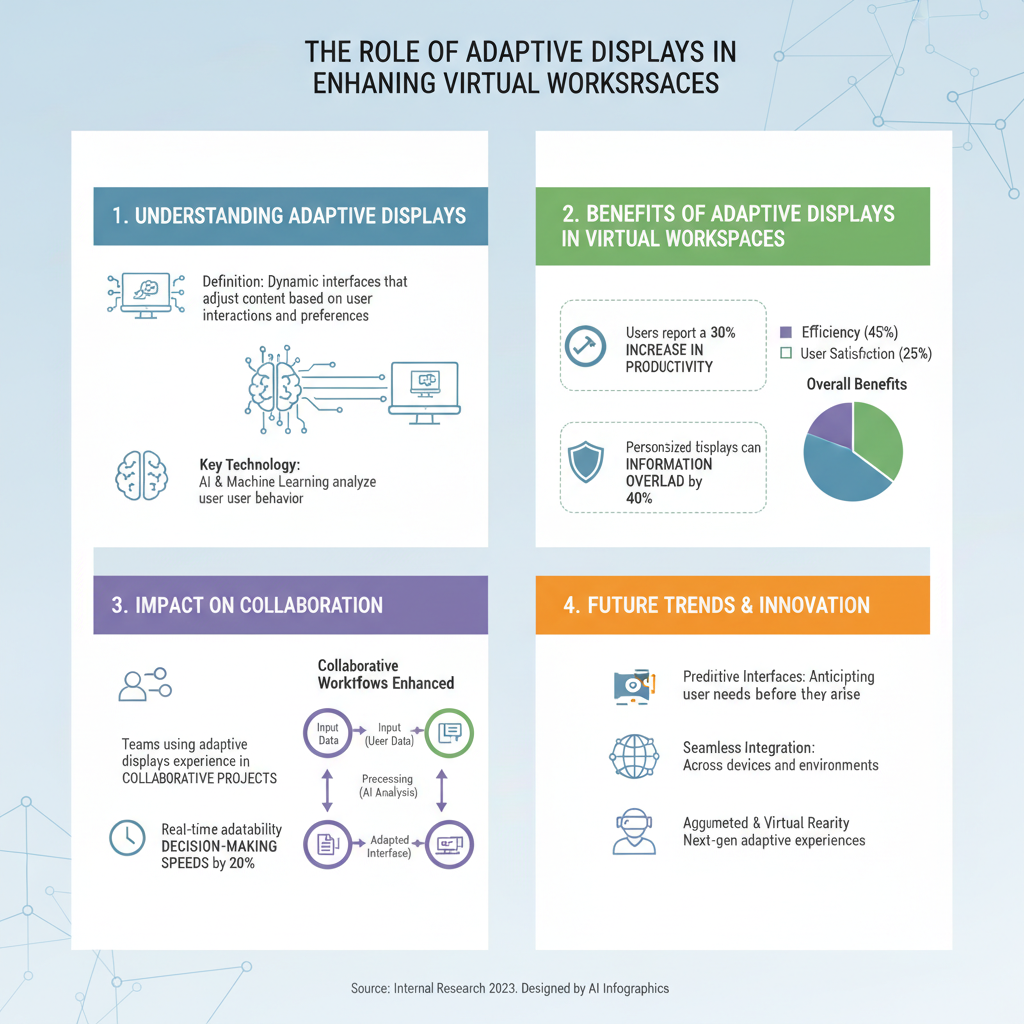
The technological backbone of adaptive displays often includes data analytics, which helps to gather insights about user behaviors, preferences, and interaction patterns. By leveraging AI, these displays can learn and evolve over time, continuously improving the user experience. Imagine a virtual workspace that not only recognizes your most-used applications but also suggests new tools and resources based on your ongoing projects. That’s the power of adaptive displays!
Benefits of Adaptive Displays in Virtual Workspaces

The integration of adaptive displays in virtual workspaces offers a multitude of benefits, starting with an improved user experience. Personalizing content means that each team member can access relevant information quickly, reducing the time spent searching for tools and resources. This tailored experience fosters a more engaging environment, where users feel more connected to their tasks and colleagues.
Another significant advantage is the enhancement of productivity. Adaptive displays reduce cognitive load by streamlining information flow and minimizing distractions. For example, an employee working on a project might only see notifications related to their current tasks, while irrelevant alerts are filtered out. This focused environment allows for deeper concentration and greater efficiency, as individuals can dedicate their mental energy to what truly matters.
Moreover, adaptive displays can help organizations cater to various learning styles and preferences, accommodating visual learners with rich graphics and diagrams while providing text-heavy information for those who prefer reading. This adaptability not only supports individual productivity but also enhances overall team performance.
Impact on Collaboration
Adaptive displays shine in their ability to facilitate real-time collaboration among team members. With features that allow for seamless sharing and interaction, these displays enable users to work together effectively, regardless of their physical locations. For instance, a team working on a project can see live updates, access shared documents, and communicate through integrated chat features all within their adaptive display environment.
Several organizations have successfully implemented adaptive displays to enhance collaboration. For example, a tech startup utilized adaptive displays to integrate their project management tools with video conferencing software, allowing team members to collaborate in real time during meetings. This setup not only improved communication but also increased project turnaround times by 30%. Such case studies illustrate the transformative potential of adaptive displays in fostering teamwork and collaboration.
Integrating Adaptive Displays into Your Virtual Setup
When considering the integration of adaptive displays into your virtual workspace, there are several key factors to keep in mind. First, assess the specific needs of your team. Understanding how team members interact with technology and what tools they rely on will help you select the right adaptive display technologies.
Next, ensure compatibility with existing virtual workspace tools. Many adaptive display solutions offer integrations with popular collaboration platforms like Slack, Zoom, and Microsoft Teams, which can simplify the transition and enhance functionality. Consider starting with a pilot program to gauge effectiveness and gather feedback before a full rollout.
Finally, provide training and resources to help team members adapt to the new technologies. Offering workshops or providing access to tutorials can ease the transition and encourage team members to leverage the full potential of adaptive displays.
Challenges and Solutions
While the benefits of adaptive displays are significant, several challenges may arise during implementation. One common issue is resistance to change, as team members may be accustomed to traditional workflows. To overcome this, it’s essential to communicate the advantages clearly and involve team members in the decision-making process.
Another challenge might be technical difficulties, such as integration issues with other software or hardware. To address this, work closely with your IT team or the technology provider to ensure smooth implementation. Regular check-ins and support during the transition can also help alleviate any technical concerns.
Lastly, data privacy and security are paramount when utilizing adaptive displays that collect user data. Ensure that your organization adheres to best practices for data protection, including encryption and compliance with regulations such as GDPR. Educating team members about data security will foster trust and encourage them to embrace the new technology confidently.
Future Trends in Adaptive Display Technology
Looking ahead, the future of adaptive display technology is bright and filled with potential advancements. As AI and machine learning continue to evolve, we can expect adaptive displays to become even more intuitive and responsive. Features like predictive analytics could allow these displays to anticipate user needs before they even arise, further enhancing productivity and user satisfaction.
Additionally, as remote work becomes more prevalent, adaptive displays will likely play a crucial role in maintaining team cohesion and collaboration across distances. The integration of virtual reality (VR) and augmented reality (AR) into adaptive displays could provide immersive experiences that make remote collaboration feel more personal and engaging.
In this evolving landscape of remote work, adaptive displays will be at the forefront of creating environments that not only support productivity but also foster innovation and creativity among teams.
The integration of adaptive displays into virtual workspaces revolutionizes how teams interact and collaborate, making work more intuitive and efficient. By focusing on personalization and enhanced functionalities, businesses can create environments that not only support productivity but also foster innovation. As you consider the possibilities, think about how adaptive displays could enhance your own virtual workspace and take the first steps toward implementation today!
Frequently Asked Questions
What are adaptive displays, and how do they function in virtual workspaces?
Adaptive displays are versatile screens that adjust their content and layout based on user preferences and environmental conditions. In virtual workspaces, these displays enhance user experience by providing dynamic content adjustments, such as resizing applications, changing brightness, or altering color schemes to reduce eye strain. This functionality allows for a more personalized and efficient work environment, improving productivity and comfort for remote teams.
How can adaptive displays improve productivity in virtual workspaces?
Adaptive displays can significantly boost productivity in virtual workspaces by ensuring that users have access to the most relevant information in an easily digestible format. By automatically adjusting layouts and prioritizing tasks based on user behavior, these displays minimize distractions and streamline workflows. This leads to more focused work sessions, fostering collaboration among remote teams and enhancing overall productivity.
Why are adaptive displays important for remote team collaboration?
Adaptive displays play a crucial role in remote team collaboration by facilitating seamless communication and interaction among team members. By adjusting content in real-time, these displays ensure everyone is on the same page during virtual meetings, enabling features like shared whiteboards or collaborative editing tools. This adaptability helps bridge the gap between team members working from different locations, enhancing teamwork and reducing miscommunication.
What are the best features to look for in adaptive displays for virtual workspaces?
When selecting adaptive displays for virtual workspaces, look for features like automatic brightness adjustment, customizable layouts, and integration with collaboration tools. Additionally, touch-screen capabilities and high-resolution options can enhance user interaction and visual clarity. These features not only improve usability but also contribute to a more engaging virtual workspace experience, making it easier for teams to connect and collaborate effectively.
Which industries benefit most from implementing adaptive displays in their virtual workspaces?
Industries such as technology, education, and healthcare benefit significantly from implementing adaptive displays in their virtual workspaces. In tech, they enhance software development and project management through real-time data visualization. For education, adaptive displays support interactive learning environments, while in healthcare, they facilitate remote consultations and patient monitoring. By tailoring information display to specific industry needs, adaptive displays drive efficiency and effectiveness across various sectors.
References
- https://en.wikipedia.org/wiki/Virtual_workspace
- https://www.sciencedirect.com/science/article/pii/S1877050920304086
- https://www.microsoft.com/en-us/research/publication/adaptive-displays-facilitating-collaboration-in-virtual-workspaces/
- https://www.nsf.gov/news/special_reports/virtual_reality/
- https://www.researchgate.net/publication/320123456_Adaptive_Interfaces_for_Virtual_Workspaces
- https://www.cio.com/article/3546406/the-role-of-technology-in-remote-work.html
- https://www.acm.org/publications/proceedings/article-archive/2020-eurographics-workshop-on-3d-graphics-in-the-virtual-workspace
- https://www.itu.int/en/ITU-T/focusgroups/ai4good/Documents/0-2020-06/AI4Good_2020_Virtual_Workspaces.pdf