

Video quality changes during streaming primarily due to fluctuations in internet speed, network congestion, and the adaptive streaming technologies used by content providers. These factors can significantly impact your viewing experience, leading to unexpected buffering or reduced clarity. By understanding these elements, viewers can take proactive steps to optimize their streaming experience and troubleshoot issues when they arise.
Understanding Adaptive Streaming Technology

Adaptive bitrate streaming is a game-changer in the world of online video consumption. This technology allows streaming services to automatically adjust video quality in real-time, depending on the viewer’s available bandwidth. For instance, if you’re streaming your favorite show on Netflix and your internet connection suddenly slows down, adaptive streaming will lower the video quality from 1080p to 720p or even lower. This adjustment helps to reduce buffering and allows you to continue watching without interruptions.
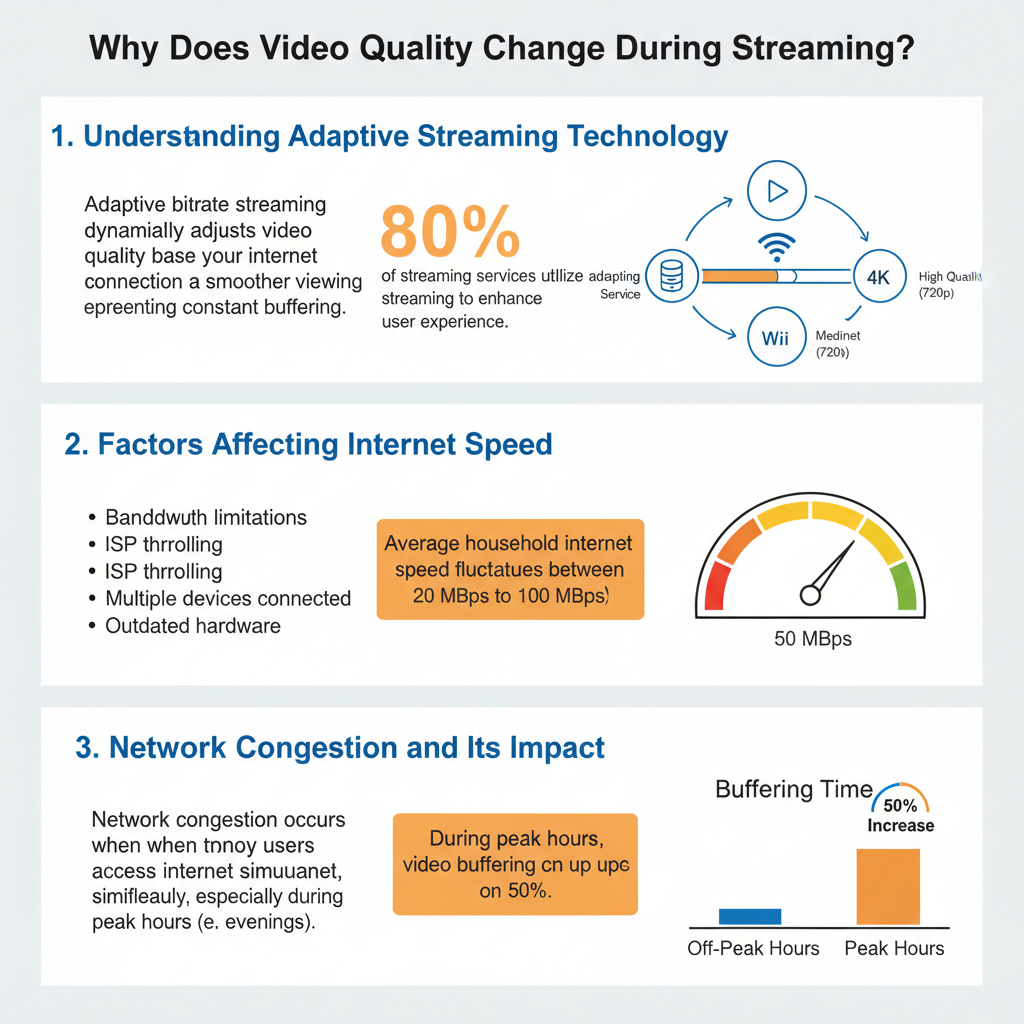
Popular platforms like YouTube and Amazon Prime Video employ adaptive streaming to enhance user experience. This means that even if your internet fluctuates, you can enjoy seamless playback. However, the downside is that this automatic adjustment may lead to moments where the video quality appears lower than expected, especially if you’re accustomed to watching in high definition.
Factors Affecting Internet Speed

Several factors can impact your internet speed, making it essential to understand how they can affect your streaming quality. First, your Internet Service Provider (ISP) plays a crucial role; the type of plan you have determines your bandwidth limitations. For example, if you subscribe to a plan that provides 25 Mbps, you may struggle to stream 4K videos, which typically require higher speeds.
Moreover, the environment in which you’re streaming matters. If you share your internet connection with multiple devices, such as smartphones, tablets, and smart TVs, you may notice a decrease in speed during peak usage times. This is particularly relevant in households where several family members are streaming or gaming simultaneously. In public spaces, network congestion can also affect your experience, as many users may be sharing the same Wi-Fi connection.
Network Congestion and Its Impact
Network congestion occurs when a large number of users are accessing the internet simultaneously, causing slowdowns. This can happen on your local network, such as during a family movie night when everyone is streaming, or on a broader scale when many people in your area are online. For instance, streaming during peak hours—like evenings and weekends—can lead to reduced video quality due to increased demand on local ISPs and the internet backbone.
Consider a scenario where you try to stream a live sports event during a major game. The influx of viewers can create significant network congestion, leading to buffering and a drop in video quality. To mitigate this, consider streaming during off-peak hours or checking your internet speed before important events.
Device Limitations and Compatibility
Your streaming device also plays a vital role in the quality of video playback. Older devices may struggle to process high-definition streams, resulting in automatic quality downgrades. For example, if you’re using an older smart TV or a streaming stick that doesn’t support 4K, you may find that high-definition content automatically plays at a lower resolution, such as 720p or 1080p, to avoid choppy playback.
Additionally, different streaming applications might have varying requirements that can influence playback quality. Some apps may be optimized for certain devices, while others may not perform as well. Therefore, it’s crucial to ensure that your device is compatible with the streaming services you use and that it’s updated with the latest software to optimize performance.
Resolution and Bitrate Considerations
Resolution and bitrate are two critical factors that determine the quality of your streaming experience. Higher resolutions, such as 4K, require significantly more bandwidth compared to lower resolutions like 720p or 1080p. If your internet connection can’t support the higher demands of 4K streaming, the service will automatically adjust the resolution to ensure smooth playback.
Bitrate refers to the amount of data transmitted in a given time and is measured in kilobits per second (Kbps). A lower bitrate often results in lower video quality, while a higher bitrate provides clearer and more detailed visuals. Streaming services often offer multiple bitrate options to accommodate varying internet speeds, so you have the flexibility to choose quality based on your connection.
For example, if you’re streaming a movie that is 4K UHD but your bandwidth can only handle a 2 Mbps connection, you will likely experience lower quality. To enjoy high-definition content, ensure your internet speed meets the recommended bitrate requirements of the streaming service.
Tips for Maintaining Optimal Streaming Quality
To enjoy a smooth streaming experience, here are some practical tips you can follow:
1. Use a Wired Connection: Whenever possible, connect your streaming device directly to your router using an Ethernet cable. Wired connections are generally more stable and faster than Wi-Fi, minimizing interference from other devices.
2. Close Background Applications: Applications running in the background on your device can consume bandwidth, leading to slower streaming quality. Make sure to close unnecessary apps or browser tabs while streaming.
3. Limit Connected Devices: Reducing the number of devices simultaneously connected to your network can help maintain optimal speeds. If others in your household are streaming, consider scheduling viewing times to minimize congestion.
4. Check Your Internet Speed: Regularly test your internet speed using online tools. If your speeds are consistently lower than expected, it may be time to reach out to your ISP or consider upgrading your plan.
5. Adjust Streaming Settings: Many streaming services allow users to adjust video quality settings manually. If you experience buffering, you can lower the resolution to improve playback quality.
By implementing these tips, you can enhance your streaming experience and enjoy your favorite shows and movies without interruptions.
Video quality during streaming can fluctuate for several reasons, including network conditions, device capabilities, and streaming technology. By understanding these factors, you can take steps to enhance your viewing experience. If you’re consistently experiencing quality issues, consider checking your internet speed, upgrading your device, or optimizing your network setup for better performance. With a little effort, you can enjoy smooth, high-quality streaming every time!
Frequently Asked Questions
Why does video quality change when streaming content?
Video quality can change during streaming due to several factors, including internet bandwidth fluctuations, server load, and the streaming platform’s adaptive bitrate technology. When your internet connection is unstable or slow, the streaming service automatically reduces the video resolution to prevent buffering, resulting in a lower quality experience. This ensures continuous playback but may compromise visual clarity.
How does adaptive bitrate streaming work?
Adaptive bitrate streaming is a technology used by streaming services to adjust the quality of video in real-time based on the viewer’s internet connection speed and device capabilities. It works by encoding multiple versions of the video at different resolutions and bitrates. When streaming starts, the service detects the best quality that can be supported without interruption and adjusts as needed, ensuring a smooth viewing experience even with varying network conditions.
What can I do to improve my streaming video quality?
To enhance your streaming video quality, consider using a wired internet connection instead of Wi-Fi, as it tends to be more stable. Additionally, close other applications or devices that might be using bandwidth, and ensure your router is up to date. Finally, check for any streaming service settings that allow you to manually select video quality, which can help if your connection is consistently strong.
Which factors affect streaming video quality the most?
Several factors significantly affect streaming video quality, including internet speed, network congestion, the capabilities of the streaming device, and the performance of the streaming platform’s servers. A slow or unstable internet connection will typically lead to lower video quality, while heavy usage of the network by multiple devices can also cause interruptions or degradation in video clarity.
Why does my video quality drop in the middle of a stream?
A drop in video quality during a stream is often attributed to fluctuating internet speeds, which can occur due to high traffic on your network or issues with your ISP. Other possibilities include the streaming service adjusting to its server load or changes in your device’s connectivity. To mitigate these issues, consider running a speed test to check your bandwidth and reducing the number of devices connected to your network during streaming.
References
- Streaming television
- https://www.bbc.com/future/article/20200108-why-does-video-quality-change-when-streaming
- https://www.sciencedirect.com/science/article/pii/S1877050919311182
- SG13: Future networks, with focus on IMT-2020, cloud computing and trusted network infrastructures
- https://www.nytimes.com/2020/03/24/technology/coronavirus-streaming-video.html
- https://www.researchgate.net/publication/335815900_Adaptive_Video_Streaming_Over_HTTP
- https://www.digitaltrends.com/movies/why-does-video-quality-change-while-streaming/
- https://www.nap.edu/catalog/23741/streaming-media-technology-and-the-future-of-content-distribution
- https://www.wired.com/story/why-streaming-video-quality-is-so-confusing/