You generally can’t mix mesh Wi-Fi brands into one unified mesh network unless the devices explicitly support a shared standard and cross-brand compatibility. For seamless roaming and centralized control, a single compatible mesh system is the clear winner; mixing brands makes sense only if you accept separate access points rather than a true mesh. Here’s how to tell whether your devices can work together—and when replacing a node is smarter than reusing one.



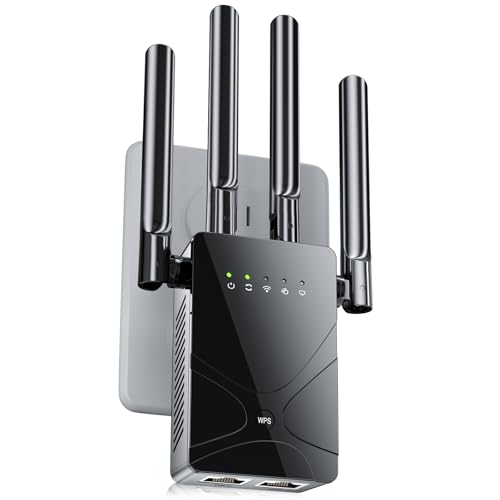
You usually cannot combine different mesh Wi-Fi brands into one coordinated mesh system. You can often use them on the same home network as separate access points, but cross-brand mesh operation requires explicitly supported compatibility. This article explains the difference, what to check, and when reusing equipment makes sense.
This guide is for anyone hoping to expand coverage with another brand’s mesh unit or reuse an older system without replacing everything.
Why Different Mesh Brands Usually Won’t Form One System

Different mesh brands usually cannot share one mesh because their setup, management, and coordination systems are not interchangeable. Connecting equipment to the same network does not make that equipment part of the same managed mesh.
A mesh node joins a supported system that coordinates settings and connections between units. An access point provides Wi-Fi access to an existing network; it can operate independently of other access points.
A shared internet connection does not make two different mesh Wi-Fi systems one coordinated mesh.
Matching Wi-Fi generations does not establish compatibility either. Two Wi-Fi 6 products can communicate with compatible clients while remaining unable to join each other’s mesh. Identical network names—also called SSIDs—and passwords likewise do not create shared management or guarantee uninterrupted roaming.
Wi-Fi EasyMesh, a Wi-Fi Alliance certification program for interoperable multi-access-point networks, offers a possible route between vendors. However, the specific devices, firmware, and controller or agent roles must support the intended arrangement. Consult the [official Wi-Fi Alliance EasyMesh documentation](https://www.wi-fi.org/discover-wi-fi/wi-fi-easymesh), not just a product’s Wi-Fi generation.
Wi-Fi EasyMesh is a compatibility pathway, not evidence that every mesh product works with every other brand.
What to Check Before Connecting Different Brands
Check exact model numbers, hardware revisions, firmware requirements, and official compatibility lists before purchasing anything. Brand names alone are insufficient because manufacturers can maintain incompatible product families.
Google provides a concrete example: its [Nest Wifi compatibility documentation](https://support.google.com/googlenest/answer/9548099?hl=en) explains that Nest Wifi Pro does not combine into a mesh with previous-generation Nest Wifi or Google Wifi.
Devices from the same manufacturer can belong to incompatible mesh families.
Next, verify access-point or bridge mode, Ethernet availability, and any expressly documented cross-brand functionality. Check guest networking, parental controls, traffic prioritization, and centralized management separately; retaining internet access does not mean retaining every feature.
Hardware specifications also matter. According to [Google’s Nest Wifi Pro specifications](https://store.google.com/product/nest_wifi_pro_specs), Nest Wifi Pro has two Ethernet ports, supports 1 Gbps Ethernet, and uses three wireless bands: 2.4, 5, and 6 GHz. These manufacturer specifications are useful for 2026 planning, but none establishes cross-brand mesh compatibility.
Ethernet ports and supported operating modes determine whether otherwise incompatible mesh equipment can be reused as an access point.
How to Reuse Another Brand as an Access Point
The usual arrangement is one main router connected by Ethernet to the second system operating in its supported access-point or bridge mode. The main router continues handling internet routing and address assignment.
Follow this sequence:
1. Update both systems using their manufacturers’ instructions.
2. Keep the existing gateway as the main router.
3. Enable the second system’s documented access-point or bridge mode.
4. Connect the specified ports by Ethernet.
5. Test internet access, local-device discovery, coverage, and movement between access points.
TP-Link’s [Deco access-point setup guide](https://www.tp-link.com/us/support/faq/1432/) documents this operating mode for supported Deco equipment. eero provides separate [bridge-mode instructions](https://support.eero.com/hc/en-us/articles/208276903-How-do-I-bridge-my-eeros). Follow the applicable guide rather than assuming the menus or port requirements are identical.
A wired access-point setup lets different Wi-Fi brands share a home network without joining the same mesh.
Do not assume the second system can connect wirelessly to the first. That requires a documented repeater, bridge, or interoperable mesh mode. A secondary system may support wireless links among its own nodes without supporting a wireless uplink to another brand’s router.
Wireless backhaul within one mesh family does not establish wireless compatibility with another brand.
Seven Wi-Fi Connection Arrangements and Their Mesh Status
| # | Arrangement | Connection | Operating Requirement | One Coordinated Mesh? |
|---|---|---|---|---|
| 1 | Supported same-family nodes | Supported wired or wireless backhaul | Manufacturer-approved pairing | Yes |
| 2 | Documented cross-brand EasyMesh pairing | Device-supported backhaul | Compatible controller, agent, and firmware | Yes, when explicitly supported |
| 3 | Different-brand access point | Ethernet | Supported access-point mode | No |
| 4 | Separate mesh system in bridge mode | Ethernet uplink to main router | Supported bridge configuration | Not with the main router |
| 5 | Universal wireless repeater | Compatible Wi-Fi uplink | Documented repeater support | No, not by itself |
| 6 | Second router behind main router | Main LAN to secondary WAN | Separate routed subnet | No |
| 7 | Independent access points sharing an SSID | Ethernet to the same LAN | Matching SSID and compatible security | No |
What Can Go Wrong With a Mixed-Brand Setup
The main risks are routing conflicts, unreliable roaming, and missing features. A connection that provides internet access can still behave poorly for gaming, local sharing, or guest isolation.
Leaving both devices in router mode can create double NAT: two devices performing network address translation between separate networks. This can complicate incoming connections and port forwarding. Separately, competing DHCP servers, which assign IP addresses, can produce incorrect network settings when active on the same local network.
Double NAT and competing DHCP servers are different problems that require different configuration fixes.
Roaming is another limitation. Phones and laptops generally decide when to leave an access point, so a client may cling to a weak signal. Matching SSIDs does not supply missing coordination or guarantee smooth calls while walking.
Identical Wi-Fi names do not guarantee seamless handoffs between independently managed access points.
Expect separate management apps and potentially inconsistent guest-network behavior. TP-Link’s [router-mode versus access-point-mode documentation](https://www.tp-link.com/us/support/faq/2399/) identifies Deco feature differences. Google’s [bridge-mode documentation](https://support.google.com/googlenest/answer/6240987?hl=en) explains restrictions affecting Google Wifi and Nest Wifi configurations. Do not apply one manufacturer’s limitations to every product.
When Mixing Brands Is Worth It—and When to Skip It
Reuse equipment when Ethernet is available and separate management is acceptable. Choose a supported mesh combination when simple expansion and consistent controls matter more than avoiding a purchase.
A mixed-brand access-point setup is most practical when wiring already exists and unified management is unnecessary.
- Reuse existing access points
- Advantages: avoids replacing usable hardware and adds coverage through Ethernet. Disadvantages: separate configuration, potentially uneven roaming, and feature differences.
- Expand a supported mesh system
- Advantages: documented pairing, centralized administration, and clearer support responsibility. Disadvantages: requires compatible hardware and may mean another purchase.
Readers needing wireless-only expansion or dependable ecosystem features should avoid undocumented cross-brand arrangements. As of 2026, neither newer Wi-Fi branding nor a shared manufacturer name replaces an explicit compatibility statement.
Reusing hardware can save a purchase while increasing setup and troubleshooting work.
A Compatibility Checklist to Save Before You Buy
Confirm compatibility, connection methods, and retained features before ordering an expansion unit. Save the relevant documentation alongside the model numbers.
The exact model and firmware determine compatibility more reliably than branding or Wi-Fi generation.
– [ ] Confirm the exact models, firmware requirements, and officially supported mesh combinations—do not rely on branding or Wi-Fi generation alone.
– [ ] Verify the intended connection method and operating modes, including whether Ethernet is required.
– [ ] Check retained features, management requirements, and the seller’s return policy before purchasing an expansion unit.
A return policy reduces purchase risk but does not replace checking supported operating modes.
Official Sources to Consult
Use primary documentation to establish supported pairings and setup requirements. Compatibility pages answer whether devices can join; operating-mode guides explain how they should connect.
– Supported Google pairings: [Google Nest Wifi and Google Wifi compatibility](https://support.google.com/googlenest/answer/9548099?hl=en).
– TP-Link configuration: [Deco access-point setup](https://www.tp-link.com/us/support/faq/1432/) and [router/access-point feature differences](https://www.tp-link.com/us/support/faq/2399/).
– eero configuration: [Official bridge-mode guide](https://support.eero.com/hc/en-us/articles/208276903-How-do-I-bridge-my-eeros).
– Google configuration: [Official bridge-mode requirements and limitations](https://support.google.com/googlenest/answer/6240987?hl=en).
– Hardware specifications: [Google Nest Wifi Pro specifications](https://store.google.com/product/nest_wifi_pro_specs).
– Interoperability standard: [Wi-Fi Alliance EasyMesh documentation](https://www.wi-fi.org/discover-wi-fi/wi-fi-easymesh).
Manufacturer compatibility documentation should substantiate any claimed mesh pairing.
Access-point setup instructions establish a connection method, not cross-brand mesh interoperability.
Mixing mesh Wi-Fi brands is usually a way to reuse access points, not build one unified mesh. Check your exact models against official compatibility documentation first, then choose between supported mesh expansion and a mixed-brand access-point setup based on your wiring, feature needs, and willingness to manage separate devices.
Frequently Asked Questions
Can you mix mesh Wi‑Fi brands in your home network?
In many cases, you can mix mesh Wi‑Fi brands if they support standard networking features like Wi‑Fi connectivity and have a way to interoperate with your main router/modem. However, true “mesh” behavior (automatic handoff, unified management, and seamless roaming) is often best when all nodes are from the same brand and use the same system. If you mix brands, expect the experience to vary—especially around roaming consistency and centralized app control.
How do you set up mixed-brand mesh Wi‑Fi systems without breaking connectivity?
Start by keeping one brand as the primary router and connecting the other devices in a supported mode (commonly “access point” mode via Ethernet backhaul). If your mixed nodes only support “mesh” mode, check whether they support standard protocols or bridging that can work alongside your primary system. Test placement and throughput first—mixed-brand setups may require manual network naming (SSID), consistent security settings, and careful channel/backhaul settings to avoid instability.
Why might mixed mesh Wi‑Fi brands not provide seamless roaming?
Mesh systems from the same manufacturer typically use optimized roaming algorithms and vendor-specific technology to negotiate handoffs smoothly between nodes. When you combine different brands, the devices may use different roaming behavior, minimum signal thresholds, or steering logic, which can cause brief drops during device handoff. To reduce issues, use the same SSID and security settings across nodes when possible, and consider Ethernet backhaul rather than relying on wireless backhaul.
What is the best way to combine brands—mesh mode or access point mode?
For most mixed-brand scenarios, access point mode is the more reliable choice because each node acts as a standard Wi‑Fi AP under one main router. Mesh mode is designed for specific ecosystems, and when nodes aren’t part of the same system, they may not form a true mesh backbone with unified control. If you need seamless coverage rather than full mesh automation, access point mode with wired backhaul generally delivers the most stable performance.
Which mesh Wi‑Fi brands are most compatible with other systems?
Compatibility depends less on brand names and more on the device capabilities—especially whether the extra nodes support access point/bridge mode and whether they can join the same underlying router network cleanly. Look for features like “AP mode,” “bridge mode,” “wired backhaul support,” and the ability to operate under your primary router’s DHCP and Wi‑Fi settings. If you want a plug-and-play experience with consistent roaming, choosing the same brand and model family across all nodes is still the safest option.
📅 Last Updated: October 16, 2026 | Topic: Can You Mix Mesh Wi-Fi Brands? | Content verified for accuracy and freshness.
References
- Wi-Fi Alliance
- IEEE 802.11s
- IEEE 802.11r-2008
- IEEE 802.11k-2008
- IEEE 802.11v-2011
- Wi-Fi Alliance
- https://scholar.google.com/scholar?q=Can+you+mix+mesh+Wi-Fi+systems+different+brands Google Scholar
- https://scholar.google.com/scholar?q=Wi-Fi+EasyMesh+multi-vendor+interoperability Google Scholar
- https://scholar.google.com/scholar?q=802.11r+k+v+roaming+interoperability+mesh+networks Google Scholar