
To enhance video streaming on a slow internet connection, you can implement several effective strategies. By adjusting settings, using the right devices, and optimizing your network, you can significantly improve your streaming experience. Whether you’re binge-watching your favorite series or catching up on the latest movies, a few simple tweaks can turn frustrating buffering into smooth viewing. In this article, we will explore practical tips to help you enjoy smoother video playback, even with limited bandwidth.
Adjust Streaming Quality Settings

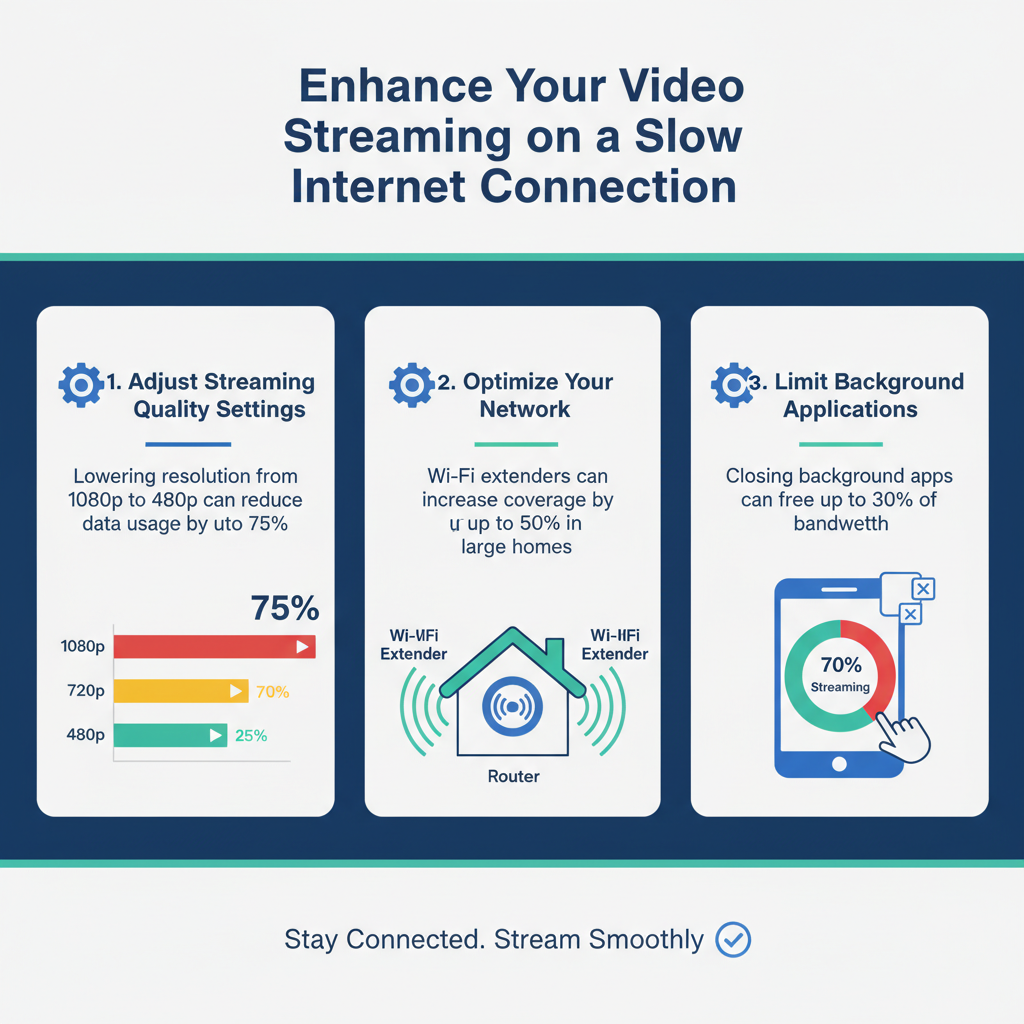
One of the quickest ways to improve your video streaming experience is to lower the video resolution. Streaming services like Netflix, YouTube, and Amazon Prime Video often default to higher resolutions such as 1080p or even 4K, which can be taxing on a slow internet connection. By manually adjusting the settings to 480p or even 360p, you can significantly reduce the amount of data being used, allowing for a smoother playback experience without constant buffering interruptions.
Additionally, consider turning off auto-play features that automatically queue the next video. This can consume additional bandwidth and lead to frustrating interruptions. By taking control of your streaming settings, you can ensure that your watching experience is as enjoyable as possible.
Optimize Your Network
Optimizing your network can make a world of difference when streaming videos. If possible, use a wired Ethernet connection instead of Wi-Fi. Wired connections are generally more stable and provide faster speeds, which can be crucial when streaming high-quality video. If you must use Wi-Fi, ensure that your router is positioned in a central location in your home and away from any obstructions that might interfere with signal strength.
Another effective strategy is to reduce the number of devices connected to your network. The more devices that are using the internet (like smartphones, tablets, and smart home devices), the more bandwidth is consumed. Try disconnecting devices that aren’t in use or ask family members to limit their internet usage during your streaming sessions. This simple step can free up precious bandwidth and lead to a smoother streaming experience.
Limit Background Applications
Background applications can be sneaky culprits when it comes to consuming bandwidth. Before settling in for a streaming session, take a moment to close any unnecessary applications and browser tabs. For instance, if you’re streaming on your laptop, check for any open apps that might be refreshing in the background, such as email clients or cloud services.
Additionally, if you have downloads or software updates ongoing, pause them while streaming. These processes can hog bandwidth and lead to buffering and interruptions. Just a little housekeeping can have a big impact on your streaming quality!
Utilize Streaming Device Features
The device you’re using to stream can also play a significant role in your experience. Make sure to check for any available updates for your streaming device or app. Manufacturers often release updates that can improve performance and fix bugs, so keeping your device up-to-date is essential for the best streaming experience.
If you’re using a smart TV, streaming stick, or console, look for features specifically designed to work well on slower connections. Some devices have settings that allow you to prioritize streaming performance or to choose lower-quality settings automatically based on your bandwidth availability. Opting for these features can help ensure that you have a smoother experience even when the internet is less than ideal.
Clear Cache and Data
Over time, your browsing history, cache, and cookies can accumulate and slow down your device, which can adversely affect streaming performance. Regularly clearing your browser’s cache and cookies is a good practice to keep your streaming smooth. You can do this through your browser settings, and it’s usually a simple one-click process.
In addition, consider resetting your streaming app to eliminate any accumulated data that may be bogging it down. This can help improve loading times and reduce buffering, making your streaming sessions more enjoyable. Just remember that you may need to log in again after a reset, but the performance boost is often worth the small inconvenience.
Consider Off-Peak Viewing Times
Internet speeds can vary significantly depending on the time of day, particularly in households and neighborhoods where many users are online simultaneously. To enjoy a smoother streaming experience, consider planning your viewing sessions during off-peak hours. Streaming late at night or early in the morning, when fewer people are online, can lead to better speeds and less congestion.
You may notice a distinct difference in performance during these times, as your connection may not be competing with as many other users. This can be especially beneficial for families or roommates who may also be online during peak times.
Explore Alternative Streaming Options
If you’re still facing issues despite trying the above tips, it may be time to explore alternative streaming options. Some streaming services are designed for lower bandwidths and can provide a better experience under these conditions. For example, services like Hulu offer settings that allow you to choose lower quality for streaming, which can be beneficial if your connection struggles with higher resolutions.
If possible, try downloading videos for offline viewing when you have a stable connection. Many platforms now offer this feature, allowing you to save content directly to your device. This can help you avoid buffering issues entirely, providing a seamless viewing experience no matter your internet speed.
By following these strategies, you can greatly improve your video streaming experience on a slow internet connection. Implementing even a few of these tips will help minimize buffering and enhance the quality of your viewing experience. Don’t hesitate to put these suggestions into practice today for a more enjoyable streaming adventure! Remember, with a few adjustments and a little foresight, you can make your slow internet connection work for you. Happy streaming!
Frequently Asked Questions
What are some practical tips to improve video streaming on a slow internet connection?
To enhance video streaming quality on a slow internet connection, consider lowering the video quality settings in the streaming service you’re using, as this reduces the amount of data needed. Additionally, closing unnecessary applications and devices connected to your network can free up bandwidth. Using an Ethernet cable instead of Wi-Fi can also provide a more stable connection, and scheduling streaming during off-peak hours can help minimize congestion.
How can I check my internet speed to determine if it’s affecting my video streaming?
You can check your internet speed using free online tools such as Speedtest.net or Fast.com. These websites measure your download and upload speeds, which can help you assess whether your internet connection is fast enough for smooth video streaming. Generally, a minimum download speed of 5 Mbps is recommended for standard definition (SD) streaming, while HD streaming typically requires at least 15 Mbps.
Why is my video buffering frequently, and how can I reduce it during streaming?
Frequent buffering often occurs due to insufficient bandwidth, network congestion, or poor Wi-Fi signal strength. To reduce buffering, try pausing the video to allow it to pre-load more content, reducing the quality setting, or connecting to a different Wi-Fi network with better performance. Additionally, limiting the number of devices using the internet simultaneously can help allocate more bandwidth to your streaming needs.
Which streaming platforms are best optimized for slow internet connections?
Some streaming platforms are more optimized for slow internet connections, such as YouTube, which allows users to adjust video quality easily. Similarly, Netflix offers a “mobile” setting designed to use less data while still providing a decent viewing experience. Platforms like Amazon Prime Video and Hulu also allow for lower quality settings, making them suitable options for users with limited bandwidth.
What equipment can I upgrade to improve video streaming on a slow internet connection?
Upgrading your router can significantly enhance your video streaming experience, especially if you choose a dual-band router that supports both 2.4 GHz and 5 GHz frequencies, allowing for better signal distribution. Additionally, investing in a Wi-Fi extender can help eliminate dead zones in your home. Ensuring your smart devices are updated with the latest software can also improve streaming performance by enhancing compatibility and efficiency.
References
- Streaming television
- https://www.consumer.ftc.gov/articles/how-improve-your-internet-speed
- https://www.pcmag.com/how-to/how-to-improve-your-streaming-experience
- https://www.lifewire.com/how-to-improve-video-streaming-4174306
- https://www.cnet.com/home/internet/how-to-improve-your-streaming-experience/
- https://www.digitaltrends.com/home-theater/how-to-stream-video-when-you-have-slow-internet/
- https://www.npr.org/sections/technology/2020/04/02/826775209/streaming-services-are-stretching-the-internet-what-happens-when-you-run-out-of-bandwidth
- https://www.vice.com/en/article/y3nqkx/how-to-stream-movies-and-tv-shows-with-slow-internet-connection