

YouTube optimally handles video resolution and bitrate by utilizing adaptive streaming technology, which adjusts the quality of the video based on the viewer’s internet speed and device capabilities. This ensures a smooth viewing experience without buffering, allowing users to enjoy content in the best possible quality. In this article, we’ll explore how YouTube manages these aspects to enhance user experience.
Understanding Video Resolution on YouTube

Video resolution refers to the amount of detail that a video displays, measured in pixels. Higher resolution means more pixels and, consequently, a sharper and clearer image. On YouTube, you can find a variety of resolution options, ranging from low-quality 144p to stunning 8K, accommodating a wide range of devices and internet speeds. For example, 144p might suffice for mobile users with slow connections, while 4K and 8K resolutions are perfect for viewers on large screens looking for the best visual experience.
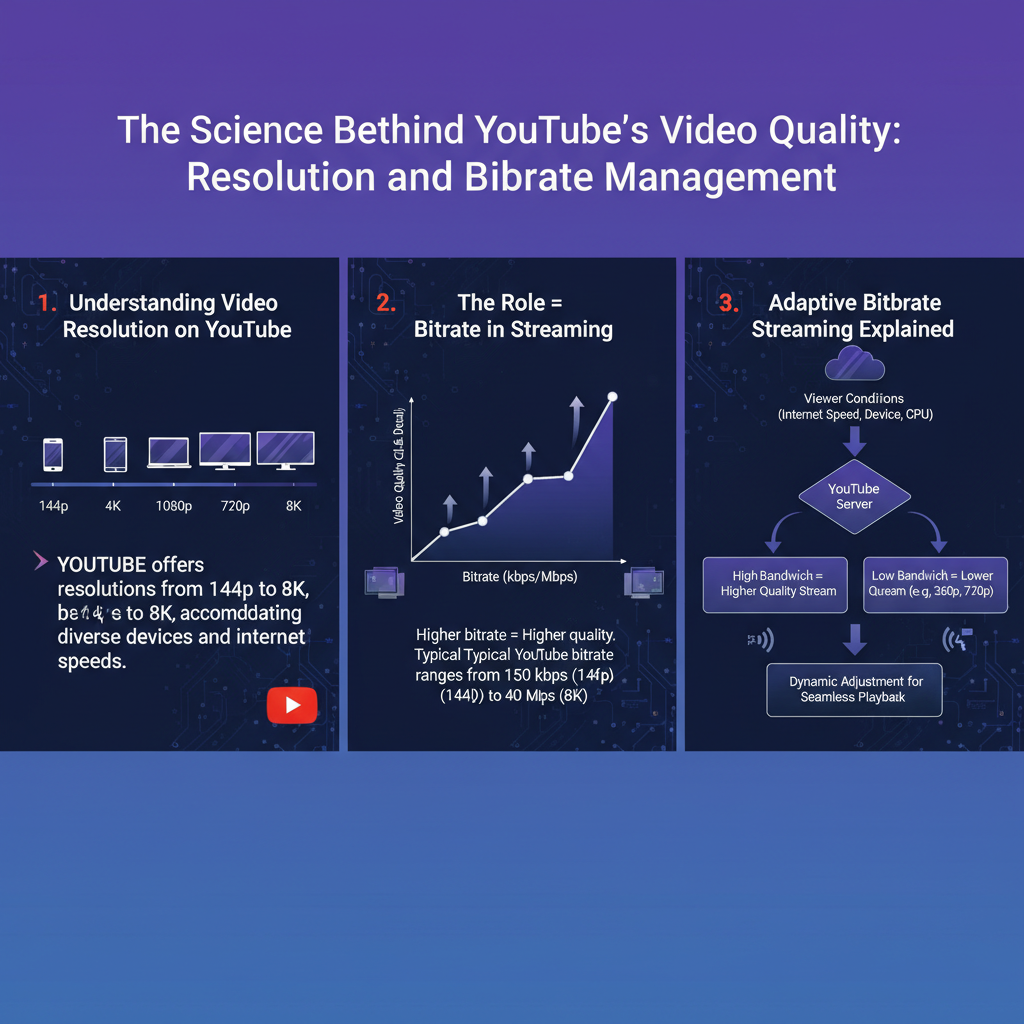
The choice of resolution significantly impacts user experience and data consumption. Higher resolutions provide clearer visuals but require more data. For instance, streaming in 4K can consume up to 7GB of data per hour, while 144p uses less than 1GB. Users should consider their internet data caps and device capabilities when selecting their preferred resolution to ensure an optimal balance between quality and data usage.
The Role of Bitrate in Streaming

Bitrate is the amount of data transmitted in a given amount of time, usually measured in kilobits per second (kbps). In the context of video streaming, higher bitrates typically mean better quality, as more data translates to more detail in each frame. For example, a 1080p video might have a bitrate ranging from 3,000 to 6,000 kbps, while a 4K video could require a bitrate of 15,000 kbps or more to maintain high quality.
Bitrate varies not only with resolution but also with frame rates. A video at 60 frames per second (fps) will generally require a higher bitrate than the same video at 30 fps to maintain the same quality. This relationship is crucial because a low bitrate can lead to pixelation and visual artifacts, resulting in a less enjoyable viewing experience. Furthermore, if the bitrate exceeds the viewer’s internet speed, buffering may occur, interrupting the flow of the video.
Adaptive Bitrate Streaming Explained
Adaptive bitrate streaming (ABR) is a technology that dynamically adjusts the video quality based on the viewer’s internet connection quality and device capabilities. YouTube employs this technology to ensure that users receive the best possible quality without interruptions. When a user starts watching a video, YouTube automatically detects the available bandwidth and selects the appropriate resolution and bitrate.
For example, if you begin watching a video on a mobile device with a slow connection, YouTube might start streaming at 480p. If your connection improves, the platform can seamlessly switch to a higher resolution, such as 1080p or 4K, without requiring any action from the user. This adaptability not only enhances the viewer’s experience but also helps content creators reach a broader audience, as their videos can be viewed across various devices and situations without compromising quality.
The Impact of Internet Speed on Video Playback
Internet speed is a major factor influencing video playback quality on YouTube. A faster connection allows for higher resolutions and smoother playback, while slower speeds can lead to buffering and lower quality. For instance, YouTube recommends a minimum speed of 3 Mbps for streaming at 720p, 5 Mbps for 1080p, and at least 25 Mbps for 4K content.
To check and improve internet speed, users can run various online speed tests and take steps such as switching to a wired connection, optimizing their Wi-Fi network, or upgrading their internet plan. Being proactive about internet speed can greatly enhance the viewing experience, especially for users who enjoy streaming high-definition content regularly.
YouTube’s Encoding Process
YouTube’s encoding process is essential for providing optimal playback across a myriad of devices and internet speeds. When a video is uploaded, YouTube compresses it into various formats and resolutions, using advanced codecs like H.264 and VP9. These codecs determine how efficiently a video is compressed while maintaining quality, allowing users to stream videos without excessive buffering.
The encoding settings chosen by creators also play a significant role in the final quality of their uploads. For example, uploading in a higher bitrate and resolution can improve the viewing experience, but it may also increase upload times and potentially lead to longer processing periods on YouTube’s end. Creators should be mindful of these settings to ensure their content is optimized for the best performance across all devices.
Best Practices for Uploading High-Quality Videos
For content creators looking to upload high-quality videos, several best practices can help enhance the final product. First, it’s advisable to upload videos in the highest possible resolution and bitrate, ideally aligning with YouTube’s recommendations for each format. This ensures better quality and more options for viewers.
Maintaining high-quality source files is equally important. Creators should avoid compressing videos too much before upload, as this can lead to loss of detail. Utilizing high-quality cameras and equipment can also enhance the final product. Additionally, optimizing videos for different platforms by considering aspect ratios and formats can further improve viewer engagement.
Future Trends in Video Resolution and Bitrate Management
As technology evolves, so too do the trends surrounding video resolution and bitrate management. The rise of 8K content is one such trend that may reshape the way platforms like YouTube handle video quality. With more advanced codecs and streaming technologies on the horizon, we might see even more efficient compression methods that allow for higher resolutions with lower bitrates.
Moreover, innovations like Virtual Reality (VR) and Augmented Reality (AR) content are likely to introduce new standards for video quality and bitrate management. As these technologies become more mainstream, YouTube may need to adapt its streaming capabilities to accommodate the unique requirements of such immersive content. Creators should stay informed about these trends to ensure their content remains relevant and engaging.
Summarizing the key points, YouTube’s management of video resolution and bitrate plays a crucial role in delivering an optimal viewing experience. By understanding how these elements work together, users can make informed choices about their viewing habits, and creators can enhance the quality of their uploads. Explore more about video quality and streaming on YouTube to maximize your experience or improve your content creation strategies.
Frequently Asked Questions
What video resolutions does YouTube support and how do they affect video quality?
YouTube supports various video resolutions, including 240p, 360p, 480p, 720p (HD), 1080p (Full HD), 1440p (2K), 2160p (4K), and even 4320p (8K). Higher resolutions like 1080p and 4K provide significantly better image quality and detail, making them ideal for larger screens. However, the choice of resolution also impacts the bitrate, which can affect buffering times for viewers with limited internet speeds.
How does YouTube optimize video bitrate for different resolutions?
YouTube employs a technology called adaptive streaming that adjusts the bitrate according to the viewer’s internet connection and device capabilities. This means that for lower resolutions like 480p, YouTube uses a lower bitrate, while higher resolutions like 4K require higher bitrates for optimal quality. This optimization helps ensure a smooth viewing experience regardless of bandwidth limitations.
Why is bitrate important for video streaming on YouTube?
Bitrate is crucial because it determines the amount of data transmitted per second in a video stream, directly influencing video quality and playback performance. A higher bitrate generally results in better video clarity but requires more bandwidth. Conversely, a lower bitrate can lead to pixelation and reduced quality, especially in fast-moving scenes. Understanding bitrate helps creators optimize their uploads for the best viewer experience.
What is the best bitrate for YouTube videos at different resolutions?
The best bitrate for YouTube videos varies depending on the resolution and frame rate. For example, at 1080p and 60 frames per second (fps), a recommended bitrate is around 12 Mbps, while for 4K content, it may range from 35 to 45 Mbps. Following YouTube’s recommended bitrate guidelines helps ensure that your videos maintain high quality without risking excessive buffering for viewers.
Which factors influence how YouTube decides the resolution and bitrate during playback?
YouTube considers several factors when determining the best resolution and bitrate for playback, including the viewer’s internet speed, the device being used, and the original quality of the uploaded video. Additionally, YouTube’s algorithms assess network conditions in real-time, allowing it to switch resolutions seamlessly to enhance user experience and maintain uninterrupted streaming, especially in areas with fluctuating internet connectivity.
References
- YouTube
- Choose live encoder settings, bitrates, and resolutions – YouTube Help
- https://www.wired.com/story/youtube-video-quality/
- https://www.theverge.com/2018/4/19/17197696/youtube-video-quality-streaming-4k-1080p
- https://techcrunch.com/2020/05/05/youtube-video-quality-4k-hdr/
- https://www.bbc.com/news/technology-60532644
- https://www.sciencedirect.com/topics/computer-science/youtube
- https://www.nature.com/articles/s41598-019-49092-0