
If you’re a beginner looking to explore the world of video editing, you’ll be relieved to know that there are fantastic free software options available that make the process both accessible and enjoyable. With user-friendly interfaces and essential editing features, these programs can help you create stunning videos without breaking the bank. In this article, we’ll delve into the best free video editing software for beginners, outlining their key features, advantages, and limitations to help you find the right tools for your creative projects.
Top Features to Look For in Free Video Editing Software
When choosing free video editing software, it’s important to identify the features that will enhance your experience and streamline your workflow. Here are some essential aspects to consider:
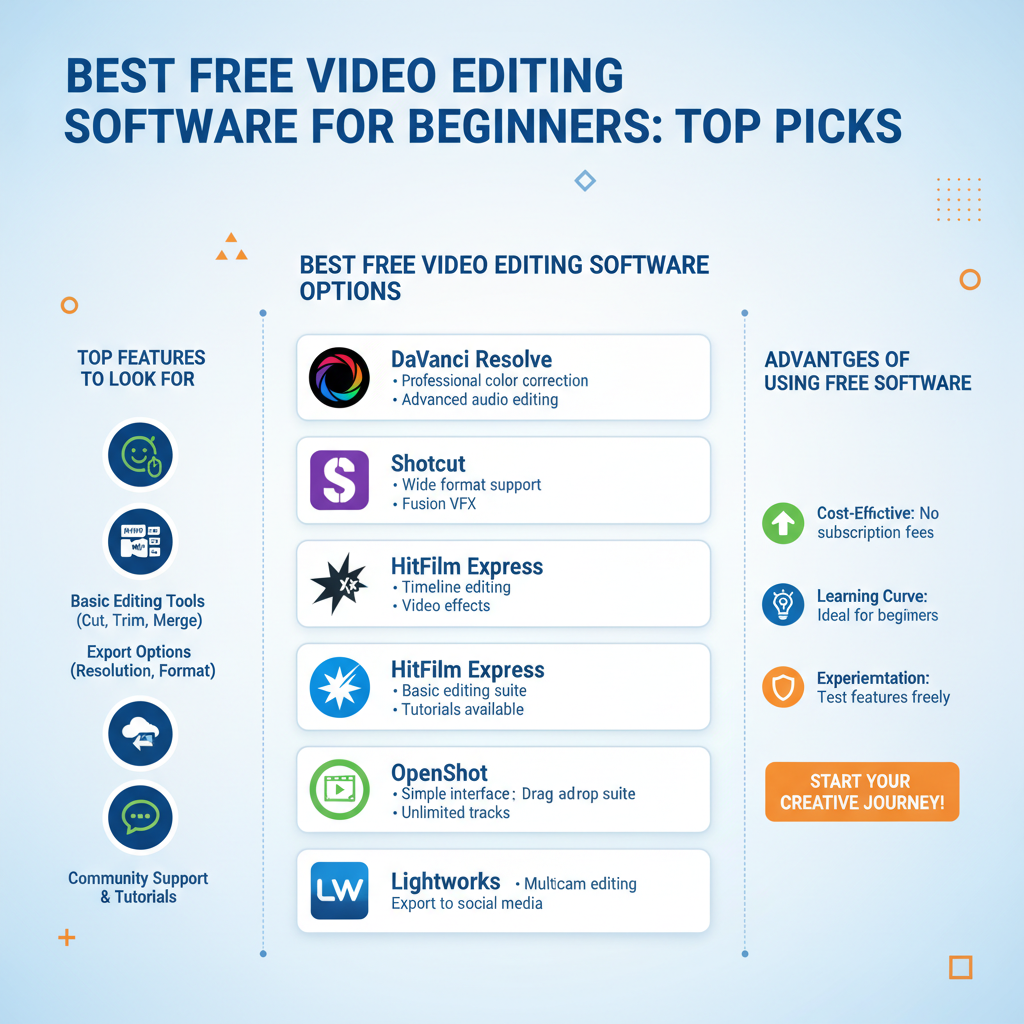
– User-friendly Interface: A simplified layout can make a significant difference, especially for someone just starting out. Look for software that provides a drag-and-drop functionality, clear menus, and intuitive tools that help you focus on creativity rather than getting bogged down in technicalities.
– Essential Editing Tools: Every video editor should have basic functionalities such as trimming, cutting, and merging clips. Look for software that also includes options for adjusting audio levels, adding transitions, and applying filters. These features will help you craft polished, professional-looking videos.
– Export Options: Good software should offer a variety of export settings to suit different platforms. Whether you want to upload directly to social media or save in a specific format for later use, having flexible export options is a huge plus.
– Tutorial Support: For beginners, having access to tutorials, guides, and community forums can make a world of difference. Look for software that provides resources to help you learn and overcome challenges as you edit your videos.
Best Free Video Editing Software Options
Now that you know what features to look for, let’s explore some of the best free video editing software options available for beginners:
– DaVinci Resolve: This software is a powerhouse in the video editing world, offering a robust set of features typically found in paid programs. It’s widely used in the film industry for color correction and audio post-production, making it an excellent choice for those who want to elevate their editing skills. The software supports multi-user collaboration, which is great for team projects. While it may seem intimidating at first, the vast number of online tutorials can help you learn the ropes quickly.
– HitFilm Express: If you’re interested in combining video editing with visual effects, HitFilm Express is a fantastic choice. It offers a wide range of features, including advanced compositing tools and a library of special effects. The software is designed for beginners but also allows for growth, as you can expand your skill set with more complex projects. Plus, HitFilm Express has an active community that shares tips and tricks, making it easier to learn and improve.
– Lightworks: Known for its professional-grade editing capabilities, Lightworks has a free version that offers a good selection of features. This option is perfect for those who might want to transition to professional editing in the future. The interface is a bit different from other editing software, so there may be a learning curve, but it’s well worth the effort for the quality you receive.
Advantages of Using Free Video Editing Software
Choosing free video editing software has many benefits, especially for beginners:
– Cost-effective Solutions: One of the most significant advantages is, of course, the price. Free software allows you to dip your toes into video editing without spending money. This is especially beneficial for students, hobbyists, or anyone unsure about making a financial commitment to a premium software package.
– Access to Features: Surprisingly, many free programs come loaded with features that you might expect only in paid versions. From basic editing functions to more advanced capabilities like color grading and audio mixing, you can accomplish a lot without spending a dime.
– Community Support: Free software often boasts a large user base, which means you’ll find a wealth of community-generated content such as tutorials, forums, and advice. This network can be incredibly helpful as you navigate the challenges of learning video editing.
Limitations of Free Video Editing Software
While there are many advantages to free video editing software, it’s equally important to consider the potential limitations:
– Lack of Advanced Features: Free software often lacks some of the advanced tools and effects that come with premium versions. If your projects require specific features, you may eventually need to invest in a paid option.
– Watermarks and Limited Exports: Many free editing tools will add watermarks to your exported videos, which can be a drawback if you want to share your work publicly. Additionally, some software may limit the resolution or file format options in the free version, which can be restrictive.
Tips for Getting Started with Video Editing
Ready to jump into video editing? Here are some tips to help you get started:
– Start with Simple Projects: As a beginner, it’s best to begin with small, manageable projects to build your confidence. Try editing together short clips from a vacation or creating a simple montage of family photos. This way, you can gradually learn the software without feeling overwhelmed.
– Utilize Online Tutorials: Take full advantage of the vast array of online tutorials available for these software options. Websites like YouTube offer countless step-by-step guides, while many software developers have their own dedicated learning resources. Engaging with these materials can fast-track your learning process.
– Experiment and Practice: Don’t be afraid to play around with the software! Experimenting with different tools and features is a great way to learn. The more you practice, the more comfortable you’ll become with the editing process.
Frequently Asked Questions
– What are the system requirements for these software options?
Most free video editing software will have specific system requirements listed on their websites. Generally, you’ll need a reasonably modern computer with a decent amount of RAM and a good graphics card to ensure smooth performance.
– Can I use these tools for professional projects?
While these software options are great for beginners, many also offer advanced features that can be suitable for professional work, especially if you’re just starting in the industry. However, you may need to upgrade to premium versions for more extensive projects or high-level professional work.
In summary, there is a wealth of free video editing software available for beginners that can help you unleash your creativity and produce professional-quality videos. From the powerful capabilities of DaVinci Resolve to the creative possibilities offered by HitFilm Express, these tools provide excellent starting points for anyone eager to learn. Remember to explore your options, try a few programs, and share your experiences in the comments section below! Happy editing!
Frequently Asked Questions
What is the best free video editing software for beginners?
The best free video editing software for beginners includes options like DaVinci Resolve, Shotcut, and HitFilm Express. These programs are user-friendly and packed with features that cater to novice editors, such as drag-and-drop interfaces, basic video effects, and audio editing tools. Each software has its own unique strengths, so it’s worth trying them out to see which one fits your editing style and needs.
How do I choose the right free video editing software for my needs?
To choose the right free video editing software, consider your editing goals, the types of videos you plan to create, and your operating system compatibility. Look for software that offers intuitive interfaces, essential editing tools, and tutorials for beginners. Additionally, read user reviews and watch demo videos to gauge the software’s capabilities and ease of use before making your selection.
Why should I use free video editing software instead of paid options?
Free video editing software is an excellent choice for beginners as it allows you to learn the basics of video editing without financial commitment. Many free tools offer a wide range of features typically found in paid software, making them suitable for personal projects or small-scale professional work. Using free software also helps you determine your editing style and skill level before investing in more advanced, paid options.
Which free video editing software offers the best features for beginners?
DaVinci Resolve is often considered one of the best free video editing software options due to its robust features, including color correction, audio post-production, and visual effects. Additionally, Shotcut is praised for its wide format support and simple interface, while OpenShot is ideal for users who prefer a straightforward editing process. Evaluating these software options based on your specific editing needs will help you find the best fit.
How can I improve my video editing skills using free software?
To improve your video editing skills using free software, start by familiarizing yourself with the interface and available tools through online tutorials and guides. Practice by editing short clips, experimenting with different effects, transitions, and audio adjustments. Joining online forums or communities can also provide valuable feedback and tips from fellow video editors, enhancing your learning experience and skill set.
References
- List of video editing software
- https://www.educationcorner.com/video-editing-software.html
- https://www.pcmag.com/picks/the-best-free-video-editing-software
- https://www.techradar.com/news/best-free-video-editing-software
- https://www.howtogeek.com/686722/the-best-free-video-editing-software-for-beginners/
- https://www.makeuseof.com/tag/best-free-video-editing-software/