
To stream in 4K without experiencing lag or stuttering, you need a combination of a strong internet connection, optimized streaming settings, and the right hardware. With the right approach, you can fully enjoy the stunning visuals and rich details that 4K content offers. This article will guide you through essential tips and best practices to ensure smooth 4K streaming, making your viewing experience as enjoyable as possible.
Understanding 4K Streaming Requirements

Before diving into the techniques for seamless streaming, it’s essential to understand the basic requirements for 4K streaming. Firstly, a minimum internet speed of 25 Mbps is recommended for streaming 4K content. This speed is crucial because 4K video files are significantly larger than their HD counterparts, requiring more bandwidth to deliver a smooth experience without interruptions.
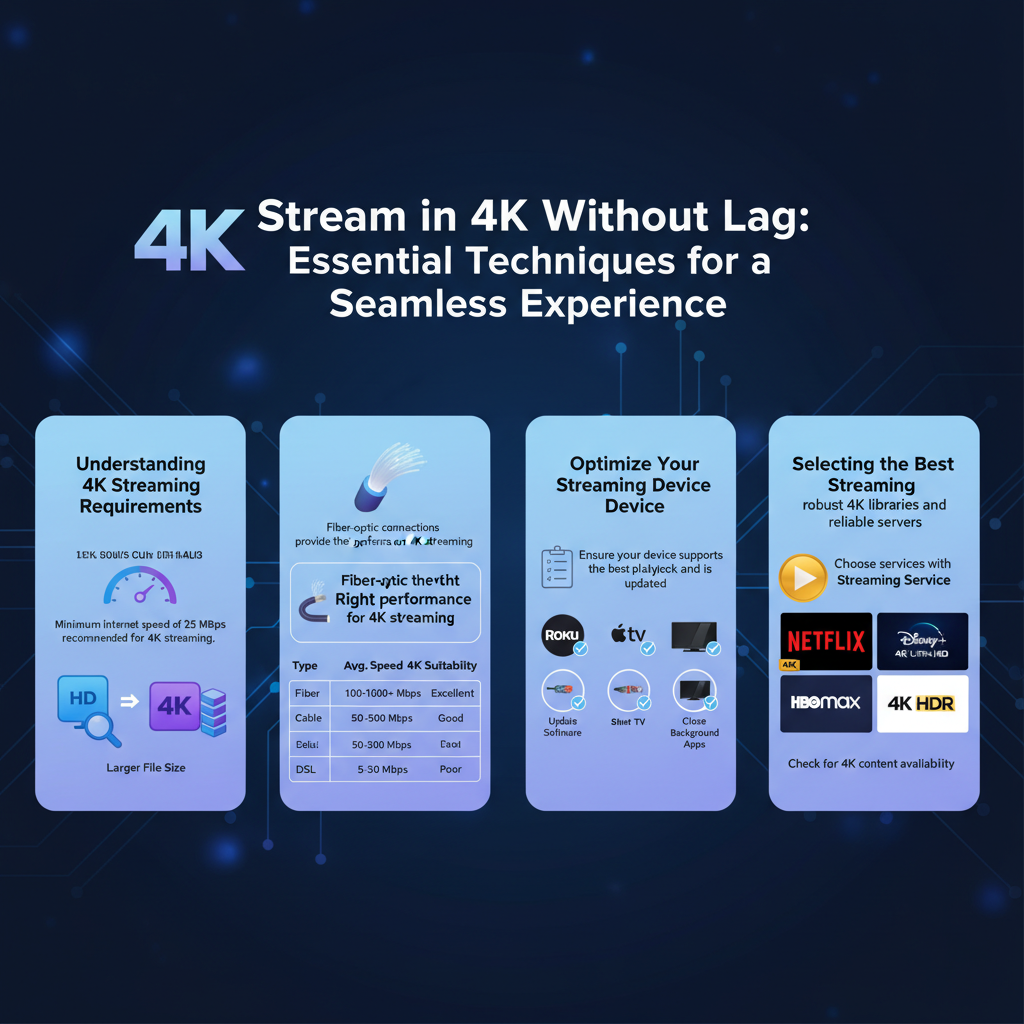
Moreover, your streaming devices and applications should support 4K resolution and HDR (High Dynamic Range) formats. Devices like smart TVs, streaming boxes (such as Roku Ultra or Apple TV 4K), and gaming consoles (like PlayStation 5 and Xbox Series X) are typically equipped to handle 4K content. Additionally, ensure that the streaming service you choose—be it Netflix, Amazon Prime Video, or Disney+—offers 4K content. Checking these specifications beforehand can save you a lot of frustration later!
Choosing the Right Internet Connection

Your internet connection is the backbone of your streaming experience. While Wi-Fi is convenient, it can often be less stable than a wired Ethernet connection. For the best results, consider connecting your streaming device directly to your router using an Ethernet cable. This not only provides a more reliable connection but also reduces latency, which is crucial for uninterrupted 4K streaming.
If you must use Wi-Fi, ensure your router supports the latest standards, preferably Wi-Fi 5 (802.11ac) or Wi-Fi 6 (802.11ax). These standards offer improved speed, efficiency, and range, which are essential for handling the demands of 4K video streaming. Additionally, positioning your router in a central location within your home and minimizing physical obstacles can further enhance your Wi-Fi signal.
Optimizing Your Streaming Device
Once you’ve ensured a suitable internet connection, it’s time to optimize your streaming device. Start by checking for software and firmware updates, as manufacturers frequently release updates that improve performance and fix bugs. Keeping your device updated can significantly enhance your streaming experience, reducing the chances of lag or stuttering.
Moreover, many streaming devices allow you to adjust settings to prioritize performance over quality. If you notice buffering or lag during high-resolution playback, consider adjusting the quality settings to a lower resolution temporarily. While this might not deliver the full 4K experience, it can help maintain a smoother stream until you can troubleshoot further.
Selecting the Best Streaming Service
Not all streaming services are created equal when it comes to delivering 4K content. Some platforms are better optimized for streaming without buffering or interruptions. Research and choose services that are known for their 4K capabilities. For instance, Netflix and Amazon Prime Video offer extensive libraries of 4K content, with both providing options for adjusting playback quality based on your connection’s current performance.
Additionally, consider streaming services that allow you to download content for offline viewing. This feature can be a lifesaver when you anticipate periods of weak connectivity, such as traveling or during peak usage hours. By downloading your favorite shows in advance, you can watch without worrying about buffering issues.
Managing Network Traffic
In today’s digital world, it’s common for multiple devices to be connected to your home network simultaneously. While this can be convenient, it can also lead to network congestion, particularly when streaming high-bandwidth content like 4K videos. To ensure a seamless experience, limit the number of devices connected to your network while streaming.
You can also manage network traffic by scheduling heavy downloads and uploads for times when you are not streaming. For example, if someone in your household is working from home and needs to download large files, try to do this during off-peak hours. This approach will free up bandwidth for your 4K streaming needs, allowing for smoother playback.
Troubleshooting Common Issues
Even with the best setup, you may occasionally experience issues while streaming. Identifying potential sources of interference can be crucial to maintaining a stable connection. Common culprits include other electronics, such as microwaves or cordless phones, which can disrupt Wi-Fi signals. Physical obstacles like walls and furniture can also weaken your connection, so consider relocating your router if you experience consistent problems.
Regularly restarting your devices and router can also help maintain optimal performance. This simple step can clear out temporary glitches and refresh your connection, leading to a more stable streaming experience.
Enhancing Your Viewing Experience
To truly enjoy the beauty of 4K content, invest in a good quality HDMI cable that supports 4K and HDR. Not all cables are created equal; ensuring that you have a high-speed HDMI cable can prevent potential quality issues. Additionally, if your television isn’t optimized for 4K content, you may miss out on the rich details and vibrant colors that make 4K so impressive.
If you’re considering an upgrade, look for a display that is specifically designed for 4K viewing, with features such as HDR support and a high refresh rate. This investment can significantly enhance your overall viewing experience and allow you to appreciate the full depth of your favorite films and shows.
Summarizing these key strategies will help you achieve a seamless 4K streaming experience. By ensuring you have the right internet connection, optimizing your devices, and managing your network effectively, you can enjoy your favorite shows and movies without interruptions. Take action now by reviewing your setup and implementing these tips for a more enjoyable streaming experience. Happy streaming!
Frequently Asked Questions
What internet speed is needed for streaming in 4K without lag?
To stream 4K content without lag or stuttering, a minimum internet speed of 25 Mbps is recommended. However, for optimal performance, especially if multiple devices are connected to the same network, speeds of 50 Mbps or higher are ideal. Ensuring that your connection is stable and utilizing a wired Ethernet connection can further enhance streaming quality.
How can I reduce buffering while streaming 4K content?
To reduce buffering while streaming 4K content, it’s essential to check your internet speed and upgrade your plan if necessary. Additionally, consider using a wired connection instead of Wi-Fi, minimizing the number of devices connected to the network, and closing any background applications that may consume bandwidth. Lastly, upgrading your router or using a mesh Wi-Fi system can significantly improve your streaming experience.
Why is my 4K stream lagging despite having a fast internet connection?
If your 4K stream is lagging despite having a fast internet connection, the issue may stem from several factors. These include network congestion, where multiple devices are consuming bandwidth simultaneously, or issues with your streaming service’s server. Additionally, your device’s processing power and the quality of your HDMI cables can impact performance, so ensure all components are capable of handling 4K streaming.
What are the best devices for streaming 4K content smoothly?
The best devices for streaming 4K content smoothly include streaming media players like Roku Ultra, Amazon Fire TV Stick 4K, and Apple TV 4K, as they are designed for high-performance streaming. Additionally, smart TVs with built-in 4K streaming capabilities and gaming consoles like the PlayStation 5 and Xbox Series X also offer excellent 4K streaming experiences. Ensure that the device you choose supports the required streaming protocols for the best results.
Which streaming services offer the best 4K content without lag?
The top streaming services that offer high-quality 4K content without lag include Netflix, Amazon Prime Video, Disney+, and YouTube. These platforms are optimized for 4K streaming and offer a variety of content ranging from movies to series. To ensure a lag-free experience, be sure to check if your internet connection meets their speed requirements and that your device is compatible with their 4K streaming features.
References
- https://www.wired.com/story/how-to-stream-4k-without-lag/
- https://www.pcgamer.com/how-to-stream-4k-gaming/
- https://www.cnet.com/home/theater/how-to-stream-4k-video-without-lag/
- https://www.techradar.com/how-to/how-to-stream-4k-video
- https://www.digitaltrends.com/home-theater/how-to-stream-4k-video/
- https://www.lifewire.com/how-to-avoid-video-buffering-1846668
- Into Resuming Federal Executions