Reducing glare on your laptop and mobile screens can dramatically improve your viewing experience and protect your eyes from strain and discomfort. By adjusting screen settings, using anti-glare accessories, and optimizing your environment, you can create a more comfortable and efficient workspace. In this article, we’ll explore practical methods to minimize glare and enhance visibility on your devices.

![[2 Pack] 24 Inch Computer Privacy Screen Filter for 16:9 Widescreen Monitor | Anti Glare, Anti Blue &UV Light, Anti Spy, Eye Protect, Protector, Film, Shield, Fit, Removable, Reusable, 9H, Black, Quality](https://m.media-amazon.com/images/I/41SBKw3J4ML._SL500_.jpg)

Adjust Screen Brightness and Settings
One of the simplest yet most effective ways to reduce glare is by adjusting your screen brightness and settings. Start by lowering the screen brightness to better match the ambient light in your environment. If you’re working in a dimly lit room, a bright screen can produce a harsh glare that strains your eyes. Conversely, if you’re in a bright environment, increasing the brightness can help the screen images pop without causing glare.
Many devices today also come equipped with a night mode or blue light filter option. This setting reduces the amount of blue light emitted by your screen, which not only helps to alleviate glare but also minimizes eye strain during prolonged use. If you spend a lot of late nights working on your laptop or mobile device, activating this feature can make a world of difference in your comfort level.
Moreover, consider experimenting with contrast settings. Increasing contrast can help improve visibility, especially in bright conditions. Most operating systems offer accessibility settings that allow you to customize these features based on your preferences.
Use Anti-Glare Screen Protectors

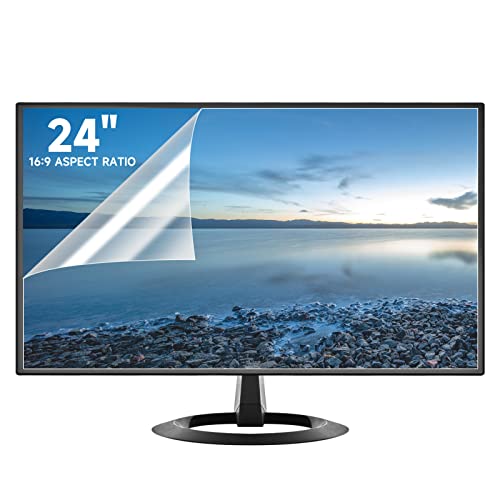
Another effective strategy to combat glare is to invest in high-quality anti-glare screen protectors. These simple yet powerful accessories can be applied directly to your device’s screen, significantly reducing reflections and making it much easier to see what’s on display. When selecting a screen protector, ensure it’s specifically designed for your device model to avoid issues like bubbles or misalignment.
A good anti-glare protector not only minimizes glare but also protects your screen from scratches and fingerprints. Many users find that applying such a protector transforms their viewing experience, especially in bright environments. For instance, if you often work outside or near windows, an anti-glare screen protector can make it possible to see your screen clearly without squinting or adjusting your position constantly.
Optimize Your Workspace Lighting
The lighting in your workspace plays a pivotal role in how much glare you experience on your devices. Ideally, you want to position your laptop or mobile device away from direct light sources, such as windows or overhead lamps. This simple adjustment can drastically reduce glare and improve visibility.
Consider using diffused lighting options like soft white bulbs or lamps with lampshades to create a more gentle lighting environment. If natural light from a window is unavoidable, using sheer curtains can help to soften the rays without completely blocking out the sunlight. Additionally, try to keep your screen at a right angle to any light source; this can help prevent reflections that cause glare.
If you find yourself in a workspace with harsh fluorescent lighting, consider using task lighting instead of relying solely on overhead lights. A well-placed desk lamp that directs light onto your workspace without shining on your screen can make a significant difference.
Angle Your Device Correctly
The angle at which you position your laptop or mobile device can greatly impact glare levels. Tilting or adjusting the screen can help minimize reflections from overhead lighting or windows. Take a moment to experiment with different angles; you might find that a slight tilt can dramatically improve your viewing experience.
When working on a laptop, try to adjust the screen to eye level rather than looking down at a flat screen. This not only helps reduce glare but also promotes better posture, which is a bonus for your overall comfort. If you’re using a mobile device, holding it slightly above eye level can also help in reducing glare and making it easier to see.
Choose the Right Environment
The environment in which you work can have a substantial effect on glare. Opt for rooms with matte surfaces and furnishings that absorb light rather than reflect it. For example, a workspace with a matte finish on desks and walls will help to minimize glare compared to a room filled with glossy surfaces.
Avoid shiny surfaces in your workspace, such as mirrors or polished tables, as they can reflect light directly onto your screen. If you have control over your environment, consider painting walls with matte paint or using non-reflective materials for your office furniture. This simple change can make a big difference in reducing glare.
Consider Specialized Software
In our tech-savvy world, there are software applications designed specifically to reduce glare by adjusting color settings based on the time of day or ambient light conditions. Programs like f.lux or Windows 10’s built-in Night Light feature automatically change your screen’s color temperature based on the time of day, making it more comfortable for your eyes.
Additionally, some software can dynamically adjust screen brightness based on the surrounding light conditions. This means that as the sun sets or rises, your screen will adapt accordingly, helping to minimize glare and eye strain. Utilizing such software can greatly enhance your overall experience, particularly for those who spend long hours in front of screens.
Invest in Quality Screens
When it comes to combating glare, investing in quality screens can be one of the best decisions you make. When purchasing a new laptop or mobile device, look for models that feature anti-glare screens or matte finishes. These screens are specifically designed to minimize reflective glare and are perfect for users who often work in bright conditions or outdoor settings.
Researching and comparing different models before making a purchase can save you from frustration down the line. Brands are increasingly offering devices that cater to users who prioritize screen quality and eye comfort, so take advantage of those options.
In conclusion, reducing glare on your laptop and mobile screens is not only possible but also essential for a comfortable viewing experience. By adjusting screen brightness and settings, using anti-glare screen protectors, optimizing your workspace lighting, angling your device correctly, choosing the right environment, considering specialized software, and investing in quality screens, you can create a glare-free space that enhances both productivity and comfort. Implement these strategies today, and enjoy clearer screens that are easier on your eyes, whether you’re working from home or on the go.
Frequently Asked Questions
What are the best settings to reduce glare on my laptop and mobile screens?
To minimize glare on your laptop and mobile screens, start by adjusting the brightness settings to a comfortable level that suits your environment. Additionally, use the built-in display settings to enable “Night Mode” or “Reading Mode” to reduce blue light emissions, which can help ease eye strain. Consider increasing the contrast settings to improve text clarity, making it easier to read without straining your eyes.
How can I physically reduce glare on my laptop and mobile screens?
To physically reduce glare, position your screen at an angle that minimizes reflections from overhead lights or windows. Utilize anti-glare screen protectors, which can significantly diminish reflections and improve visibility in bright conditions. Furthermore, consider using a matte screen finish instead of a glossy one, as matte screens naturally reduce glare and enhance viewing comfort.
Why does glare occur on laptop and mobile screens, and how can I address it?
Glare occurs on screens due to reflections from external light sources, such as sunlight or artificial lighting, which can interfere with visibility. To address glare, consider changing your environment by closing blinds or curtains to block out direct light. Moreover, adjusting your screen’s position or using an anti-glare filter can help create a more comfortable viewing experience, allowing you to focus without distraction.
What are effective anti-glare screen protectors for laptops and mobile devices?
Some highly-rated anti-glare screen protectors include brands like amFilm, Paperlike, and JETech, which offer products specifically designed to reduce reflections while maintaining touch sensitivity. Ensure to choose a protector that is compatible with your device model for optimal performance. These protectors not only help reduce glare but also provide additional scratch resistance, enhancing the durability of your screens.
Which ambient lighting solutions can help reduce screen glare while using my devices?
To reduce screen glare, consider using soft, diffused lighting instead of harsh overhead lights. Floor lamps with adjustable brightness levels or desk lamps with a warm color temperature can create a more conducive environment for screen use. Additionally, using indirect lighting or LED strips behind your monitor can help balance the light levels, reducing strain and glare when using laptops and mobile devices.
References
- https://www.nhlbi.nih.gov/health-topics/eye-health
- https://www.health.harvard.edu/staying-healthy/protecting-your-eyes-from-digital-glare
- https://www.cdc.gov/niosh/topics/eyes/default.html
- https://www.verywellhealth.com/how-to-reduce-screen-glare-5190218
- https://www.osha.gov/eye-and-face-protection
- Tips & Prevention – American Academy of Ophthalmology
- Home – ConnectCenter
- https://www.ncbi.nlm.nih.gov/pmc/articles/PMC5890958/