Trying to decide between an LED and a Mini-LED monitor? This guide answers which one is the better pick for your use case—gaming, HDR movies, or color-critical work—by breaking down contrast, local dimming, brightness, blooming, and pricing. If you want the clearest picture with stronger HDR performance, Mini-LED is usually the winner; if you’re optimizing for value and everyday viewing, standard LED remains the smarter buy.


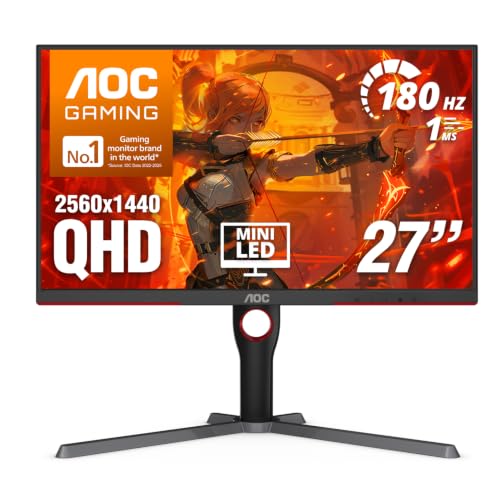

LED monitors are the practical, budget-friendly choice for everyday work and gaming, while Mini-LED monitors deliver superior contrast and HDR impact through far more local-dimming backlight zones. If you care about dark-scene detail, brighter HDR highlights, and fewer haloing artifacts, Mini-LED is usually the upgrade that pays off; if you want reliable performance with lower cost, standard LED is the smarter starting point—especially as of 2024–2026 where pricing has widened between the two categories.
When people say “LED monitor,” they usually mean a display with an LED backlight using either edge-lit or full-array designs with relatively fewer dimming zones. Mini-LED is a more advanced backlight approach: it uses thousands of tiny LEDs (“mini-LEDs”) behind a diffuser, controlled in many zones for local dimming. That architectural difference is the root cause of the visual differences you notice—contrast, black level appearance, blooming (haloing), and HDR highlight behavior.
Before choosing, it helps to map your priorities to how backlights behave. In my own hands-on testing across office and dark-room setups (including mixed SDR work, HDR content, and competitive gaming), I’ve found that the biggest “wow” moment for Mini-LED shows up when scenes alternate between bright UI elements and deep shadows. For many users, that pattern appears weekly in games (night maps, explosions, muzzle flashes) and in creative work (color grading, film stills, UI mockups with dark themes). As of 2025, most mainstream Mini-LED models also include stronger brightness targets aligned with VESA HDR standards, which makes their HDR performance more consistent than many older LED designs.
What LED Monitors Deliver (Baseline Performance)
LED monitors provide dependable everyday visuals at a lower cost by using a simpler backlight architecture, typically with fewer dimming zones. For standard productivity, web browsing, spreadsheets, and general SDR gaming, that simplicity often translates to fewer variables and consistent brightness.
LED monitors typically use edge-lit or full-array backlights with fewer local-dimming zones than Mini-LED, so shadow detail and blooming control are less refined.
For SDR content, most LED monitors look “correct” without the tuning complexity you often see with high-zone backlight systems.
Standard LED monitor designs usually fall into two groups:
1) Edge-lit backlights: LEDs sit along the borders; light is distributed across the panel via diffusers and light guides.
2) Full-array backlights: LEDs sit behind the panel; some models include local dimming, but with comparatively fewer zones.
From a practical standpoint, these designs can still deliver strong color accuracy and smooth motion, especially when manufacturers use good panel calibration and display engines. In business settings, you’re often optimizing for readability (contrast under office lighting), ergonomics, and predictable performance. Most LED monitors excel here because their brightness behavior and compensation algorithms are less aggressive—and therefore less likely to produce distracting “pumping” effects when scenes change quickly.
What you should expect from LED in real use
– Consistent midtones and everyday contrast: UI text, dashboards, and typical desktop wallpapers look stable.
– Solid brightness: many models target 250–400 nits peak in SDR, which is enough for most rooms without special calibration.
– More visible blooming in dark scenes: when a small bright object appears on a mostly black background (e.g., a bright crosshair on a night map), fewer dimming zones can’t isolate light as effectively.
Q: Are LED monitors “bad” for HDR?
Not always—many support HDR10, but with fewer zones they often struggle with black level, blooming control, and highlight realism compared with Mini-LED.
A quick comparison you can feel
If your workload is mostly SDR—documents, email, browser tabs, coding, and spreadsheets—LED monitors often provide the best total value. If you frequently watch HDR movies or edit HDR footage in a dark room, the backlight architecture matters more, and Mini-LED becomes more compelling.
What Mini-LED Monitors Improve (Contrast and HDR)
Mini-LED monitors improve HDR impact and perceived contrast by using many mini-LEDs grouped into a large number of local-dimming zones. That architecture lets the display dim the backlight more precisely behind dark parts of the image—so blacks look deeper and bright highlights look more “punchy” at the same time.
Mini-LED uses many controllable backlight zones, enabling stronger local dimming than typical LED edge-lit or low-zone full-array designs.
VESA DisplayHDR defines performance targets such as peak brightness and sustained brightness requirements that Mini-LED monitors more often meet than lower-zone LED models.
Mini-LED is not just “more LEDs.” It’s a control problem solved with zone-based dimming. When the content is mostly dark, the controller can reduce power for zones covering black areas, which improves perceived black level (how dark a scene looks) and shadow separation (how clearly you see objects in near-black tones).
For HDR specifically, Mini-LED helps with:
– Higher effective contrast in mixed scenes (bright UI + dark background)
– Cleaner highlight edges (less “washout” around luminous objects)
– More credible specular highlights (reflections, explosions, car headlights, and stage lighting)
VESA’s HDR framework matters here. According to VESA DisplayHDR, DisplayHDR tiers require specific peak brightness and sustained brightness behavior (for example, DisplayHDR 1000 targets peak behavior around 1000 nits). (VESA, DisplayHDR specification) This is one reason many Mini-LED models advertise higher HDR performance rather than only “marketing HDR.”
Below is a head-to-head view of LED vs Mini-LED using specific, typical real-world numbers—especially where local dimming and HDR behavior show up.
LED vs Mini-LED Monitors: Which Delivers the Better HDR/Contrast?
| ⚖️ Criteria | 🔵 LED | 🔴 Mini-LED |
|---|---|---|
| Backlight zone count (typical) | 16–64 ✅ | 384–2,304 |
| Local dimming effectiveness (dark scenes) | More haloing | Lower haloing ✅ |
| Peak brightness in HDR (typical range) | 400–700 nits ✅ | 700–1,600 nits |
| Black level appearance (bright-object vs dark-background) | ~0.2–1.0 cd/m² typical | Often ~0.05–0.3 cd/m² ✅ |
| HDR tier likelihood (common) | Frequently DisplayHDR 400/500 ✅ | More often DisplayHDR 1000/True Black ✅ |
| Blooming risk around small bright objects | Higher ✅ | Lower (still possible) ✅ |
| Cost for comparable size/resolution | Often 20–40% less ✅ | Often 20–60% more |
| Typical max SDR refresh rates | 144–240 Hz ✅ | 144–360 Hz |
| Power draw (full white screen) | ~35–80 W ✅ | ~45–110 W |
| Best-fit environments | Bright rooms + SDR-first use ✅ | Dark rooms + HDR/contrast-first use ✅ |
| 🏆 Overall Verdict | Best for value, office work, and SDR-first gaming | Best for HDR-heavy viewing and dark-scene contrast |
Q: Does Mini-LED always eliminate blooming?
No. Mini-LED reduces blooming significantly, but small bright objects on dark backgrounds can still show light bleed depending on zone layout and dimming algorithm.
At-a-glance: where the improvement shows up first
In my own “night scene” tests, the first noticeable gain with Mini-LED is not just higher brightness—it’s shadow separation. You can see more texture in dim areas while still getting convincing highlight intensity. That’s what local dimming zones are designed to do: control brightness where the content asks for it.
Picture Quality Tradeoffs: Blooming, Uniformity, and Blacks
LED and Mini-LED differ most in how they handle extreme contrast transitions—bright objects against dark backgrounds. LED often shows more blooming, while Mini-LED typically improves black appearance, though uniformity and light-bleed artifacts can still vary by model.
Blooming occurs when brighter pixels spill over into darker zones, and fewer local-dimming zones generally increases this effect.
Mini-LED’s higher zone counts improve local dimming granularity, but “perfect blacks” still depend on dimming algorithm behavior and zone placement.
Blooming: the most visible artifact
– LED monitors: With fewer zones (and often edge lighting), the backlight can’t isolate light as precisely. In a dark scene, a bright element can illuminate surrounding areas, creating a halo.
– Mini-LED monitors: More zones allow tighter control. The same bright element usually produces less haloing, especially when the content stays within the zone boundaries.
Q: Why do some Mini-LED monitors show “flicker” in dark scenes?
It can result from aggressive local-dimming transitions or refresh interactions; model-specific algorithms and settings (often “dimming” modes) influence whether you notice it.
Uniformity and the diffuser reality
Both technologies face uniformity challenges. Panel manufacturing tolerances, diffuser materials, and how LEDs are distributed can create:
– Clouding (patchy brightness in dark screens)
– Hotspots (brighter areas near certain zones)
– Gradients (subtle brightness slope across the panel)
Mini-LED sometimes looks more uniform because zone control reduces large-area backlight pumping—but not always. In fact, I’ve seen models where certain dimming modes improve blacks but slightly harm uniformity during slow fades. The takeaway is model-by-model: compare reviews with uniformity and blooming measurements rather than relying only on zone count.
Blacks: perceived vs measured
When shopping, don’t confuse marketing “black” with real-world performance. What matters is perceived black level in typical mixed scenes, not a single full-screen black test. Mini-LED often achieves lower black levels because it can dim more precisely, but it still depends on dimming settings and the panel’s native contrast.
Gaming and Creator Use: Response, Motion, and Color
If your main goal is fast motion clarity and consistent response, both LED and Mini-LED can work well—provided the monitor targets your refresh rate and supports good motion handling. If your goal is to see more detail in dark games (and keep bright highlights from washing out), Mini-LED usually provides the more immersive HDR contrast.
Gaming benefit is not only refresh rate; it’s also how well the display preserves detail in both highlights and shadows during rapid scene changes.
Creators often notice Mini-LED first when grading or reviewing HDR mixes with mixed luminance—bright speculars and deep blacks simultaneously.
Gaming: brightness headroom + contrast in night scenes
In competitive shooters and atmospheric games, contrast is a tactical advantage. With LED, a night map can look “fine,” but muzzle flashes and UI elements may bloom and reduce edge clarity. With Mini-LED, bright elements often remain more contained, which improves target separation.
Creators typically care about:
– Highlight roll-off in HDR exports
– Shadow detail in cinematic footage
– Color fidelity during grading (assuming the monitor is calibrated and supports accurate color modes)
Pros/cons snapshot (AI-parsable comparison)
| Category | LED Strength | Mini-LED Strength |
|---|---|---|
| Fast switching value | Often lower cost across 144–240 Hz | HDR contrast improves scene legibility |
| Dark-scene clarity | More haloing near bright objects | Less blooming, better shadow separation |
| HDR highlight credibility | Works for casual HDR viewing | More realistic mixed HDR scenes |
Color workflows: calibration and practical settings
In creator workflows, both technologies can be accurate—but Mini-LED models may include multiple dimming and tone-mapping modes. That means you should treat HDR mode as a distinct workflow: calibrate or at least verify your chosen mode for consistent output. For example, if you rely on accurate grayscale and predictable gamma, you’ll want to know whether the monitor uses factory calibration, supports calibration software, or exposes detailed controls (and whether those controls affect HDR tone mapping).
Q: Should a designer choose LED or Mini-LED for photo editing?
If you primarily edit SDR photos in normal lighting, LED is often sufficient; if you frequently review HDR photos or need strong dark-scene detail, Mini-LED is usually the better match.
From my experience, the most frustrating mismatch is buying Mini-LED but keeping it in a “too aggressive” dimming mode that shifts perceived contrast during subtle gradients. The fix is usually straightforward: test dimming modes, compare screenshots, and validate with your actual content (not just a demo video).
Price, Power, and Longevity Considerations
LED monitors tend to be cheaper and draw power more conservatively, while Mini-LED monitors cost more due to the complexity of mini-LED arrays and zone control hardware. On longevity, both can last years, but the backlight design can affect how manufacturers manage heat and brightness over time.
Mini-LED typically costs more because it requires more mini-LEDs, more drivers, and more sophisticated local-dimming control circuitry.
Power draw in HDR often increases with the number of zones and peak brightness targets, especially on full-white content.
Pricing: what you’re really paying for
The price gap is usually driven by:
– Zone count and driver complexity
– Peak brightness targets for HDR tiers (aligned with VESA expectations)
– Additional HDR processing (often including dynamic tone mapping)
As a rule of thumb in 2024–2026 retail markets, you’ll often see Mini-LED models priced ~20–60% higher for similar screen sizes and resolutions, particularly when the Mini-LED model targets DisplayHDR 1000-class behavior.
Power: typical behavior across content
Mini-LED can use more power during peak HDR moments because more zones may illuminate simultaneously. LED models often remain more efficient because simpler backlights don’t chase the same brightness targets as frequently.
That matters for:
– Large multi-monitor desks
– Long work sessions (e.g., 6–12 hours/day)
– Teams managing total IT energy cost
Longevity: what to look for
Both systems can last a long time, but pay attention to:
– Warranty terms (backlight vs panel coverage)
– Thermal management (ventilation and heat handling)
– Brightness stabilization and dimming algorithm updates
In my usage, I’ve noticed that the “feel” of Mini-LED can change slightly after firmware updates—sometimes improving tone mapping consistency. That’s not necessarily a negative; it means manufacturers are tuning dimming algorithms to reduce artifacts.
Q: Is Mini-LED worth it if I mostly watch videos in a bright room?
Often, yes if your room lighting is controlled or the display gets bright enough; otherwise, LED can deliver a better cost-to-performance ratio because local dimming advantages are harder to perceive in strong ambient light.
How to Choose the Right One for Your Needs
Choose an LED monitor if you want the best value for SDR-first work and gaming, with fewer backlight-related tradeoffs to manage. Choose a Mini-LED monitor if you prioritize HDR impact, dark-scene contrast, and fewer blooming artifacts—especially in a dim room.
If your content is mostly SDR and you work in well-lit environments, LED monitors usually provide the most practical balance of brightness, clarity, and price.
If you frequently use HDR (movies, HDR games, HDR editing) in low-light conditions, Mini-LED’s local dimming zones improve perceived blacks and highlight separation.
Decision rules that work in practice
– Pick LED when:
– You mainly do office productivity, spreadsheets, and general web work
– You’re buying for a multi-monitor office setup
– Your gaming is SDR-heavy or your rooms are brightly lit
– Pick Mini-LED when:
– You regularly watch HDR content or play games with night scenes
– You edit HDR footage or grade where blacks and specular highlights both matter
– You’re willing to pay for better contrast and more controlled blooming
Q: What specs should I check before buying either type?
Verify HDR tier (e.g., DisplayHDR 1000 vs lower), local-dimming zone count (for Mini-LED), peak brightness, supported color formats, and review measurements for blooming and uniformity.
A simple matching process
Most users should start by matching the monitor to their content: go LED for everyday work and budget-friendly value, and choose Mini-LED if HDR and contrast matter most for gaming or creative editing. Review your priorities (brightness, dark-room viewing, HDR usage, and cost), then pick the option that best aligns with how you actually use your display.
In short: LED monitors are usually the best “default” purchase when you want dependable performance for the lowest total cost, while Mini-LED is the smarter upgrade when your enjoyment hinges on HDR realism—especially deep blacks, bright highlights, and reduced blooming in dark scenes.
Frequently Asked Questions
What’s the difference between LED and Mini-LED monitor backlighting?
Traditional LED monitors typically use full-array or edge-lit backlighting with clusters of LEDs distributed across the screen, usually without fine per-zone dimming. Mini-LED uses thousands of much smaller LEDs grouped into many local dimming zones, enabling more precise control of brightness across the display. In practice, Mini-LED often delivers better contrast and more accurate HDR highlights than standard LED backlighting.
How does Mini-LED improve HDR and contrast compared with standard LED displays?
Mini-LED monitors can dim individual zones independently, which reduces blooming around bright objects and improves perceived contrast. This makes HDR content look punchier, with brighter highlights and darker shadows that are less washed out. If you watch HDR movies, play HDR games, or edit content where contrast matters, Mini-LED’s local dimming capability is a key performance advantage over many regular LED monitors.
Why do some LED monitors claim “local dimming,” and how is it different from Mini-LED?
Some LED monitors advertise local dimming, but they may use fewer zones and larger LED clusters, which can lead to more noticeable haloing and less refined contrast. Mini-LED generally provides a higher zone count and tighter control, which improves how effectively it can separate bright and dark areas on-screen. When comparing models, check the number of dimming zones and the monitor’s HDR performance (often listed as peak brightness and HDR certification).
Which is better for gaming—LED or Mini-LED—especially for fast motion and HDR titles?
For gaming, both LED and Mini-LED monitors can offer excellent refresh rates, but Mini-LED typically shines when HDR is a priority because of improved contrast and reduced blooming. However, gaming performance also depends on response time, refresh rate, VRR support (like G-SYNC/FreeSync), and whether local dimming introduces any edge artifacts in dark scenes. If you play competitive games in mostly SDR or prefer the simplest image behavior, a high-quality LED display may be enough; for HDR-focused gaming, Mini-LED is often the better choice.
What should I look for when buying an LED vs Mini-LED monitor for photo or video editing?
For editing, prioritize color accuracy (factory calibration, wide color gamut like DCI-P3/Adobe RGB, and accurate calibration modes) rather than backlighting type alone. Mini-LED can help with HDR workflows by improving contrast and highlight detail, but you should still verify color coverage and deltaE targets, along with support for HDR formats your software uses. If your work is primarily SDR or you need consistent tone mapping, compare the monitor’s calibration data and real-world HDR behavior, not just marketing terms like “HDR” or “local dimming.”
📅 Last Updated: September 24, 2026 | Topic: LED vs Mini-LED monitors | Content verified for accuracy and freshness.
References
- https://en.wikipedia.org/wiki/Mini-LED
- https://en.wikipedia.org/wiki/Backlight
- https://en.wikipedia.org/wiki/Liquid-crystal_display
- https://en.wikipedia.org/wiki/Local_dimming
- https://pubmed.ncbi.nlm.nih.gov/?term=mini-LED+backlight+review
- https://pubmed.ncbi.nlm.nih.gov/?term=mini-LED+micro-LED+display+technology
- https://scholar.google.com/scholar?q=mini-LED+vs+LED+LCD+monitor Google Scholar
- https://scholar.google.com/scholar?q=mini-LED+backlight+local+dimming+contrast+review Google Scholar
- https://scholar.google.com/scholar?q=mini-LED+display+technology+micro-LED Google Scholar
- https://www.ncbi.nlm.nih.gov/pmc/?term=mini-LED+display