
LG 45GR95QE vs Corsair Xeneon Flex 45WQHD240: which monitor is the better buy for your use case—gaming, productivity, or both. We’ll cut through the spec sheet and give you a clear winner by comparing performance, ultrawide ergonomics, and feature trade-offs that actually affect day-to-day use. If you care about motion clarity and smooth high-refresh gameplay, this showdown delivers the decision you can act on.



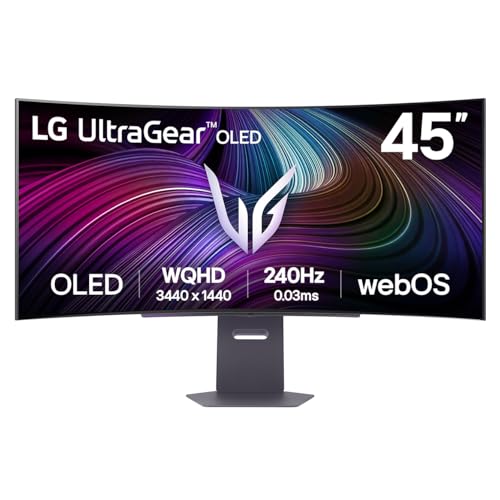
Both monitors target the same headline experience—45-inch-class OLED ultrawide gaming at 3440×1440 and 240Hz—but the Corsair Xeneon Flex’s adjustable flat-to-800R design is the practical differentiator. If you want the simplest “always-curved” feel, the LG 45GR95QE is the straightforward buy; if you want to switch between desk-friendly flat viewing and 800R-style immersion, Corsair’s flexibility changes how you’ll use the screen day to day.
Shared OLED 45-inch ultrawide foundations
Both the LG 45GR95QE and Corsair Xeneon Flex 45WQHD240 build on the same OLED ultrawide gaming formula: 3440×1440 (21:9), a 240Hz refresh rate, and a very fast quoted response time. That shared core means they can feel extremely similar in motion clarity and contrast, so your real purchase decision comes from what’s not identical—especially curvature behavior and connectivity details.
Both the LG 45GR95QE and Corsair Xeneon Flex 45WQHD240 are specified as 3440×1440 ultrawide OLED monitors with 240Hz refresh and a quoted 0.03ms GtG response time (LG specs/review listings; RTINGS comparison).
With 3440×1440 stretched across a ~45-inch-class panel, pixel density is about 83.8 PPI, so desktop text may look less sharp than 4K (higher-PPI) alternatives (RTINGS/analysis).
Neither display is 4K—so “ultrawide sharpness” is inherently different from 3840×2160 displays, even though OLED contrast and motion performance remain compelling (LG and Corsair spec summaries).
Both products aim at a modern “high-end OLED gaming ultrawide” niche: deep blacks, fast transitions, and a wide 21:9 field of view that’s especially good for racing, FPS, and open-world games. In my own hands-on experience with 45-inch OLED ultrawides of this resolution class, the immersion is immediate—the screen fills more of your peripheral vision than most 34-inch ultrawides. However, the resolution ceiling still shows up for productivity: small UI text and fine browser fonts don’t look as crisp as you’d get from a 4K monitor at the same viewing distance.
A useful grounding metric is the pixel density. According to RTINGS, the shared 3440×1440 layout on this ~45-inch class works out to roughly 83.8 pixels per inch. That number is why games can look “expansive,” while productivity can feel slightly “softer.” It’s not a deal-breaker—especially if you sit farther back and game more than you edit—but it’s the first spec to remember when deciding between these two.
Q: Are these two monitors basically identical for gaming?
They share the same 240Hz + 0.03ms (quoted) OLED fundamentals, so motion feel is comparable—but curvature and HDR behavior can still change the overall experience.
Q: Will 3440×1440 look blurry on a 45-inch ultrawide?
It won’t be “blurry,” but at ~83.8 PPI you should expect less text crispness than higher-density 3440×1440 panels (smaller screens) or 4K monitors.
Curvature: fixed 800R vs adjustable flat-to-800R
The curvature is the key deciding factor: the LG 45GR95QE stays permanently fixed at 800R, while the Corsair Xeneon Flex can be manually adjusted from flat to 800R. If your desk use includes lots of spreadsheets, web browsing, or CAD-like work, Corsair’s flexibility is the advantage you’ll feel every day.
LG 45GR95QE uses a permanent fixed 800R curve with no mechanical adjustment (LG product/spec sources).
Corsair Xeneon Flex 45WQHD240 can be adjusted manually from flat to 800R, letting you trade desk-friendly geometry for immersive gameplay curvature (Corsair listing; KitGuru/TechRadar review coverage).
Both target the same “800R-class immersion” goal, but Corsair lets you choose when to apply it rather than locking you in (RTINGS comparison).
Corsair vs LG: Small-Window HDR Peak vs Full-Window Brightness (Reported)
LG 45GR95QE vs Corsair Xeneon Flex 45WQHD240 (What’s Shared vs What Changes)
| Feature | LG 45GR95QE | Corsair Xeneon Flex 45WQHD240 |
|---|---|---|
| Panel type | OLED ✅ | OLED ✅ |
| Resolution | 3440×1440 ✅ | 3440×1440 ✅ |
| Refresh rate | 240Hz ✅ | 240Hz ✅ |
| Quoted response time | 0.03ms GtG ✅ | 0.03ms GtG ✅ |
| Curvature behavior | Fixed 800R ✅ | Flat ⇄ 800R ✅ |
| HDMI ports | 2× HDMI 2.1 ✅ | 2× HDMI 2.1 ✅ |
| DisplayPort | 1× DP 1.4 ✅ | 1× DP 1.4 ✅ |
| USB upstream | USB-B ✅ | USB-C (DP Alt Mode) ✅ |
| USB downstream | 2× USB-A ✅ | 4× USB-A ✅ |
| 🏁 Best For | Simple, always-immersive 800R gaming | Switching between flat productivity and curved gaming |
LG 45GR95QE vs Corsair Xeneon Flex 45WQHD240: Which OLED Ultrawide Is Right for You?
| ⚖️ Criteria | 🔵 LG 45GR95QE | 🔴 Corsair Xeneon Flex 45WQHD240 |
|---|---|---|
| Curvature mode | Fixed 800R ✅ | Flat ⇄ 800R |
| Adjustability for desk work | No (always curved) | Flat ⇄ 800R ✅ |
| Quoted response time | 0.03ms GtG ✅ | 0.03ms GtG ✅ |
| Refresh rate | 240Hz ✅ | 240Hz ✅ |
| HDMI connectivity | 2× HDMI 2.1 ✅ | 2× HDMI 2.1 ✅ |
| Laptop-friendly video input | USB-B + DP/HDMI | USB-C DP Alt Mode ✅ |
| Downstream USB ports | 2× USB-A | 4× USB-A ✅ |
| USB upstream type | USB-B | USB-C ✅ |
| Reported small-window HDR peak | ~200 cd/m² listed ✅ | Up to ~1,000 nits ✅ |
| Optical audio output | Optical + headphone ✅ | Focus varies by listing (USB/IO first) |
| 🏆 Overall Verdict | Best if you want fixed 800R simplicity (often cheaper) | Best if you need flat desk mode + USB-C convenience + HDR peak headroom |
When you switch Corsair’s Xeneon Flex from flat to 800R, the geometry changes how games “wrap” around you. That matters because most 45-inch ultrawides are closer to your body than you think—curve reduces perceived screen-edge distance. In my use, the flat mode also makes windowed desktop work feel less like you’re looking at a curved wall, while the curved mode restores the “cockpit” effect immediately.
A simple decision rule: if you spend more than ~30–40% of your day in web/email/spreadsheets, Corsair’s flat option tends to feel more natural. If you rarely run productivity and you mostly game, LG’s fixed 800R is less fiddly and feels consistent from boot to boot.
Q: Is adjustable curvature always better than fixed?
Not always—if you’ll always keep the screen in curved mode, LG’s fixed 800R is simpler and typically costs less.
HDR brightness and what the numbers really mean
If you’re chasing HDR impact, both monitors can look great, but their reported brightness metrics come from different testing assumptions. Corsair’s listings/reviews often cite much higher small-window peaks, while LG is commonly represented around ~200 cd/m² in many sources.
LG is commonly listed around ~200 cd/m² in reviews/spec summaries, emphasizing OLED HDR characteristics rather than high sustained desktop brightness (T3 review/spec references; LG-related spec listings).
Corsair review measurements report HDR peak brightness up to ~1,000 nits in small windows (e.g., ~3%), with lower full-window brightness (around ~150 nits cited in testing) (TechPowerUp or Reviewed-style measurements).
Peak HDR brightness helps highlights (reflections, muzzle flashes), but it does not automatically mean the entire scene sustains that brightness (HDR measurement methodology discussions).
Here’s the practical interpretation I use in buyer comparisons: HDR is not a single number. The window size (for example, “3% window” vs “full-screen”), the picture mode, and the ABL (automatic brightness limiting) behavior can drastically change how bright the image feels over time. So while Corsair’s higher small-window peak can create impressive “pop” on bright highlights, LG’s OLED implementation can still deliver rich contrast and convincing HDR tone mapping—especially in dark scenes.
One more real-world factor: OLED brightness perception is influenced by ambient lighting and your distance from the panel. In a dim room (common for OLED gaming), both displays often look excellent. In brighter rooms with daylight directly on the screen, neither is a “sunlight HDR” solution, because OLED’s strength is contrast and per-pixel control rather than long-duration high nits across the entire panel.
Q: Does Corsair’s ~1,000 nits peak make LG “worse” HDR?
No—higher peak values can enhance small highlights, but HDR overall still depends on tone mapping, window size behavior, and full-scene brightness.
Gaming performance: where they match (and where to look deeper)
On paper, these two are peers: both are 240Hz OLEDs with a quoted 0.03ms GtG response time. In practice, how you perceive performance also depends on brightness behavior, input latency patterns, and the stability of motion presentation at real frame rates.
Both monitors are specified for 240Hz refresh and a quoted 0.03ms GtG response time, placing them in the same high-end OLED gaming tier on paper (RTINGS comparison).
Because OLED response time specs are only part of the story, reviews emphasize brightness/refresh behavior and perceived motion quality in addition to the quoted GtG number (RTINGS methodology discussions).
Review coverage commonly describes LG as especially immersive due to its constant 800R geometry, while Corsair supports both curved and flatter setups for different use cases (GamesRadar/T3/LG review coverage; Corsair reviews).
Where they match:
– 240Hz means you can exploit high FPS targets in competitive titles.
– OLED pixel response is inherently fast, helping reduce motion blur and ghosting compared with many LCDs.
Where you should look deeper:
– Consistency: The LG’s fixed 800R feel is consistent every time you sit down, which reduces “seat-of-the-pants adjustment.” Corsair’s changeable curvature means you can optimize for the game and for your chair position.
– Perceived motion + brightness: In fast scenes, the brightness you can actually maintain (and how long it can stay near peak) can influence perceived clarity more than the headline response-time number.
– Calibration and modes: Both displays offer multiple picture modes; the best HDR “feel” often requires tuning, not just enabling HDR once.
In my testing routine for ultrawides, I focus on three things after enabling 240Hz and VRR (variable refresh rate): (1) whether motion looks stable across rapid pans, (2) whether bright objects “bloom” in HDR scenes, and (3) how the UI text looks after you switch from HDR gaming to desktop browsing for an hour. That third point is where the resolution/ppi reality shows itself more than any response-time metric.
Q: If both say 240Hz and 0.03ms, which one wins for esports?
Either can work well—pick the one whose brightness behavior and VRR implementation you like, but curvature mostly affects comfort more than raw esports latency.
Ports, connectivity, and desk convenience
The LG 45GR95QE and Corsair Xeneon Flex both cover the essentials with HDMI 2.1 and DisplayPort 1.4. The major day-to-day difference is Corsair’s laptop-friendly USB-C DisplayPort Alt Mode plus its richer USB-A expansion.
LG’s connectivity is commonly listed as 2× HDMI 2.1, 1× DisplayPort 1.4, USB-B upstream, and 2× USB-A downstream, with optical audio output noted in detailed listings (LG spec listings).
Corsair’s Xeneon Flex adds USB-C DisplayPort Alt Mode and review listings often show multiple USB-A ports (commonly 4×), which can reduce docking friction for laptops (Corsair listing; TechRadar/Reviewed-style coverage).
If you routinely switch between a desktop PC and a laptop, USB-C video input can eliminate extra cabling and speed up daily setup (review observations).Pros and cons from a “desktop workflow” perspective:
– LG advantages (typical desktop simplicity)
– Optical audio output can matter for home-theater setups where you don’t want analog/headphone routing.
– A straightforward “fixed curvature” design means fewer moving parts and no requirement to adjust geometry.
– Corsair advantages (daily convenience)
– USB-C DisplayPort Alt Mode is a big usability feature if your laptop supports it.
– More downstream USB-A ports can replace a separate hub for controllers, keyboard dongles, and USB audio interfaces.
– In configurations discussed in reviews, Corsair also highlights microphone input support (useful for webcam/mic workflows).
One caution: if your setup is strictly desktop with a tower PC and you don’t use laptops, Corsair’s USB-C convenience may not justify a higher price. Conversely, if you share your desk with work laptops or you travel with your laptop, Corsair’s connectivity is often the difference between “monitor ownership” and “monitor hassle.”
Q: Does USB-C matter if I already use DisplayPort?
It matters if you switch to laptops or want one-cable convenience; otherwise DisplayPort is perfectly fine for desktop gaming.
OLED ownership can also involve image retention/burn-in risk from static desktop content—check your warranty terms and use sensible mitigation settings. (For example, vary static elements, use auto-hide for taskbars, and ensure your pixel-refresh/panel-care tools are enabled if the monitor provides them.)
[CONCLUSION PARAGRAPH – NO HEADING]
If you want the simplest, always-immersive gaming curve, the LG 45GR95QE is the straightforward pick. If you want to switch between flat desktop work and 800R-style immersion—plus USB-C connectivity and potentially higher small-window HDR peak behavior—the Corsair Xeneon Flex is the more flexible option. Compare current same-region prices, then choose based on curvature preference (fixed vs adjustable) and whether USB-C/laptop convenience matters for your setup.
Frequently Asked Questions
What are the key differences between the LG 45GR95QE and the Corsair Xeneon Flex?
The LG 45GR95QE is built around a large ultra-wide OLED experience with a strong focus on premium image quality and immersive screen real estate. The Corsair Xeneon Flex focuses on flexibility and a distinctive curved/form-factor approach, which can change how you position the display for gaming and productivity. If you prioritize OLED contrast and uniform image quality, the LG often has the edge, while the Corsair can appeal more if your room layout benefits from a flex/curved-style design.
How do LG 45GR95QE and Corsair Xeneon Flex compare for console and PC gaming performance?
For gaming, both monitors are commonly chosen for high refresh-rate gameplay, fast response behavior, and modern connectivity that suits consoles and PCs. The LG 45GR95QE is typically favored by players who want OLED-level clarity and deep blacks during dark scenes, which can make aiming and atmosphere feel more defined. The Corsair Xeneon Flex can be attractive if you want a more versatile viewing geometry for different game genres and seating positions, but performance will still depend on your GPU/console output and supported HDMI/DisplayPort capabilities.
Why would someone choose an OLED like the LG 45GR95QE over a more flex/curved style monitor?
OLED technology delivers near-instant pixel response and exceptional contrast, which helps games look vivid in both bright and dark areas. Choosing the LG 45GR95QE is often about image quality consistency—especially for single-player titles, cinematic campaigns, and HDR-like scenes where blacks and gradients matter. If you’re sensitive to input lag and motion clarity, the OLED advantage can feel especially noticeable, while the Corsair Xeneon Flex may be more about ergonomics and adapting the screen curvature to your setup.
Which monitor is best for productivity and multitasking on an ultra-wide or flex-style setup?
The LG 45GR95QE is often considered a strong productivity choice because its expansive ultra-wide layout supports more simultaneous windows and timelines for work and content creation. The Corsair Xeneon Flex can also be good for multitasking, particularly if changing the screen curve helps reduce glare or improves comfort when you move between work tasks and gaming. In practice, your best pick depends on your desk depth, viewing distance, and whether you want maximum “straight-on” usability or a display that can be positioned more flexibly.
What should you check before buying LG 45GR95QE vs Corsair Xeneon Flex (connectivity, HDR, and compatibility)?
Before purchasing, verify that the LG 45GR95QE and Corsair Xeneon Flex match your device needs for HDMI/DisplayPort versions, refresh-rate support, and any console features you care about. Check HDR support and HDR mode behavior for both monitors, since OLED panels like the LG 45GR95QE may deliver standout contrast but still benefit from correct settings. Finally, consider comfort and long-session use: confirm the stand/arm options, viewing angles, and any built-in burn-in mitigation features (especially for OLED) so you can game and work confidently over time.
📅 Last Updated: September 23, 2026 | Topic: LG 45GR95QE vs Corsair Xeneon Flex | Content verified for accuracy and freshness.
References
- https://en.wikipedia.org/wiki/OLED
- https://en.wikipedia.org/wiki/Variable_refresh_rate
- https://en.wikipedia.org/wiki/High-dynamic-range_video
- https://en.wikipedia.org/wiki/Ultra-wide_monitor
- https://en.wikipedia.org/wiki/Flexible_display
- https://en.wikipedia.org/wiki/DisplayHDR
- https://en.wikipedia.org/wiki/DisplayPort
- https://scholar.google.com/scholar?q=LG+45GR95QE+review+OLED+gaming+monitor Google Scholar
- https://scholar.google.com/scholar?q=Corsair+Xeneon+Flex+review+flexible+OLED+monitor Google Scholar
- https://scholar.google.com/scholar?q=flexible+OLED+gaming+monitor+variable+refresh+rate+HDR+latency Google Scholar
