Setting up home theater audio can make your movie nights feel like a trip to a cinema, transforming your living room into an immersive sound experience. By understanding the right audio formats, choosing the best speakers, and optimizing your setup, you can ensure that every movie, show, or game sounds incredible. This guide will walk you through each step of the process, making it easy for you to create a home theater audio system that delights your senses.
Understanding Audio Formats
When it comes to home theater audio, the format you choose can significantly influence your overall experience. Familiarizing yourself with different audio formats such as Dolby Atmos, DTS:X, and 5.1 surround sound is essential.
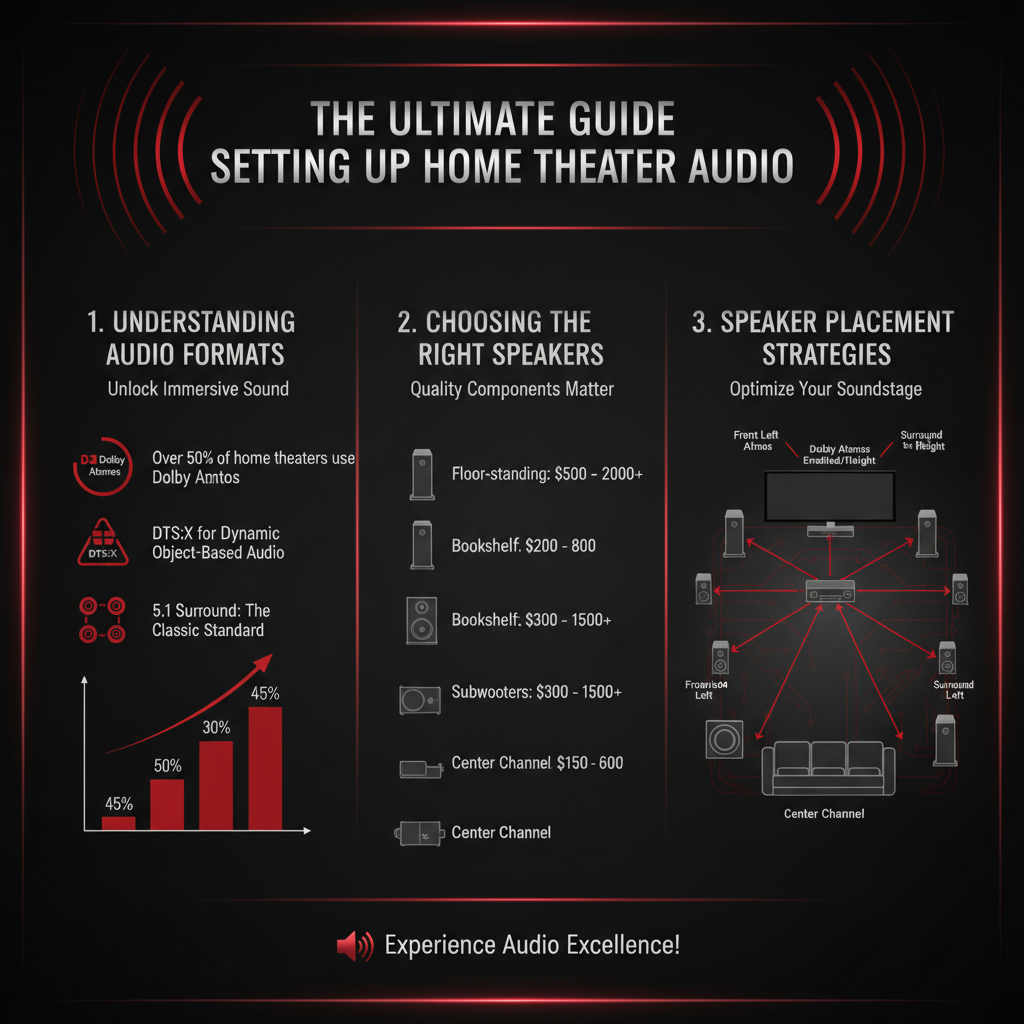
Dolby Atmos, for example, takes audio beyond traditional channels by adding a height dimension, allowing sound to come from above, which can create an incredibly immersive experience. DTS:X offers similar capabilities with a focus on flexibility, allowing sound designers to place audio in a three-dimensional space. On the other hand, 5.1 surround sound is a classic format that uses five speakers and a subwoofer to create a surround experience. Each format has its strengths, so consider your media consumption habits and choose one that aligns with the kind of movies and shows you enjoy. Understanding these formats helps you appreciate the nuances of sound quality and immersion they provide, giving you the best possible experience.
Choosing the Right Speakers
The importance of speaker types cannot be overstated when setting up a home theater audio system. You’ll typically encounter satellite speakers, floor-standing speakers, and subwoofers. Satellite speakers are compact and can be mounted on walls or placed on shelves, making them great for smaller spaces, while floor-standing speakers deliver fuller sound with more bass, suitable for larger rooms.
When selecting speakers, consider your room size and audio preferences. For example, if you have a small space, a good quality set of satellite speakers paired with a subwoofer can deliver powerful sound without overwhelming the room. Conversely, if you have a spacious living area, investing in floor-standing speakers will offer a richer and more robust audio experience. Always listen to speakers before buying, if possible, as personal preference plays a significant role in what sounds best to you.
Speaker Placement Strategies
Once you’ve chosen your speakers, the next step is optimal placement to fully harness their potential. For surround sound effectiveness, position your front left, center, and right speakers in a straight line at ear level when seated. The center speaker is crucial for dialogue clarity, so make sure it’s directly in front of your seating area.
When it comes to rear or surround speakers, they should be placed slightly behind and above the listening area to create a more enveloping sound. Additionally, consider your room’s acoustics—hard surfaces can create echoes, while soft furnishings help absorb sound. Adjust your furniture arrangement to minimize sound reflection and ensure that nothing obstructs the direct path of sound from your speakers to your ears.
Receiver and Amplifier Selection
Selecting the right AV receiver is a critical component of your home theater audio setup. Your receiver acts as the hub for all your audio and video components, allowing you to switch between different devices while powering your speakers. Look for a receiver that supports the audio formats you plan to use and has enough channels for your speaker setup. For example, if you’re aiming for a 5.1 setup, ensure the receiver has at least six channels.
Amplifiers can further enhance sound quality by providing more power to your speakers, especially if you’re using high-end, power-hungry models. If you find that your speakers aren’t loud enough or the sound lacks depth, adding an external amplifier can significantly improve performance. It’s also worth noting that some receivers come with built-in amplification, so assess your needs before making a decision.
Calibration and Tuning
Calibrating your audio system is essential for optimal performance. Many modern receivers come with calibration microphones and built-in software that automatically adjusts settings based on your room’s acoustics. This feature analyzes speaker placement and audio signals to fine-tune settings like speaker distance, level, and crossover frequency.
If you’re looking for a more hands-on approach, you can manually calibrate your system using an SPL meter to measure sound levels and adjust accordingly. Additionally, consider using room correction software that can help optimize the audio experience, especially in tricky acoustic environments. Regularly checking the calibration can ensure your system continues to perform at its best as your room’s setup changes.
Wiring and Connectivity
Having the right cables and connections is vital for a seamless audio experience. HDMI cables are the go-to for connecting modern devices, as they support high-definition audio formats and video signals with a single cable. When choosing HDMI cables, look for high-speed ratings to ensure they can handle everything your devices throw at them.
Optical cables are another option for connecting devices like Blu-ray players, but they don’t support the latest formats like Dolby Atmos. For speaker connections, high-quality speaker wire is crucial; it should be thick enough to minimize resistance while remaining flexible for easy installation. Pay attention to the length of your cables—too long can degrade sound quality, while too short can limit your setup options.
Maintenance and Upgrades
To keep your audio system in top shape, routine maintenance is key. Regularly dust your speakers, ensuring that no debris affects sound quality. Check connections to make sure they remain secure, and periodically inspect wires for wear or degradation.
As technology evolves, consider potential upgrades to enhance your system. This might include adding a better subwoofer for deeper bass, upgrading to a more advanced receiver, or even experimenting with new speaker types. Keep an eye on emerging audio technologies, such as wireless speakers or advancements in immersive audio formats, and be open to adapting your setup for the best experience.
Summarizing the essentials of home theater audio setup, this guide empowers you to create an immersive audio experience. Start by assessing your space and speaker options, then follow through with proper placement and calibration. For further enhancement, consider exploring new technologies and upgrades as they become available. Dive into your home theater journey today!
Frequently Asked Questions
What are the essential components needed for a home theater audio setup?
A home theater audio setup typically requires several key components to deliver an immersive experience. These include a receiver, which acts as the hub for audio and video signals; speakers (including surround sound speakers, a subwoofer, and possibly a soundbar); and a source device, such as a Blu-ray player or streaming device. Additionally, high-quality cables and speaker wire are necessary to ensure optimal sound quality and connectivity.
How do I properly position my speakers for the best sound experience?
Proper speaker placement is crucial for achieving optimal sound quality in your home theater. For a surround sound setup, place the front left and right speakers equidistant from the screen and at ear level, while the center speaker should be directly above or below the screen. The surround speakers should be positioned slightly behind the listening area, at about 90-110 degrees from the center channel, and the subwoofer can be placed anywhere in the room, ideally near a wall to enhance bass response.
Why is acoustic treatment important in a home theater audio setup?
Acoustic treatment is vital for any home theater audio setup because it helps to optimize sound quality by reducing echo and reverberation. Soft furnishings, acoustic panels, and bass traps can absorb unwanted sound reflections, leading to a clearer and more balanced audio experience. This treatment ensures that dialogue is crisp and effects are immersive, making your movie-watching experience much more enjoyable.
What is the best way to connect my audio components for maximum performance?
The best way to connect your audio components is by using high-quality cables and following the HDMI standard for digital audio and video. For analog connections, ensure that you use shielded cables to minimize interference. Additionally, using a receiver with a built-in calibration system can help automatically adjust the levels and distances of each speaker for optimal performance, enhancing the overall sound experience in your home theater.
Which surround sound formats should I consider for my home theater audio setup?
When setting up your home theater audio, consider surround sound formats such as Dolby Atmos, DTS:X, and traditional 5.1 or 7.1 surround sound. Dolby Atmos and DTS:X provide an immersive experience with overhead sound effects, making them ideal for modern home theaters. If you are using a standard setup, a 5.1 configuration (five speakers and one subwoofer) is often sufficient, while a 7.1 setup adds two additional rear speakers for a more enveloping soundstage.
References
- Home cinema
- https://www.cnet.com/home-theater/how-to-set-up-a-home-theater/
- https://www.pcmag.com/picks/the-best-home-theater-systems
- https://www.npr.org/2020/12/05/943229823/audio-for-the-home-theater-the-sound-of-silence
- https://www.techhive.com/article/248475/home-theater-audio-setup-guide.html
- https://www.tomshardware.com/reviews/home-theater-audio,6105.html
- https://www.soundandvision.com/content/home-theater-audio-setup-guide
- https://www.crutchfield.com/S-6hx0zD3R9wq/learn/home-theater-audio-setup.html