
Power cuts and fluctuations can severely disrupt the performance and longevity of your audio devices. Understanding these issues is crucial for any audiophile or professional in the industry. This article will help you identify common causes of power-related problems, recognize symptoms in your audio equipment, and implement effective solutions to ensure optimal functionality.



Understanding Power Cuts and Fluctuations
Power cuts, also known as blackouts, occur when there is a complete loss of electricity in a specific area. This can result from various factors, including severe weather, equipment failure, or maintenance activities by power companies. Fluctuations, on the other hand, refer to sudden changes in electrical voltage, which can manifest as surges or sags. These fluctuations can be equally detrimental to electronic devices, especially sensitive audio equipment.
Audio devices, such as amplifiers, speakers, and digital audio converters, rely on stable power supply to operate effectively. Power cuts can lead to abrupt shutdowns, while fluctuations can cause distortion, overheating, or even permanent damage to the components. In essence, understanding the nature of these electrical issues is the first step in safeguarding your audio equipment.
Identifying Symptoms in Audio Devices
Detecting power-related issues in audio devices can often be challenging, particularly when symptoms overlap with device malfunctions. Common signs that may indicate power issues include:
– Distortion: This can be perceived as a crackling or buzzing sound, often caused by voltage spikes.
– Random Shutdowns: Devices turning off unexpectedly can point to power cuts or fluctuations.
– Overheating: If a device becomes excessively hot, it may be due to inconsistent power supply.
– Unresponsive Controls: If the device fails to react to commands, this could indicate a power supply issue.
Differentiating between power issues and equipment malfunctions is essential. For instance, if only one device in a setup exhibits problems while others function normally, the issue is likely related to that specific device rather than the power supply as a whole. Conversely, if multiple devices are affected, it suggests a broader power issue.
Immediate Steps to Take During Power Issues
When experiencing power cuts or fluctuations, immediate actions can prevent potential damage to your audio devices:
– Unplug Devices: During a blackout or noticeable fluctuations, unplugging your audio devices is crucial to avoid damage from surges when power is restored. This simple step can save you from costly repairs or replacements.
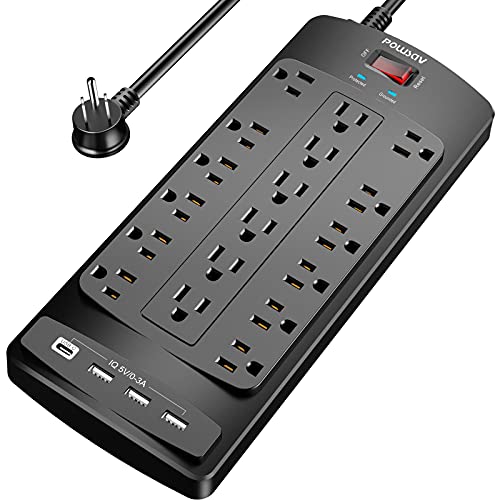
– Use Surge Protectors: Invest in high-quality surge protectors designed for audio equipment. These devices can absorb excess voltage and protect your systems from fluctuations that could lead to malfunctions.
Taking these immediate steps can shield your audio devices from the adverse effects of unstable power supply.
Common Symptoms of Power Issues in Audio Devices
| # | Symptom | Possible Cause | Action |
|---|---|---|---|
| 1 | Distortion | Voltage Spikes | Use a Surge Protector |
| 2 | Random Shutdowns | Power Cuts | Unplug Devices |
| 3 | Overheating | Inconsistent Power Supply | Check for Voltage Issues |
| 4 | Unresponsive Controls | Power Supply Issues | Reset Device |
| 5 | Flickering Lights | Fluctuations | Use a UPS |
| 6 | Input Lag | Power Supply Variations | Inspect Power Sources |
| 7 | Distorted Sound Levels | Surges | Check Connections |
Long-term Solutions for Stable Power Supply
To safeguard your audio devices from the risks associated with power cuts and fluctuations, implementing long-term solutions is essential.
– Uninterruptible Power Supplies (UPS): A UPS serves as a backup power source during outages and provides steady voltage levels, protecting your equipment from both cuts and fluctuations. This is particularly important for professional setups where downtime can lead to significant losses. Investing in a UPS can add a layer of security, ensuring that your devices remain operational during outages.
– Regular Maintenance of Electrical Systems: Ensuring that your home or studio’s electrical system is up to code is vital. Regular inspections by a qualified electrician can identify potential issues before they escalate into significant problems. This not only enhances safety but also ensures that your audio equipment operates within optimal voltage ranges.
Testing and Diagnosing Your Audio Equipment
After experiencing power issues, testing your audio devices for potential damage is crucial. Here are some steps to follow:
1. Visual Inspection: Check for any visible signs of damage, such as burnt components or unusual odors which may indicate overheating.
2. Functionality Tests: Power on the device and conduct a series of tests to ensure all functions are operating as intended. Listen for any distortions or anomalies in performance.
3. Use Diagnostic Tools: Employ tools like multimeters to test the voltage output from the device. This can help identify internal faults or issues with the power supply that may have been caused by fluctuations.
By following these steps, you can ascertain whether your audio equipment has sustained any damage due to power fluctuations or cuts.
Testing Methods for Audio Devices Post-Power Issues
Seeking Professional Help
In cases where symptoms persist despite taking preventive measures, it may be time to consult a professional technician. Here are some guidelines on when to seek help:
– Persistent Issues: If devices continue to malfunction after power issues have been resolved, this indicates potential internal damage or faults that require expert evaluation.
– Complex Configurations: For setups involving multiple devices or complex configurations, a technician can provide insights on optimizing performance and ensuring that all components are compatible and functioning correctly.
When consulting professionals, provide them with detailed information about the symptoms you’ve observed, the steps you’ve already taken, and any trends you’ve noted regarding power supply stability. This information will aid technicians in diagnosing and addressing the problem more effectively.
Preventative Measures to Protect Your Devices
To mitigate the risk of future power-related issues, consider implementing the following preventative measures:
– Routine Inspections: Regular checks of wiring, outlets, and power sources can help identify potential hazards before they escalate into significant problems. Ensure that all connections are secure and that no visible wear exists on cables or plugs.
– Quality Equipment: Invest in high-quality audio devices and accessories, as well as reputable surge protectors and UPS systems. Low-quality components are often more susceptible to damage from power fluctuations.
By adopting these preventative measures, you can enhance the resilience of your audio devices against power cuts and fluctuations, ensuring a long lifespan and optimal performance.
In conclusion, understanding the impact of power cuts and fluctuations on audio devices is crucial for both amateurs and professionals in the audio industry. By identifying symptoms, taking immediate protective actions, and implementing long-term strategies, you can effectively safeguard your equipment. Regular maintenance and professional consultations, when needed, will further enhance your ability to manage and prevent power-related issues.
Frequently Asked Questions
What are the common causes of power cuts or fluctuations that affect audio devices?
Common causes of power cuts or fluctuations include severe weather conditions, faulty electrical wiring, or issues with the local power grid. Additionally, power surges can occur when large appliances are turned on or off, disrupting the electrical flow and potentially damaging your audio devices.
How can I protect my audio devices from power fluctuations?
To protect your audio devices from power fluctuations, consider using a surge protector or an uninterruptible power supply (UPS). These devices help manage voltage spikes and provide backup power during outages, ensuring your audio equipment remains safe and functional.
Why do power cuts cause audio devices to malfunction?
Power cuts can cause audio devices to malfunction due to abrupt shutdowns, which may corrupt internal settings or damage sensitive components. Additionally, fluctuations can lead to inconsistent power delivery, potentially causing overheating or short-circuiting, ultimately affecting the device’s performance.
What should I do if my audio device is damaged due to a power surge?
If your audio device is damaged due to a power surge, first unplug it and inspect for visible signs of damage like burned components or frayed cables. Depending on the severity, you may need to consult a professional technician for repairs or check if it is still under warranty for potential replacement.
Which types of audio devices are most vulnerable to power cuts and fluctuations?
Audio devices most vulnerable to power cuts and fluctuations include amplifiers, mixers, and digital audio interfaces, as they often contain sensitive circuitry. Additionally, home theater systems and high-end speakers can be affected, making it essential to implement protective measures to safeguard these investments.
References
- Power outage
https://en.wikipedia.org/wiki/Power_outage - https://www.sciencedirect.com/topics/engineering/power-quality
https://www.sciencedirect.com/topics/engineering/power-quality - https://www.nature.com/articles/s41598-022-18560-5
https://www.nature.com/articles/s41598-022-18560-5 - https://www.ncbi.nlm.nih.gov/pmc/articles/PMC4823856/
https://www.ncbi.nlm.nih.gov/pmc/articles/PMC4823856/ - https://www.bbc.com/news/business-64654035
https://www.bbc.com/news/business-64654035 - https://www.theguardian.com/environment/2021/oct/06/power-cuts-britain-winter-2021
https://www.theguardian.com/environment/2021/oct/06/power-cuts-britain-winter-2021 - https://www.energy.gov/articles/what-does-power-quality-mean
https://www.energy.gov/articles/what-does-power-quality-mean - Google Scholar Google Scholar
https://scholar.google.com/scholar?q=troubleshooting+power+cuts+audio+devices - Google Scholar Google Scholar
https://scholar.google.com/scholar?q=power+fluctuations+affecting+electronics - Google Scholar Google Scholar
https://scholar.google.com/scholar?q=effects+of+power+cuts+on+audio+equipment



