Organizing cables for a clean home theater setup is essential for both aesthetics and functionality. A well-managed cable system not only enhances your viewing experience but also prevents potential hazards and frustration. By implementing effective techniques and using the right tools, you can streamline your cables and create a professional-looking space that’s easy to maintain.



Assess Your Cable Needs
Before diving into organizing, take a moment to assess your cable needs. Start by identifying all the devices in your home theater setup, including your TV, gaming consoles, sound systems, streaming devices, and any other peripherals. Jot down each device and the specific connections it requires, such as HDMI, optical audio, or power cables. This will help you determine the type and length of cables you need, which is crucial in avoiding excess slack that contributes to clutter.
For instance, if your gaming console is located a significant distance from your TV, consider using a longer HDMI cable. However, be cautious—too long can lead to signal degradation. Aim for cables that are just the right length to keep things tidy without unnecessary loops. By doing this preliminary work, you’ll have a clear picture of what you need, making the next steps much easier.
Choose the Right Cable Management Tools
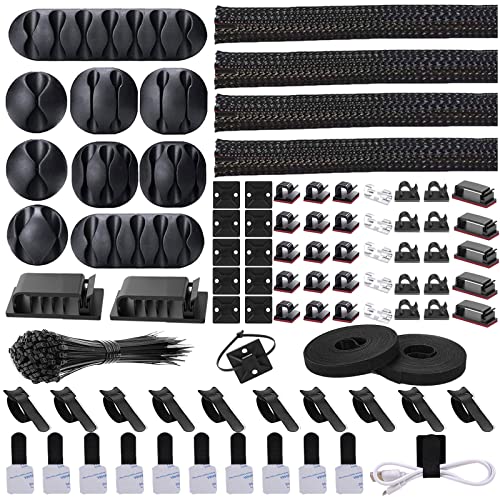
Now that you know what you’re working with, it’s time to choose the right cable management tools. There are a variety of options available to help you bundle and secure your cables neatly. Cable ties and Velcro straps are excellent for grouping cables together, while cable sleeves can provide a more streamlined look by covering multiple cables in one sheath.
Another popular option is the use of cable clips, which can be attached to walls or furniture to guide cables along a desired path. If you prefer to conceal your cables entirely, consider investing in a cable box or raceways. These solutions not only hide the cables from view but also protect them from dust and potential damage. For example, a cable box can be placed next to your entertainment center, offering a clean way to manage power strips and excess cable length.
Label Your Cables
Once your cables are bundled and secured, it’s time to label them. This step is often overlooked but can save you a lot of time and hassle down the line. Use small labels or color-coded tags to identify each cable’s purpose—this makes troubleshooting a breeze. For example, label your HDMI cables with tags like “TV to Console” or “Soundbar Connection.”
In addition to physical labels, consider keeping a digital record of your setup. You can create a simple spreadsheet that lists each device, its corresponding cables, and their connections. This not only helps when you need to rearrange things but also comes in handy if you ever need to troubleshoot issues. Labeling is a small investment of time that pays off in spades later!
Plan Your Layout
Planning your layout is a crucial step in creating an organized home theater. Arrange your devices based on usage frequency to minimize cable length and reduce clutter. For instance, if you frequently use your gaming console, place it closer to the TV than your rarely-used DVD player. This will help keep the necessary cables shorter and reduce the chances of tangling.
Additionally, ensure there’s adequate space around your devices for airflow. Overheating can damage electronics, so leave at least a few inches of space around each device. If you have a media cabinet, consider using shelves or risers to elevate devices and promote better airflow. A well-planned layout not only looks better but also functions more efficiently.
Hide Cables Effectively
With your devices neatly arranged, it’s time to tackle cable visibility. Utilizing furniture like bookshelves or media cabinets is an excellent way to conceal cables from sight. For instance, you can run cables behind a TV stand or through cable management holes in furniture. This method keeps cables hidden while still allowing easy access when you need to make changes.
If you’re looking for a more modern solution, consider wall-mounted options for your devices. Wall-mounting your TV can keep cables off the floor, making your space feel cleaner and more open. You can also use wall-mounted cable raceways to guide cables along the wall and out of sight. This approach not only enhances aesthetics but also reduces the risk of tripping over loose cables.
Regular Maintenance
Organizing your cables isn’t a one-time task; it requires regular maintenance to keep everything tidy. Schedule a routine check every few months to ensure cables remain organized and inspect for any new devices that may have been added to your setup. As technology evolves and you acquire new gadgets, take the time to reassess your cable organization and make adjustments as needed.
During maintenance, look out for any signs of wear and tear on your cables. Replace frayed or damaged cables promptly to avoid potential hazards. Keeping your setup updated and organized not only enhances functionality but also prolongs the life of your equipment.
By following these steps, you’ll find that keeping your home theater setup neat and organized not only improves the aesthetics of your space but also enhances functionality and ease of use. Implementing the right tools and strategies makes it possible to create a space that is both visually appealing and practical. So, start assessing your needs today and embrace a clutter-free home theater experience. Enjoy your viewing with the peace of mind that comes from an organized setup!
Frequently Asked Questions
What are the best ways to hide cables in my home theater setup?
Hiding cables in your home theater setup can create a cleaner, more organized look. Some of the best methods include using cable management sleeves, which bundle multiple cables together, and adhesive cable clips that can attach to walls or furniture. Additionally, consider using a cable raceway, which is a channel that conceals cables along baseboards or walls. For a more permanent solution, you can also route cables through walls or furniture with built-in cable management features.
How can I prevent cable tangling in my home theater?
Preventing cable tangling in your home theater requires a proactive approach to organization. Use Velcro ties or twist ties to bundle cables together and keep them from intertwining. Label each cable with tags or colored stickers to identify their purpose easily, and consider using a cable box or basket to store excess lengths. By implementing these strategies, you can maintain a clutter-free environment and make troubleshooting easier.
Why is cable management important for a home theater system?
Cable management is crucial for a home theater system for several reasons. First, it enhances the aesthetic appeal of your space by reducing visual clutter, making your setup look more professional and inviting. Second, proper organization helps prevent accidents, such as tripping over loose cables or damaging equipment. Lastly, effective cable management can improve airflow around your devices, reducing the risk of overheating and ensuring optimal performance.
Which cable management products are essential for a home theater?
Essential cable management products for a home theater include cable ties, adhesive clips, and cable sleeves, which help organize and conceal multiple cables. A cable management box is also beneficial for hiding power strips and excess cable lengths. Additionally, consider using a wall-mounted cable raceway to route cables neatly along walls, and cable labels to keep track of what each cable connects to, ensuring a seamless and tidy setup.
What steps should I follow to set up an organized cable system in my home theater?
To set up an organized cable system in your home theater, start by unplugging all devices and assessing the cables you have. Group similar cables together—such as those for audio, video, and power—and use cable ties or sleeves to bundle them. Plan your layout before reconnecting, ensuring that cables are routed along walls or furniture rather than across open spaces. Finally, label each cable to simplify troubleshooting and adjustments in the future, ensuring your home theater remains tidy and functional.
References
- https://www.wikihow.com/Organize-Cables
- https://www.lifewire.com/how-to-organize-cables-4771718
- https://www.techhive.com/article/3052518/how-to-organize-your-cords-and-cables.html
- https://www.aarp.org/home-family/personal-organization/info-2019/cord-management.html
- https://www.cnet.com/how-to/how-to-organize-your-cables/