
To enhance the battery life of your wireless speakers, start by adjusting volume levels and disabling unnecessary features like LED lights and Bluetooth connectivity when not in use. These simple changes can significantly extend the time between charges, ensuring you enjoy uninterrupted music for longer. In this article, we will explore various strategies to help you maximize your speaker’s battery performance, allowing you to enjoy your favorite tunes without the constant worry of recharging.
Optimize Volume Levels

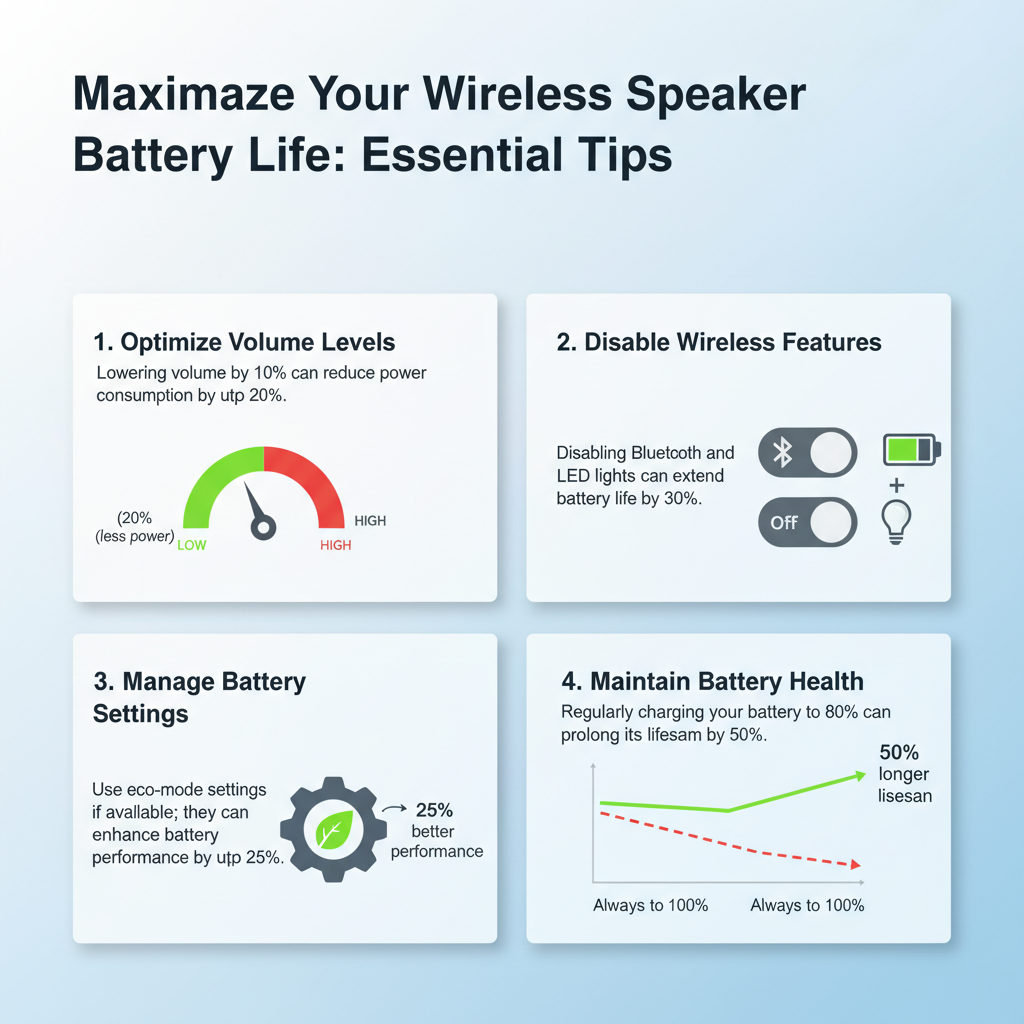
One of the simplest yet most effective ways to enhance your wireless speaker’s battery life is to optimize volume levels. Lowering the volume, even by a few notches, can lead to a notable reduction in power consumption. For instance, if you’re listening in a quiet environment, there’s no need to blast the sound at maximum volume. By keeping the volume at around 50% or lower, you can enjoy several additional hours of playtime.
Additionally, many modern speakers come equipped with volume limiters. This feature is particularly handy if you have young listeners around or if you’re prone to cranking the volume up too high. By setting a maximum volume limit, you can prevent accidental high-volume levels that could drain the battery quickly. Remember, every little bit counts when it comes to extending your listening experience!
Disable Wireless Features

Wireless speakers often come packed with features that enhance connectivity and versatility. However, these features can also be energy hogs. When you’re not actively using your speakers, it’s wise to turn off Bluetooth connectivity. Leaving Bluetooth on means your speaker is constantly searching for devices, which can drain the battery faster than you might expect. Simply switching off Bluetooth when not in use can yield significant battery savings.
Moreover, if your speaker has Wi-Fi capabilities or the ability to connect to multiple devices simultaneously, consider disabling these features when they’re unnecessary. For example, if you’re using the speaker for a single device, turn off the multi-device pairing to keep power consumption in check. By being mindful of the wireless features you use, you can keep your speaker running longer between charges.
Manage Battery Settings
Many wireless speakers now come with advanced battery management settings, including battery-saving modes. If your speaker has this feature, make sure to utilize it! Battery-saving modes often limit maximum performance to extend battery life, which can be a great compromise if you’re not in need of high-fidelity sound for a particular listening session.
Additionally, manufacturers frequently release firmware updates that can enhance performance and optimize power management. Keeping your speaker’s firmware up to date ensures you benefit from the latest improvements. Check the manufacturer’s website or your device app regularly for updates, as these can make a noticeable difference in battery efficiency.
Maintain Battery Health
Taking care of your battery is crucial for maximizing its lifespan. One common mistake many users make is allowing their battery to deep discharge frequently. Ideally, you should recharge your wireless speaker before the battery drops below 20%. This practice helps prevent long-term damage and maintains optimal battery health.
Temperature also plays a critical role in battery performance. Store and charge your speakers in moderate temperatures; extreme heat or cold can negatively impact battery life. For instance, leaving your speaker in a hot car can cause overheating, leading to irreversible damage. Conversely, charging your speaker in freezing temperatures can hinder the battery’s ability to hold a charge. Keeping these temperature guidelines in mind will help you maintain the health of your wireless speaker battery.
Clean and Care for Your Speakers
Regularly cleaning and caring for your wireless speakers is an often-overlooked aspect of battery management. Dust and debris can accumulate in speaker ports, affecting sound quality and creating unnecessary strain on the battery. Use a soft, dry cloth to wipe down the exterior, and a can of compressed air can help clear out any dust from the ports.
Creating a dust-free environment for your speakers can also enhance their performance. If possible, store your speakers in a protective case or shelf that minimizes dust exposure. Keeping your speakers well-maintained not only ensures better sound quality but can also help with energy efficiency, allowing your batteries to last longer.
Utilize Smart Charging Practices
The way you charge your wireless speakers can significantly impact their battery life. Always use the charger and cable recommended by the manufacturer. Third-party chargers may not deliver the correct voltage, potentially harming the battery. For example, using a fast charger on a device that doesn’t support it can lead to overheating and quicker battery degradation.
It’s also a good practice to unplug the speaker once it’s fully charged. Overcharging can lead to battery swelling and shorten lifespan. Many speakers come with built-in safety features to prevent overcharging, but it’s still wise to monitor the charging process. If you’re charging overnight, consider setting an alarm to unplug the speaker once it’s charged.
Monitor Usage Habits
Lastly, being aware of your usage habits can provide valuable insights into how to better manage your wireless speaker’s battery life. Keep track of how often you use your speakers and adjust your charging frequency accordingly. If you notice you’re using your speakers daily, consider charging them more frequently to ensure they’re always ready when you need them.
Creating a charging schedule that aligns with your listening habits can also be beneficial. For instance, if you typically listen to music during your morning routine, make it a habit to charge your speaker overnight. This way, you’ll ensure your speaker is always ready to go when you need it, without the risk of it running out of battery mid-jam session.
By implementing these strategies, you can significantly enhance the battery life of your wireless speakers. From optimizing volume levels and disabling unnecessary features to maintaining battery health and monitoring your usage habits, you now have a toolkit to ensure your speakers last longer between charges. Make these adjustments today, and enjoy those extended listening sessions without worrying about running out of power mid-playlist!
Frequently Asked Questions
What are the best practices to extend the battery life of wireless speakers?
To extend the battery life of your wireless speakers, consider lowering the volume and avoiding maximum settings, as high volumes can drain batteries faster. Additionally, keep your speakers away from extreme temperatures, as both heat and cold can negatively impact battery performance. Regularly update the speaker’s firmware and turn off Bluetooth when not in use to prevent unnecessary battery drain.
How can I optimize my wireless speaker settings for better battery performance?
To optimize your wireless speaker settings, enable power-saving modes if available, as they can significantly reduce energy consumption. Lowering the EQ settings and disabling features like ambient sound or LED lights can also help conserve battery life. Furthermore, using a wired connection instead of Bluetooth when possible can lead to longer playback times.
Why is my wireless speaker’s battery draining so quickly, and how can I fix it?
Rapid battery drain in wireless speakers can be attributed to factors like outdated firmware, high volume levels, or background apps consuming power. To fix this, ensure your speaker’s firmware is up to date, reduce volume levels, and disconnect from devices when not in use. Additionally, check for any connected apps that might be running in the background and disable them to conserve battery life.
Which wireless speakers have the longest battery life on the market?
Some of the wireless speakers known for their impressive battery life include the JBL Charge 5, which offers up to 20 hours of playtime, and the Ultimate Ears Megaboom 3, boasting around 20 hours as well. Additionally, the Anker Soundcore Motion+ provides up to 15 hours of playtime, making it a great choice for those prioritizing long-lasting performance. When selecting a speaker, always check the manufacturer’s specifications for battery capabilities.
What charging habits can help maintain the battery health of my wireless speakers?
To maintain the battery health of your wireless speakers, avoid letting the battery completely discharge before recharging, as this can shorten battery lifespan over time. Ideally, keep your speakers charged between 20-80%, and use the original charger to prevent any potential damage. Additionally, storing your speakers in a cool, dry place when not in use can help preserve battery life and performance.
References
- https://en.wikipedia.org/wiki/Battery_life
- https://www.sciencedirect.com/science/article/pii/S2213138819300196
- https://www.nytimes.com/2020/11/06/technology/how-to-extend-battery-life.html
- https://www.hbr.org/2020/12/how-to-extend-the-battery-life-of-your-devices
- https://www.consumerreports.org/portable-audio/how-to-improve-the-battery-life-of-your-wireless-speakers-a32270769/
- https://www.nichd.nih.gov/health/topics/battery/conditioninfo/improve
- https://www.energy.gov/articles/how-improve-battery-life-your-electronics