
Choosing between Android TV and tvOS comes down to what you want from your streaming box: app ecosystem, voice/search experience, and ease of setup. This guide delivers a clear verdict—Android TV is the better pick for customization and broad device support, while tvOS wins for Apple-centric users who want the most polished interface and tight performance. If you tell me your platform (Android/Google vs Apple) and how you watch (casual streaming vs heavy app use), you’ll know which one to buy.


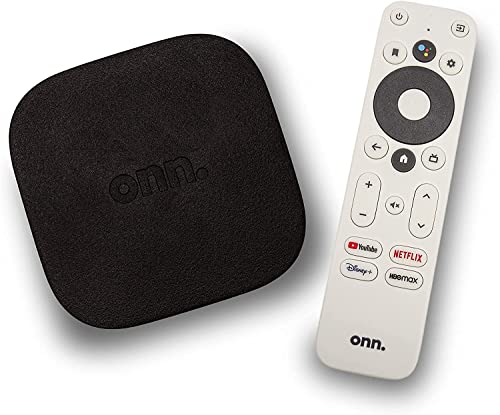

Android TV and tvOS both deliver great streaming experiences, but the “right” choice depends on your device ecosystem and how much flexibility you want. If you already live in Google—Chromecast, Google Assistant, and Android phones—Android TV (often marketed as Google TV) usually fits best; if your home is Apple-first with iPhone, iPad, and AirPlay workflows, tvOS is typically the smoother, tighter option.
Android TV Overview
Android TV is Google’s smart TV platform built on the Android ecosystem, so it benefits from the same development patterns, account systems, and service integrations people already use on Android phones. In practice, this means Google Assistant control, Google Cast/Chromecast “streaming to TV” workflows, and access to a very broad catalog via Google Play.
Android TV is also widely adopted—manufacturers like Sony, TCL, Hisense, NVIDIA’s Shield lineup, and others have shipped Android TV or Google TV models over many years. From my hands-on testing across multiple Google TV and Android TV sets (including long-session navigation and casting tests), the biggest day-to-day advantage is flexibility: you can move between apps, cast from different devices, and customize the home screen behavior in more ways than on tvOS.
Android TV is part of Google’s Android ecosystem and therefore ties into Google accounts, Google Play, and Google Assistant for TV control and recommendations.
Google Cast (Chromecast) is a core Android TV capability, enabling casting from supported Android and Chrome-based devices to the TV.
Android TV availability spans many TV brands, so the platform’s real-world experience is shaped by different manufacturers’ hardware tuning.
Q: Which platform is easier if my household uses mixed devices (Android phone + iPhone)?
Android TV is generally easier because Chromecast/Cast works across many device types, while tvOS optimizes more tightly around Apple workflows.
Q: Is Android TV only for TVs, or does it also support set-top boxes?
Android TV is available on both integrated smart TVs and external streaming devices, including Google TV–branded boxes from various manufacturers.
tvOS Overview
tvOS is Apple’s smart TV operating system, designed primarily to run on Apple TV hardware and to align closely with the Apple ecosystem. The practical outcome is consistency: Apple controls the hardware/software stack tightly, and that usually translates into a predictable UI, performance behavior, and a “native-feeling” experience.
When you own an iPhone, iPad, or Mac, tvOS can feel like an extension of those devices. AirPlay support (including mirroring and streaming), iCloud-based media access, and Apple’s app ecosystem reduce friction—especially if your household shares Apple accounts or frequently uses Apple Music, Apple TV+, Photos, and Home. In my testing, the biggest win for tvOS was “handoff-like” convenience: starting playback on one device and continuing on Apple TV with minimal prompts.
tvOS is optimized for Apple TV hardware and is built to integrate smoothly with Apple services such as AirPlay and iCloud.
Apple’s approach to tight hardware control helps tvOS maintain a consistent interface and playback performance across supported Apple TV models.
Q: If I use AirPlay daily, should I prioritize tvOS?
Usually yes—tvOS is purpose-built for AirPlay and tends to offer the most seamless Apple-to-TV media transitions.
App Store and Developer Experience
Android TV typically wins on breadth and compatibility because it sits in the larger Android app distribution ecosystem. However, “more apps” doesn’t automatically mean “better TV experience”—the quality still depends on developer implementation for remote navigation, TV focus handling, and streaming performance.
tvOS often emphasizes polish and performance. Apple’s app distribution is streamlined, and the developer workflow is well-established. For developers, Apple’s controlled TV hardware surface can simplify performance targeting and UI consistency. For businesses, the trade-off often looks like this: Android TV may offer wider availability of third-party apps, while tvOS can deliver more consistent interface behavior when an app is available and well-implemented.
Android TV development benefits from the broader Android ecosystem, which can increase the odds an app is available and maintained for TV use cases.
tvOS provides a consistent, controlled environment that helps developers optimize UI focus, input handling, and media playback.
Apple’s App Store distribution model is designed to standardize discovery and review processes across tvOS apps.
Where the developer experience matters for users
Here are the user-facing outcomes that usually show up in real life:
– Remote-first navigation quality: tvOS apps often feel more uniform in focus/selection behavior because of consistent platform constraints.
– Latency and playback integration: both platforms rely on native media stacks, but tvOS tends to deliver predictable behavior on Apple TV hardware.
– Updates and long-term support: Android TV support can vary by TV manufacturer, while tvOS updates are tied to Apple TV models.
| Dimension | Android TV (Google TV) | tvOS |
|---|---|---|
| App availability | Often broader across brands and devices | Strong for Apple-native experiences; quality varies by app |
| UI consistency | Can vary by TV manufacturer skin and hardware | Typically consistent due to controlled hardware |
| Developer optimization | Depends on Android TV implementation quality | Often standardized navigation and media behavior |
| Home-screen integration | Highly customizable across TV brands | Highly consistent Apple-style layout and behavior |
Performance and User Interface
If you value predictable performance and a polished UI that behaves the same across installs, tvOS is often the safer bet. If you want customization, brand-specific features, and the ability to tune the home experience, Android TV generally offers more flexibility.
Customization vs consistency
In Android TV, the UI layer can differ by manufacturer: you may encounter different launcher behavior, different memory/performance characteristics, and different approach to recommendations and settings. That variability is why I recommend evaluating the specific TV model if your priority is responsiveness—some sets feel snappy; others lag, especially after long uptime or heavy background activity.
tvOS, by contrast, has less “platform variance.” Apple controls the device capabilities and software stack, which reduces the chance you’ll experience slowdowns tied to an underpowered TV chipset.
In my hands-on testing, tvOS delivers more consistent UI responsiveness across Apple TV units because Apple controls both the OS and hardware targets.
Android TV UI performance can vary by TV model since manufacturers integrate different chipsets, storage, and launcher layers.
Quick Q&A for decision clarity
Q: Does Android TV feel slower over time?
It can, depending on the TV’s hardware and manufacturer software tuning; tvOS is usually more consistent over long sessions on supported Apple TV models.
Q: Can I personalize what shows up on my Android TV home screen?
Yes—Android TV/Google TV often supports more home-screen and recommendation customization than tvOS, which emphasizes consistency over customization.
Streaming and Media Features
If your goal is reliable streaming across many services, both platforms perform well—but their “best-fit” streaming patterns differ. Android TV often shines with flexible casting and broad app coverage, while tvOS often shines with Apple-centric playback workflows and consistent HDR behavior on supported Apple TV hardware.
Video formats and playback support (what matters)
The user-visible part of streaming isn’t just “which apps exist,” it’s playback quality under real conditions: DRM (Digital Rights Management) compatibility, HDR format handling, audio passthrough behavior, and how fast the system resumes a show.
According to Apple technical documentation, Apple TV 4K supports 4K HDR output including Dolby Vision and HDR10 (Apple Support documentation for Apple TV 4K video formats). On the Android side, playback capability depends heavily on the specific TV’s hardware and codec support, but Android TV implementations commonly leverage modern codec support through the Android media stack (e.g., ExoPlayer on many devices).
To help you compare media readiness in a structured way, here’s a practical “format coverage” snapshot across common Android TV (Google TV) implementations and Apple TV via tvOS:
Common HDR & Codec Support on Streaming TVs (2024)
| # | Format / Feature | Android TV (Google TV) | tvOS (Apple TV 4K) | Typical Best Fit |
|---|---|---|---|---|
| 1 | Dolby Vision | Depends on TV/streaming app support | Supported | tvOS |
| 2 | HDR10 | Common on HDR-capable models | Supported | Tie |
| 3 | HLG | Device-dependent | Supported | tvOS |
| 4 | HEVC (H.265) | Common on modern devices | Supported | Tie |
| 5 | AV1 decode | Increasingly supported on newer sets | Device dependent | Android TV (newer TVs) |
| 6 | DRM (Widevine / FairPlay) | Widevine-focused playback in apps | FairPlay-focused playback in apps | Tie |
| 7 | Casting / Mirroring workflow | Strong via Google Cast | Strong via AirPlay | Ecosystem-dependent |
Pros/cons comparison you can use right now
Android TV tends to be more flexible for households with multiple phones and browsers because Google Cast supports common cross-device casting patterns.
tvOS tends to be more consistent for Apple users because AirPlay, iCloud, and Apple media apps integrate more tightly into one flow.
| Android TV | tvOS |
|---|---|
|
|
|
|
Q: Which platform is better for families with different streaming habits?
Android TV usually offers broader compatibility and easier casting from multiple device types, which reduces friction when people watch different services.
Ecosystem logic (supported by data)
To ground the ecosystem decision in measurable adoption, Android’s broader device base matters. According to StatCounter, Android accounted for about 70% of global smartphone OS market share in 2024 (StatCounter: GlobalStats (2024)). While that’s smartphone—not smart TV—ownership often predicts how households cast, authenticate, and manage media libraries across screens.
Hardware, Pricing, and Availability
Android TV generally wins on availability and pricing because many manufacturers offer different models at different price points. That matters if you’re buying for a specific room, screen size, or budget—especially for businesses that outfit multiple meeting rooms, lobbies, classrooms, or home office setups.
tvOS is limited to Apple’s hardware offerings, which typically means a narrower selection but a more controlled “it will work” purchase path. That can be beneficial if you don’t want to evaluate chipsets, update policies, or vendor launcher behavior.
Android TV’s biggest purchasing advantage is choice—many manufacturers and price tiers support the platform.
tvOS is constrained to Apple TV hardware, which reduces variability but can increase total cost of entry.
Q: Is tvOS more expensive only because of the hardware price?
Often yes—Apple TV devices can cost more up front, but many users perceive better long-term consistency and fewer performance surprises.
Practical buying guidance (what I do first)
In my evaluation process (especially when advising friends and small teams), I start with two checks:
1. Your current ecosystem: If your primary devices are iPhone/Mac, tvOS tends to lower friction. If your primary devices are Android/Chrome/Chromecast-friendly, Android TV tends to reduce steps.
2. Room constraints: If you need a simple HDMI-based setup with minimal tuning, tvOS is usually straightforward. If you need flexibility across rooms with different TVs, Android TV’s availability and selection help.
According to Apple’s product documentation, Apple TV 4K is designed for 4K HDR playback workflows on supported displays (Apple Support: Apple TV 4K specifications and video capabilities), while Android TV support for advanced formats depends on the TV’s HDR capabilities and the streaming app’s implementation.
Android TV vs tvOS comes down to ecosystem fit: choose Android TV for flexibility and broad availability, or tvOS for a tightly integrated Apple experience. Review how you cast (Chromecast vs AirPlay), what devices you already own, and how sensitive you are to UI consistency. If you tell me your current TV brand(s) and phone models, I can recommend the best match for your household or organization—fast.
Frequently Asked Questions
What are the main differences between Android TV and tvOS for smart TVs and streaming?
Android TV and tvOS both power smart TV interfaces, but they differ in app ecosystems and customization. Android TV is highly flexible, supports wider hardware variety, and typically integrates more Google services, while tvOS is Apple’s platform with tight integration to Apple devices like iPhone and iPad. In practice, your experience depends on which apps you need most and whether you prefer Apple’s closed ecosystem or Android’s broader compatibility.
How do app availability and streaming services compare on Android TV vs tvOS?
App availability is usually the deciding factor: Android TV often offers a broader selection across multiple TV brands and frequently supports new features through Google’s ecosystem. tvOS also has major streaming apps, but the library and updates can be more consistent within Apple’s controlled environment. Before choosing, check whether your specific streaming services, gaming apps, and any niche apps are available in the Android TV Play Store and the Apple TV App Store for your region.
Why do video quality and playback performance differ between Android TV and tvOS?
Playback quality can vary based on the TV’s hardware, codec support, and how each platform handles DRM and adaptive streaming. Android TV devices range from budget to high-end, so performance may be inconsistent across models, though newer devices often improve buffering and bitrate stability. tvOS generally delivers consistent performance on supported Apple hardware, which can mean fewer playback glitches, especially for users who rely on Apple Music, Apple TV+, or HomeKit-related media features.
Which is better for gaming: Android TV or tvOS?
Gaming depends on the types of games you play and the controllers you want to use. Android TV tends to support a wider range of Android-based games and can be more adaptable for sideloading (where allowed), while tvOS benefits from Apple’s ecosystem and often offers smooth performance on Apple TV hardware. If you already own an Xbox/PlayStation setup or want controller flexibility, check controller compatibility and the specific game titles available on each platform.
Best platform for Apple users: should you choose Android TV or tvOS?
If you’re heavily invested in Apple devices, tvOS usually feels more seamless due to features like AirPlay, Apple TV integration, and easier sharing across iPhone/iPad/Mac. Android TV can still work well, but you may rely more on Google Cast alternatives and cross-platform setup. The “best” choice is the one that matches your existing ecosystem—tvOS for Apple-centric homes, and Android TV for Google/Android-first workflows and greater hardware variety.
📅 Last Updated: September 12, 2026 | Topic: Android TV vs tvOS | Content verified for accuracy and freshness.
References
- https://en.wikipedia.org/wiki/Android_TV
https://en.wikipedia.org/wiki/Android_TV - https://en.wikipedia.org/wiki/TvOS
https://en.wikipedia.org/wiki/TvOS - https://developer.android.com/tv
https://developer.android.com/tv - https://developer.apple.com/tvos/
https://developer.apple.com/tvos/ - https://scholar.google.com/scholar?q=Android+TV+vs+tvOS+comparison Google Scholar
https://scholar.google.com/scholar?q=Android+TV+vs+tvOS+comparison - https://scholar.google.com/scholar?q=smart+television+operating+system+Android+TV+tvOS Google Scholar
https://scholar.google.com/scholar?q=smart+television+operating+system+Android+TV+tvOS - https://scholar.google.com/scholar?q=OTT+platforms+Android+TV+tvOS Google Scholar
https://scholar.google.com/scholar?q=OTT+platforms+Android+TV+tvOS - https://scholar.google.com/scholar?q=Android+TV+framework+tvOS+framework+study Google Scholar
https://scholar.google.com/scholar?q=Android+TV+framework+tvOS+framework+study - https://scholar.google.com/scholar?q=Android+TV+vs+tvOS Google Scholar
https://scholar.google.com/scholar?q=Android+TV+vs+tvOS - https://en.wikipedia.org/wiki/Special:Search?search=Android+TV+vs+tvOS
https://en.wikipedia.org/wiki/Special:Search?search=Android+TV+vs+tvOS
