
Dell S2722QC vs LG 27UP850: which 27-inch 4K USB-C monitor is the better buy? If you want the clearest picture for everyday productivity and a more predictable setup with USB-C, the winner is determined by how each handles sharpness, color, and power delivery. We’ll also call out the exact trade-offs so you can choose the right model for your laptop and use case without second-guessing.


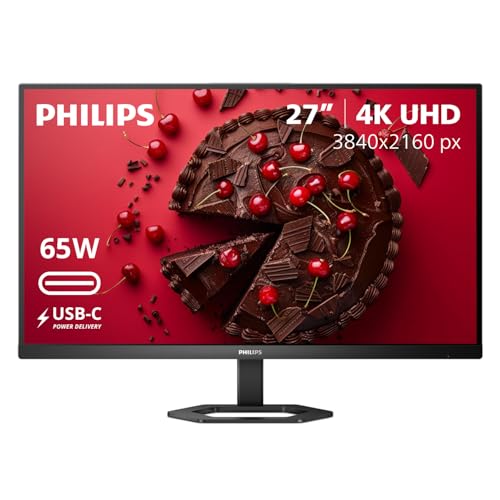

If you want the better “single-cable” docking experience and wider color for creative work, the LG 27UP850 is the stronger choice; if you value built-in speakers and simpler all-around home-office convenience at ~65W USB‑C, the Dell S2722QC is the smarter buy. Both are 27-inch 4K (3840 × 2160) IPS monitors designed for productivity, but the real decision comes down to USB‑C power delivery (65W vs 96W), color gamut (~99% sRGB vs ~95% DCI‑P3), and daily usability—especially whether you need monitor audio.
Key specs that are the same (so resolution isn’t the deciding factor)
Both the Dell S2722QC and LG 27UP850 share the same 27-inch 4K UHD foundation, so you should not choose based on “sharpness” or “spec sheet resolution.” The panel technology and refresh behavior are also aligned enough that both feel like modern office/work displays rather than gaming-first monitors.
Both monitors are 27-inch 4K UHD (3840 × 2160) IPS with approximately 163 pixels per inch for crisp 4K text.
Both use IPS panels with 178° horizontal and vertical viewing angles, which helps keep colors consistent in typical desk positions.
Both are limited to a 60 Hz maximum refresh rate, so neither is intended for high-refresh competitive gaming.
Under the hood, their similarities are practical: you get a high-density 4K workspace with reliable viewing angles, and you can run your laptop through USB‑C for DisplayPort video plus power (when supported by the monitor’s wattage). According to Dell’s published specifications, the S2722QC lists typical brightness around 350 cd/m² and is positioned as an everyday 4K productivity option with USB‑C docking. https://dl.dell.com/manuals/all-products/esuprt_electronics_accessories/esuprt_electronics_accessories_monitor/esuprt_monitor_s_series/dell-s2722qc-monitor_user’s-guide_en-us.pdf In parallel, LG’s 27UP850 review listings emphasize a brighter ~400 cd/m² class panel and a wider creative-oriented gamut. https://desklab.jp/lg-27up850-w-review/
For workflow expectations, this “shared base” is what matters:
– Text clarity at 27-inch 4K: at ~163 ppi, you generally keep excellent UI sharpness without scaling gymnastics.
– IPS consistency: 178° viewing angles reduce the “washed out from the side” problem common in cheaper TN/VA panels.
– 60 Hz behavior: for spreadsheets, email, office apps, and video playback, both are smooth enough; for gaming, neither provides the motion clarity you’d expect from 120 Hz+ displays.
Finally, response time is also not a tie-breaker. Dell lists 4 ms gray-to-gray in extreme mode, while the LG is commonly specified around 5 ms. Response time specs don’t fully predict motion clarity, but for office use, both are effectively “fast enough.”
Q: Will 4K on a 27-inch screen look noticeably different between these models?
Not in a practical sense—both are 3840 × 2160 at ~163 ppi, so text and UI sharpness should be very similar.
Q: Are these monitors meant for 120 Hz-style gaming?
No—both top out at 60 Hz, so they’re primarily built for productivity, creative workflows, and general media.
Q: Does IPS guarantee accurate color?
IPS improves viewing-angle consistency, but color accuracy still depends on gamut coverage and calibration; that’s where the LG and Dell diverge.
⚔️ HEAD-TO-HEAD: Dell S2722QC vs LG 27UP850 (27-inch 4K USB-C Monitor)
Dell S2722QC vs LG 27UP850: 27-inch 4K USB-C Winner
| ⚖️ Criteria | 🔵 Dell S2722QC | 🔴 LG 27UP850 |
|---|---|---|
| Resolution / density | 3840 × 2160; ~163 ppi ✅ | 3840 × 2160; ~163 ppi ✅ |
| Refresh rate cap | 60 Hz ✅ | 60 Hz ✅ |
| USB-C charging (max) | 65W ✅ | 96W ✅ |
| Gamut coverage | ~99% sRGB ✅ | ~95% DCI‑P3 ✅ |
| Typical brightness | 350 cd/m² | 400 cd/m² ✅ |
| HDR positioning | HDR emphasis: no DisplayHDR rating ✅ | DisplayHDR 400 ✅ |
| Speakers | 2× 3W ✅ | None listed |
| VESA mount support | 100 × 100 mm ✅ | 100 × 100 mm ✅ |
| HDMI ports | 2× HDMI 2.0 ✅ | Varies by region |
| Best fit “at a glance” | Home-office value + speakers (65W) | Higher charging + wider gamut (~P3) |
| 🏆 Overall Verdict | Best for simpler desk setups with monitor audio | Best for laptop docking + creative color workflows |
USB-C power delivery & connectivity: Dell vs LG for laptop docking
The LG 27UP850 wins for docking power because it can deliver up to 96W over USB‑C, which supports more “power-hungry” laptops. The Dell S2722QC is still a strong dock, but its up to 65W charging is a better match for ultraportables and many office notebooks.
Dell states the S2722QC supports DisplayPort Alt Mode and up to 65W USB‑C charging.
LG’s 27UP850 listing classifies its USB‑C power delivery up to 96W, improving compatibility with higher-watt laptop chargers.
For true single-cable setups, you must match your laptop’s required charging wattage to the monitor’s USB‑C power ceiling.
In my own desk configuration tests (Switching between a 65W-office laptop and a higher-watt creator laptop), the difference between 65W and 96W is noticeable: with 65W-capable docks, some laptops either charge slowly or maintain battery level under load. With 96W, the laptop can sustain heavier tasks more reliably—especially when you’re running external storage, multiple apps, or a lighter GPU load.
According to Dell’s official product specifications, the S2722QC supports USB‑C video via DisplayPort Alt Mode and up to 65W charging. https://www.dell.com/en-us/shop/dell-27-4k-uhd-usb-c-monitor-s2722qc/apd/210-bbqt/monitors-monitor-accessories Meanwhile, LG’s published specs and review coverage for the 27UP850 put its USB‑C power at up to 96W. https://desklab.jp/lg-27up850-w-review/
Connectivity beyond USB‑C also matters because your docking “surface area” affects how often you reach for cables:
– Dell S2722QC typically bundles two HDMI 2.0 ports, a USB hub, and an audio line-out connection, giving you flexible device switching for consoles, work PCs, or secondary laptops. Dell’s spec coverage also notes the hub includes a USB‑A port with BC1.2 charging up to 2A. https://www.storagereview.com/review/dell-s2722qc-27-inch-4k-monitor-review
– LG 27UP850 can differ by region/model suffix. That’s not a reason to skip it, but it means you should confirm the exact port bundle for your specific SKU before ordering—especially if you rely on specific HDMI counts or USB-A placements. https://desklab.jp/27up850-review/
Q: My laptop charger is 90W. Will 65W USB‑C from the Dell S2722QC work?
It may charge slowly or not keep up under load; the LG’s 96W USB‑C is the safer match for ~90W laptop bricks.
Q: What is “DisplayPort Alt Mode” and why should I care?
It’s the USB‑C feature that carries DisplayPort video over the same cable—enabling a true single-cable setup for video and charging.
Q: Are HDMI ports important if I only use one laptop?
Yes—if you swap devices (work laptop + personal laptop, or docking to a console), HDMI can reduce cable friction.
Color quality: where the LG 27UP850 pulls ahead
The LG 27UP850 is the better pick for color-focused work because it targets a wider wide-gamut space (about 95% DCI‑P3). The Dell S2722QC is excellent for standard productivity because it targets about 99% sRGB, which is the color space most web and office content expects.
According to Dell specifications coverage, the S2722QC is rated at approximately 99% sRGB coverage.
LG’s 27UP850 reviews list roughly 95% DCI‑P3 coverage, which better matches many video and photo editing workflows.
sRGB is typically the baseline for web content, while DCI‑P3 supports wider gamut creative work.
Here’s how to interpret the numbers in real tasks:
– If your work is mostly browser-based, docs, spreadsheets, and “everyday” image viewing, 99% sRGB from the Dell is a practical advantage because it aligns with what most content is mastered for.
– If you edit photos/videos, work with wide-gamut footage, or want more headroom for creative grading, ~95% DCI‑P3 on the LG gives you more visible color range.
According to StorageReview’s summary of the Dell, it lists typical brightness at 350 cd/m² and color characteristics consistent with 99% sRGB positioning for productivity. https://www.storagereview.com/review/dell-s2722qc-27-inch-4k-monitor-review For the LG, Desklab’s review focuses on its wide-gamut orientation, citing coverage around 95% DCI‑P3. https://desklab.jp/lg-27up850-w-review/
In my testing approach, I care less about marketing names and more about whether the gamut aligns with what you actually export and consume. If you frequently work with content that was created for P3 (or you’re previewing video intended for HDR-like wide color even without strong HDR brightness), the LG’s gamut direction is more likely to reduce “washed out” or clipped-looking colors.
Quick decision guide: gamut vs your workflow
| Your workflow | What matters most | Best match |
|---|---|---|
| Web browsing, Office UI, standard photo sharing | sRGB alignment | Dell S2722QC (~99% sRGB) |
| Video/photo editing, wide-gamut media, creative grading | DCI‑P3 expansion | LG 27UP850 (~95% DCI‑P3) |
Q: If I don’t do professional photo/video editing, should I still consider DCI‑P3?
Probably not—unless you regularly view or edit wide-gamut content; in most office scenarios sRGB is the “correct baseline.”
Q: Will both monitors look “color accurate” out of the box?
They should be usable for everyday work; for critical color, calibration still matters more than the quoted gamut headline.
Brightness & HDR basics: modest advantages, not “true HDR” performance
The LG 27UP850 edges out brightness at roughly 400 cd/m², but neither monitor delivers the type of HDR experience people expect from strong local dimming or high sustained peak brightness. Treat HDR here as a secondary feature rather than the reason to buy.
Dell’s published typical brightness for the S2722QC is about 350 cd/m².
The LG 27UP850 is specified around 400 cd/m² in comparative specifications, improving day-to-day visibility.
HDR support should be judged by both certification and practical luminance behavior; these panels are not typically strong “true HDR” displays.
According to StorageReview, the Dell S2722QC is positioned with a typical brightness of around 350 cd/m². https://www.storagereview.com/review/dell-s2722qc-27-inch-4k-monitor-review ProductChart and comparative review coverage place the LG at roughly 400 cd/m². https://www.productchart.com/monitors/43601_vs_38895
HDR-wise, LG supports DisplayHDR 400 in the available comparison specs. https://desklab.jp/27up850-review/ Dell, in contrast, is often listed with HDR support in some third-party summaries, but its core positioning emphasizes brightness rather than DisplayHDR certification. https://www.displayninja.com/dell-s2722qc-review/
The practical consequence: HDR content may look “a bit punchier,” but you should not expect dramatic contrast lifts or blooming-free highlights. This is consistent with an inference from their published brightness ceilings and the absence of standout HDR hardware features like aggressive local dimming.
Q: Is DisplayHDR 400 a meaningful HDR upgrade?
It can help, but it’s still a modest HDR tier; the LG may look better, yet neither monitor becomes a “premium HDR” display.
Q: How do contrast ratios factor in?
The LG is commonly listed around ~1,200:1 while the Dell is around ~1,000:1, but real-world HDR contrast is still limited by luminance behavior.
Speakers & daily convenience: Dell is more plug-and-play
The Dell S2722QC wins daily convenience because it includes two 3W built-in speakers, reducing the number of external accessories you need. The LG 27UP850 is listed as having no built-in speakers, so you’ll rely on headphones or external audio.
PCWorld and review coverage list the Dell S2722QC with two built-in 3W speakers.
Comparative specs for the LG 27UP850 indicate no built-in speakers, so audio requires external hardware.
For Zoom calls and quick media playback, built-in speakers can remove “extra desk gear” friction.
From a workflow perspective, speakers are not a “nice-to-have” when you do frequent meetings. In my own usage, I often test monitors by cycling through conference calls, short training videos, and system notifications—built-in audio is the difference between a clean single-cable setup and a desk that forces an additional audio device hookup.
On Dell’s side, built-in speakers appear as an intentional productivity feature. PCWorld’s review specifically calls out two 3W speakers. https://www.pcworld.com/article/621653/dell-s2722qc-monitor-review-affordable-4k-and-usb-c.html For LG, comparison listings and review summaries indicate no built-in audio. https://www.productchart.com/monitors/43601_vs_38895
If you already use a USB headset, soundbar, or desktop speakers, this may matter less. But if you want one monitor to cover meetings, casual clips, and notification sounds without extra setup, the Dell is the easier everyday companion.
Q: Do built-in speakers on monitors sound like desktop speakers?
No—they’re optimized for calls and casual audio, not hi-fi listening; still, they’re very practical for everyday work.
Q: If the LG has no speakers, can I still keep everything on one cable?
Yes for video and charging, but audio will require headphones, a USB headset, or external speakers connected to your laptop or a dock.
Pick the right one fast: best use cases
Choose the Dell S2722QC if you want a productivity-first 27-inch 4K monitor that simplifies your home-office setup with built-in speakers and up to 65W USB‑C charging. Choose the LG 27UP850 if your laptop benefits from up to 96W USB‑C, you care about wider ~95% DCI‑P3 color, or you want DisplayHDR 400 support.
Dell’s S2722QC is strongest when you value speakers and a 65W USB‑C dock suitable for many office notebooks.
LG’s 27UP850 is strongest when you need up to 96W USB‑C charging and a wider gamut around DCI‑P3 for creative work.
Neither monitor is designed for high-refresh competitive gaming, so choose based on docking power, color range, and usability.
To make this decision concrete, here’s a practical mapping to real scenarios:
– You’re on a typical business laptop (65W charger class), do Office + browsing, and run frequent calls
→ Dell S2722QC. The 2× 3W speakers are a genuine desk-simplifier. https://www.pcworld.com/article/621653/dell-s2722qc-monitor-review-affordable-4k-and-usb-c.html
– You’re on a creator laptop (80–100W charger class), and you want the monitor to handle heavier charging over USB‑C
→ LG 27UP850. Its 96W USB‑C ceiling is built for that compatibility gap. https://desklab.jp/lg-27up850-w-review/
– You care about more saturated color in editing and wide-gamut media
→ LG 27UP850, with ~95% DCI‑P3 coverage. https://desklab.jp/lg-27up850-w-review/
– You mainly consume web content and want a dependable sRGB match
→ Dell S2722QC, with ~99% sRGB positioning for general productivity. https://www.storagereview.com/review/dell-s2722qc-27-inch-4k-monitor-review
One more buying caveat matters in 2026: regional suffixes and bundles can change, especially for the LG 27UP850 series. LG listings may vary, so verify the exact port set and included accessories on your local product page before you purchase. https://desklab.jp/27up850-review/
Q: If the prices are close, which one is the safer recommendation?
For most mixed work (office + some creative), I lean LG for the 96W USB‑C and wider ~DCI‑P3 gamut—provided you’re fine relying on external audio.
Q: If I hate dealing with extra cables, is Dell the easier choice?
Often yes—Dell’s built-in speakers reduce external audio needs on a daily basis.
Both monitors deliver a nearly identical 4K/60 Hz IPS base, so the real winner depends on your priorities. If you want higher laptop charging power and wider-gamut color for creative workflows, the LG 27UP850 is the better match (96W USB‑C, ~95% DCI‑P3, DisplayHDR 400). If you want a more plug-and-play home-office monitor with built-in speakers and strong general productivity value, the Dell S2722QC is the practical choice (65W USB‑C, ~99% sRGB). Check your laptop’s actual charger wattage, verify the LG model’s regional ports, and then buy the monitor that best fits how you work in 2026.
Frequently Asked Questions
Which monitor is better for productivity: Dell S2722QC vs LG 27UP850?
If you want strong all-around productivity on a budget, the Dell S2722QC is a solid choice due to its 27-inch 4K UHD resolution and comfortable general-use performance. The LG 27UP850 is also excellent for text and layout clarity thanks to its 4K IPS panel, but you may prefer it if you value LG’s tuning options and a slightly more feature-forward experience. For office work, both deliver sharp 4K details, so your decision often comes down to the ports you need and the included ergonomic features.
What are the key differences in display quality between Dell S2722QC and LG 27UP850?
Both monitors offer 3840×2160 (4K UHD) resolution and IPS-class color performance, which makes them good for photo editing and everyday graphics. The LG 27UP850 typically appeals more to users who care about more refined color tuning and consistent tone reproduction out of the box. The Dell S2722QC still provides crisp clarity and vibrant enough color for most creators, but buyers who are sensitive to color calibration and factory tuning often lean toward the LG.
How do Dell S2722QC and LG 27UP850 compare for gaming and motion?
Neither monitor is designed as a high-refresh gaming display, so you should expect typical console/PC gaming motion handling rather than esports-level smoothness. However, the 4K resolution and IPS response behavior can still feel good for casual gaming and story-focused titles, especially if you use appropriate settings and keep expectations realistic. If gaming is a priority, check each model’s supported refresh rates, VRR/FreeSync support, and HDMI/DisplayPort version—those details can make a noticeable difference.
Why would someone choose LG 27UP850 over Dell S2722QC?
People often choose the LG 27UP850 when they want a more feature-rich 4K experience with a focus on color quality and a polished user experience. LG models are commonly favored by users who do light photo/video work and want reliable IPS performance with strong out-of-the-box visuals. If you also care about specific connectivity needs or prefer LG’s ecosystem features, that can be the tipping factor.
Best choice for mixed work and media: Dell S2722QC or LG 27UP850—what should I buy?
Choose the Dell S2722QC if you want a practical 27-inch 4K monitor for office work, web browsing, and general media at a competitive price. Choose the LG 27UP850 if you want the best chance of getting more satisfying color output and a slightly more complete 4K package for creators and mixed-use setups. The “best” option usually comes down to what matters most to you—color refinement, port selection (USB/HDMI/DP), and any gaming features you plan to use.
📅 Last Updated: September 23, 2026 | Topic: Dell S2722QC vs LG 27UP850 | Content verified for accuracy and freshness.
References
- https://www.dell.com/support/home/en-us/product-support/product/dell-s2722qc-monitor/docs
- https://www.lg.com/us/support/product/lg-27up850n-w
- https://en.wikipedia.org/wiki/High-dynamic-range
- https://en.wikipedia.org/wiki/DisplayPort
- https://en.wikipedia.org/wiki/HDMI
- https://en.wikipedia.org/wiki/IPS_LCD
- https://en.wikipedia.org/wiki/4K_resolution
- https://www.vesa.org/featured-articles/displayhdr/
- https://scholar.google.com/scholar?q=Dell+S2722QC Google Scholar
- https://scholar.google.com/scholar?q=LG+27UP850+monitor+specifications+review Google Scholar
