
Wireless audio systems can often experience issues that disrupt performance, but many of these problems have straightforward solutions. By understanding common troubleshooting steps, you can quickly resolve issues like connectivity problems, audio quality drops, and interference. This article will guide you through effective strategies for diagnosing and fixing these common wireless audio system challenges.



Identify Connectivity Issues

Connectivity issues are among the most prevalent problems encountered with wireless audio systems. These can manifest as audio dropouts, intermittent sound, or complete loss of signal.
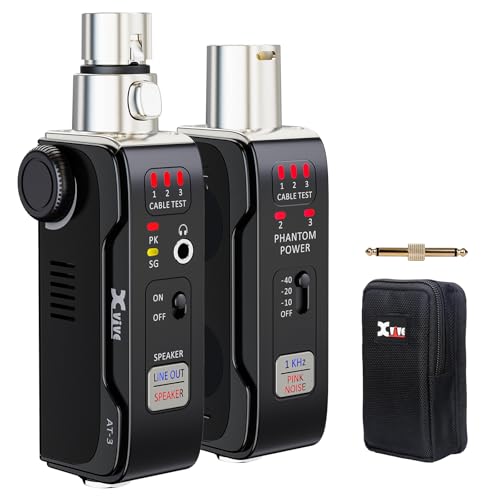
To begin troubleshooting, verify that both the transmitter and receiver are powered on. It’s essential that each unit is plugged in and operational. Check for any indicator lights on both devices—often, a green light signifies a good connection, while a red or blinking light could indicate a fault.
Next, ensure that the transmitter and receiver are properly connected. This includes checking that any necessary audio cables are securely plugged into the correct ports. If using an audio interface or mixer, confirm that the correct output settings are selected.
Physical obstructions can also impede connectivity. Walls, furniture, and other electronic devices can weaken the signal. If possible, reposition the transmitter and receiver, ensuring they have a clear line of sight. Additionally, maintaining a distance of at least three feet between the transmitter and receiver can help improve signal strength.
Resolve Audio Quality Problems

Audio quality problems can significantly diminish the listening experience, leading to distortion, static, or audio dropouts. To address these issues, start by adjusting the volume levels on both the audio source and the receiving device. Sometimes, setting the levels too high can lead to distortion, so finding a balanced setting is crucial.
Next, inspect audio cables for any signs of damage such as fraying or loose connections. Faulty cables can compromise audio quality, so replacing them might be necessary. Also, ensure that the connectors are clean and free from dust or corrosion.
If the audio quality remains poor, consider the environment in which the wireless system is operating. Interference from other electronic devices can introduce noise. Move away any devices that could cause interference, such as microwaves, cordless phones, or Wi-Fi routers.
Minimize Interference
Interference is a critical factor in the performance of wireless audio systems. The crowded frequency spectrum can lead to signal degradation, particularly in urban areas where many devices operate on similar frequencies.
A practical step is to switch the wireless channel on your audio system. Many wireless audio devices allow for channel selection; choose a channel that is less congested. This is particularly important in environments with multiple wireless systems in use.
Additionally, consider the placement of your audio equipment. Keeping other electronic devices away from your audio system can significantly reduce radio frequency interference. Positioning your transmitter and receiver away from metal objects can also help maintain a clear signal.
📋 DATA
Common Issues with Wireless Audio Systems
| # | Problem | Percentage of Users Affected | Common Cause | Resolution |
|---|---|---|---|---|
| 1 | Connectivity Issues | 45% | Obstruction or Power Off | Check Power and Reposition |
| 2 | Audio Quality Problems | 32% | Cable Damage or Overvolume | Adjust Levels and Replace Cables |
| 3 | Interference | 23% | Crowded Frequency | Change Channel |
| 4 | Signal Drops | 15% | Distance or Obstacle | Reposition Devices |
| 5 | Static Noise | 10% | Electrical Interference | Move Away from Electronics |
| 6 | Latency Issues | 8% | Buffering | Adjust Buffer Settings |
| 7 | No Sound | 5% | Power or Connection Issue | Check Connections |
📈 CHART
Interference Sources in Wireless Audio Systems (%)
Update Firmware and Software
Keeping your wireless audio system updated is crucial for optimal performance. Manufacturers often release firmware updates that enhance functionality, fix bugs, and improve security. Therefore, regularly check for firmware updates for your wireless audio devices.
To check for updates, visit the manufacturer’s website or utilize any software associated with your audio system. Install updates as directed, ensuring your system operates with the latest features and improvements.
In addition, ensure your audio playback software is also up to date. Using outdated software can lead to compatibility issues that may affect audio quality or connectivity. Regular updates ensure that your audio system synchronizes well with the latest formats and services.
Perform a System Reset
If persistent issues occur, performing a system reset may be necessary. Resetting your wireless audio devices to factory settings can help clear any configuration errors that might have developed over time. This can often resolve issues that other troubleshooting steps have failed to fix.
Consult the manufacturer’s instructions for the proper reset procedure. Once you have reset the devices, re-pair them to establish a fresh connection. This process can often resolve lingering issues related to connectivity or audio quality.
Utilize External Tools and Resources
Investing in external tools can significantly enhance your troubleshooting capabilities. An audio analyzer or spectrum analyzer can help identify specific frequency issues or interference sources, providing insight into problems that may not be immediately obvious.
Additionally, always consult the user manual or the manufacturer’s website for additional troubleshooting tips specific to your model. Many manufacturers provide comprehensive support resources, including FAQs, forums, and customer service that can assist in resolving more complex issues.
By leveraging these tools and resources, you can effectively diagnose and address the challenges associated with your wireless audio system.
In summary, troubleshooting common issues with wireless audio systems requires a systematic approach. By addressing connectivity, audio quality, interference, updates, resets, and utilizing external resources, you can enhance your audio experience. Should problems persist, consider reaching out to customer support for further assistance or exploring professional help.
Frequently Asked Questions
What are the most common issues with wireless audio systems?
The most common issues with wireless audio systems include signal interference, audio dropouts, and connectivity problems. These issues can be caused by physical obstructions, other electronic devices operating on similar frequencies, or low battery levels in transmitters and receivers. Identifying the source of these problems is crucial for effective troubleshooting.
How can I improve the sound quality of my wireless audio system?
To improve sound quality, ensure that your wireless audio system is properly set up with the correct frequency settings and distance from obstacles. Regularly check for firmware updates from the manufacturer, as these can enhance performance. Additionally, consider using high-quality audio cables and speakers to further boost overall sound clarity.
Why is there a delay in audio transmission from my wireless system?
Audio delay in wireless systems can occur due to latency in the digital signal processing or interference from other wireless devices. To minimize delay, try reducing the distance between the transmitter and receiver, and eliminate any potential sources of interference. Switching to a higher quality wireless system designed for low latency can also resolve this issue.
What should I do if my wireless audio system keeps disconnecting?
If your wireless audio system keeps disconnecting, first check the battery levels of both the transmitter and receiver. Ensure they are fully charged and try repositioning your equipment to reduce obstacles. Additionally, switching to a different wireless channel or frequency may help to maintain a stable connection.
Which wireless audio system is best for live performances?
The best wireless audio system for live performances typically includes features like low latency, robust signal strength, and multiple frequency options. Brands like Shure and Sennheiser are well-regarded for their reliability in live settings. Consider your specific needs, such as range and number of channels, when selecting a system to ensure optimal performance.
References
- Wireless
https://en.wikipedia.org/wiki/Wireless_audio - https://www.ncbi.nlm.nih.gov/pmc/articles/PMC6355092/
https://www.ncbi.nlm.nih.gov/pmc/articles/PMC6355092/ - https://www.sciencedirect.com/topics/engineering/wireless-audio
https://www.sciencedirect.com/topics/engineering/wireless-audio - https://www.bbc.com/future/article/20200720-how-the-wireless-audio-revolution-changed-music
https://www.bbc.com/future/article/20200720-how-the-wireless-audio-revolution-changed-music - https://www.theguardian.com/technology/2021/mar/11/the-wonder-of-wireless-audio
https://www.theguardian.com/technology/2021/mar/11/the-wonder-of-wireless-audio - https://www.nature.com/articles/s41598-021-84326-4
https://www.nature.com/articles/s41598-021-84326-4 - Google Scholar Google Scholar
https://scholar.google.com/scholar?q=troubleshooting+wireless+audio+systems - Google Scholar Google Scholar
https://scholar.google.com/scholar?q=common+issues+with+wireless+audio+systems - Google Scholar Google Scholar
https://scholar.google.com/scholar?q=wireless+audio+system+troubleshooting - Page Not Found – Site Help – Mayo Clinic
https://www.mayoclinic.org/health-information/faq-20058073




One thought on “Troubleshooting Common Issues with Wireless Audio Systems”