
If you want to enhance your TV’s sound quality without splurging on a soundbar, you’re in luck! There are several effective strategies you can apply right now to improve your audio experience. From adjusting your TV settings to utilizing existing speakers and considering acoustic treatments, these practical tips can elevate your viewing pleasure significantly.
Optimize Your TV Settings

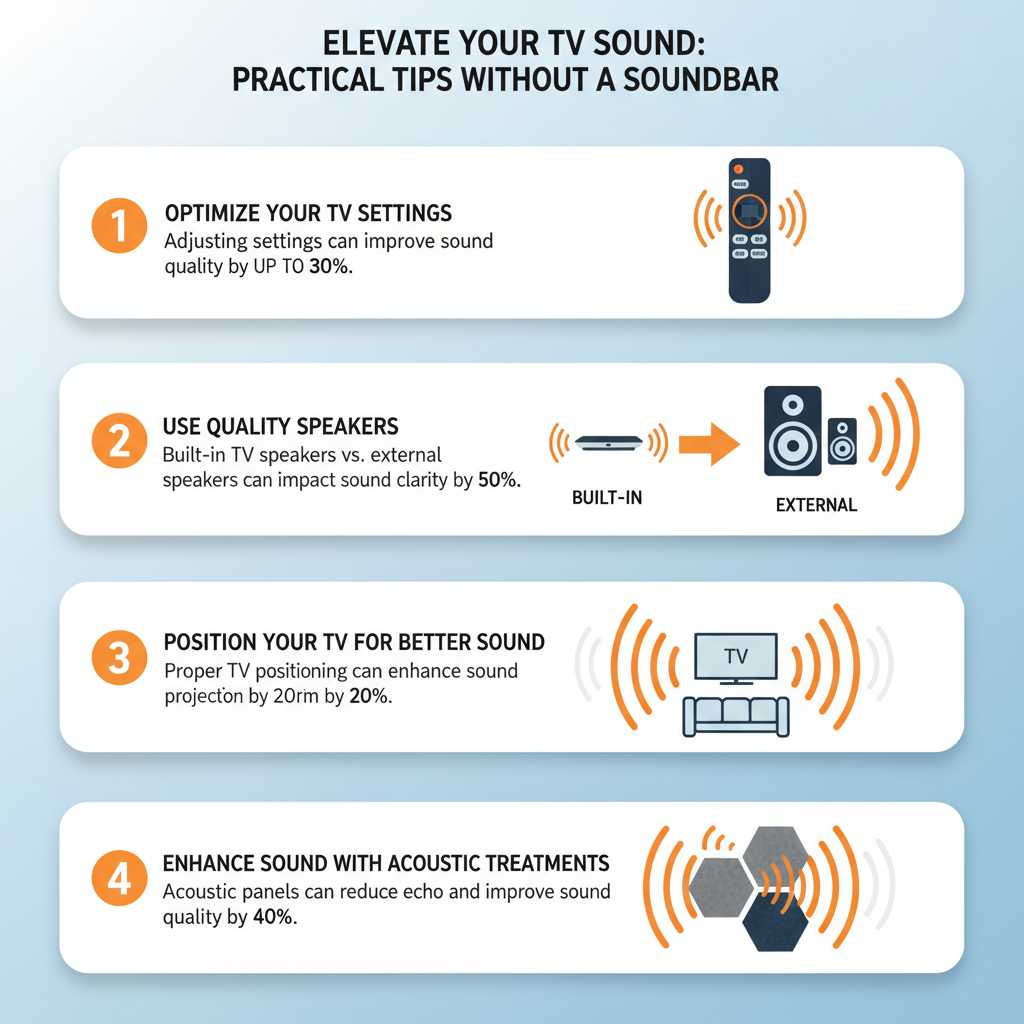
One of the simplest yet most impactful ways to enhance your TV sound is by diving into the audio settings. Most modern TVs come equipped with a variety of sound options, allowing you to customize the audio to fit your room’s acoustics. Start by enabling surround sound if your TV supports it, as this can create a more immersive audio experience. If available, explore the equalizer settings; adjusting frequencies to emphasize bass and treble can make dialogues clearer and background music more engaging.
However, be wary of sound enhancements that might distort the audio. Features like virtual surround sound can sometimes lead to an unnatural soundstage, so it’s often best to turn them off. Instead, aim for a more straightforward audio output, which can provide a clearer and more authentic listening experience. Experiment with these settings until you find a balance that suits your preferences and environment.
Use Quality Speakers

If you have access to external speakers, connecting them to your TV can significantly improve sound quality. Consider using stereo or bookshelf speakers, as these typically offer richer sound than built-in TV speakers. Look for options that fit your budget and space; a decent pair of speakers can provide a fuller sound that enhances music, dialogue, and sound effects during your favorite shows and movies.
When connecting external speakers, you have the flexibility of choosing between wired and Bluetooth connections. If you prefer a clean look without cables, Bluetooth speakers can be a great option, but ensure they have low latency to avoid audio lag. If your space allows, a wired setup often delivers better audio fidelity. No matter your choice, investing in quality speakers can transform your audio experience.
Position Your TV for Better Sound
Believe it or not, the placement of your TV can greatly affect sound quality. Ideally, your TV should be positioned at ear level. If you find yourself craning your neck to see the screen, you’re likely missing out on optimal audio clarity and volume. The distance from the wall can also make a difference; placing the TV too close to a wall can result in muffled sound, while too far can lead to echoing.
Moreover, ensure that speakers are not obstructed by furniture or walls. For instance, a coffee table or large bookcase can block the sound waves, resulting in a less than stellar audio experience. If possible, experiment with the location of both the TV and speakers to find the best acoustics in your room. A little adjustment can go a long way in enhancing your overall TV sound.
Enhance Sound with Acoustic Treatments
Another effective way to improve your TV sound is by enhancing your room’s acoustics. Soft furnishings such as rugs, curtains, and cushions can absorb sound and reduce echoes, creating a more pleasant auditory environment. For example, if your living room has hard floors and bare walls, adding a thick rug and heavy curtains can significantly dampen sound reflections and improve clarity.
For a more permanent solution, consider investing in acoustic panels or soundproofing materials. These can be strategically placed on walls or ceilings to manage sound reflections and improve overall acoustics. While this might involve a bit more effort and expense, it can make a substantial difference in your audio experience over time.
Utilize a Home Theater System
If you already own a home theater receiver, connecting your TV to it can dramatically enhance audio quality. Home theater systems are designed to provide high-quality sound through multiple speakers, allowing for a more immersive experience. Make sure to configure the system properly, optimizing speaker placement for the best surround sound effects. For instance, placing speakers at ear level and ensuring they are equidistant from the main seating area can help create a more balanced soundstage.
Additionally, many home theater systems come with advanced audio processing capabilities that can make a significant difference in sound quality. Explore the settings and options available on your receiver to customize the audio output according to your preferences and room acoustics.
Explore Alternative Audio Solutions
If you’re looking for a more personal listening experience, consider using a gaming headset or high-quality headphones. This can be particularly appealing for late-night viewing when you don’t want to disturb others in the house. Many headsets now come with surround sound features and can connect directly to your TV via Bluetooth or a wired connection.
For those who prefer a wireless setup, investigate wireless audio transmitters that can connect your TV’s audio to other devices like Bluetooth speakers. This technology allows for greater flexibility in how you listen to audio, letting you enjoy a superior sound experience without cluttering your space with equipment.
Maintain Your Equipment
Finally, don’t overlook the importance of maintaining your equipment. Regularly check and clean your TV and speakers to ensure optimal performance. Dust and debris can accumulate and affect sound quality, so a quick wipe-down can make a difference. Additionally, updating the firmware on your TV and connected devices can unlock new audio features and improvements that enhance your overall experience.
Make it a habit to check for updates, as manufacturers often roll out enhancements that can further improve audio fidelity and compatibility with other devices.
Improving your TV sound without a soundbar can be achieved with thoughtful adjustments and the use of existing equipment. By optimizing settings, utilizing quality speakers, and enhancing your room acoustics, you can create a more immersive viewing experience. Start implementing these strategies today for a noticeable upgrade in your audio quality! With just a few changes, you’ll find yourself enjoying your favorite shows and movies in a whole new way.
Frequently Asked Questions
What are some simple ways to enhance my TV sound without a soundbar?
There are several effective ways to improve your TV sound without investing in a soundbar. First, try adjusting the TV’s audio settings, such as enabling surround sound or optimizing equalizer settings to enhance clarity. Secondly, consider using external speakers, like bookshelf speakers or Bluetooth speakers, which can create a more immersive audio experience. Lastly, placing your TV on a solid surface or mounting it at ear level can significantly improve sound quality by reducing echo and improving sound projection.
How can I optimize my TV’s built-in speakers for better sound quality?
To optimize your TV’s built-in speakers, start by ensuring that the TV is positioned properly; mounting it at ear level can help with sound clarity. Additionally, check for any audio settings like ‘Clear Voice’ or ‘Dialogue Enhancement’ that can boost speech intelligibility. Lastly, consider using a sound-absorbing material, such as curtains or rugs, in the room to minimize echo and enhance overall sound quality.
Why does my TV sound muffled, and how can I fix it without a soundbar?
Muffled sound can often stem from poor speaker placement or room acoustics. To fix this issue, ensure that your TV’s speakers are not obstructed by furniture or other objects, and try to position the TV in a way that minimizes sound reflection off hard surfaces like walls. You can also use the TV’s audio settings to adjust for bass and treble levels, which might help to clarify the sound.
What is the best way to connect external speakers to my TV for improved audio?
The best way to connect external speakers to your TV typically depends on the inputs available. Most modern TVs have options like Bluetooth, optical audio output, or 3.5mm headphone jacks. For a wired connection, using an optical cable provides high-quality sound, while Bluetooth speakers offer convenience without the clutter of cables. Always check your TV’s audio output settings to ensure the external speakers are recognized and set as the primary output.
Which audio accessories can I use to boost my TV sound without a soundbar?
There are various audio accessories that can significantly enhance your TV sound without needing a soundbar. A pair of high-quality bookshelf speakers can deliver richer sound and are often more affordable than a soundbar. Additionally, a subwoofer can add depth to your audio experience by providing deeper bass. If you prefer a wireless solution, consider Bluetooth speakers or a home theater system that includes multiple speakers for a surround sound effect.
References
- https://www.pcmag.com/how-to/how-to-improve-your-tv-sound
- https://www.techradar.com/news/how-to-improve-your-tvs-sound
- https://www.howtogeek.com/698632/how-to-improve-your-tv-sound-without-a-soundbar/
- https://www.cnet.com/home/theater/how-to-improve-your-tv-sound-without-a-soundbar/
- https://www.consumerreports.org/tv-sound/how-to-improve-your-tv-sound-a1036398653/