
To enhance your wireless audio range without sacrificing sound quality, consider optimizing your environment, upgrading your equipment, and leveraging technology solutions. This article will explore practical strategies to extend the reach of your wireless audio setup, ensuring you enjoy uninterrupted, high-quality sound wherever you are.



Optimize Your Environment
Creating an optimal environment for wireless audio is crucial for maximizing range and sound quality. The first step is to eliminate physical obstacles. Walls, furniture, and electronic devices can all interfere with the wireless signal, leading to interruptions and degraded audio quality. If possible, try to keep your audio source and receiving devices as unobstructed as possible.
Additionally, positioning your audio source strategically can make a significant difference. Place your transmitter in a central location within the area you wish to cover. This maximizes coverage and minimizes the likelihood of dead zones where the signal may falter. Moreover, consider the height of your devices; elevating your transmitter can help improve line-of-sight connectivity, further enhancing the audio range.
Upgrade Your Equipment
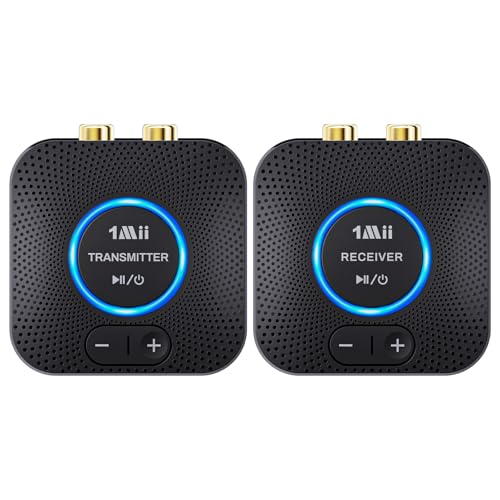
Investing in high-quality transmitters and receivers is a fundamental way to boost your wireless audio range. Look for devices that support advanced audio codecs such as aptX, AAC, or LDAC. These codecs are designed to optimize audio quality while extending range, thus ensuring that you don’t lose sound fidelity even at greater distances.
Another effective upgrade is to consider the use of external or higher-gain antennas. Many modern audio devices allow for antenna upgrades, which can significantly boost signal strength and reach. By enhancing the physical components responsible for transmitting and receiving the audio signals, you can create a more robust wireless audio network.
Utilize Wireless Standards
Choosing the right wireless technology can have a profound impact on your audio experience. Devices that support Bluetooth 5.0 or Wi-Fi 6 offer significantly greater range and performance compared to their predecessors. Bluetooth 5.0 can provide up to four times the range of earlier versions, while Wi-Fi 6 enhances overall network efficiency, allowing for better handling of multiple devices without compromising audio quality.
Implementing a mesh networking system can further enhance your wireless network. Mesh systems consist of multiple nodes that work together to cover larger areas without the dead zones often associated with traditional routers. This technology is particularly useful in larger homes or spaces where you want to ensure consistent audio quality across multiple rooms.
Top Wireless Audio Technologies Compared (2024)
| # | Technology | Max Range (ft) | Audio Quality | Best For |
|---|---|---|---|---|
| 1 | Bluetooth 5.0 | 800 | High | General Use |
| 2 | Wi-Fi 6 | 1500 | Very High | Streaming |
| 3 | Bluetooth 4.2 | 300 | Medium | Limited Use |
| 4 | AptX HD | 600 | High | Audiophiles |
| 5 | LDAC | 900 | Very High | High-End Use |
| 6 | Wired Ethernet | Unlimited | Very High | Best Quality |
Adjust Audio Settings
After optimizing your environment and upgrading your equipment, the next step is to adjust your audio settings for the best performance. Optimizing audio codecs is essential; choose codecs that strike a balance between range and audio fidelity. For example, aptX is excellent for maintaining quality over distance, while AAC is commonly used for Apple devices due to its efficient encoding.
Fine-tuning equalizer settings can also make a notable difference in audio quality. Adjusting bass, midrange, and treble according to your listening preferences can enhance clarity and reduce distortion over longer distances. Experimenting with these settings can help you find the perfect balance tailored to your environment and audio preferences.
Audio Codec Performance by Range and Quality
Explore Signal Boosting Solutions
If you’ve taken steps to optimize your environment and adjust settings but still find your signal lacking, consider exploring additional signal boosting solutions. Wi-Fi range extenders are an effective option. By placing extenders strategically between your audio source and the listening area, you can amplify the signal, extending the range of your wireless audio system.
Dedicated audio transmitters are another excellent choice for enhancing signal strength over longer distances. Some devices are specifically designed to boost audio signals without compromising sound quality. These transmitters can connect directly to your audio source and broadcast to multiple receivers, making them ideal for larger spaces or multiple rooms.
Experiment with Alternative Solutions
In some cases, wired connections may provide superior sound quality without the range limitations associated with wireless technology. If you prioritize audio quality above all else, consider using high-quality cables to connect your audio devices directly. This can eliminate interference and ensure a consistent, high-fidelity listening experience.
Additionally, powerline adapters can be a useful solution for extending audio signals. These devices use your home’s electrical wiring to transmit audio signals, effectively bypassing any wireless interference. They can be particularly beneficial in homes where Wi-Fi signals struggle to penetrate thick walls or multiple floors.
In summary, optimizing your environment, upgrading equipment, utilizing advanced wireless technologies, adjusting audio settings, and exploring signal-boosting solutions are key steps to enhance your wireless audio experience. For more tips and tricks, stay tuned to our blog for the latest in audio technology!
Frequently Asked Questions
What are the best methods to boost wireless audio range without compromising sound quality?
To enhance your wireless audio range, consider using a high-quality wireless audio transmitter with a strong signal strength. Additionally, utilizing range extenders or repeaters specifically designed for audio can help maintain sound quality while increasing coverage. Positioning your audio source away from obstructions and using high-gain antennas can also significantly improve your wireless range.
How can I reduce interference in my wireless audio setup?
To minimize interference in your wireless audio system, keep your audio devices away from other electronic devices that operate on similar frequencies, such as microwaves and Wi-Fi routers. Switching to a less crowded frequency band, like 5GHz, if your system supports it, can also help. Regularly updating firmware and changing channels on your wireless audio system can further reduce signal disruption.
Why does my wireless audio quality drop when I increase the range?
The drop in wireless audio quality when increasing the range is often due to signal degradation over distance or interference from physical barriers. As the distance between your audio source and receiver increases, the signal strength decreases, which can lead to compression artifacts and a loss of clarity. Using higher quality equipment and ensuring a clear line of sight can help mitigate these issues.
Which wireless audio devices are best for long-range performance?
For long-range wireless audio performance, devices that utilize Bluetooth 5.0 or Wi-Fi-based audio systems are ideal, as they offer greater range and stability. Look for models that boast extended range capabilities and high-definition audio support, such as those using aptX HD or LDAC codecs. Brands like Sonos and Bose are known for their effective long-range wireless audio solutions.
What tips can I follow to improve my wireless audio signal strength at home?
To boost your wireless audio signal strength at home, start by placing your audio receiver in a central location, free from walls or obstructions. Consider using a wireless audio extender to enhance the signal and avoid interference from other devices by changing the frequency settings. Additionally, ensure all devices are updated to the latest firmware for optimal performance.
References
- Wireless
https://en.wikipedia.org/wiki/Wireless_audio - https://www.ncbi.nlm.nih.gov/pmc/articles/PMC6462571/
https://www.ncbi.nlm.nih.gov/pmc/articles/PMC6462571/ - https://www.sciencedirect.com/topics/engineering/wireless-audio
https://www.sciencedirect.com/topics/engineering/wireless-audio - https://www.bbc.com/future/article/20201020-how-to-boost-your-wi-fi-signal
https://www.bbc.com/future/article/20201020-how-to-boost-your-wi-fi-signal - https://www.nature.com/articles/s41598-020-69146-5
https://www.nature.com/articles/s41598-020-69146-5 - Google Scholar Google Scholar
https://scholar.google.com/scholar?q=boost+wireless+audio+range - Google Scholar Google Scholar
https://scholar.google.com/scholar?q=improving+wireless+audio+quality - https://www.nytimes.com/2020/05/13/technology/personaltech/wifi-range.html
https://www.nytimes.com/2020/05/13/technology/personaltech/wifi-range.html - https://www.cdc.gov/niosh/topics/telecom/wireless.html
https://www.cdc.gov/niosh/topics/telecom/wireless.html - https://www.britannica.com/technology/wireless-communication
https://www.britannica.com/technology/wireless-communication




One thought on “How to Boost Wireless Audio Range Without Losing Quality”