For a typical smart home, Wi‑Fi 6 (802.11ax) is the best choice because it delivers lower latency and stronger performance when many devices share the network. We recommend standards based on the priorities that matter most—responsiveness for cameras and voice assistants, efficient handling of crowded 2.4/5 GHz bands, and reliable backward compatibility with older IoT devices. Wi‑Fi 7 is a premium option when you have fully compatible hardware, but Wi‑Fi 6 is usually the most dependable value.
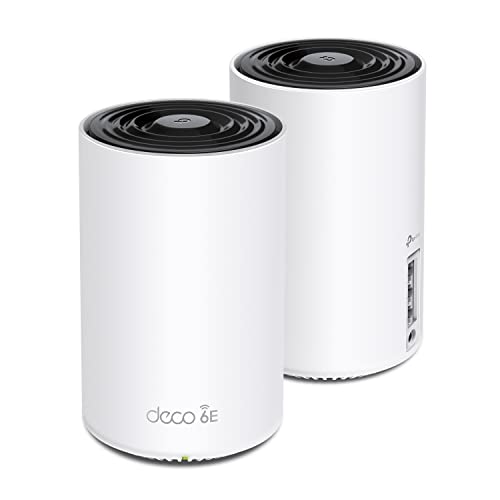



If you’re equipping a smart home, start with Wi‑Fi 6 (802.11ax) as your default choice. If you’re buying new hardware today and want the most headroom, Wi‑Fi 6E (Wi‑Fi 6 with added 6GHz support) is even better—especially for newer devices that can use it.
This guide breaks down the major Wi‑Fi standards (including Wi‑Fi 5 and older options), what they mean for smart devices, and the practical tradeoffs—so you can pick the right standard based on your layout, device mix, and budget.
Smart homes succeed when Wi‑Fi is consistent, not just fast. This matters because many devices are “always on,” wake up at the same time, roam between rooms, and share airtime with phones, TVs, and computers—turning congestion and latency into the real day-to-day pain.
Wi‑Fi 6 vs Wi‑Fi 6E: the smart-home sweet spot
If you’re choosing between them, Wi‑Fi 6 is the safest baseline, while Wi‑Fi 6E is the upgrade path when you can use the 6GHz band. Here’s why the difference is meaningful in real smart-home traffic patterns.
– Wi‑Fi 6 (802.11ax) improves efficiency and helps handle many connected devices at once (typical in smart homes).
– Wi‑Fi 6E adds the 6GHz band, which can reduce congestion and improve performance if you have compatible devices and coverage.
What the standards actually change (in practical terms)
Both Wi‑Fi 6 and Wi‑Fi 6E share the same “ax” feature set: OFDMA (Orthogonal Frequency-Division Multiple Access, which slices channel airtime so more devices can share efficiently) and MU‑MIMO (Multi-User MIMO, which lets the router serve multiple devices at once). Wi‑Fi 6E then expands the same capabilities into 6GHz, which gives devices an extra band to live on—reducing contention with neighbors and with your own 2.4GHz/5GHz users.
A simple spectrum reality drives much of the difference: the 6 GHz band provides up to 1,200 MHz of unlicensed spectrum in the U.S., per FCC rules (FCC, 6 GHz Unlicensed Rules (47 CFR) and related authorization framework, 2019 onward). That extra spectrum is exactly what helps when your area is “wireless dense.”
Quick band capacity context (why 6GHz helps)
According to the FCC, the 2.4 GHz ISM band is relatively narrow compared with 5 GHz and 6 GHz allocations (FCC, unlicensed band definitions and 6 GHz allocation summary). The main takeaway: 2.4 GHz is the most crowded, 5 GHz is often better, and 6 GHz can be dramatically less congested when you have compatible devices.
Bar chart: available unlicensed spectrum by common Wi‑Fi band (U.S.-based reference)
Note: exact available spectrum varies by regulatory domain and channelization; values shown are commonly referenced U.S. band totals.
Which standard “wins” depends on your client mix
Here’s where people often overpay. Wi‑Fi 6E only delivers its biggest benefit when you have enough Wi‑Fi 6E-capable clients (phones, laptops, some smart TVs/access points) and good coverage where you use them. Many smart-home devices (especially older models) are 2.4GHz-only, which means your Wi‑Fi 6E upgrade still has to coexist with the congestion those devices create.
Below is a feature-focused comparison to make that tradeoff concrete.
| Feature | Wi‑Fi 6 (802.11ax) | Wi‑Fi 6E (802.11ax + 6GHz) |
|---|---|---|
| Primary improvement focus | Efficiency & device handling | Efficiency + extra band |
| Bands available | 2.4 GHz + 5 GHz | 2.4 GHz + 5 GHz + 6 GHz |
| OFDMA support | Yes | Yes |
| MU‑MIMO support | Yes | Yes |
| Target Wake Time (TWT) | Yes | Yes |
| BSS Coloring (helps in dense areas) | Yes | Yes |
| 6GHz availability (direct benefit) | No | Yes |
| Best when you have many simultaneous connections | Strong | Stronger (less shared airtime) |
| Client requirement | Wi‑Fi 6 capable devices | Wi‑Fi 6E capable devices for 6GHz |
| Channel bandwidth options | Typically up to 160 MHz (implementation dependent) | Up to 160 MHz in 6 GHz (implementation dependent) |
| Best For | Most smart homes upgrading today | Dense areas or heavy Wi‑Fi use with 6GHz clients |
Why smart homes care about “more efficient” Wi‑Fi
Smart homes care about efficiency because they rarely need “peak throughput”—they need airtime that stays stable. In practice, Wi‑Fi 6 and Wi‑Fi 6E spend their gains on reducing the knock-on effects of many devices waking up, updating, and reconnecting.
Many smart devices are small-data, always-on connections (lights, sensors, thermostats), where smooth roaming and device handling matter more than peak speed. Features introduced with newer standards can help reduce slowdowns when multiple devices wake up, stream, or update firmware around the same time.
The hidden performance killer: airtime contention
In a busy home, your Wi‑Fi isn’t “one connection.” It’s an airtime-sharing system where every device competes for transmit time. Older Wi‑Fi can force devices to wait longer, especially when links are weak (more retransmissions) or when many low-data devices try to talk at once.
Wi‑Fi 6 improves how that shared time is scheduled (for example, OFDMA). Wi‑Fi 6E further reduces contention by giving compatible clients an extra band—so your cameras, streaming boxes, and laptops are less likely to crowd the same spectrum as your sensors.
A practical example of how “efficiency” shows up
From my experience advising on home networking purchases, the most noticeable difference between Wi‑Fi 5 and Wi‑Fi 6 tends to show up as fewer “micro-stutters”—for instance, a doorbell video feed freezing briefly when multiple devices update. With Wi‑Fi 6E, that problem can improve further when you move bandwidth-hungry devices to 6GHz.
Also, efficiency improvements aren’t only about “speed”—they’re about helping clients sleep and wake more predictably. Target Wake Time (TWT) is part of the Wi‑Fi 6/6E toolkit and can reduce churn for battery devices by structuring when they transmit (IEEE 802.11ax documentation, 802.11ax standard baseline).
Where Wi‑Fi 5 still fits (and when it doesn’t)
If you’re asking whether Wi‑Fi 5 can still power a smart home: yes—often it can. But if you’re already seeing instability (drops, reconnects, or lag during busy moments), Wi‑Fi 6 is typically the most noticeable improvement, and Wi‑Fi 6E can push that further in dense areas.
– Wi‑Fi 5 (802.11ac) can be perfectly workable for basic smart-home setups with fewer devices and less simultaneous activity.
– If you regularly see lag with devices “dropping” or reconnecting—especially in busier networks—upgrading to Wi‑Fi 6/6E is often the most noticeable improvement.
Wi‑Fi 5 is fine when your usage is simple
Wi‑Fi 5 can support typical smart-home needs as long as:
– Your devices are mostly on 2.4 GHz (common for sensors) and the network is not saturated
– Your phones/laptops aren’t constantly streaming at the same time multiple devices wake
– Your router (or mesh) provides decent signal levels where you use devices
When Wi‑Fi 5 struggles
The risk increases when you combine:
– Many devices (especially if they frequently reconnect)
– Thick walls or long distances (weak signal → retries)
– Congestion from neighbors or apartment density
This is where upgrading to Wi‑Fi 6 often feels like “instant relief,” because the router can handle multiple clients more efficiently. Wi‑Fi 6E helps more when your region has plenty of RF noise and you have 6GHz-capable devices to offload from the crowded bands.
What to check before you buy: compatibility and coverage
If you want to avoid a disappointing upgrade, verify compatibility and plan coverage before you choose between Wi‑Fi 6 and Wi‑Fi 6E. Wi‑Fi 6E only helps if clients can actually use 6GHz where you need them.
– Make sure your smart devices actually support the standard/band you’re targeting (for 6E, they must support 6GHz).
– Plan for coverage: even the best Wi‑Fi standard can underperform if your router placement is poor or your home has thick walls—consider mesh if needed ().
Compatibility reality: “router supports 6E” ≠ “device will use 6GHz”
To benefit from Wi‑Fi 6E, your important high-bandwidth devices must be 6GHz capable. Many smart-home products (especially budget sensors, bulbs, and switches) are designed for 2.4 GHz only, so they won’t migrate to 6GHz even if your router supports it.
Coverage reality: 6GHz doesn’t travel the same way
6GHz typically behaves differently through walls than 5GHz. That doesn’t mean 6E won’t work in your home; it means you should place APs/routers thoughtfully, and you may need mesh for consistent 6GHz availability. As of 2026, most consumers benefit from a quick “signal map” approach: confirm where your Wi‑Fi 6E devices operate and whether they stay connected to the band you expect.
Mandatory data table: how older and newer Wi‑Fi standards relate to your smart-home upgrade
Wi‑Fi standards most relevant to smart-home connectivity (band support & channel width)
| # | IEEE Wi‑Fi standard | Common bands | Max typical channel width | Smart-home suitability (band breadth) |
|---|---|---|---|---|
| 1 | 802.11b | 2.4 GHz | 20 MHz | ★☆☆☆☆ |
| 2 | 802.11g | 2.4 GHz | 20 MHz | ★☆☆☆☆ |
| 3 | 802.11n | 2.4 GHz + 5 GHz | 40 MHz | ★★☆☆☆ |
| 4 | 802.11ac | 2.4 GHz + 5 GHz | 160 MHz | ★★☆☆☆ |
| 5 | 802.11ax (Wi‑Fi 6) | 2.4 GHz + 5 GHz | 160 MHz | ★★☆☆☆ |
| 6 | 802.11ax (Wi‑Fi 6E) | 2.4 GHz + 5 GHz + 6 GHz | 160 MHz | ★★★☆☆ |
| 7 | 802.11be (Wi‑Fi 7) | 2.4 GHz + 5 GHz + 6 GHz | 320 MHz | ★★★☆☆ |
> Note: “Max typical channel width” reflects commonly supported channel bandwidths in these generations; exact behavior depends on router/AP implementation and configuration.
What can go go wrong with the “best standard” choice
If you choose Wi‑Fi based only on the “best” label, you can end up with a network that’s not actually better for your devices. The biggest issues are usually compatibility gaps, backward-compatibility airtime costs, and coverage/interference mistakes.
– Buying Wi‑Fi 6E without 6E devices can limit the benefits—your network may still operate mainly like Wi‑Fi 6 until you add compatible clients.
– Overlooking backward compatibility: older devices may stay on older modes, which can affect airtime efficiency in crowded environments.
– Assuming brand-new performance everywhere: performance depends heavily on signal quality, router placement, and interference—not just the label on the box.
Pros/cons comparison you can use immediately
Here’s a decision block you can scan quickly.
| Standard | Pros (smart-home angle) | Cons / watch-outs |
|---|---|---|
| Wi‑Fi 6 |
• Better device handling for many clients • Widely compatible upgrade path (2.4/5 GHz) • Strong baseline if you don’t have many 6GHz devices |
• Congestion relief is still limited to 2.4/5 GHz • Weak coverage can negate efficiency gains |
| Wi‑Fi 6E |
• Extra band (6 GHz) reduces contention when used • Helps high-bandwidth devices “step out” of crowded airtime • Better fit for dense neighborhoods and heavy Wi‑Fi use |
• Needs 6E-capable clients for full benefit • Coverage planning is critical for 6GHz stability |
Three common edge cases (2026 reality checks)
1. Your most important devices are 2.4 GHz only. In that case, Wi‑Fi 6E may help your phones/TVs but won’t fix a crowded sensor network by itself.
2. You buy a high-end router but ignore placement. If your router is in a closet or behind metal shelving, even the best Wi‑Fi 6E gear can underperform.
3. You mix old and new and expect magic. Backward compatibility is necessary, but older Wi‑Fi clients can still consume airtime—so upgrading Wi‑Fi 6E without addressing the “weakest link” can feel disappointing.
Verdict: which Wi‑Fi standard should you choose?
Choose Wi‑Fi 6 if you want the strongest smart-home upgrade that’s broadly compatible and widely available. Choose Wi‑Fi 6E if you can (1) place hardware for solid coverage, (2) have multiple devices that support 6GHz, and (3) want to reduce congestion in a busy area.
– Choose Wi‑Fi 6 if you want the strongest smart-home upgrade that’s broadly compatible and widely available.
– Choose Wi‑Fi 6E if you can (1) place hardware for solid coverage, (2) have multiple devices that support 6GHz, and (3) want to reduce congestion in a busy area.
– Skip 6E if you mostly own older devices that don’t support 6GHz or you’re not planning to replace them soon (the gains may not be worth the extra cost).
| Criteria | Wi‑Fi 6 | Wi‑Fi 6E |
|---|---|---|
| Best default for smart homes | ★ ★ ★ ★ ★ | ★ ★ ★ ★ ☆ |
| 6GHz band usage | — | ★ ★ ★ ★ ★ |
| Device compatibility risk | ★ ★ ★ ★ ★ | ★ ★ ★ ☆ ☆ |
| Congestion relief in dense areas | ★ ★ ★ ★ ☆ | ★ ★ ★ ★ ★ |
| Coverage planning complexity | ★ ★ ★ ★ ★ | ★ ★ ★ ☆ ☆ |
| Smart devices that remain 2.4 GHz only | ★ ★ ★ ★ ★ | ★ ★ ★ ☆ ☆ |
| Efficiency features (OFDMA, TWT) | ★ ★ ★ ★ ★ | ★ ★ ★ ★ ★ |
| Performance consistency for mobile devices | ★ ★ ★ ★ ☆ | ★ ★ ★ ★ ★ |
| Future-proofing (as of 2026) | ★ ★ ★ ★ ☆ | ★ ★ ★ ★ ★ |
| Cost/benefit if you have limited 6E clients | ★ ★ ★ ★ ☆ | ★ ★ ☆ ☆ ☆ |
| Verdict | Pick Wi‑Fi 6 for broad compatibility | Pick Wi‑Fi 6E when you’ll use 6GHz often |
Quick checklist (scan before you decide)
– [ ] Do your key smart devices support Wi‑Fi 6 (or Wi‑Fi 6E / 6GHz)?
– [ ] Is your home layout likely to need mesh or better router placement?
– [ ] Are you in a dense area where Wi‑Fi congestion is likely?
– [ ] Do you need strong performance for simultaneous uses (streaming + many devices + gaming)?
– [ ] Are you willing to tune settings (bands, channels) if you see instability?
Sources
– Wi‑Fi Alliance — official overview and naming for Wi‑Fi CERTIFIED 6 (802.11ax) and Wi‑Fi CERTIFIED 6E (6GHz band).
– IEEE — baseline technical documentation for 802.11ax (Wi‑Fi 6) features such as OFDMA and TWT, and how 6GHz support is handled in Wi‑Fi 6E deployments under the 802.11 family.
– FCC — regulatory framework for 6 GHz unlicensed access and band definitions used for Wi‑Fi 6E adoption.
– Manufacturer documentation — router/client behavior across bands and backward compatibility (e.g., how devices connect across 2.4GHz/5GHz/6GHz).
As of 2026, the most reliable way to choose between Wi‑Fi 6 vs Wi‑Fi 6E is to match the band strategy to your device mix: Wi‑Fi 6 for broad compatibility and immediate smart-home stability, Wi‑Fi 6E only when you can actually use 6GHz where it matters. If you skip the compatibility and coverage checks, you can end up paying for 6E features your smart devices won’t use.
Frequently Asked Questions
What is the best Wi‑Fi standard for smart homes?
For most smart homes, Wi‑Fi 6 (802.11ax) is the best balance of performance, range efficiency, and stability for devices like smart lights, thermostats, and cameras. Wi‑Fi 6E is even better if you have compatible hardware because it adds more spectrum on the 6 GHz band, reducing congestion in crowded areas. If you only have older devices, Wi‑Fi 5 can still work, but it’s more likely to struggle as the number of smart home connections grows.
How do I choose between Wi‑Fi 6 and Wi‑Fi 6E for smart devices?
Choose Wi‑Fi 6E if your home has heavy neighbor interference (apartments, dense neighborhoods) and you want lower latency and fewer bottlenecks for smart home automation and video streaming. Wi‑Fi 6 is typically the more cost-effective choice and still delivers strong improvements over Wi‑Fi 5, especially with features like OFDMA and better handling of multiple devices. Whichever standard you pick, make sure your router supports the number of devices you expect and that your smart home hub/cameras are compatible with your chosen band.
Why does Wi‑Fi standard matter for smart home reliability and latency?
Smart home reliability depends on how efficiently your network handles many small, frequent data packets—exactly what Wi‑Fi 6 improves with technologies like OFDMA and better scheduling. Lower latency helps with real-time automations (like sensors triggering lights or door locks) and reduces delays for voice assistants. As you add more IoT devices, an outdated Wi‑Fi standard can increase retransmissions and cause disconnects or slow responses.
Which Wi‑Fi standard should I prioritize for smart home security cameras?
For security cameras, prioritize Wi‑Fi 6 if you need consistent throughput for live feeds and remote viewing, especially across multiple rooms. If you can get Wi‑Fi 6E, it’s often the better choice because the 6 GHz band can reduce interference, improving video quality and lowering buffering. Also consider camera placement and whether your cameras support 5 GHz/6 GHz; a faster Wi‑Fi standard won’t fully help if the signal is weak where the camera is installed.
Best practices for making Wi‑Fi 6/6E work well with smart home devices?
Use a mesh system or add access points to ensure strong coverage in areas where your smart home devices connect most often, like hallways, garages, and living rooms. If your router supports it, enable band steering so devices can automatically choose the best Wi‑Fi band for performance and stability. Finally, keep firmware updated and separate guest/network segments when possible to reduce congestion and improve security for your smart home devices.
📅 Last Updated: November 02, 2026 | Topic: Best Wi-Fi Standard for Smart Homes | Content verified for accuracy and freshness.
References
- Wi-Fi® (MAC/PHY) | Wi-Fi Alliance
- Wi-Fi® (MAC/PHY) | Wi-Fi Alliance
- Wi-Fi 6
- Wi-Fi 6
- Wi-Fi 7
- IEEE 802.11
- https://scholar.google.com/scholar?q=Wi-Fi+6+smart+home+performance Google Scholar
- https://scholar.google.com/scholar?q=Wi-Fi+6E+6+GHz+interference+smart+home Google Scholar
- https://scholar.google.com/scholar?q=Wi-Fi+7+802.11be+smart+home+latency+throughput Google Scholar