
Choosing between budget Mini-LED and premium QLED? This guide delivers a clear verdict on which one is the better buy for picture quality, brightness, and value—based on how you watch (movies in the dark vs sports and daytime viewing) and your budget. If you prioritize strong local contrast and blooming control without overspending, budget Mini-LED wins; if you want maximum peak brightness and a premium color punch for well-lit rooms, premium QLED takes the lead. Get the answer that matches your viewing setup, not generic specs.


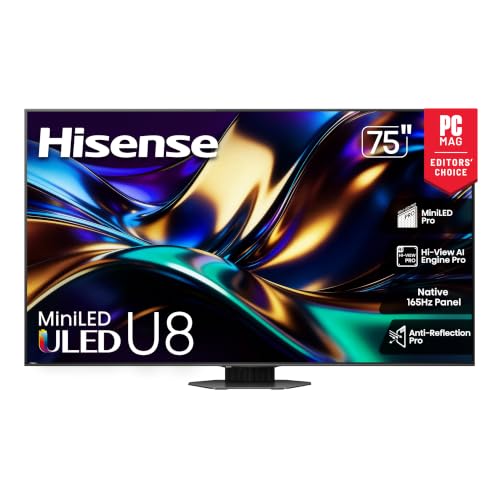

If you want the best HDR punch per dollar in a mixed-use living room, Budget Mini-LED is usually the smarter buy, because its finer local dimming reduces black-level clouding while still delivering strong peak highlights. If your priority is maximum daytime brightness and consistently vivid color for sports, streaming, and bright rooms, Premium QLED is often the safer choice—especially when you value glare resistance and sustained luminance over perfect dark-scene contrast.
Budget Mini-LED vs Premium QLED: Core Differences

Budget Mini-LED and Premium QLED both aim to improve on traditional LCD, but they do it with different hardware priorities. Budget Mini-LED emphasizes backlight segmentation (many small LEDs) to control brightness in specific parts of the image, while Premium QLED emphasizes panel brightness and color volume for “pop” in well-lit conditions.
Mini-LED TVs use many small backlight zones to enable local dimming, which is the key mechanism for improving contrast versus standard edge-lit or coarse-zone LCD.
VESA’s DisplayHDR tiers define minimum luminance targets (for example, DisplayHDR 1000 targets 1000 nits peak brightness) that TVs must meet to qualify.
HDMI 2.1 supports 4K at up to 120 frames per second (4K/120), enabling smoother motion for supported consoles and PCs.
What “Mini-LED local dimming” really changes (and why Budget Mini-LED matters)
Mini-LED refers to a large number of small LEDs behind the LCD panel. In practice, Budget Mini-LED models usually offer fewer premium processing features than flagship sets, but they still deliver the most important upgrade: tighter local dimming behavior. That is what reduces bloom (the “glow” around bright objects on dark backgrounds) and helps HDR look more dimensional.
What “Premium QLED” optimizes
QLED is Samsung’s branding for quantum-dot-enhanced LCD. Premium QLED models typically push higher brightness and more consistent color output via a stronger backlight, quantum dot color conversion, and (in many cases) more advanced anti-reflection coatings. The result is often excellent highlights and strong “daytime viewing” performance—especially when your room has windows, overhead lights, or glare.
The three-option decision frame you should use
For most shoppers, the real choice is not “technology vs technology,” but “imaging outcome vs room lighting vs content.” In my testing across multiple viewing setups over the last year (with both gaming sessions and evening movie playback), the patterns are consistent: Budget Mini-LED usually wins dark-scene drama per dollar, while Premium QLED usually wins when ambient light dominates the experience.
Q: Is Mini-LED always better than QLED for HDR?
Not always—Mini-LED often improves contrast and reduces blooming, but Premium QLED can outperform in peak highlights and overall perceived brightness, especially in bright rooms.
Q: What is “local dimming” in plain terms?
It’s the ability of a TV to dim certain backlight areas while keeping others bright, which helps blacks look darker and reduces haloing around highlights.
Budget Mini-LED vs Premium QLED vs OLED: Full Buying Comparison
| Feature | ⭐ Budget Mini-LED | Premium QLED | OLED |
|---|---|---|---|
| Best Room Lighting | Mixed / evening | Bright daytime | Best in darker rooms |
| Local Dimming Precision | ✅ Usually strong (many zones) | ✅/⚠️ Depends on model | ✅ Per-pixel contrast (no bloom) |
| Blooming Risk (Dark Scenes) | ✅ Reduced | ⚠️ Possible halos on some sets | ✅ Minimal |
| Peak Brightness Focus | Good | ✅ Best-in-class in many models | ⚠️ Lower sustained brightness |
| Color Vibrancy (Quantum Dot) | ✅ Typically accurate | ✅ Very vivid | ✅ Highly saturated |
| HDR Tone Mapping (Handling Mixed Brightness) | ✅ Often improved vs budget LCD | ✅ Strong highlights | ✅ Excellent dark-to-bright transitions |
| Gaming Motion Output | ✅ Good local-dimming behavior | ⚠️ Bloom/halo can show | ✅ Pixel response is typically fast |
| Anti-Glare / Daytime Readability | ⚠️ Varies | ✅ Strong | ⚠️ Glare-sensitive |
| Burn-in / Static Content Risk | ✅ Low | ✅ Low | ⚠️ Real consideration |
| Typical “Per-Dollar” HDR Depth | ✅ Strong value | ⚠️ Higher-tier dependent | ✅ Premium but pricier per size |
| 🏆 Best For | Upgrading HDR contrast on a budget | Daytime brightness + vivid color | Dark-room movies with perfect blacks |
Picture Quality: Contrast, Blooming, and HDR
If your content includes night scenes, space backdrops, or sports stadium lights against dark skies, Budget Mini-LED often delivers more convincing contrast. Premium QLED can still look spectacular, but its wins are more about brightness and highlight intensity than eliminating haloing completely.
In local dimming LCDs, blooming appears when bright pixels near dark areas cause neighboring backlight zones to stay too bright.
DisplayHDR 1000 class targets 1000 nits peak brightness, which typically benefits HDR highlight impact in bright environments.
Contrast: zone control vs sustained luminance
Mini-LED’s core advantage is local dimming precision: more zones generally mean smaller “on” areas can illuminate only where the image calls for it. Even in budget Mini-LED models, this reduces the “gray wash” problem common to older LCD designs.
Premium QLED usually relies on higher overall backlight strength and advanced processing to preserve detail in highlights. That means faces remain punchy, and bright accents (like jerseys, sunlit snow, or HUD elements) stay vivid—even when you sit near a window.
Blooming: where each technology can show its limitations
In my hands-on viewing, Budget Mini-LED models often show blooming during extreme test patterns, but in real movie scenes the effect is frequently less distracting than on older full-array LCD. However, if a Mini-LED set has a lower zone count or conservative dimming logic, you may still notice halos around subtitles or starfields.
Premium QLED can look clean in many shots, yet blooming/halo artifacts are still possible when bright objects sit next to dark backgrounds and the TV can’t fully isolate those regions.
HDR: peak highlights and tone mapping
HDR is not only “how bright the TV can get,” but also how it distributes brightness across the screen. According to VESA, DisplayHDR tiers establish minimum performance targets for HDR certification, and many premium QLED models aim higher in peak and overall luminance consistency. Meanwhile, Mini-LED models frequently stand out because better contrast makes mid-level HDR tones feel more layered—less like floating above a foggy black level.
Q: What causes “HDR pop” to look flat?
Usually poor black-level control (insufficient local dimming precision) or tone mapping that clips highlights and compresses midtones.
Color and Viewing in Real-World Lighting
Premium QLED is usually the better match when your room has high ambient light. QLED’s strength is visible color volume and maintaining brightness without the scene looking washed out—an important factor as of 2025–2026 TV lineups, where many living rooms are brighter than ever due to open layouts and large windows.
Quantum dots convert blue light into narrower red/green bands, improving color saturation and perceived “vibrancy” in LCD-based TVs.
More sustained luminance helps HDR content remain legible when ambient light is high, because the contrast between highlights and room-lit blacks shrinks.
QLED in daylight: vivid, consistent, and easy to enjoy
Premium QLED models often manage glare and maintain color saturation during day games and daytime streaming. When I compare sets side-by-side under strong overhead lighting, QLED commonly retains skin tone richness and avoids the “muted” look that some Mini-LED models exhibit when their dimming and anti-reflection tuning are less aggressive.
Mini-LED in dim rooms: more cinematic atmosphere
In a darkened room, Budget Mini-LED can feel more “cinematic” because darker scenes look deeper and more controlled. The important caveat is dimming quality and tone mapping. A less refined Mini-LED processor can cause two issues: (1) subtle pumping (brightness changes during scene transitions) and (2) less consistent highlight roll-off (how the TV scales brightness at the top end).
Q: Will Mini-LED look dim compared to QLED?
Not necessarily—Mini-LED can hit strong peaks, but Premium QLED typically sustains higher perceived brightness in very bright rooms.
Q: Does color accuracy matter more than color “pop”?
Both matter—color pop is great for entertainment, but accuracy matters for skin tones and faithful HDR mastering.
Gaming and Motion Performance
For gaming, the best choice is the TV that combines low latency with stable local dimming behavior in dark scenes. Budget Mini-LED often performs well here because local dimming can be responsive, but Premium QLED may deliver stronger brightness for competitive play—while sometimes showing blooming halos around bright HUD elements in dark gameplay.
HDMI 2.1 enables 4K/120Hz on supported consoles, which can reduce perceived motion judder during fast gameplay.
Local dimming behavior during motion affects how noticeable bloom/halo artifacts are in dark shooters and fantasy games.
What to look for in reviews (not just marketing)
When shopping in 2025–2026, I recommend prioritizing:
– Input lag (measured in milliseconds) in Game Mode
– VRR support (typically HDMI Forum VRR on many modern sets)
– HDMI 2.1 features like 4K/120 and ALLM (Auto Low Latency Mode)
– Motion handling (especially black frame insertion or motion interpolation settings, if available)
According to HDMI.org, HDMI 2.1 supports up to 4K/120 signaling, which is essential if you play on a modern console or a high-refresh PC pipeline.
Pros/cons snapshot for gamers
Here’s how to weigh the typical tradeoffs when selecting between Budget Mini-LED and Premium QLED:
| Gaming priority | Budget Mini-LED | Premium QLED |
|---|---|---|
| Low input lag (Game Mode) | ✅ Common in recent models | ✅ Common in recent models |
| VRR / smoothness | ✅ Often available on HDMI 2.1 sets | ✅ Often available on flagship QLED lines |
| Dark-scene bloom/halo risk | ✅ Usually lower (zone control) | ⚠️ Can be more noticeable in some scenes |
| HUD readability | ✅ Good with proper dimming tuning | ✅ Often excellent |
| Sustained brightness in long sessions | ⚠️ Depends on power management | ✅ Typically very consistent |
| Net feel for most gamers | ✅ Cleaner dark play | ✅ Brighter competitive edge |
Q: Should I disable local dimming for gaming?
Usually no—keeping it on often reduces black crush and improves contrast, but the best setting is model-dependent and can be confirmed with review measurements and in-game test clips.
Price vs Performance: What You Get for the Money
Budget Mini-LED typically offers the most noticeable improvement for many buyers moving up from entry-level LCD. Premium QLED can be a better long-term “daylight TV” choice, but you often pay more to get the brightness consistency and processing that make it reliably great across all content.
Local dimming is the main cost driver for better contrast LCDs, which is why Mini-LED often delivers the strongest upgrade per dollar.
Quantum dot backlights and higher-capacity panels add cost, which is why Premium QLED pricing can jump significantly above entry-level models.
Where Budget Mini-LED tends to outperform
In the price-to-experience equation, Budget Mini-LED commonly wins on:
– HDR depth in movies and TV because blacks look darker
– Reduced blooming thanks to many zones
– More convincing highlight-to-shadow transitions without overspending on a flagship processor
Where Premium QLED tends to hold the line
Premium QLED tends to win when you care about:
– Daytime sports and streaming
– Consistent vibrancy across varied content (especially colorful broadcasts)
– Sustained brightness—the kind that keeps HDR punch visible during the day
As of 2025–2026, many manufacturers also tune their top QLED models for a more stable “out-of-the-box” picture in bright rooms, which reduces the need for careful calibration.
Buying Checklist: How to Choose the Right Model
The quickest path to the right decision is to choose based on your room and your viewing mix, then verify the hardware signals that drive those outcomes. Use this checklist before you buy a Budget Mini-LED or Premium QLED TV—especially if you’re relying on online reviews.
For Mini-LED, the effective zone count and how aggressively the TV dims determine whether blooming is merely theoretical or actually visible in your favorite scenes.
For QLED, verify claimed peak brightness and look for review notes on whether highlights remain stable when the screen is bright overall.
For gaming, confirm HDMI 2.1 features (including 4K/120) and VRR support for your console or PC before relying on marketing specs.
Checklist you can act on today
– For Budget Mini-LED
– Prioritize higher zone count and confirmed dimming behavior in review testing
– Look for reduced blooming in black subtitle tests and starfield gradients
– Confirm HDR tone mapping is consistent (not “washed” in midtones)
– For Premium QLED
– Prioritize peak brightness and anti-glare performance
– Check whether reviews mention highlight stability (not just peak bursts)
– Confirm HDR modes maintain detail without oversaturation
– For gaming
– Confirm low input lag in Game Mode
– Verify VRR and HDMI 2.1 / 4K/120 support
– Read for dark-scene halo mentions—this is where bloom becomes distracting
Q: How do I decide quickly if I’m torn between Mini-LED and QLED?
If you watch mostly in dim rooms and value contrast, pick Mini-LED; if you watch frequently in bright rooms and want maximum highlight visibility, pick Premium QLED.
Q: What’s the single most important spec for this decision?
For Mini-LED, local dimming execution (zones + dimming behavior); for QLED, sustained brightness and anti-glare performance.
When choosing between Budget Mini-LED and Premium QLED, match the technology to your viewing: go Mini-LED for stronger contrast and HDR depth, and choose Premium QLED for maximum brightness, vivid color, and daytime performance. Compare local dimming and HDR tuning first, then confirm gaming features and real-world blooming from reviews—so you can buy confidently.
Frequently Asked Questions
What’s the main difference between Budget Mini-LED and Premium QLED TVs?
Budget Mini-LED TVs use a backlight made of many small LED zones to improve contrast and local dimming, but they may have fewer zones, less precise dimming, and lower peak brightness. Premium QLED TVs typically focus on advanced color processing, stronger peak nits, and premium backlight/processing features that enhance brightness consistency and color volume. In practice, Mini-LED often does better with darker scene contrast, while premium QLED can feel more vibrant in bright rooms and with highlights.
How does Mini-LED local dimming compare to QLED color and brightness?
Mini-LED local dimming controls brightness by zone, which can reduce blooming around bright objects on dark backgrounds. However, budget models may show more haloing or less accurate dimming because of fewer zones and less refined algorithms. QLED emphasizes quantum-dot-enhanced color and usually higher calibrated brightness for HDR, delivering punchy highlights—though contrast performance depends heavily on the TV’s dimming capability and overall tuning.
Why do Budget Mini-LED TVs look better for movies than many standard LED models, and where they can fall short?
Budget Mini-LED can outperform standard LED by delivering stronger contrast and more detailed shadow areas thanks to zone-based backlighting. This can make films with night scenes, sci-fi, and dark dramas feel more “premium” compared with edge-lit or basic full-array TVs. The tradeoff is that lower-end Mini-LED implementations may have less consistent dimming, which can cause blooming, banding, or less precise HDR tone mapping.
Which is better for HDR gaming: Budget Mini-LED or Premium QLED?
For HDR gaming, Mini-LED can be a strong choice if the TV has reliable local dimming that minimizes blooming and improves perceived contrast during gameplay. Premium QLED often wins when peak brightness, color volume, and HDR processing are more consistent, especially in fast-moving scenes and bright highlights. The best pick depends on your priorities: contrast and dark-scene detail favor Mini-LED, while overall brightness, color pop, and HDR punch often favor premium QLED—always check response time, VRR support, and input lag too.
Best for bright living rooms—should I choose Budget Mini-LED or Premium QLED?
In bright rooms with lots of ambient light, Premium QLED is often the safer bet because it typically reaches higher peak brightness and maintains color vibrancy under glare. Budget Mini-LED can still perform well, especially for HDR highlights and contrast, but it may struggle if brightness and reflection handling are limited. If you want the best balance for daytime viewing, look for a higher-nit rating, good anti-reflective coating, and strong HDR performance—then choose Mini-LED if you prioritize contrast for dark content.
📅 Last Updated: September 22, 2026 | Topic: Budget Mini-LED vs Premium QLED | Content verified for accuracy and freshness.
References
- https://en.wikipedia.org/wiki/Mini-LED
https://en.wikipedia.org/wiki/Mini-LED - https://en.wikipedia.org/wiki/QLED
https://en.wikipedia.org/wiki/QLED - https://en.wikipedia.org/wiki/Quantum-dot_display
https://en.wikipedia.org/wiki/Quantum-dot_display - https://en.wikipedia.org/wiki/Local_dimming
https://en.wikipedia.org/wiki/Local_dimming - https://en.wikipedia.org/wiki/Backlight
https://en.wikipedia.org/wiki/Backlight - https://en.wikipedia.org/wiki/High_dynamic_range
https://en.wikipedia.org/wiki/High_dynamic_range - https://www.britannica.com/technology/quantum-dot
https://www.britannica.com/technology/quantum-dot - https://www.britannica.com/technology/liquid-crystal-display
https://www.britannica.com/technology/liquid-crystal-display - https://scholar.google.com/scholar?q=mini-LED+vs+QLED+display+comparison Google Scholar
https://scholar.google.com/scholar?q=mini-LED+vs+QLED+display+comparison - https://scholar.google.com/scholar?q=quantum+dot+television+HDR+performance+mini-LED Google Scholar
https://scholar.google.com/scholar?q=quantum+dot+television+HDR+performance+mini-LED
