
Cleaning your speakers is vital for keeping the sound quality at its best. Regular maintenance removes dust and grime that can muffle sound, allowing you to fully enjoy your music, movies, or gaming sessions. In this article, we’ll explore effective methods and tips to clean your speakers properly, ensuring they deliver the clear, crisp audio you desire.



Understanding the Importance of Speaker Maintenance

Regular cleaning is essential for prolonging the life of your speakers and maintaining optimal sound quality. Over time, dust, dirt, and even pet hair can accumulate on the speaker surfaces and inside the components, leading to distortion and muted sounds. A clean speaker not only sounds better but also looks better, enhancing your overall audio setup. By understanding the importance of speaker maintenance, you can take proactive steps to ensure your audio equipment remains in top condition, allowing you to enjoy your favorite tunes without interruption.
Tools You’ll Need for Cleaning
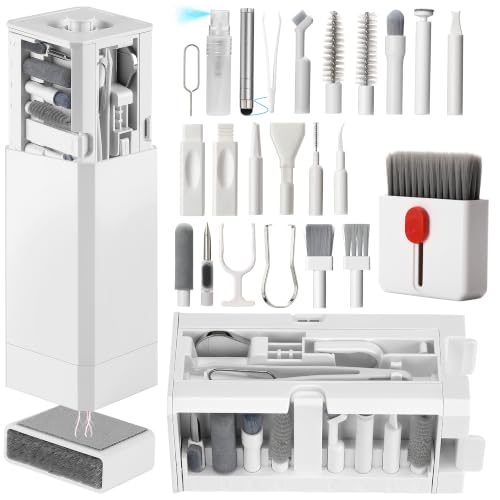
Before diving into the cleaning process, it’s important to gather the right tools. Here’s a short list of essential items you’ll need:

– Soft Microfiber Cloths: These are perfect for wiping down surfaces without scratching them. Avoid using paper towels or rough fabrics that could damage the finish of your speakers.
– Compressed Air Cans: These are invaluable for removing dust from hard-to-reach areas, such as speaker vents and behind grilles. The powerful air blast can dislodge debris without requiring direct contact.
– Small Brushes: A soft-bristled brush can help remove dust from delicate components if you’re cleaning internal parts.
– Vacuum with Brush Attachment: This can be useful for cleaning around the base of your speakers or in corners where dust tends to collect.
Having these tools on hand will make your cleaning process smoother and more effective.
Step-by-Step Cleaning Process for Different Speaker Types
Different types of speakers may require tailored cleaning approaches. Here’s a step-by-step breakdown for some common speaker types:
– For Bookshelf Speakers: Start by unplugging the speakers to ensure safety. Use a microfiber cloth to gently wipe down the exterior surfaces and grilles. If the grilles are removable, take them off and clean them separately with a soft brush or vacuum. Be gentle to avoid damaging the fabric.
– For Subwoofers: These can collect dust in their vents and openings. Use a vacuum with a brush attachment to carefully clean around the vents. For the exterior, a microfiber cloth will work wonders. Ensure that you avoid any water or liquid cleaners, as subwoofers can be particularly sensitive to moisture.
– For Home Theater Systems: Focus on cleaning both the satellite speakers and the central speaker unit. Use compressed air to remove dust from the small openings, and be sure to wipe down the surfaces with a microfiber cloth.
Make sure to follow manufacturer-specific guidelines if available, as different brands might have unique recommendations.
Cleaning Speaker Grilles and Covers
Speaker grilles and covers can attract a lot of dust and dirt, which can impact sound quality.
– Detachable Grilles: If your speakers have removable grilles, these can often be washed with mild soap and water. Use a soft sponge to gently scrub them, then let them air dry completely before reattaching them to avoid moisture damage.
– Non-Detachable Grilles: For speakers with non-detachable grilles, use a damp cloth or a soft brush to gently wipe away dust and grime. Be careful not to push debris further into the speaker, as this could affect the sound output.
Regular cleaning of your grilles ensures that you don’t miss out on any audio detail, as even a thin layer of dust can muffle high frequencies.
Addressing Internal Speaker Components
If you feel comfortable and have experience, you can take your cleaning a step further by accessing the internal components of your speakers.
– Removing Speaker Drivers: If you can safely and easily remove the speaker drivers, this is a great opportunity to clean the inside. Use a dry microfiber cloth or a soft brush to gently wipe away any dust or debris. Be sure to handle the components with care, as they are delicate.
– Avoiding Liquids: When cleaning internal parts, avoid using any liquids directly. Instead, focus on dry methods like using a vacuum with a brush attachment or a soft cloth to prevent any moisture-related damage.
If you’re not comfortable with this step, it’s perfectly fine to stick to the external cleaning methods.
Tips for Maintaining Clean Speakers Long-Term
To keep your speakers looking and sounding their best, consider implementing these long-term maintenance tips:
– Placement Matters: Position your speakers in areas that are less prone to dust accumulation. Keeping them away from vents or windows can significantly reduce the amount of dust that settles on them.
– Covers and Cases: Use speaker covers when your speakers are not in use. This will protect them from dust and accidental spills.
– Regular Cleaning Schedule: Incorporate speaker cleaning into your regular household cleaning routine. A quick wipe down every month or so can make a big difference in maintaining sound quality.
– Monitor Environment: If you have pets or live in a particularly dusty area, consider more frequent cleaning. It’s better to clean a little often than to let dirt build up over time.
By following these tips, you’ll help ensure that your speakers remain in optimal condition for years to come.
Troubleshooting Common Speaker Issues
Sometimes, despite regular cleaning, you may still experience sound quality issues. Here are some troubleshooting tips:
– Identify the Source of the Problem: If the sound is distorted, check to see if there’s any visible dust buildup or if the cables are securely connected. Sometimes, simply unplugging and re-plugging your speakers can resolve connectivity issues.
– Check for External Factors: Ensure that the issue isn’t coming from the audio source itself. Try different devices or tracks to see if the problem persists.
– Know When to Seek Help: If after cleaning your speakers you still experience issues, it might be time to consult a professional technician. They can diagnose and fix problems that require more than just a cleaning.
By understanding common problems and their solutions, you’ll be better equipped to enjoy your audio experience without interruptions.
Keeping your speakers clean is crucial for achieving the best sound experience possible. By following the steps outlined in this article, you can ensure your audio equipment remains in excellent condition. Regular maintenance not only enhances sound clarity but also prolongs the life of your speakers. Start cleaning today and revel in the improved sound quality of your favorite music, movies, and games!
Frequently Asked Questions
What are the best methods to clean speaker grilles without damaging them?
To clean speaker grilles effectively, start by using a soft brush attachment on your vacuum cleaner to remove loose dust and debris. For more stubborn grime, lightly dampen a microfiber cloth with a mixture of mild soap and water, ensuring it’s not soaking wet, and gently wipe the grille surface. Always avoid harsh chemicals or abrasive materials, as they can damage the finish and sound quality of your speakers.
How often should I clean my speakers to maintain optimal sound quality?
It’s recommended to clean your speakers every few months, or more frequently if you notice a buildup of dust or debris. Regular maintenance not only enhances sound quality by preventing distortion but also prolongs the life of your speakers. For environments with pets or heavy dust, consider cleaning monthly to keep your speakers in top shape.
Why is it important to clean the cone and surround of my speakers?
Cleaning the cone and surround of your speakers is crucial because dust and dirt can dampen sound quality and cause unwanted vibrations. These components are essential for producing clear audio, and any obstruction can lead to a muffled sound. Regular cleaning ensures that your speakers perform at their best, providing a richer listening experience.
Which cleaning products are safe to use on my speaker cabinet?
For your speaker cabinet, it’s best to use a gentle cleaning solution specifically designed for electronics, or a mixture of mild soap and water. Avoid using alcohol-based cleaners, as they can strip finishes or damage wood. Always test any cleaner on a small, inconspicuous area first to ensure it won’t harm the surface.
How can I safely clean the internal components of my speakers?
Cleaning the internal components of your speakers should be approached with caution, as improper handling can lead to damage. If you feel confident, open the cabinet and use a soft brush or compressed air to remove dust. However, it’s often best to leave internal cleaning to professionals, especially if you’re not experienced, as they can ensure that your speakers are serviced without risking harm.
References
- Loudspeaker
- https://www.soundguys.com/how-to-clean-your-speakers-17617/
- https://www.gramophone.co.uk/advice/how-to-clean-your-loudspeakers
- https://www.techhive.com/article/3258929/how-to-clean-your-speakers.html
- https://www.audioholics.com/how-to/cleaning-your-speakers
- https://www.cnet.com/how-to/how-to-clean-your-speakers/
- https://www.essentialhomeandgarden.com/how-to-clean-speakers/
- https://www.lifewire.com/how-to-clean-a-speaker-1846989
- https://www.hifiengine.com/manuals/pioneer/speaker-cleaning.shtml
