Audio lag in wireless sound systems can be frustrating, but there are several effective ways to troubleshoot and resolve this issue. By adjusting settings, optimizing your environment, and ensuring compatibility, you can significantly reduce audio delay. This guide will walk you through the steps to diagnose and fix audio lag in your wireless setup.



Understanding Audio Lag
Audio lag refers to the delay between the audio signal being transmitted and the sound being heard. This latency can severely impact your listening experience, especially when watching movies, playing video games, or during live performances. In scenarios where sound and video must be synchronized, even a fraction of a second can lead to noticeable discrepancies, detracting from the overall enjoyment.
Common causes of audio lag in wireless sound systems include the quality and type of connection, the processing speed of devices involved, and environmental factors. For instance, Bluetooth devices often experience more latency compared to Wi-Fi-based systems due to the inherent limitations in their technology. Additionally, interference from other wireless devices, improper configuration, and outdated software can exacerbate the problem.
Check Your Wireless Signal
A strong and stable wireless signal is crucial for optimal audio performance. Begin by ensuring that your audio source and speakers are positioned correctly. Ideally, they should be within close proximity and in line of sight, minimizing obstacles that could hinder the signal.
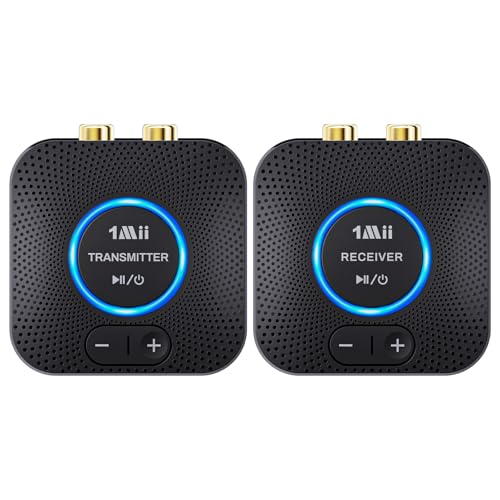
Interference from other electronic devices can also disrupt your audio quality. Devices such as microwaves, cordless phones, and even Wi-Fi routers can create interference. Consider moving your wireless sound system away from these potential sources of disruption or switching to a less congested frequency band if your system allows for it.
Update Firmware and Software
Keeping your sound system and connected devices updated is essential for optimal performance. Firmware updates often include improvements to audio processing, which can significantly reduce lag. Manufacturers regularly release updates to address known issues and enhance compatibility with new devices.
To check for updates, consult the manufacturer’s website or the device settings directly. For example, many modern sound systems have built-in update functionalities that can easily be accessed through their companion apps or settings menus. Regular maintenance, including these updates, will help ensure you are getting the best performance from your devices.
Adjust Audio Settings
Most modern audio devices come equipped with settings that can help you manage audio sync issues. Explore your device’s audio settings for options like audio delay or lip-sync adjustments. These settings allow you to fine-tune the timing of audio playback to match video output, minimizing the perception of lag.
Additionally, experimenting with different audio formats can also yield improvements. Some devices may perform better with specific formats, such as PCM or Dolby Digital. Testing various settings can help you find the optimal configuration for your particular setup.
Top Causes of Audio Lag in Wireless Sound Systems
| # | Cause | Impact on Lag | Solution |
|---|---|---|---|
| 1 | Poor Wireless Signal | High | Reposition Devices |
| 2 | Interference from Other Devices | Medium | Minimize Electronic Clutter |
| 3 | Outdated Firmware | High | Update Software Regularly |
| 4 | Improper Audio Settings | Medium | Adjust Audio Settings |
| 5 | Network Congestion | High | Optimize Network Usage |
| 6 | Device Compatibility Issues | Medium | Check Device Specifications |
| 7 | Audio Format Limitations | Medium | Experiment with Formats |
Optimize Your Network
Network performance can significantly impact the quality of your wireless sound system. For best results, consider using a dedicated Wi-Fi network specifically for your audio devices. This can greatly reduce congestion and improve overall performance.
If possible, connecting your sound system through a wired connection can eliminate latency issues altogether. While this may not be feasible for all setups, using Ethernet connections for critical audio setups can ensure maximum reliability and performance.
Test with Different Devices
To isolate the source of audio lag, connect different devices to your sound system. For example, if you experience lag while streaming from a smart TV, try using a smartphone or tablet to see if the problem persists. This will help you determine whether the issue lies with the audio source or the sound system itself.
There are also various troubleshooting apps available that can analyze audio performance across different devices. Utilizing these tools can provide insights into latency issues and help you find the best configuration for your setup.
Consult Manufacturer Support
If you’ve gone through the troubleshooting steps and still experience audio lag, don’t hesitate to reach out to the manufacturer’s customer support. They can provide specific guidance tailored to your model and help resolve any persistent issues.
Additionally, online resources, FAQs, and user forums can be invaluable. Many users share their experiences and solutions, which can offer new insights or approaches to troubleshooting your audio lag problems.
Audio Lag Testing Results Across Different Devices
By following these steps, you can effectively troubleshoot audio lag in your wireless sound systems and enhance your listening experience. Make sure to implement the solutions that fit your situation best, and don’t hesitate to seek professional help if the problem persists. By staying proactive with your setup, you can enjoy a seamless audio experience that maximizes the capabilities of your wireless sound system.
Frequently Asked Questions
What causes audio lag in wireless sound systems?
Audio lag in wireless sound systems can be caused by various factors, including signal interference from other wireless devices, the distance between the audio source and the receiver, and the processing time required for digital signals. Additionally, lower-quality transmitters and receivers may introduce more latency, leading to noticeable delays in sound playback.
How can I reduce audio lag when using Bluetooth speakers?
To reduce audio lag with Bluetooth speakers, ensure that both your device and the speaker support low-latency codecs like aptX Low Latency. Keeping the devices close together can also help minimize delays, and avoiding physical obstructions or sources of interference, such as Wi-Fi routers, can further enhance audio synchronization.
Why is there a delay between video and audio when streaming?
A delay between video and audio during streaming often occurs due to the processing time required for encoding and decoding the audio/video signals. Additionally, network latency and buffering can contribute to this issue, especially if you’re using wireless connections. To improve synchronization, try connecting via a wired connection or adjusting the audio delay settings in your streaming app.
What is the best way to troubleshoot audio lag in a home theater system?
To troubleshoot audio lag in a home theater system, first check your connections to ensure all cables are secure and functioning properly. Next, review the audio delay settings on your receiver or TV, as many devices allow you to adjust the sync between video and audio. Lastly, consider updating the firmware of your devices to ensure optimal performance.
Which devices are most prone to audio lag in wireless sound systems?
Devices most prone to audio lag in wireless sound systems include older Bluetooth speakers, low-end wireless headphones, and devices using basic Wi-Fi connections. Additionally, televisions with built-in Bluetooth capabilities may experience latency, especially if they are not equipped with advanced audio processing features. Upgrading to newer, higher-quality devices can help reduce the likelihood of audio lag.
References
- https://www.lifewire.com/how-to-fix-wireless-speaker-lag-4687563
https://www.lifewire.com/how-to-fix-wireless-speaker-lag-4687563 - https://www.researchgate.net/publication/334758309_Troubleshooting_Audio_Lag_in_Wireless_Sound_Systems
https://www.researchgate.net/publication/334758309_Troubleshooting_Audio_Lag_in_Wireless_Sound_Systems - Google Scholar Google Scholar
https://scholar.google.com/scholar?q=How+to+Troubleshoot+Audio+Lag+in+Wireless+Sound+Systems - Google Scholar Google Scholar
https://scholar.google.com/scholar?q=Audio+Latency+Wireless+Sound+Systems - Google Scholar Google Scholar
https://scholar.google.com/scholar?q=Wireless+Audio+Technology+Troubleshooting - https://en.wikipedia.org/wiki/Special:Search?search=How+to+Troubleshoot+Audio+Lag+in+Wireless+Sound+Systems
https://en.wikipedia.org/wiki/Special:Search?search=How+to+Troubleshoot+Audio+Lag+in+Wireless+Sound+Systems - https://www.ncbi.nlm.nih.gov/search/research-articles/?term=How+to+Troubleshoot+Audio+Lag+in+Wireless+Sound+Systems
https://www.ncbi.nlm.nih.gov/search/research-articles/?term=How+to+Troubleshoot+Audio+Lag+in+Wireless+Sound+Systems