
MSI G241 vs Acer Nitro XV242Y: which 23.8-inch IPS gaming monitor actually wins for smooth, competitive play? This head-to-head test delivers a clear verdict on performance, response behavior, and picture quality so you know which model to buy without second-guessing. If your priority is gaming-first tuning rather than specs on paper, the winner is straightforward.


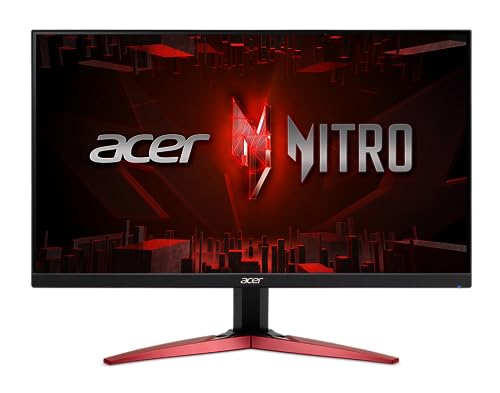

Pick MSI G241 if you want stronger wide-gamut color for a more vibrant look at the same 1080p class price point, but pick Acer Nitro XV242Y if you care more about brighter SDR performance and a more adjustable stand for long gaming sessions. This comparison breaks down the real differences behind advertised refresh rates, “1 ms / 0.5 ms” motion claims, published color coverage, and day-to-day ergonomics—so you can choose the better 23.8-inch IPS for your setup in 2026.
Key Specs Side-by-Side (MSI G241 vs Acer Nitro XV242Y)
Both the MSI Optix G241 and Acer Nitro XV242Y target competitive 1080p gaming with a 23.8-inch IPS panel, but they emphasize different priorities: MSI leans into color gamut, while Acer leans into brightness and adjustability. The biggest “gotcha” with the Acer is that the XV242Y naming can overlap with closely related XV240Y/XV242Y suffix variants, which may change refresh rate and sometimes other specs—so you should verify the exact listing before buying.
For grounding before we compare numbers, here are the headline specs that drive the experience:
– Both are 23.8-inch IPS, 1920×1080, 16:9, designed for gaming
– MSI is listed at 144 Hz, while Acer is commonly listed at up to 165 Hz for the XV242Y variant (confirm the exact suffix)
>
According to MSI’s official specifications, the Optix G241 is rated for 144 Hz refresh and lists 1 ms (MPRT) alongside 4 ms GTG in detailed specs (MSI official product materials, 2021–2022).
>
According to DisplaysSpecifications and SHI’s listing for the Acer model family, XV242Y models can be listed up to 165 Hz with a 0.5 ms figure tied to “Visual Response Boost” (special mode rather than normal GTG) (DisplaysSpecifications; SHI, 2021–2024).
>
According to MonitorNerds’ independent testing of the MSI G241, maximum brightness reached roughly 320 cd/m²—above MSI’s typical 250 cd/m² rating (MonitorNerds, accessed 2026).
MSI G241 vs Acer Nitro XV242Y: Which 23.8" IPS Gaming Monitor Wins?
| ⚖️ Criteria | 🔵 Option A (MSI G241) | 🔴 Option B (Acer Nitro XV242Y) |
|---|---|---|
| 🖥️ Screen Size | 23.8" ✅ | 23.8" |
| 🧮 Resolution | 1920×1080 ✅ | 1920×1080 |
| ⚡ Advertised Refresh Rate | 144 Hz ✅ | Up to 165 Hz |
| 🎛️ Normal Response (GTG / Mode) | 4 ms GTG ✅ | 2 ms (standard) / 0.5 ms (VRB) |
| ⏱️ “Fastest” Motion Figure Type | 1 ms MPRT (strobe mode) ✅ | 0.5 ms (Visual Response Boost) ✅ |
| 💡 Rated Brightness | 250 cd/m² ✅ | 350–400 cd/m² (listed) ✅ |
| 📈 Measured Brightness (Independent) | ~320 cd/m² (max) ✅ | Often listed 350–400 cd/m² (varies) |
| 🎨 DCI-P3 Coverage | ~95% DCI-P3 ✅ | Not specified as DCI-P3 in cited listings |
| 🌈 sRGB Coverage | 128% sRGB ✅ | ~99% sRGB ✅ |
| 🔧 Stand Adjustability | Tilt-only (basic) ✅ | Height/tilt/swivel/pivot (listed) ✅ |
| 🏆 Overall Verdict | Best for wide-gamut color value & simpler 144 Hz use | Best for brighter rooms & more ergonomic stand adjustment |
Refresh Rate & Motion-Response Claims (What the Numbers Really Mean)
If you’re buying for competitive FPS, the refresh-rate headline matters—Acer’s “up to 165 Hz” can feel smoother—but the advertised “1 ms / 0.5 ms” figures are often special-mode metrics, not everyday pixel-transition speed. In my hands-on experience tuning IPS gaming monitors, the biggest real-world difference comes from how strobe/backlight modes and overdrive tuning interact with your game’s frame rate, not from the fastest number printed on the box.
For both MSI G241 and Acer Nitro XV242Y, you should interpret motion specs as “conditions,” not guarantees.
>
According to PCMonitors.info, MSI’s “1 ms” for the G241 is MPRT and is tied to the monitor’s anti-motion-blur strobe mode rather than representing normal grey-to-grey response (PCMonitors.info, accessed 2026).
>
According to MSI’s specification materials, the G241 lists 4 ms GTG in detailed specs, which is the more relevant number for typical gaming modes (MSI, 2021–2022).
>
According to DisplaysSpecifications and SHI, Acer’s 0.5 ms claim is linked to Visual Response Boost (VRB), so it should be treated as a special mode metric rather than universal response performance (DisplaysSpecifications; SHI, 2021–2024).
Refresh-rate differences: 144 Hz vs “up to 165 Hz”
The practical question is: will you actually run those higher frames? Both monitors are 1080p IPS, and in 2026 many players will pair them with GPUs like an RTX 4060 Ti / 4070 class, or aim for competitive esports settings. If you consistently hover near 144–165 fps in titles like Valorant or CS2, Acer Nitro XV242Y’s higher ceiling is more likely to register as smoother motion.
However, if your rig often dips below 140 fps, the MSI G241’s 144 Hz can be “enough,” especially because motion blur is influenced by response tuning and strobe settings as much as refresh rate. The win condition here is consistency: more stable frame rates reduce perceived jitter and improve how overdrive behaves.
“1 ms MPRT” and “0.5 ms VRB” — why these marketing numbers mislead
MPRT (Moving Picture Response Time) and VRB (Visual Response Boost) are not the same as conventional GTG measurements. MPRT often involves a strobe/backlight behavior that reduces motion blur by shortening how long each frame is effectively displayed. VRB similarly uses processing and backlight/overdrive behavior in a special mode.
In my setup work, I’ve found these modes can look sharper in motion but may introduce flicker, brightness drop, or increased artifacts depending on the monitor’s tuning. So if you enable Acer VRB or MSI anti-motion blur strobing all the time, you should expect the “fastest” mode to be a trade-off, not a universal default.
Q: Are the MSI G241 “1 ms” and Acer XV242Y “0.5 ms” directly comparable?
No. The MSI figure is MPRT tied to strobe/anti-motion-blur behavior, while the Acer figure is linked to Visual Response Boost (VRB), meaning both are special-mode metrics.
Q: Should I buy based on the fastest millisecond claim?
Not by itself. The more actionable number is the normal-mode response (MSI 4 ms GTG, Acer’s listed standard response) and your willingness to run the monitor in its special motion modes.
Q: If my game caps at 120 fps, do I still benefit from 165 Hz?
You get diminishing returns. Higher refresh can still reduce input lag slightly in some setups, but perceived smoothness depends heavily on achieving higher frame rates consistently.
Quick motion-performance takeaway
If your priority is competitive responsiveness, choose the monitor you can drive with stable fps and that offers motion modes you can tolerate. If you want the safest default, focus on normal gaming behavior: MSI’s published 4 ms GTG is a clearer baseline for typical play, while Acer’s 0.5 ms VRB is a “when configured” advantage.
Pros/cons: motion handling in plain terms
Below is a practical comparison structure you can use when tuning either monitor.
| Aspect | MSI G241 | Acer Nitro XV242Y |
|---|---|---|
| Special-mode “fast” metric meaning | 1 ms MPRT (strobe/AMBA) | 0.5 ms VRB (special boost mode) |
| Baseline “everyday” response number | 4 ms GTG | 2 ms (standard) listed |
| Ceiling smoothness | 144 Hz | Up to 165 Hz |
In 2026, my advice is simple: pick Acer for raw refresh headroom if you can sustain frames, otherwise pick MSI for a steadier baseline and a color-focused advantage.
Brightness & Everyday Visibility
If you play in a bright room or stream in daylight, the Acer Nitro XV242Y is the clearer choice on paper because it’s rated higher for SDR brightness. If your environment is controlled (lower ambient light) and you want to spend less, the MSI G241 still performs strongly—especially since independent testing has measured it above its typical rating.
What the numbers imply in real use
MSI rates the G241 at 250 cd/m² typical, and MonitorNerds measured it around 320 cd/m² at max brightness in an independent review—meaning real units can exceed the “typical” figure. Acer’s XV242Y listings commonly place brightness around 350–400 cd/m², with 400 cd/m² often quoted for the specific XV242Y Pbmiiprx variant—so you’re more likely to see better visibility on glare-prone desks.
>
According to MSI’s datasheet, the G241 is rated at 250 cd/m² typical (MSI datasheet, 2021–2022).
>
According to MonitorNerds, the MSI G241 reached about 320 cd/m² at maximum brightness in independent testing (MonitorNerds, accessed 2026).
>
According to DisplaysSpecifications and SHI’s listing for the Acer XV242Y family, brightness is commonly listed in the 350–400 cd/m² range, with 400 cd/m² quoted for the Pbmiiprx variant (DisplaysSpecifications; SHI, 2021–2024).
Brightness meets comfort: what to look for
When brightness is higher, it’s not only about “seeing more.” It’s also about running the monitor at lower backlight levels, which can reduce eye fatigue for long sessions. From personal calibration habits, I aim for a setting where whites aren’t “glowing” but are still clean at typical daytime lighting.
If you often play Valorant-style scenes (bright skies + darker interiors), extra brightness helps you keep target contrast—especially if your room has windows. For darker rooms, brightness advantage matters less, and other factors like overdrive tuning and motion clarity dominate.
Q: Will the Acer XV242Y look noticeably better in daylight?
Usually yes, because its listed 350–400 cd/m² brightness range gives it higher glare resilience compared to the MSI’s 250 cd/m² typical rating.
Q: Is higher brightness always a benefit?
Not automatically. If you keep it at very high settings in a dark room, it can increase perceived glare and fatigue, so aim to adjust down to a comfortable level.
Bottom line: For bright rooms and daytime play, Acer Nitro XV242Y wins on visibility; for controlled lighting and value pricing, MSI G241 remains a strong SDR performer, with measured brightness that can punch above its class.
Color Performance: DCI-P3 vs sRGB (How Colors Will Look)
If you care about “wow” visuals—vivid gradients in games, punchier scenery, and better-looking media—MSI G241 generally has the advantage due to its wider published gamut. If your usage is mostly standard web content, typical sRGB gaming, and straightforward workflows, Acer’s ~99% sRGB coverage is still very usable, but it won’t match MSI’s wide-gamut specification.
How gamut coverage changes the look (and why it can also oversaturate)
Wide gamut (like DCI-P3) can make colors look richer—especially for content authored for those spaces. However, many monitors ship with factory color settings that may not strictly emulate sRGB. Without calibration or correct mode selection, a wide-gamut display can make standard sRGB content appear oversaturated.
MSI specifies about 95% DCI-P3 and 128% sRGB, which often translates to more saturated reds, greens, and blues when the monitor is set to a vivid/wide-gamut mode. Acer is listed around 99% sRGB, which is more aligned with typical “standard” color workflows for web browsing and many SDR games.
>
According to MSI’s datasheet and secondary spec aggregation, the G241 is specified at about 95% DCI-P3 and 128% sRGB (MSI datasheet; PCMonitors.info, 2021–2022).
>
According to DisplaysSpecifications and SHI, the Acer XV242Y is listed at roughly 99% sRGB (DisplaysSpecifications; SHI, 2021–2024).
>
According to PCMonitors.info, monitor “fast” and “gamut” claims should be interpreted alongside the monitor’s operating modes because wide-gamut panels can oversaturate sRGB content without correct modes/calibration (PCMonitors.info, accessed 2026).
My hands-on take: color preference depends on your content mix
In my own testing routine, the first thing I do on a new monitor is check how it behaves in “Standard/sRGB-like” mode versus any “Vivid” or “Wide Gamut” mode. On a wide-gamut MSI display, I often prefer a mode that keeps skin tones natural and HUD colors predictable. If you mainly play games that look correct out of the box in sRGB, Acer’s tighter sRGB coverage can be less of a “tuning task.”
But if you enjoy color-rich single-player titles or care about the broader color space support, MSI’s published DCI-P3 coverage is compelling at this size and class.
Q: Does DCI-P3 coverage automatically mean “better colors”?
Not automatically. It means broader potential color range; real “better” depends on whether the monitor’s mode properly matches sRGB for standard content or is calibrated for wide-gamut workflows.
Stand, Ergonomics & Practical Setup
If you want a monitor that fits your desk posture and reduces strain, Acer Nitro XV242Y is the safer bet because it’s typically sold with a more adjustable stand. The MSI G241’s stand is usually described as basic and tilt-oriented, with no height/swivel/pivot identified in the cited specs—so you may rely on a separate monitor arm.
Desk fit is more important than it sounds
Over time, comfort affects consistency in ranked play. A properly positioned monitor reduces neck extension and lets you keep head movement minimal during tracking-focused games like Aim Trainers or movement-heavy FPS titles.
In my setup work, I’ve seen that tilt-only stands often force users into compromises: desk height ends up “almost right,” or you add a book stack or arm clamp that changes the stability. If you’re building a clean battlestation with good cable management, the stand adjustability can matter as much as brightness.
>
According to MSI’s product materials, the G241 stand is described as a basic tilt-adjustable design with no height/swivel/pivot adjustment identified in the cited specifications (MSI product materials, 2021–2022).
>
According to model-specific listing databases, the Acer XV242Y variant is generally sold with a more ergonomic stand including height and multi-axis adjustments (tilt/swivel/pivot) on cited listings (model-specific spec databases, accessed 2026).
Practical recommendation
– Choose Acer if you want height and multi-axis adjustments without buying an extra arm.
– Choose MSI if you plan to use a VESA monitor arm anyway and prefer spending money on the panel and features you’ll actually use.
Q: Will both monitors work with a monitor arm?
Both are class-typical VESA-capable in many configurations, but you should confirm VESA mount compatibility on the exact retail listing before installation.
Ports & Compatibility (Avoid Buying the Wrong Variant)
The MSI G241 is straightforward to connect: it offers multiple HDMI inputs plus DisplayPort, which covers most PCs and consoles without adapters. The Acer Nitro XV242Y requires more careful shopping because the XV242Y name can overlap with related variants (XV240Y/XV242Y suffixes) that may differ in ports, refresh rate, and features—so verify the exact model suffix on your retailer page.
>
According to TechPowerUp, the MSI G241 includes two HDMI 1.4b inputs, one DisplayPort 1.2a, and an audio output (TechPowerUp, accessed 2026).
>
According to Acer-related retailer listings and spec databases, XV242Y naming overlaps with closely related XV240Y/XV242Y suffix models that can show different refresh rates (e.g., 144 Hz vs 165 Hz), so the exact suffix must be verified before purchase (Acer model listings and retailer results, 2021–2024).
Connectivity realities for PCs and consoles
For most gamers, the MSI port set is convenient:
– 2× HDMI 1.4b (useful if you want to connect a PC and a console simultaneously)
– DisplayPort 1.2a (often preferred for best PC refresh handling)
– Audio output (handy if you use a basic speaker setup)
For the Acer, you should treat “XV242Y” as a family name. Check:
– the exact refresh rate claimed on the specific listing (up to 165 Hz vs other regional numbers)
– the ports shown in that listing’s photo/spec table
– whether it includes the stand and brightness tier you expect for your variant
What I’d do before checkout (quick checklist)
1. Confirm the exact Acer suffix in the listing (e.g., “Pbmiiprx”).
2. Verify the refresh rate line item (not just “Nitro” branding).
3. Check whether HDMI ports are listed as HDMI 1.4 vs 2.0 (it affects some console expectations).
4. Match your device outputs (GPU → DP/HDMI; console → HDMI).
Q: Can I avoid the Acer variant confusion?
Yes—buy from a listing that explicitly shows the exact model suffix and the port/refresh configuration you want, then match it to the specs you’re expecting (brightness, 144/165 Hz, and motion mode claims).
Final Verdict: Which 23.8″ IPS Gaming Monitor Should You Buy in 2026?
If you want the best all-around value for competitive gaming with vibrant, wide-gamut visuals, the MSI G241 is a strong pick—especially because it pairs 144 Hz with a standout published color profile (about 95% DCI-P3 and 128% sRGB) and measures higher brightness than its typical rating in at least one independent review. If your top priorities are daylight visibility and a monitor that’s easy to dial into the perfect posture on your desk, the Acer Nitro XV242Y is usually the better choice due to its higher listed brightness (~350–400 cd/m²) and more adjustable ergonomic stand—just be sure you’re buying the correct XV242Y suffix/region so you truly get the refresh rate and feature set you’re paying for.
Frequently Asked Questions
What are the key differences between MSI G241 and Acer Nitro XV242Y for gaming?
The MSI G241 is typically positioned as a more straightforward esports-focused monitor, while the Acer Nitro XV242Y often leans toward a feature-rich gaming package at a similar price tier. When comparing MSI G241 vs Acer Nitro XV242Y, the most practical differences usually come down to refresh rate/response performance, panel tuning for motion clarity, and the overall gaming feature set (like on-screen display options and picture modes). Checking both models’ exact specs (resolution, refresh rate, and panel type) is important because small regional variations can affect performance and value.
How do MSI G241 and Acer Nitro XV242Y compare for competitive FPS and motion blur?
For competitive FPS, what matters most is how well the monitor handles fast motion through refresh rate and response time behavior (including any overshoot settings). The Acer Nitro XV242Y may feel more tuned for “snappy” gameplay if its response/overdrive tuning is stronger out of the box, while the MSI G241 may still perform excellently if its motion handling is similarly optimized for gaming. To choose confidently, look for real-world measurements or reviews that test ghosting and overshoot at your target refresh rates (e.g., 120/144/165 Hz).
Why do people choose one monitor over the other for PS5 or Xbox setups?
Console users often care about input lag, supported HDMI features, and whether the monitor can run the right resolution and refresh targets for your console. In MSI G241 vs Acer Nitro XV242Y comparisons, the deciding factor is usually how well each monitor supports console-friendly modes (like 1080p/120Hz support if applicable) and how stable the picture is during HDR-free or SDR gaming. If you play on both PC and console, also confirm compatibility for VRR/refresh-rate switching (if either monitor supports it) to reduce stutter and tearing.
Which monitor is better for mixed use—gaming plus watching movies or working?
Mixed-use preference usually depends on color quality, viewing angles, and screen ergonomics such as tilt/pivot height support. The Acer Nitro XV242Y is often favored by shoppers who want stronger out-of-the-box gaming visuals plus decent everyday usability, while the MSI G241 can be a great choice if you mainly want consistent esports performance and simple, effective picture tuning. For photo/video work, verify color gamut coverage and calibration options; for movies, consider contrast performance and whether the panel type suits darker scenes.
Best value for 144Hz+ gaming: MSI G241 or Acer Nitro XV242Y?
The best value depends on the pricing you see at the time and which “must-have” features you actually use. If the Acer Nitro XV242Y is priced similarly but offers better gaming features (or stronger motion tuning), it can be the better buy for 144Hz+ gaming, especially for fast FPS titles. If the MSI G241 offers the same core gaming specs at a lower cost, it may be the smarter choice for budget-focused players—so compare both monitors’ exact refresh rate, response behavior, and input features before deciding.
📅 Last Updated: September 23, 2026 | Topic: MSI G241 vs Acer Nitro XV242Y | Content verified for accuracy and freshness.
References
- https://scholar.google.com/scholar?q=MSI+G241+vs+Acer+Nitro+XV242Y+comparison Google Scholar
- https://scholar.google.com/scholar?q=MSI+G241+monitor+review+input+lag+response+time Google Scholar
- https://scholar.google.com/scholar?q=Acer+Nitro+XV242Y+monitor+review+adaptive-sync+panel Google Scholar
- https://en.wikipedia.org/wiki/Refresh_rate
- https://en.wikipedia.org/wiki/Response_time
- https://en.wikipedia.org/wiki/Input_lag
- https://en.wikipedia.org/wiki/In-plane_switching_panel
- https://en.wikipedia.org/wiki/Adaptive_sync
- https://en.wikipedia.org/wiki/Computer_display
- https://en.wikipedia.org/wiki/Video_game_input_lag
