
Understanding display latency is crucial for gamers, as it can significantly affect overall gaming performance. High display latency can lead to delayed reactions, poor accuracy, and a less immersive experience. By minimizing display latency, gamers can enjoy a more responsive and engaging gaming environment. In this article, we’ll explore what display latency is, how it impacts gaming, and tips to minimize its effects.




What is Display Latency?
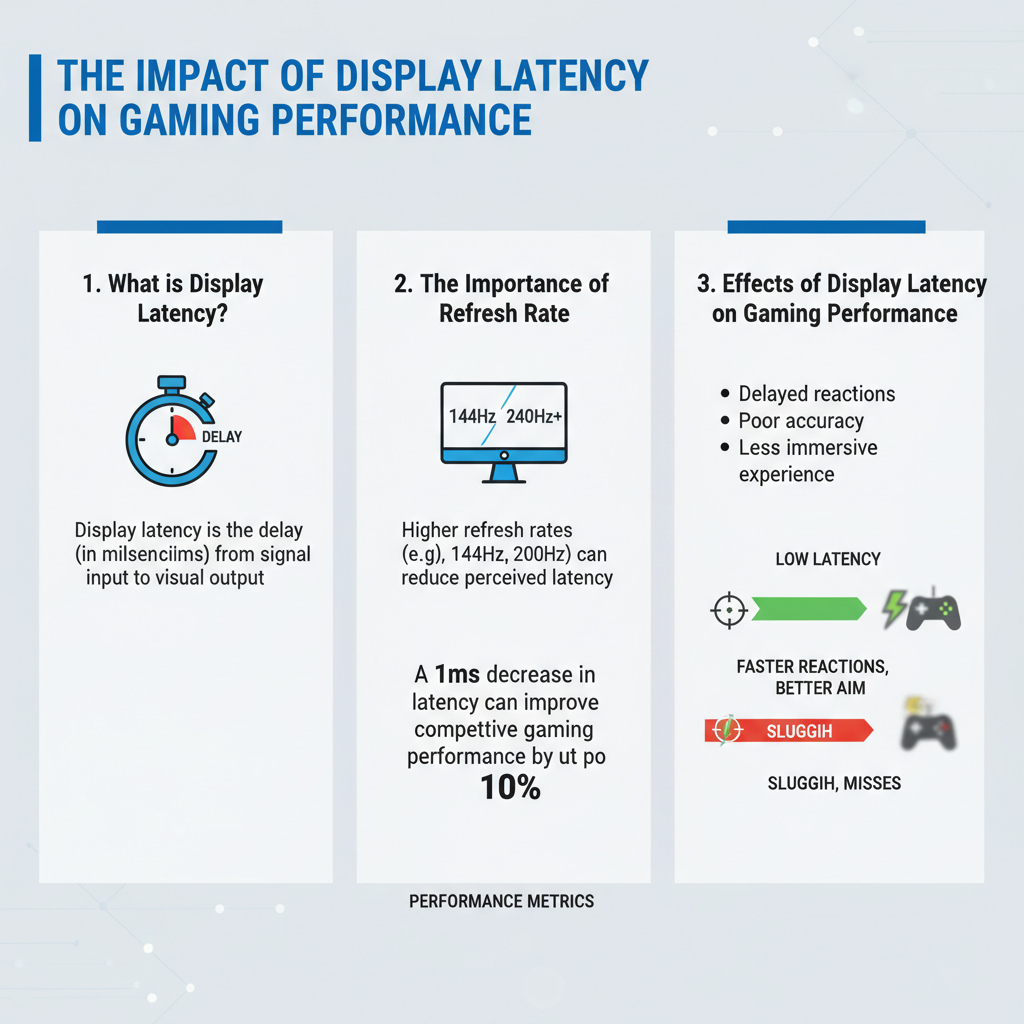
Display latency refers to the delay between a signal being sent to a display and the moment it is actually shown on the screen. This measurement is typically expressed in milliseconds (ms). It’s important to note that display latency is distinct from input lag, which is the delay between a player’s action (like pressing a button) and the corresponding action appearing on-screen. While input lag measures how fast your commands are registered, display latency focuses on how quickly those commands are visually represented. Both aspects are crucial for gamers, especially in fast-paced environments where split-second decisions can mean the difference between victory and defeat.
The Importance of Refresh Rate
Refresh rate is another key factor that influences display latency. This term describes how many times per second a display updates with new information, measured in hertz (Hz). A higher refresh rate means that the screen refreshes more often, which can directly reduce the perception of latency. For instance, a monitor with a refresh rate of 144Hz will update the display 144 times a second, compared to 60Hz, which only does so 60 times. This increase can provide a smoother visual experience, making it easier for gamers to react quickly to in-game events. Higher refresh rates also help eliminate motion blur, allowing players to see fast-moving objects more clearly, thereby enhancing their overall performance.
Effects of Display Latency on Gaming Performance
Display latency has a profound impact on gaming performance, particularly in competitive gaming and fast-paced genres such as first-person shooters (FPS) and multiplayer online battle arenas (MOBAs). High display latency can lead to a noticeable delay between a player’s actions and what they see on-screen, resulting in missed shots, poorly timed maneuvers, or even being outplayed by opponents who are better equipped to react swiftly.
The correlation between latency and player experience cannot be overstated. Gamers often report frustration when they perceive lag, which can detract from immersion and enjoyment. For example, in a game like “Call of Duty,” where precision and speed are critical, even a delay of a few milliseconds can mean the difference between winning a firefight or being eliminated. Thus, understanding and managing display latency is essential for gamers who want to perform at their best.
Measuring Display Latency
To accurately measure display latency, gamers can use various tools and methods. One of the most popular methods is using a high-speed camera to capture the time difference between a button press and the corresponding action appearing on the screen. This technique provides an accurate reading of both input lag and display latency.
Additionally, there are software tools available, such as “Lag Test” or “Input Lag Tester,” that can help measure latency on different displays. Common benchmarks used in the gaming community include tests that assess how well certain monitors perform in real-world gaming scenarios. Gamers can also refer to online reviews that often include latency measurements for popular gaming monitors, helping them make informed purchasing decisions.
Reducing Display Latency
Optimizing settings on your monitor and gaming setup can significantly reduce display latency. Here are some tips for achieving a more responsive gaming experience:
1. Enable Game Mode: Most modern monitors come with a “Game Mode” setting designed to minimize processing time and reduce latency.
2. Use the Right Connection: Opt for a direct connection, such as DisplayPort or HDMI, rather than using adapters, which can introduce additional latency.
3. Adjust Refresh Rate: Ensure your monitor is set to its maximum refresh rate in the display settings of your operating system.
4. Reduce Resolution Scaling: While higher resolutions can enhance visuals, they may also increase latency. Balancing resolution with performance is key.
5. Consider Hardware Upgrades: Investing in a monitor with a lower response time (measured in milliseconds) and a higher refresh rate can make a significant difference.
The Role of Game Optimization
Game developers play a crucial role in addressing display latency through game optimization. Many modern titles include features that reduce latency, such as frame rate cap adjustments and options to disable v-sync, which can introduce additional input lag. Developers also frequently release patches and updates that improve overall performance, including latency issues that could affect gameplay.
For example, a game like “Fortnite” regularly receives updates that fine-tune its performance based on player feedback, allowing for a smoother and more responsive gaming experience. Staying updated with the latest patches can ensure that players benefit from ongoing improvements.
Future Trends in Display Technology
The future of display technology is bright, with several emerging trends aimed at reducing display latency. Innovations such as OLED and Mini-LED displays promise faster response times and higher refresh rates, which could revolutionize how gamers experience visual fidelity. Additionally, technologies like Variable Refresh Rate (VRR) and G-Sync/FreeSync help synchronize the display’s refresh rate with the graphics card’s output, minimizing screen tearing and reducing latency.
Looking ahead, we can expect even more advanced gaming hardware designed explicitly with latency in mind. Concepts like 240Hz and beyond monitors are already in development, offering gamers an unprecedented level of responsiveness. As hardware continues to evolve, the gaming community can look forward to a more immersive and less laggy gaming experience.
Summarizing, display latency plays a critical role in shaping your gaming experience, affecting everything from responsiveness to immersion. By understanding its impact and implementing strategies to minimize latency, gamers can enhance their performance and enjoyment. Explore the tips provided and consider evaluating your current gaming setup to optimize your gameplay.
Frequently Asked Questions
What is display latency and how does it affect gaming performance?
Display latency, often referred to as input lag, is the delay between a player’s input (like pressing a button) and the corresponding action displayed on the screen. In gaming, high display latency can significantly impact performance, especially in fast-paced genres like first-person shooters and fighting games, where quick reflexes are essential. Lowering display latency through optimized settings and high-refresh-rate monitors can lead to a more responsive and enjoyable gaming experience.
How can I measure display latency on my gaming setup?
To measure display latency, you can use specialized tools like the “Display Lag Tester” or software solutions that analyze the time taken for an input to register on the screen. Additionally, some gaming monitors have built-in tools that measure latency. Using a high-speed camera to record gameplay can also help you determine the lag by calculating the time difference between input and visual response, enabling you to make informed optimizations.
Why is it important to reduce display latency for competitive gaming?
Reducing display latency is crucial for competitive gaming because it directly affects your ability to react to in-game events. A lower latency means faster feedback from your inputs, allowing you to execute moves and strategies more effectively than your opponents. In a highly competitive environment, even milliseconds can be the difference between winning and losing, making it essential to invest in equipment and settings that minimize display latency.
What are the best settings to minimize display latency on my gaming monitor?
To minimize display latency on your gaming monitor, consider enabling “Game Mode,” which optimizes settings for responsiveness. Additionally, use a refresh rate of 120Hz or higher, adjust the response time settings to the fastest option available, and disable any post-processing effects like motion smoothing. Ensuring your graphics card drivers are up-to-date and using a wired connection instead of wireless can also contribute to lower latency.
Which types of monitors are best for reducing display latency in gaming?
For reducing display latency in gaming, look for monitors with a low input lag rating, typically below 10 milliseconds. TN (Twisted Nematic) panels often provide the lowest latency, but modern IPS (In-Plane Switching) and VA (Vertical Alignment) panels have improved significantly in this area. Additionally, choose a monitor with a high refresh rate (144Hz or 240Hz) and features like NVIDIA G-Sync or AMD FreeSync, which help synchronize frame rates and further reduce display latency.
References
- Lag (video games)
- https://www.sciencedirect.com/science/article/pii/S1877050919310304
- https://www.ncbi.nlm.nih.gov/pmc/articles/PMC7575883/
- https://www.theverge.com/2019/11/13/20964790/display-lag-input-lag-gaming-performance
- https://www.techrepublic.com/article/what-is-input-lag-and-how-does-it-impact-gaming/
- https://www.pcgamer.com/what-is-input-lag-and-how-does-it-affect-gaming/
- https://www.nytimes.com/2021/06/15/technology/pixels-gaming-latency.html

16 Comments