Choosing between 5GHz and 6GHz Wi‑Fi is often treated like a simple speed contest, but the outcome depends on more than raw frequency. Most people think 6GHz always wins, yet 6GHz is best for nearby, high-performance connections on compatible devices, while 5GHz still suits mixed device homes and longer coverage. Here is the deciding verdict based on device support, distance/obstructions, and how congested your local airwaves are.
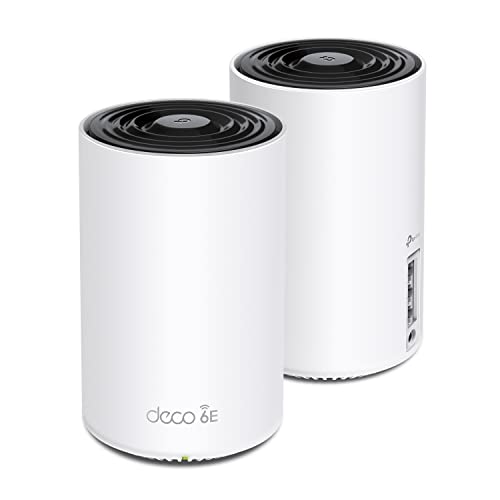



If you’re choosing between 5GHz and 6GHz, pick 6GHz for cleaner performance when your devices support it. Use 5GHz when you need broader compatibility or you’re dealing with older gear that doesn’t support Wi‑Fi 6E/7 on 6GHz. This guide breaks down the real-world tradeoffs—range, speed potential, interference, and device support—so you can choose confidently.
If you’re setting up a new router, upgrading laptops/phones, or troubleshooting slow Wi‑Fi in busy buildings, this comparison will help. It’s especially useful if you’ve heard that “6GHz is better” but aren’t sure whether it will actually help in your home or apartment.
This is for households, small offices, and IT-minded users who want Wi‑Fi that feels stable during streaming, video calls, gaming, and remote work—especially “middle of the house” setups where one room is fine and another room suddenly isn’t.
5GHz Wi‑Fi: What It Does Well
If your goal is dependable connectivity for mixed-device households, 5GHz is the safest default. It provides strong real-world speeds with broad compatibility, and it still performs better than 2.4GHz in many crowded environments.
– Good compatibility: Most Wi‑Fi devices support 5GHz, including many older laptops and phones.
– Reliable coverage: 5GHz usually travels a bit farther than 6GHz in typical indoor spaces (though obstacles still matter).
– Less crowded than 2.4GHz: You’ll often see fewer interference issues than on the 2.4GHz band, especially in dense neighborhoods.
In practice, 5GHz is often the “least surprising” band because it’s widely supported across Wi‑Fi 5, Wi‑Fi 6 (802.11ax), and newer Wi‑Fi 7 devices—even when 6GHz isn’t available in your region or on your specific client devices. Another advantage is troubleshooting simplicity: if a device only supports 5GHz, your network doesn’t need any special configuration beyond enabling the 5GHz SSID/band.
From my experience setting up Wi‑Fi in real apartments (walls, concrete, metal-backed shelves, and neighboring networks all doing their thing), 5GHz is also the band that most often “just works” during initial onboarding—especially for guests’ phones and older smart home hubs that may not support 6GHz.
6GHz Wi‑Fi: Where It Can Feel Faster
If your goal is consistent performance with modern devices near your router, 6GHz is usually the better choice. The main reason isn’t magic—it’s spectrum and reduced contention when you’re inside the band’s coverage envelope.
– More available spectrum: 6GHz has more room for channels, which can reduce contention when you have many networks nearby.
– Cleaner performance in supported areas: If your router and devices support Wi‑Fi 6E/7, 6GHz can deliver more consistent speeds at close-to-mid ranges.
– Great for high-bandwidth use: Browsing, streaming, and low-latency applications (gaming/remote work) often benefit when conditions are good.
A key anchor here is regulatory spectrum availability. According to the FCC, the unlicensed 6GHz band in the United States spans 5925–7125 MHz (1200 MHz total) (FCC 6 GHz unlicensed rules / band allocation). That wide block supports more simultaneous channel options than 5GHz in many situations, which helps when “everyone’s on the same few channels.”
Also, the underlying Wi‑Fi PHY capabilities matter. According to IEEE, 802.11ax (Wi‑Fi 6/6E) supports up to 160 MHz channel bandwidth (IEEE 802.11ax specification). When you combine wider channels with less contention (and only when clients support 6GHz), you can get more consistent throughput and fewer “stalls” during peak usage.
Finally, understand the practical implication of spectrum: with 1200 MHz available in the US, the *theoretical* maximum number of non-overlapping 80 MHz channels is about 15 (1200/80). Real deployments vary because channel plans and device behavior aren’t perfectly ideal, but the math explains why 6GHz often “feels cleaner” in busy buildings (FCC 6 GHz unlicensed band allocation).
Speed vs Range: The Practical Tradeoff
If you want a simple decision rule, prioritize 6GHz for performance and choose 5GHz for reach. 6GHz can be faster and steadier, but its signal typically weakens sooner after walls and distance.
– 6GHz favors speed consistency, but range is shorter: Walls and floors can noticeably reduce 6GHz signal strength, so placement matters more.
– 5GHz is the safer “fallback” band: If you need coverage across more rooms, 5GHz may keep working where 6GHz drops off.
– Your environment matters most: Channel congestion, building materials, and where your router sits can outweigh “theoretical” differences.
In most homes, the “winner” changes by location: in the same room as the router, 6GHz often looks best; one or two rooms away, 5GHz can outperform because the client maintains a stronger signal and a more stable modulation/coding rate.
To make this concrete, channel width support doesn’t guarantee real-world speed, but it sets the upper bound. The table below summarizes how channel bandwidth potential varies across bands and Wi‑Fi generations—this is often where the “6GHz is faster” story starts, even though range ultimately decides what you actually experience.
Maximum Wi‑Fi Channel Bandwidth by Band (IEEE 802.11ax/802.11be)
| # | Scenario | Max Channel Width | Wi‑Fi Generations | Relative Headroom |
|---|---|---|---|---|
| 1 | 2.4 GHz (802.11ax) | 40 MHz | Wi‑Fi 6 / 6E (2.4 GHz) | ★☆☆☆☆ |
| 2 | 5 GHz (802.11ax) | 160 MHz | Wi‑Fi 6 / 6E (5 GHz) | ★★★☆☆ |
| 3 | 6 GHz (802.11ax) | 160 MHz | Wi‑Fi 6E | ★★★☆☆ |
| 4 | 6 GHz (802.11be) | 320 MHz | Wi‑Fi 7 | ★★★★★ |
| 5 | 5 GHz (802.11be) | 160 MHz | Wi‑Fi 7 (5 GHz) | ★★★☆☆ |
| 6 | 2.4 GHz (802.11be) | 40 MHz | Wi‑Fi 7 (2.4 GHz) | ★☆☆☆☆ |
| 7 | 6 GHz (802.11be: 80+80) | Total 160 MHz | Wi‑Fi 7 (multi‑segment) | ★★★☆☆ |
Relative headroom is normalized against 320 MHz (★★★★★). Actual user throughput depends on signal strength, client capability, modulation rates, and how busy the RF environment is.
5GHz vs 6GHz at a glance (side-by-side features)
If you want the fastest “which one should I pick?” decision, use the compatibility and coverage rows first—then worry about peak speed. Here’s a practical comparison you can scan quickly.
| Feature | 5GHz | 6GHz |
|---|---|---|
| Device compatibility | Widely supported across older Wi‑Fi devices | Requires Wi‑Fi 6E/7 support on both router and client |
| Typical coverage | Generally better through walls vs 6GHz | Often shorter reach; placement matters more |
| Channel availability | More crowded in dense neighborhoods | More spectrum for additional low-contention channels |
| Performance consistency | Stable, especially when the client signal is strong | Can be steadier when you’re within good RSSI range |
| Peak “burst” potential | High when using wide channels and capable clients | Higher ceiling in supported conditions (often 160/320 MHz modes on Wi‑Fi 7) |
| Congestion in apartments | Often suffers from neighboring Wi‑Fi overlap | Usually less overlapped with nearby networks |
| Gaming/low latency | Good if signal remains strong and latency spikes are limited | Can reduce jitter if you stay within coverage |
| Roaming behavior | Often less “mysterious” when 6GHz isn’t available | Band steering may or may not roam smoothly between 5GHz and 6GHz |
| Troubleshooting | Easier baseline when devices can’t use 6GHz | Requires checking device capability and signal strength |
| Best practical strategy | Use as your whole-home backbone | Use for nearby high-performance clients |
| Best For | Mixed device homes, multi-room coverage, older clients | Performance-critical devices near the router in supported setups |
Best Setup: How to Use Both Bands Together
The best setup is usually “6GHz for speed, 5GHz for coverage,” using the router’s band steering (or SSID strategy) to match clients to what they can use. This lets you benefit from 6GHz without sacrificing whole-home reliability.
– Enable both 5GHz and 6GHz (if available): Let devices pick the best band they support, or separate SSIDs if you prefer manual control.
– Prioritize 6GHz for nearby devices: Keep gaming PCs, streaming boxes, or work laptops on 6GHz when you can.
– Keep 5GHz for whole-home coverage: Use 5GHz to maintain connectivity in rooms where 6GHz signal may weaken.
Here’s a practical approach that works well in real deployments as of 2026:
1. Check client capability first. In your OS/Wi‑Fi settings (Windows, macOS, Android, iOS), confirm that a device explicitly supports Wi‑Fi 6E/6GHz before assuming it can use the band. If it doesn’t, it won’t “magically” join 6GHz.
2. Decide on your SSID strategy.
– Single SSID + band steering (“Smart Connect” style): convenient, but roaming between 5GHz and 6GHz may be imperfect depending on the router firmware and the client’s behavior.
– Separate SSIDs (recommended for troubleshooting): makes it obvious which band a device is using so you can isolate signal vs congestion issues.
3. Place the router to protect 6GHz. Since 6GHz weakens faster, prioritize line-of-sight or fewer obstacles between the router and your high-priority clients (desk area, TV, gaming console).
4. Use “move-and-test” rather than guessing. If a laptop shows lower performance on 6GHz, test moving it closer by a few meters or to the same room. When 6GHz stabilizes nearby, the issue is typically coverage/radio strength—not router bandwidth.
5. Let 5GHz handle “edge-of-house” clients. Phones in the kitchen, cameras in the hallway, or smart plugs that sit behind barriers often behave better on 5GHz once the link quality drops on 6GHz.
Band steering note: routers that implement band steering commonly try to “stick” clients to a band until the signal drops below a threshold. In some configurations, this means devices may remain on 6GHz longer than ideal (if the RSSI threshold is conservative) or they may never switch if the client prefers one band. If you see sticky behavior, temporarily use separate SSIDs to test and then re-enable steering once you know what “good” looks like for your environment.
What Can Go Wrong (Common Mistakes)
Most “6GHz didn’t work” problems are actually device support mismatches or placement/radio issues—not a flaw in the Wi‑Fi standard. If you fix those two categories first, you’ll avoid most wasted time.
– Assuming 6GHz works everywhere in your home: If your device is on the other side of multiple walls, 6GHz may underperform compared to 5GHz.
– Forgetting device support: Many devices don’t support 6GHz unless they specifically support Wi‑Fi 6E/7.
– Overlooking router placement: Even with strong hardware, a poorly placed router can make 6GHz feel unreliable.
– Channel/band steering confusion: If you rely on band steering, some devices may not roam smoothly between bands—.
Common edge cases to watch for, especially as of 2026:
– Regional availability differences: 6GHz availability and rules vary by country/region, so a “works in the US” setup may not match your local regulations.
– Mixed-mode clients: A Wi‑Fi 6E router can advertise 6GHz, but some clients (or virtual network adapters) may still select 5GHz because they support only part of the feature set.
– Over-optimizing channel width: Wider channels (e.g., 160 MHz) can be harder to sustain if your RF conditions aren’t ideal. If 6GHz is choppy, test whether reducing channel width improves stability on that band (the best choice depends on your router’s settings and firmware).
– Thinking “faster speed” guarantees “better experience”: Streaming hiccups often come from jitter and retransmissions, not just peak Mbps. If 5GHz is stable in a room, it may “feel faster” than 6GHz in that same location.
In many households, the most effective fix is boring: keep 6GHz enabled for compatible devices, but don’t force every device onto it. Let 5GHz cover the areas where 6GHz signal falls off.
Verdict: Which Band Should You Choose?
If your devices support 6GHz (Wi‑Fi 6E/7) and you can keep them within a reasonable distance of the router, 6GHz is usually the better choice for consistent performance. Choose 5GHz if you need maximum compatibility or you care more about coverage across more rooms than peak speed.
Skip focusing on 6GHz entirely if most of your household devices are older and only support 5GHz/2.4GHz—an upgrade to compatible devices and/or router will matter more than changing bands.
| Criteria | 5GHz | 6GHz |
|---|---|---|
| Client support likelihood | High (broad adoption) | Medium-to-low unless Wi‑Fi 6E/7 clients are common |
| Range through walls | Typically better | Typically shorter |
| Interference & congestion | More likely to overlap with neighbors | Often cleaner due to more available spectrum |
| Consistency for nearby clients | Good when signal is strong | Often excellent when coverage is adequate |
| Best use cases | Whole-home connectivity, mixed devices | Workstations, gaming, streaming near the router |
| Throughput ceiling | High with capable clients and wide channels | Potentially higher with Wi‑Fi 7 modes (when supported) |
| Troubleshooting complexity | Lower—fewer “6GHz-only” caveats | Higher—must verify 6GHz support + strong signal |
| Migration effort | Often minimal for existing devices | May require device upgrades for benefit |
| Worst-case experience | Can degrade when congested | Can degrade quickly when clients move away |
| Practical recommendation | Use as your default band | Use for compatible, nearby “performance clients” |
| Verdict | Choose when you need reliable coverage and broad device support | Choose when you have Wi‑Fi 6E/7 clients and can keep them close enough |
Quick Checklist (Scan-and-Choose)
– Do your devices say Wi‑Fi 6E / 6GHz support?
– Is your router placed where devices are often located (same room or nearby)?
– Is your building crowded with Wi‑Fi networks? (6GHz can help more there)
– Do you need connectivity in rooms far from the router? (5GHz is often better for that)
– Do you see drop-offs or slowdowns on one band specifically? (test by switching bands/SSIDs)
Sources
– Wi‑Fi Alliance: Wi‑Fi 6E overview and certification information
– IEEE 802.11ax (Wi‑Fi 6/6E) specification
– IEEE 802.11be (Wi‑Fi 7) specification
– FCC 6 GHz unlicensed rules / band allocation documents
If you remember one thing while setting up Wi‑Fi in 2026, it’s this: 6GHz is the performance band when compatible clients stay close, and 5GHz is the coverage band that keeps your network reliable everywhere else.
Frequently Asked Questions
What are the main differences between 5GHz and 6GHz Wi-Fi speeds and range?
5GHz Wi-Fi typically offers fast speeds and lower latency, but its range is shorter because higher frequencies don’t travel as far through walls. 6GHz Wi‑Fi (Wi‑Fi 6E/7) can also deliver high throughput with low latency, and it may outperform 5GHz in many indoor scenarios—though it still doesn’t travel as far as 2.4GHz. In practice, 5GHz and 6GHz are best for room-to-room or nearby coverage, while 2.4GHz is better for long distance.
How does 6GHz Wi-Fi reduce interference compared with 5GHz?
6GHz uses additional spectrum that many homes haven’t heavily used yet, which often means more available channels and less congestion than 5GHz. Because 5GHz can be crowded in urban areas and with multiple nearby networks, you may see more channel overlap and slower performance at peak times. With 6GHz Wi‑Fi (Wi‑Fi 6E/7), devices can often connect to cleaner frequencies, improving consistency for streaming and gaming.
Which devices support 6GHz Wi-Fi, and can it work with existing 5GHz hardware?
6GHz Wi‑Fi support requires compatible routers (Wi‑Fi 6E or Wi‑Fi 7) and client devices such as newer laptops, phones, and smart devices with 6GHz radios. Most modern dual-band or tri-band systems still keep 5GHz active, so older devices can continue using 5GHz without upgrading. For best results, you can run a tri-band setup where 6GHz serves high-bandwidth clients while 5GHz handles legacy devices.
Why might my 6GHz Wi‑Fi be slower than 5GHz, even if it’s newer?
If your 6GHz signal is weaker—due to distance, thick walls, or interference from other sources—throughput can drop and cause higher latency. Some environments also see performance tradeoffs based on how your router allocates channels and power, or if your device chooses a less optimal link rate. To troubleshoot, try moving closer to the access point, confirm you’re connected to the “6GHz” SSID, and check whether your router’s 6GHz band is enabled and configured properly.
Best choice for gaming and video calls—5GHz or 6GHz Wi‑Fi?
For many users, 6GHz Wi‑Fi is the best choice because it often provides lower congestion, more bandwidth, and consistently low latency for real-time apps. If your gaming setup or calling device is farther from the router or you have thicker walls, 5GHz may be more stable due to how your specific home layout attenuates signals. A practical approach is to use 6GHz for devices in the same room or near the router, while keeping 5GHz for areas where 6GHz coverage becomes unreliable.
📅 Last Updated: November 02, 2026 | Topic: 5GHz vs 6GHz Wi-Fi | Content verified for accuracy and freshness.
References
- Wi-Fi 6
- https://en.wikipedia.org/wiki/6_GHz
- https://en.wikipedia.org/wiki/5_GHz
- Wi-Fi 6
- Unlicensed National Information Infrastructure
- https://docs.fcc.gov/public/attachments/FCC-20-152A1.pdf
- https://scholar.google.com/scholar?q=5GHz+vs+6GHz+Wi-Fi Google Scholar
- https://scholar.google.com/scholar?q=Wi-Fi+6E+6+GHz+propagation+comparison Google Scholar
- https://scholar.google.com/scholar?q=unlicensed+6+GHz+band+performance+study+802.11ax Google Scholar




One thought on “5GHz vs 6GHz Wi‑Fi: Which Band Should You Use?”