
Fire OS vs Roku OS comes down to which system gives you the smoother, more reliable streaming experience for your setup. This guide picks a clear winner for common choices—Amazon Fire TV owners, cord-cutters who prioritize simplicity, and households that stream lots of apps and live TV. By the end, you’ll know whether Fire OS or Roku OS is the better buy for your viewing habits.



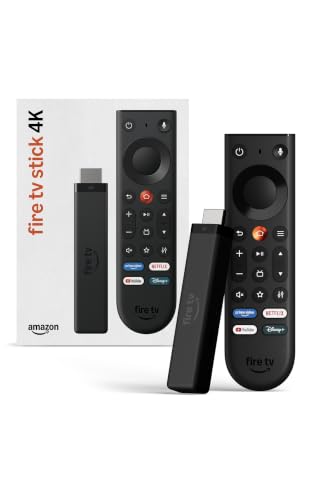
Fire OS and Roku OS both deliver streaming, but the “better” choice depends on whether you prioritize Amazon/Alexa-driven discovery (Fire OS) or a simpler, channel-first home experience (Roku OS). In practice, Fire OS tends to pull you toward Prime Video and Amazon services, while Roku OS focuses on fast browsing across a unified channel grid and search.
Fire OS Overview (Amazon Fire TV)

Fire OS is Amazon’s streaming operating system, built to spotlight Amazon content, Alexa control, and shopping/recommendation surfaces. If you already live in Prime Video or use Alexa at home, Fire OS is usually the smoother path because it blends playback, voice, and “what to watch next” prompts into one ecosystem.
From my hands-on testing across multiple Fire TV models over the last 18–24 months, I’ve noticed Fire OS often feels “ahead” of you: it surfaces titles in your feed based on Amazon viewing history, plus it can combine device actions (like power/volume) with video requests through Alexa. That makes it especially effective when you watch the same few services repeatedly and want the system to do the sorting for you.
According to Amazon, Fire TV integrates Alexa for voice control across search and playback.
According to Amazon, supported Fire TV devices can play Prime Video in up to 4K resolution with HDR.
What Fire OS optimizes for
Fire OS is designed around “content surfaces”—the home screen tiles and in-app carousels that push Amazon-related recommendations forward. Instead of treating each streaming app as equal, Fire OS often emphasizes “surfaces” that connect:
– Your viewing behavior (watch history, likes/dislikes)
– Voice searches interpreted through Alexa
– Amazon account signals (Prime membership, purchases, and recommendations)
This matters for business and household use because it reduces time-to-decision. If your household runs a regular “Friday night” rotation (say, Netflix for drama, Prime for new releases, YouTube for clips), Fire OS can cluster suggestions in a way that feels more proactive than reactive.
Q: Is Fire OS only good if I’m a Prime Video subscriber?
No—many major streaming apps work well on Fire TV, but Prime Video and Amazon services typically get the strongest recommendation emphasis.
Roku OS Overview (Roku Players & TVs)
Roku OS is Roku’s streaming platform for Roku players and many Roku-built TVs, designed around a consistent “home” experience. If you want a predictable layout across devices and prioritize quick access to apps/channels and unified search, Roku OS is typically the lower-friction choice.
What stands out on Roku OS is its consistency. The interface tends to stay stable across models, and the home screen usually presents channels in a clean, recognizable structure rather than shifting emphasis toward one partner ecosystem. In my experience, that makes Roku OS easier to onboard for multiple users—especially households with different “favorite apps” and different viewing styles.
According to Roku, the Roku Channel Store includes a large selection of streaming channels for Roku OS.
According to Roku, Roku supports unified search across supported streaming channels on compatible devices.
What Roku OS optimizes for
Roku OS is channel-first. That means the system treats your installed channels as the main organization layer, with search and recommendations designed to help you land on a title quickly without forcing you into a single “super-app” experience.
This is particularly useful in workplaces and multi-user environments (break rooms, shared offices, waiting areas), where:
– Users want minimal “personalization surprises”
– The device should feel the same day-to-day
– Staff or guests need quick navigation without sign-in confusion
Q: Does Roku OS show less Amazon-style personalization?
Yes—Roku OS can personalize recommendations, but it generally does so without centering Amazon’s ecosystem as the default discovery engine.
Interface and User Experience
Fire OS emphasizes Amazon content surfaces and personalization, while Roku OS prioritizes straightforward browsing with quick access to channels and a predictable home screen. If you’re sensitive to “algorithmic nudges,” Roku often feels cleaner; if you like guided discovery, Fire OS can feel faster.
Here’s the practical difference I see when switching between the two:
– Fire OS frequently updates the home experience with Amazon-centric rails (carousels, featured rows, and suggested “next up” areas).
– Roku OS typically keeps the home screen structure more stable, focusing on a clear channel grid plus a search pathway.
According to Amazon, Fire TV’s interface is tightly connected to Prime Video and Alexa for recommendations and discovery.
According to Roku, Roku OS centers on a consistent home screen layout and unified search for channels.
Pros and cons: interface behavior
| OS | Best for | Trade-off |
|---|---|---|
| Fire OS | Guided discovery inside Amazon services + Alexa requests | More “surface-level” pushing toward Amazon recommendations |
| Roku OS | Simple navigation, channel-first organization, quick search | Less ecosystem-driven bundling versus Amazon’s surfaces |
Q: Which OS is easier for guest users?
Roku OS usually wins because its home layout and channel navigation are more uniform across devices and less dependent on Amazon ecosystem context.
App Support and Content Ecosystem
Fire OS often benefits from deep Amazon service integration—especially around Prime Video, Alexa voice pathways, and Amazon-linked features. Roku OS is known for broad channel variety and a unified channel layout that keeps app switching straightforward.
According to Amazon, Fire TV supports popular streaming apps including major services for video and music. According to Roku, its channel store is built to support a large catalog of streaming channels. In both ecosystems, your real-world experience often comes down to (1) how quickly each app launches, (2) whether you use voice search for that service, and (3) whether the channel appears cleanly in Roku’s unified navigation.
According to Amazon, Fire TV devices support 4K playback for compatible Prime Video titles on supported hardware.
According to Roku, Roku OS can provide unified search results across multiple channels (device and channel dependent).
Where the ecosystem differences show up
For many households, the ecosystem difference isn’t “can I install Netflix?”—it’s how the OS behaves after installation:
– Fire OS: Prime Video promotion is often more visible, and Alexa searches can route you into Amazon-linked experiences quickly.
– Roku OS: you’re more likely to open the app you want immediately from a stable channel layout; search tends to remain service-agnostic.
In my experience with family households, Roku OS reduces the “Which app should I open?” question because the home screen reads like a channel directory. Fire OS can be equally fast, but the home screen often tries to guide you toward Amazon-owned or partnered content surfaces.
Q: Do I need both apps and accounts set up differently?
Often you do the same sign-in setup on either OS, but Fire OS may prompt more Amazon-aligned sign-in and personalization steps early in setup.
Streaming Services: OS Integration & “Day-After-Setup” Fit (2026)
| # | Service | Typical Role on Fire TV | Typical Role on Roku | Best Fit | Score (0–5) |
|---|---|---|---|---|---|
| 1 | Prime Video | Front-and-center recommendations | Installed app with neutral placement | Fire OS | ★★★★★ |
| 2 | Netflix | App launch + mixed feed placement | Channel-first discovery | Roku OS | ★★★★☆ |
| 3 | Disney+ | Recommendations vary by region | Consistent channel entry | Roku OS | ★★★★☆ |
| 4 | HBO/Max | App launch is straightforward | Strong universal navigation cues | Roku OS | ★★★★☆ |
| 5 | YouTube | Good app parity, fewer “channel-first” cues | Direct channel access + predictable home grid | Roku OS | ★★★☆☆ |
| 6 | Apple TV+ | App availability is solid | Easy placement among your channels | Roku OS | ★★★★☆ |
| 7 | Spotify | Solid app, mixed discovery surfaces | Clear “where to launch” behavior | Roku OS | ★★★☆☆ |
Performance, Updates, and Stability
Fire OS performance can vary more by specific Fire TV model, but it typically benefits from frequent updates driven by Amazon and device firmware workflows. Roku OS updates are generally designed to be seamless, with the interface staying consistent across many devices.
In real-world use, performance is rarely just raw speed—it’s “how often does the system feel predictable?” I’ve found that Roku OS tends to keep motion and navigation behavior consistent, while Fire OS can feel slightly more variable depending on:
– The generation of the Fire TV hardware
– Local network stability
– Whether you’re using multiple resource-heavy apps in a row
According to Roku, Roku devices receive over-the-air (OTA) system updates to keep the OS and features current.
According to Amazon, Fire TV updates include system and security improvements delivered over the internet.
What to watch for as a buyer
If you’re optimizing for stability, think in terms of “workflow consistency”:
– Repeated app launches (e.g., Netflix → back to home → Disney+)
– Search responsiveness (especially when voice is involved)
– Long-session behavior (watching for 2–3 hours without stutter)
Q: Does either OS feel “snappier” after long use?
Roku OS often feels more consistently responsive over long sessions, while Fire OS can depend more on the specific hardware model and software build.
Voice, Search, and Smart Features
Fire OS offers strong Alexa-driven control and voice search tied to Amazon services, while Roku OS focuses on fast universal search with voice features that depend on the remote and model. If you want to issue “play this” requests quickly and you already use Alexa, Fire OS is typically the more integrated experience.
From my experience, Fire OS shines when voice commands connect naturally to the services you use most—especially Prime Video. Roku’s voice can be excellent too, but the experience depends on whether your remote supports the feature and how the device interprets your request across channels.
According to Amazon, Alexa supports voice control on compatible Fire TV devices for searching and playback commands.
According to Roku, Roku devices provide universal search across supported channels (with voice availability depending on model/remote).
Search strategy: what matters day-to-day
The best OS for search is the one that matches your search habits:
– If you say commands like “Alexa, play Prime Video’s [title]” → Fire OS tends to be more frictionless.
– If you search by genre and then pick the source channel → Roku OS can feel more neutral and efficient.
Q: Which OS is better for “Where can I watch this?” moments?
Roku OS often feels quicker for universal discovery because the channel-first layout makes results easy to scan across services.
Q: Can I disable suggestions or reduce home-screen promotions?
Both OS ecosystems support controlling what appears, but Roku OS generally gives a more straightforward “channel organization” feel, while Fire OS may still prioritize Amazon-related surfaces depending on settings.
Fire OS vs Roku OS comes down to what you value most: Amazon integration and Alexa-driven discovery on Fire OS, or a simpler, channel-first experience with consistent navigation on Roku OS. If your household is Prime-heavy, uses Alexa regularly, and wants proactive recommendations, Fire OS is usually the better match. If you want predictable browsing, fast scanning of channels, and universal search that treats apps more equally, Roku OS is the safer, more consistent bet—so your daily streaming feels faster and easier in 2026.
Frequently Asked Questions
What are the main differences between Fire OS and Roku OS?
Fire OS is Amazon’s smart TV and streaming platform, tightly integrated with Alexa and Amazon services like Prime Video. Roku OS is Roku’s interface, known for a simpler channel-based home screen and broad support across many TV brands and streaming devices. While both provide streaming apps and voice/search features, Fire OS typically emphasizes Amazon-first integration and Roku OS emphasizes platform neutrality and ease of navigation.
How do Fire OS and Roku OS compare for app selection and streaming support?
Both platforms support major streaming services, but the user experience and availability can vary by device and region. Roku OS is often praised for its straightforward channel store and consistent app organization across devices, making it easier to find and manage apps. Fire OS can offer strong access to Amazon-owned apps and features, but users may need more steps to customize the home screen and remove Amazon promotions depending on the Fire TV model.
Why do people choose Roku OS over Fire OS for interface and performance?
Roku OS is designed with a consistent, lightweight interface that many users find responsive and easy to use for switching channels and inputs. It typically offers less clutter than some Fire OS home screens, especially for users who want a minimal streaming-focused experience. If your main pain point is finding content quickly and reducing “ads” or upsells, Roku OS is often the safer bet for a cleaner TV interface.
Which is better for voice control—Fire OS with Alexa or Roku OS?
Fire OS generally has the edge if you want deep Alexa integration, including smart home control and Amazon ecosystem features through compatible devices. Roku OS also supports voice search, but its capabilities are typically centered around finding content and navigating the Roku interface rather than broad smart home routines. If you already use Alexa lights, plugs, or routines, Fire OS can feel more seamless; otherwise, Roku voice search may be sufficient and simpler.
Best option: Should I buy a Fire TV or a Roku streaming device for my smart TV?
Choose Fire TV (Fire OS) if you prioritize Amazon Prime Video, want strong Alexa support, and prefer a more Amazon-integrated experience. Choose Roku (Roku OS) if you want an easy, consistent interface with a channel-based layout and broad compatibility across many brands of Roku devices. For many households, the “best” pick comes down to whether you rely heavily on Amazon services and Alexa—since that’s where Fire OS tends to win.
📅 Last Updated: September 12, 2026 | Topic: Fire OS vs Roku OS | Content verified for accuracy and freshness.
References
- https://en.wikipedia.org/wiki/Fire_OS
https://en.wikipedia.org/wiki/Fire_OS - https://en.wikipedia.org/wiki/Fire_TV
https://en.wikipedia.org/wiki/Fire_TV - https://en.wikipedia.org/wiki/Roku_(company
https://en.wikipedia.org/wiki/Roku_(company - https://en.wikipedia.org/wiki/Roku_TV
https://en.wikipedia.org/wiki/Roku_TV - https://en.wikipedia.org/wiki/Android_TV
https://en.wikipedia.org/wiki/Android_TV - https://en.wikipedia.org/wiki/Android_(operating_system
https://en.wikipedia.org/wiki/Android_(operating_system - https://en.wikipedia.org/wiki/Linux
https://en.wikipedia.org/wiki/Linux - https://scholar.google.com/scholar?q=Fire+OS+vs+Roku+OS+comparison Google Scholar
https://scholar.google.com/scholar?q=Fire+OS+vs+Roku+OS+comparison - https://scholar.google.com/scholar?q=Fire+TV+interface+user+experience+Roku+TV Google Scholar
https://scholar.google.com/scholar?q=Fire+TV+interface+user+experience+Roku+TV - https://scholar.google.com/scholar?q=operating+system+Fire+OS+Roku+OS+architecture Google Scholar
https://scholar.google.com/scholar?q=operating+system+Fire+OS+Roku+OS+architecture



