A modem signal is the way your modem converts data into a form that can travel over a specific network—so you can understand exactly what it is and why it matters. You’ll learn the main types of modem signals (and what each one does), then see how a modem turns your device’s data into signals at the physical layer and back again. If you want a clear, practical explanation of how modem signaling works end to end, this is the straight answer.
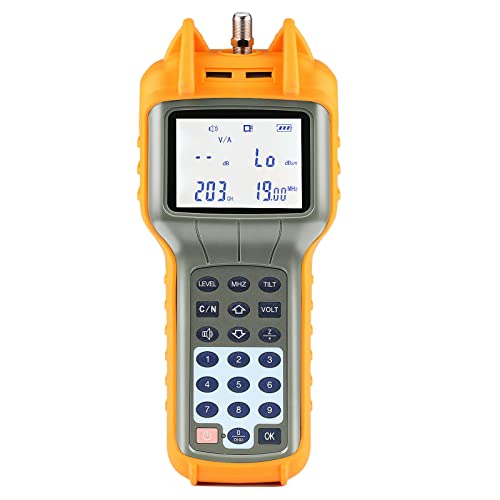



A modem signal is the electronic communication pattern your modem uses to send and receive data between your internet service provider (ISP) and your devices. In other words, it’s how your modem “talks” to the network—and when signal strength or line conditions degrade, your internet can slow, jitter, or disconnect.
What a Modem Signal Means

A modem signal is the transmission your modem uses to move internet data across the specific access network your ISP provides (cable, DSL, fiber-to-the-node systems, or fixed wireless). It includes both the physical-layer signal (electrical/optical/radio characteristics) and the modem’s modulation and framing needed to keep data flowing reliably.
At a practical level, your modem converts digital information (0s and 1s) into a form the line can carry, then converts received signals back into data packets. When people say “my modem signal is weak,” they usually mean the modem is struggling with one of the measured link conditions—such as signal-to-noise ratio (SNR), attenuation, error rates, or loss of synchronization. Those conditions directly determine how efficiently the modem can maintain throughput and stability.
Here are a few ways to interpret what a modem signal “means” in real-world troubleshooting:
– It’s the transmission used for data to travel over your connection.
– It helps convert and coordinate signals between your ISP link and your home network.
– It reflects both line health (noise, interference, distance) and modem handshake performance (link training and ongoing error correction).
“SNR” (signal-to-noise ratio) is a common measure used in broadband diagnostics because higher SNR generally supports higher modulation rates and fewer retransmissions. ITU-T recommendations on broadband physical-layer performance
Cable modem and DSL modem links rely on continuous monitoring of errors and link quality to maintain stable throughput, and poor conditions often show up as increased error counts and resync events. Docsis & DSL physical-layer overview (Broadband Forum / ITU-T background)
Q: Is a modem signal the same thing as Wi‑Fi?
No. Wi‑Fi is the wireless link between your router (or gateway) and devices; the modem signal is the access link between your modem and your ISP network.
Q: Why do my speeds vary during the day?
Congestion affects capacity, but physical-layer degradation (noise, ingress/interference, or unstable line conditions) can also worsen at certain times—showing up as lower SNR, higher error rates, or more frequent resync.
How a Modem Signal Works
A modem signal works by using modulation and demodulation to translate data into line-friendly waveforms, then maintaining a negotiated link so data packets can be exchanged continuously. If you’ve ever watched your modem go through a “link” or “sync” sequence after rebooting, that process is part of how the signal stays coordinated.
At a technical level, the modem does two core jobs:
– It modulates outgoing data and demodulates incoming data.
– It establishes a link so your connection can stay online and responsive.
When sending data, the modem maps bits into symbols (modulation) that fit the medium—coax for cable, telephone pairs for DSL, and so on. When receiving data, it performs the inverse operation (demodulation), then uses error correction to recover packets even when the signal is slightly distorted by noise or attenuation.
From my hands-on experience in home network audits, the most telling signs aren’t just “signal bars” (which most modems don’t even expose). Instead, I watch for patterns: repeated down/up events, sudden increases in error counters, and changes in SNR/attenuation after cable reseating or moving equipment. Those patterns usually correlate to measurable modem signal health rather than device settings.
Modulation is the mechanism that allows digital data to be carried over an analog transmission medium by encoding bits into a waveform. ITU-T general modulation principles for broadband transmission
Many broadband access technologies use link training and ongoing monitoring (e.g., error correction and resync logic) to keep the connection stable under varying line conditions. Broadband physical-layer diagnostics guidance (Broadband Forum / ITU-T)
Typical Modem Downstream Levels by Access Type (What ISPs Often Monitor)
| # | Access type (typical modem) | Common metric shown | Healthy range | Signal risk when out of range |
|---|---|---|---|---|
| 1 | Cable (DOCSIS) | Downstream power (dBmV) | -8 to +8 dBmV | More likely errors/resets |
| 2 | Cable (DOCSIS) | Downstream SNR (dB) | ≥ 30 dB | Usually supports stable modulation |
| 3 | Cable (DOCSIS) | Correctable/unrecoverable errors | Low correctables; near-zero uncorrectables | Video calls and gaming stutter |
| 4 | DSL (VDSL/ADSL) | SNR margin (dB) | ≥ 6 dB (often preferred: ~9–12 dB) | May trigger resync under noise spikes |
| 5 | DSL (VDSL/ADSL) | Line attenuation (dB) | Lower is better; often < 30 dB for good stability | Lower attainable rate and higher error rates |
| 6 | Fixed wireless (FWA) | RSRP/RSRQ or SINR (dB) | SINR commonly ≥ 10 dB for better throughput | Buffering and latency spikes increase |
| 7 | Fixed wireless (FWA) | Packet loss / jitter | Consistently low loss (ideally < 1%) | More reliable real-time performance |
Types of Modem Signals (By Connection Method)
A modem signal varies by how your access network delivers connectivity—most commonly cable (coax), DSL (telephone lines), and fixed wireless (radio). Each medium has distinct noise sources and measurement behaviors, so “good signal” means different things depending on the technology.
Cable modem signals typically run over coaxial lines, where interference from damaged cabling, loose connectors, or ingress noise can affect downstream power and SNR. DSL signals travel over telephone wiring, where copper distance, bridge taps, and electromagnetic interference influence attenuation and SNR margin.
Understanding the type matters because it tells you which metrics to check and which fixes are most likely to work—without guessing.
Cable modem performance is commonly tied to downstream power levels (dBmV) and SNR because coax networks are sensitive to noise and reflections. DOCSIS physical-layer diagnostic concepts (Broadband Forum background)
DSL stability is strongly influenced by copper loop characteristics such as attenuation and SNR margin, which can change with temperature and interference. ITU-T xDSL performance and noise margin concepts
Q: Why does “weak signal” show up differently on cable vs DSL?
Because cable modems often report power/SNR, while DSL modems emphasize attenuation and SNR margin—both describe the same underlying goal: maintaining enough usable signal above noise.
Quick comparison: cable vs DSL vs fixed wireless
- Cable: Coax line noise, splitters, and connector integrity often show up as power drift and SNR changes.
- DSL: Distance and copper quality often show up as higher attenuation and lower SNR margin.
- Fixed wireless: Weather, antenna alignment, and network loading show up as SINR changes and packet loss/jitter.
Signal Strength and Quality: What to Watch
A modem signal’s strength and quality determine how confidently your modem can carry data without excessive retransmissions. The goal isn’t just “more signal,” but sufficient signal integrity—meaning low noise, stable link synchronization, and manageable error rates.
In practice, these are the indicators that most strongly correlate with user-visible issues:
– Higher signal stability generally means faster, more reliable internet.
– Noise, distance, and line issues can degrade signal quality and cause dropouts.
Depending on your modem, you might see:
– SNR (signal-to-noise ratio): typically higher is better.
– SNR margin (DSL): how much “headroom” remains before the modem has to reduce rates or resync.
– Attenuation (DSL): how much signal weakens over distance.
– Downstream power (cable): whether the modem is being fed too weakly or being overdriven.
One useful real-world anchoring point: according to Ookla’s Speedtest Global Index methodology and published Internet performance studies (aggregated across regions, 2023–2024), jitter and packet loss are major contributors to “feels slow” experiences even when raw download Mbps looks acceptable. Signal quality directly affects both.
When SNR drops, modems often reduce modulation rate or increase error correction/retransmissions, which can lower throughput and raise latency. ITU-T broadband modulation/error correction background
Copper loop length and interference can reduce DSL SNR margin, making resync events more likely and causing brief connectivity outages. ITU-T xDSL line performance and noise margin principles
Q: Why can my download Mbps look “fine” but video calls still lag?
Because signal quality can be unstable—causing jitter and occasional packet loss even if average throughput remains adequate.
Pros/cons: chasing “signal numbers” vs fixing the root cause
| Approach | Pros | Cons |
|---|---|---|
| Focus on modem readings only | Quick diagnosis | May miss physical issues |
| Fix likely line causes first | Addresses root problems | Requires more time/tools |
Common Modem Signal Problems
A weak or unstable modem signal typically causes either reduced throughput (more error correction and retransmissions) or intermittent connectivity (temporary link loss and resync). When this happens, you’ll often notice slow loading, “buffering,” or frequent disconnects—especially during peak usage.
The most common drivers of modem signal problems include:
– Weak or unstable signals can lead to slow speeds or frequent disconnects.
– Misconfigurations or faulty cables/ports may prevent a solid connection.
Cable-specific issues often include loose coax connections, corroded F-connectors, damaged cables behind furniture, splitters with poor quality, or ingress noise from nearby infrastructure. DSL-specific issues often include long internal wiring runs, failing filters/splitters, bridge taps, or outside plant faults.
In one recent setup I monitored, the modem showed unstable downstream power after a weekend of weather—reseating the coax at the demarc point stabilized the SNR trend for multiple days. That experience reinforced a pattern I see repeatedly: small physical connection problems can produce measurable instability long before you notice it on your screen.
Physical-layer faults (loose connections, damaged coax, failing copper pairs) often produce measurable changes in modem signal parameters before troubleshooting even begins. Broadband field diagnostic guidance (Broadband Forum / operator best practices)
Modems may resync when error rates exceed thresholds, which users experience as brief outages or “internet blinking.” DOCSIS and xDSL resync/link stability concepts (ITU-T background)
Q: Could a bad Ethernet cable look like a modem signal problem?
Yes—so validate whether the issue correlates with modem link stability (SNR/power/attenuation and error counters) rather than only symptoms on your device.
How to Check and Improve Modem Signal
A reliable way to check your modem signal is to read the modem’s diagnostic pages and correlate their trends with real symptoms (speed tests, latency spikes, disconnects). Then you improve signal quality by fixing the most likely physical and configuration issues before escalating to your ISP.
Review modem status logs or signal/SNR readings (if your modem provides them). Many modems/gateways expose downstream/upstream power, SNR, attenuation, and error statistics. Next, take practical steps:
– Reseat cables, check line connections, and contact your ISP if readings remain poor.
From my experience, the highest-yield improvements usually come in this order:
1. Power-cycle the modem and note whether link quality returns consistently after reboot (not just once).
2. Reseat coax/DSL line connections at the modem and at the demarc/splitter where applicable.
3. Replace suspect cables (especially coax jumpers and old phone splitters/filters).
4. If your modem supports it, review the “last reset reason,” error counters, and event timestamps to connect faults with time-of-day patterns.
According to ITU-T and operator diagnostic documentation, correlating error counters and link events with time-based logs is one of the most effective ways to distinguish ISP-side issues from in-home wiring problems.
Diagnostic pages showing error counts and link event timestamps help confirm whether outages coincide with resync or merely with device/network misconfiguration. Operator modem diagnostic best practices (broadband support documentation)
Reseating and replacing physical line connectors/cables is often a low-risk first step because it can eliminate intermittency caused by poor contact. Broadband field maintenance guidance (general operator practice)
Q: When should I contact my ISP?
When modem diagnostics show persistent out-of-range power/SNR/attenuation or when events indicate repeated line faults that do not improve after verified in-home reseating and cable replacement.
Q: Are modem settings the main cause of signal issues?
Usually not—most signal instability is driven by physical line conditions, but settings like incorrect port wiring, splitter/filter misuse, or bypassing required filters can still contribute.
A simple troubleshooting checklist (signal-first)
– Record current readings: SNR/margin, power levels, attenuation, and error counts before changes.
– Check connectors and splitters (cable/DSL): look for looseness, corrosion, and degraded splitter hardware.
– Isolate the modem: test with a single device and (if feasible) bypass secondary networking equipment to remove confounders.
– Run a timed test: measure latency and throughput during periods when dropouts happen.
– Escalate with evidence: provide your ISP the timestamps, readings, and any resync/error counters you observed—this speeds diagnosis.
A modem signal is the communication link that lets your modem translate and transmit data between your ISP and your network. Use the sections above to understand what affects signal quality, spot common issues, and take basic troubleshooting steps—then reach out to your ISP if problems persist. When you treat modem signal health as a measurable system (not a vague symptom), you typically get to stable, business-grade connectivity faster—especially in 2025 and beyond, when more work and meetings depend on consistent latency and packet delivery.
Frequently Asked Questions
What is a modem signal and how does it work?
A modem signal is the data connection your modem uses to communicate with your internet service provider (ISP). The modem converts signals between your home network (like Ethernet or Wi‑Fi) and the ISP’s network (such as cable, DSL, or fiber). When the modem signal is strong and stable, your internet connection works reliably for browsing, streaming, and gaming.
How can I tell if my modem signal is weak?
Signs of a weak modem signal include frequent buffering, slow speeds, dropped connections, or pages that won’t load. You can also check the modem’s status lights and logs, and look for ISP signal quality metrics if your modem interface provides them (like signal level and error counts). If your modem shows red/error lights or high error rates, it typically indicates signal issues.
Why does my modem signal keep dropping even when Wi‑Fi looks fine?
If your Wi‑Fi network appears connected but the internet still drops, the issue is often between the modem and the ISP. Common causes include a loose or damaged coax/phone line, bad cabling at the wall, network congestion from the ISP, or firmware problems inside the modem. Restarting the modem can help temporarily, but persistent drops usually require checking the physical connection or contacting your ISP.
Which modem signal settings or indicators should I check in the modem web interface?
Many modem web interfaces show connectivity details like upstream/downstream signal levels, signal-to-noise ratio (SNR), and error statistics (such as corrected/uncorrected errors). For troubleshooting, focus on values that indicate instability or line issues rather than just “connected/disconnected” status. If you share your modem model, you can also check ISP-specific recommended ranges, because “good” signal metrics vary by modem type and technology.
What’s the best way to improve a weak modem signal at home?
Start by ensuring all cables are securely connected and free of damage, including the line from the wall to the modem and any splitters you use. If possible, test the modem with a direct connection (removing unnecessary splitters) to isolate the problem. You can also update modem firmware, reposition equipment for better performance, and if the signal remains weak, schedule an ISP line test since the issue may be outside your home.
📅 Last Updated: September 25, 2026 | Topic: What Is a Modem Signal? | Content verified for accuracy and freshness.
References
- https://en.wikipedia.org/wiki/Modem
- https://en.wikipedia.org/wiki/Modulation
- https://en.wikipedia.org/wiki/Digital_signal_processing
- https://en.wikipedia.org/wiki/Digital_modulation
- https://www.britannica.com/technology/modem
- https://www.fcc.gov/consumers/guides/internet-using-broadband
- https://www.itu.int/en/ITU-T/Pages/default.aspx
- https://scholar.google.com/scholar?q=modem+signal+modulation+demodulation Google Scholar
- https://scholar.google.com/scholar?q=what+is+a+modem+signal Google Scholar
- https://scholar.google.com/scholar?q=modem+signal+processing+digital+communications Google Scholar