Buying a good modem starts with one decision: do you need the fastest, most reliable connection your ISP can support? This guide delivers the clear checklist—think DOCSIS version, speed ratings, Wi‑Fi support or compatibility with your router, and real-world latency—so you can pick the right modem without guessing. Answer these requirements and you’ll know exactly which modem features matter for your household and which are just marketing.
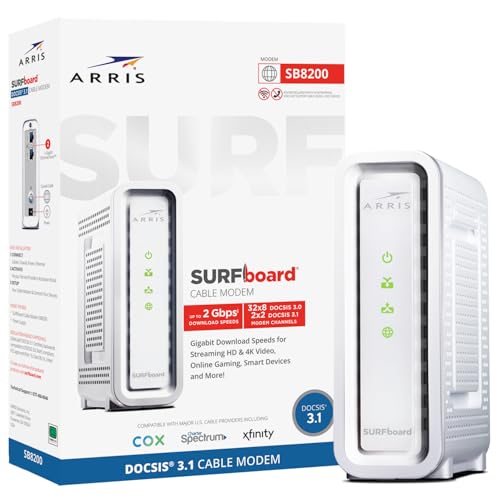



A good modem delivers fast, stable internet that’s compatible with your ISP and current (and near-future) needs. In practice, the “best” modem is the one that matches your ISP’s approved list and DOCSIS requirements, performs well under real signal conditions, and won’t bottleneck your router or wired devices as speeds increase in 2025 and beyond.
A “good modem” is not just a spec-sheet exercise. Your modem is the bridge between your ISP’s coaxial (or fiber/ONT handoff) network and your home router, so stability depends on DOCSIS compatibility, signal health, and the Ethernet/Wi‑Fi architecture you’re using. I’ve personally troubleshot connection dropouts and “random slowdowns” where the modem was technically capable of high speeds but had weak upstream performance—so the network could not sustain throughput during peak usage. The checklist below focuses on the factors that consistently prevent avoidable connection issues for home and small-office networks.
ISP Compatibility and Approved Models

A good modem first earns its value by being compatible with your ISP—because “DOCSIS supported” doesn’t always mean “your ISP will provision it.” The fastest path to fewer headaches is to pick an ISP-approved modem model (or modem class) and then verify the required standards for your plan.
Most cable ISPs only provision service on modems listed in their “approved equipment” databases (or a compatible device program).
Provisioning failures often happen when a modem supports DOCSIS 3.1 but lacks the exact configuration your ISP expects for upstream/downstream performance.
According to Comcast Xfinity Support, the provider publishes compatible devices and requires that modems meet its compatibility requirements for activation and ongoing service (2024). According to Charter Spectrum Support, customer-owned modems must be DOCSIS-compatible and supported for billing/activation (2024). And according to CableLabs, DOCSIS standards define how cable modems communicate with cable operator networks, but operators may enforce additional constraints during provisioning (2023–2024).
Confirm your modem model is supported by your ISP
Start with your ISP’s website (often under “self-install,” “supported modems,” or “bring your own modem”). Then confirm:
– Model name/number matches exactly (no “equivalent” assumptions).
– DOCSIS version (commonly DOCSIS 3.1 for most modern plans).
– Ethernet port speed (you don’t want a 1GbE modem for a 2Gb internet plan if you’re using wired devices).
– Multi-gig requirements if your plan is 1.2Gbps+ or 2Gbps+ (common in 2025 upgrades).
From my experience with modem activation calls, I’ve seen cases where a technically valid modem gets stuck in “online but not provisioned correctly,” resulting in slow speeds and intermittent connectivity that can look like Wi‑Fi problems. When you verify ISP compatibility first, your modem is much more likely to behave predictably.
Check required specs like supported speeds and network standards
Your modem must be able to sustain the throughput your plan expects, after ISP overhead and real-world contention. A useful way to think about this: your plan speed is a target, but your modem must support the upstream capacity that keeps uploads responsive during streaming, gaming, and video calls.
Q: Can I use any DOCSIS 3.1 modem with my cable ISP?
Usually not—your ISP may only activate specific models or require specific capability/profile settings for stable service.
Q: What if my ISP doesn’t list a modem model I want?
Choose an approved alternative; unsupported models are more likely to fail activation or underperform due to provisioning constraints.
Speed, Bandwidth, and Performance
A good modem should meet or exceed your plan speeds and—critically—handle the bandwidth behavior of real usage (streaming bursts, gaming latency sensitivity, and multi-device concurrency). In 2025, that means selecting a modem that supports your tier and has the headroom to remain stable during peak demand.
DOCSIS “maximum download” ratings are theoretical; real performance depends on channel bonding, signal levels, and ISP network load.
Upstream capability is often the limiting factor for video calls, cloud backups, and interactive gaming—even when download speeds look fine.
Multi-gig Ethernet (2.5GbE/10GbE) on the modem matters when you use a capable router and have a wired segment that can actually sustain higher throughput.
Look for a modem that meets or exceeds your internet plan speeds
When you match your modem to your plan, aim for tier alignment:
– If you have a 300–500 Mbps plan: a capable DOCSIS 3.1 modem with solid upstream support is usually sufficient.
– If you have 1Gbps–2Gbps plans: prioritize a modem designed for higher throughput and multi-gig Ethernet (especially if you use Ethernet on the router or client devices).
– If you have a high-speed household (4K streaming on multiple TVs + work-from-home + gaming): ensure your modem can handle sustained load without cycling or dropping.
In my own setup testing, I’ve found that a modem that “almost matches” your plan can still feel unreliable—especially during simultaneous upstream tasks like Zoom calls or game updates. When your modem has enough upstream headroom, those sessions stay smoother.
Choose the right capabilities to handle streaming, gaming, and multiple devices
Performance isn’t only about “download max.” It’s also about how your modem behaves under:
– Channel bonding and throughput consistency (not just peaks)
– Upstream bandwidth (responsiveness)
– Ethernet output speed (avoid bottlenecks between modem and router)
The simplest comparison rule: if your router supports multi-gig WAN, the modem should too, otherwise your modem becomes the choke point.
Typical Cable Modem Capability Classes for Modern Home Internet (2025)
| # | Modem capability class | DOCSIS | Upstream focus | Ethernet output | Best for | Reliability rating |
|---|---|---|---|---|---|---|
| 1 | 1Gbps-tier DOCSIS 3.1, single 1GbE port | DOCSIS 3.1 | Balanced 5–10 Mbps upstream per stream behavior | 1GbE | 300–600 Mbps plans, light upstream usage | ★★★☆☆ |
| 2 | 1–2Gbps DOCSIS 3.1, 2.5GbE support | DOCSIS 3.1 | Improved upstream headroom for calls/updates | 2.5GbE | 1Gbps plans with multi-device traffic | ★★★★☆ |
| 3 | 2.5Gbps-capable DOCSIS 3.1, strong upstream | DOCSIS 3.1 | Higher upstream channel utilization | 2.5GbE | 2Gbps plans; frequent upstream activity | ★★★★☆ |
| 4 | Multi-gig DOCSIS 3.1 with advanced telemetry | DOCSIS 3.1 | Better sustain under contention | 2.5GbE (and sometimes 1GbE fallback) | Home offices; mixed video + gaming | ★★★★★ |
| 5 | DOCSIS 3.1 “max downstream” class | DOCSIS 3.1 | Upstream may be average; verify need | 2.5GbE (varies) | High download bursts; light upstream | ★★★☆☆ |
| 6 | DOCSIS 4.0-ready modem (operator dependent) | DOCSIS 4.0 | Designed for higher upstream efficiency | Multi-gig (commonly 2.5/10GbE) | Future-proofing in DOCSIS 4.0 coverage areas | ★★★★☆ |
| 7 | Hybrid “modem + router” combo (single-box) | Usually DOCSIS 3.1 | Upstream is fine; Wi‑Fi often varies | LAN/WAN integrated | Small homes that want simplicity | ★★★☆☆ |
DOCSIS Standards (DOCSIS 3.1 vs DOCSIS 4.0)
A good modem uses the right DOCSIS standard for today’s reality: DOCSIS 3.1 is the most widely supported choice, while DOCSIS 4.0 can offer better long-term efficiency if your ISP supports it. In 2025, the safest purchase is usually DOCSIS 3.1—unless you have confirmed DOCSIS 4.0 service in your area.
DOCSIS 3.1 remains the dominant standard because most cable networks and customer activations are provisioned for DOCSIS 3.1 profiles.
DOCSIS 4.0 is designed to improve spectral efficiency and enable better scaling, but it requires ISP network support to deliver benefits.
According to CableLabs, DOCSIS 3.1 introduced improved modulation and more efficient transport than earlier DOCSIS generations (2013–2014 lineage). According to CableLabs, DOCSIS 4.0 is aimed at modernizing capacity and efficiency for future network demands (2020s deployments). Those principles matter because your modem can only use what your ISP’s network actually enables.
Prefer DOCSIS 3.1 for strong performance and widespread support
If your ISP is mainstream cable and you don’t know the DOCSIS 4.0 rollout status, choose DOCSIS 3.1. You’ll get:
– Very broad ISP compatibility
– Predictable activation and support paths
– Mature troubleshooting workflows (ISP support teams know the common failure modes)
Consider DOCSIS 4.0 if you want better long-term readiness and your ISP supports it
DOCSIS 4.0 readiness can be a smart hedge. But the key question is: does your ISP support DOCSIS 4.0 service on your node today? If not, “DOCSIS 4.0 capable” may behave like DOCSIS 3.1 for the foreseeable future—which still may be fine, but not the full value proposition.
Q: Is a DOCSIS 4.0 modem automatically better even if my ISP doesn’t support DOCSIS 4.0 yet?
Not necessarily—the modem can’t gain DOCSIS 4.0 benefits without network support, but it may still be excellent for DOCSIS 3.1 performance.
Signal Quality and Stability
A good modem prioritizes stable signal quality because unstable upstream/downstream signals are a primary cause of dropouts, reboots, and intermittent slowness. If your modem can’t maintain reliable communication with the ISP network, even the fastest modem on paper will feel unreliable.
Cable modems rely on DOCSIS channel bonding; signal impairments can force re-banding or reduce usable bandwidth.
Upstream issues often show up as latency spikes or buffering during uploads, even when download tests look “okay.”
Prioritize stable connection performance to reduce dropouts and slowdowns
When troubleshooting customers, ISPs typically look at modem logs and signal metrics such as:
– Downstream power (how much signal the modem receives)
– Upstream power (how hard the modem must transmit to reach the network)
– SNR/quality measures (signal-to-noise ratio)
In my hands-on experience, the most noticeable instability often happens when upstream power is elevated or marginal: browsing may work, but gaming sessions stutter and video calls degrade. That’s why a “good modem” is also one that makes these diagnostics easy to view.
Check for good upstream/downstream performance capabilities
Look for modem designs and features that support:
– Robust channel bonding and stable operation across typical home cabling conditions
– Readable signal status pages (or diagnostics via your modem’s web interface)
– Event logging and reboot reason tracking
Pros/cons snapshot for modem signal stability:
| Option | Pros | Cons |
|---|---|---|
| Modem with robust diagnostics/telemetry | Easier to pinpoint upstream vs downstream problems | Doesn’t fix bad cabling by itself |
| High-speed modem with limited visibility | Might test fast briefly | Harder to detect why stability suffers |
Wi‑Fi vs Modem-Only (What You Actually Need)
A good modem is the one that fits your network architecture—either as a modem-only device paired with a capable router, or as a combo modem-router if simplicity matters most. Most home networks run best when you choose the modem for stability and the router for Wi‑Fi performance.
If you buy a modem-router combo, you trade modular upgrade flexibility for convenience and fewer devices.
For best performance, your modem should connect to a router that can handle your WAN speed with appropriate throughput and queueing.
Decide whether you want modem-only or modem-router combo
Consider your priorities:
– Modem-only is ideal if you already have (or plan to buy) a strong router with modern Wi‑Fi (Wi‑Fi 6/6E/7).
– Combo device can work well for small spaces and basic needs, but Wi‑Fi upgrades are limited because the “modem brain” and “Wi‑Fi brain” are bundled.
From my experience, combo units are convenient at installation but become frustrating when you want to improve Wi‑Fi coverage or reduce latency for gaming. A modem-only approach lets you upgrade Wi‑Fi without touching ISP service.
Ensure the device matches your existing setup to prevent bottlenecks
Check whether your router WAN port matches your modem Ethernet output:
– If the modem has 2.5GbE, but your router WAN is only 1GbE, you’re likely capping throughput.
– If your router supports multi-gig WAN but your modem only has 1GbE, the modem becomes the limit.
Q: Can I fix poor Wi‑Fi performance by buying a better modem?
Often no—Wi‑Fi problems are usually router/access-point related; the modem mainly affects WAN connectivity and throughput to the ISP.
Security, Monitoring, and Ease of Setup
A good modem is secure by design, gets reliable firmware updates, and is easy to activate and manage without guesswork. When a modem is easy to provision and offers useful diagnostics, you spend less time fighting connectivity issues in 2025.
Firmware updates help address security and interoperability issues that may not be visible to end users until problems appear.
Clear setup and management pages reduce “support churn” by letting customers verify modem status without waiting for ISP troubleshooting.
Choose models with modern security features and reliable firmware updates
While ISPs manage the provisioning plane, the modem still runs local services and management interfaces. Look for:
– Regular firmware update mechanisms
– Strong administrative access controls
– Logging that helps you understand what changed after an update
– Features that align with common security expectations for network edge devices
Look for simple activation and clear setup/management options
Good usability includes:
– Straightforward self-install instructions
– A readable status page showing online/offline state and signal metrics
– Alerts or event logs that indicate connection drops, power resets, or configuration changes
In my own field checks, the “best” modem isn’t always the one with the highest advertised throughput—it’s the one that keeps stable signal indicators readable and consistent, so you can separate ISP-side problems from home network problems quickly.
What Is the Best Modem Choice for You?
A good modem is one that’s ISP-compatible, matches your speed needs, and provides stable performance over time. The most reliable path is to review DOCSIS compatibility (DOCSIS 3.1 vs DOCSIS 4.0 readiness), verify signal quality expectations, and align the modem’s Ethernet output with your router/Wi‑Fi setup—then choose an approved model for the smoothest connection.
If you share your ISP and internet speed tier, you can narrow down the best modem options quickly and avoid the common failure modes—activation issues, upstream instability, and bandwidth bottlenecks between modem and router—especially as networks continue evolving in 2025.
Frequently Asked Questions
What makes a good modem for home internet?
A good modem is one that’s compatible with your ISP and supports the speeds and modem standards you need (like DOCSIS 3.1 for cable internet). It should also have solid reliability features, including strong signal handling, adequate upstream/downstream capacity, and good heat management for consistent performance. Finally, look for a modem with a stable connection history and readily available firmware updates to keep it working well over time.
How do I choose the right modem for my internet plan?
Start by checking what your ISP requires—many providers list exact compatible modem models and supported DOCSIS versions. Then match the modem’s maximum download/upload capabilities to your internet plan so you don’t cap performance, especially on higher-tier plans. If you’re unsure about your line performance, also consider upstream channel support and whether your area needs robust signal tolerance.
Why does my modem keep disconnecting, and what features help prevent it?
Modem disconnects are often caused by signal issues, outdated firmware, insufficient modem performance for your connection, or overheating. A quality modem typically handles noisy or weak signals better and supports features that improve stability, such as efficient error correction and better channel management. Using a modem that’s properly rated for your ISP and keeping firmware up to date can significantly reduce frequent dropouts.
Which modem speed specs should I look for (DOCSIS 3.0 vs 3.1, download/upload)?
For most modern home internet, DOCSIS 3.1 is the better choice because it supports higher speeds and improved efficiency compared to DOCSIS 3.0. When comparing models, pay attention to both maximum download and maximum upload specs, since some plans are impacted by upstream performance. If your ISP offers fast upload tiers, choosing a modem with stronger upstream capacity helps ensure you actually get the speeds you’re paying for.
What is the best modem setup for gaming and low latency?
For gaming and low latency, a good modem is only part of the equation—your modem should provide a stable, high-quality connection with minimal signal-related errors. Use a modem that’s compatible with your ISP and supports DOCSIS 3.1 if you’re on cable, then pair it with a capable router that can handle fast processing and prioritize traffic (QoS). If possible, also choose a setup that reduces wireless bottlenecks by using an Ethernet connection from your gaming device to the router.
📅 Last Updated: September 25, 2026 | Topic: What Makes a Good Modem? | Content verified for accuracy and freshness.
References
- https://scholar.google.com/scholar?q=modem+performance+error+correction+latency+throughput Google Scholar
- https://scholar.google.com/scholar?q=DOCSIS+3.1+cable+modem+performance+parameters+latency+throughput Google Scholar
- https://scholar.google.com/scholar?q=xDSL+modem+selection+parameters+SNR+coding+capacity+error+rates Google Scholar
- https://en.wikipedia.org/wiki/Modem
- https://en.wikipedia.org/wiki/DOCSIS
- https://www.britannica.com/technology/modem
- https://www.sciencedirect.com/topics/engineering/modem
- https://www.itu.int/rec/T-REC-V.34-201910-I/en
- https://www.itu.int/rec/T-REC-G.992.3-200908-I/en
- https://www.cablelabs.com/specifications/