
If your Polk home theater system keeps cutting out, it may be due to connectivity issues, software glitches, or hardware malfunctions. Understanding these potential causes can help you troubleshoot and resolve the problem effectively, ensuring that you can enjoy your audio and visual experience without interruptions.
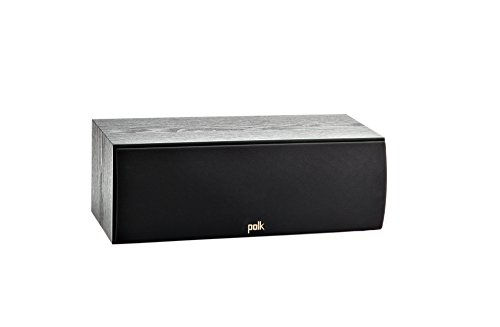



Polk audio systems are renowned for their quality, but like any technology, they can encounter problems over time. These issues can arise from various sources, including how the system is set up, the environment in which it operates, and the devices it connects to. In this article, we will explore the common causes of audio cutouts in your Polk home theater system and provide actionable solutions to help you restore your system to optimal performance.
Common Connectivity Issues
Connectivity is often the primary culprit when it comes to audio cutouts in home theater systems. Here are a few key areas to check:
– Check All Connections: Start by inspecting all cables connected to your Polk home theater system. Ensure that each cable is securely plugged into both the audio/video components and the power supply. Look for any signs of wear or damage, such as fraying or bent connectors, which could lead to signal loss.
– Inspect Wireless Signals: If you are using a wireless connection, such as Bluetooth or Wi-Fi, interference may be the root cause of the problem. Ensure that there are no obstructions, such as walls or large objects, blocking the signal between your devices. Additionally, check for interference from other wireless devices in your home, such as routers, cordless phones, or microwaves.
Software and Firmware Glitches
Software issues can also lead to performance problems in home theater systems. Consider the following steps:
– Update Firmware: Regularly updating the firmware of your Polk home theater system is crucial for maintaining optimal performance. Manufacturers often release updates to fix bugs, improve compatibility, and enhance features. Check the Polk Audio website or your system’s settings menu for available updates.
– Reset Settings: If issues persist, trying a factory reset might help. This option clears any temporary glitches that could cause your system to cut out. Refer to your user manual for instructions on how to perform a reset, and make sure to back up any important settings beforehand.
Power Supply Problems
The power supply is another critical factor that can affect the performance of your home theater system:
– Inspect Power Source: Ensure that the power outlet you are using is functioning properly. You can test the outlet by plugging in another device. Additionally, check that the power cord is not damaged and is properly plugged into both the outlet and the receiver.
– Check for Overheating: Overheating can cause your system to shut down or cut out intermittently. Ensure that your receiver and speakers have adequate ventilation. Avoid placing them in enclosed spaces, and clean any dust buildup from vents and fans.
Speaker Configuration Issues
Proper speaker configuration is essential for a well-functioning home theater system. Here are critical aspects to verify:
– Verify Speaker Setup: Confirm that the speaker configuration in your settings matches your actual physical setup. Mismatched settings can lead to audio issues, including cutouts. Use the setup wizard if available, or consult the manual to ensure proper configuration.
– Balance Audio Levels: Unbalanced audio levels can cause some speakers to overwork, leading to distortions or cutouts. Adjust the levels for each speaker in your system settings to ensure a balanced sound experience.
HDMI and Input Source Problems
Issues with HDMI connections and input sources can also disrupt your audio experience:
– Check HDMI Connections: Ensure that all HDMI cables are securely connected and that they are compatible with your devices. Sometimes, using a low-quality or damaged HDMI cable can lead to signal loss. It may be worth trying a different cable to see if the issue resolves.
– Test Different Input Sources: If your system cuts out only when using a specific device, the issue may lie with that device. Switch between input sources (for example, a streaming device, Blu-ray player, or game console) to identify if the problem is isolated to one source.
Environmental Factors
The environment where your home theater system is set up can significantly impact performance:
– Minimize Interference: Keep your home theater system away from appliances that may cause interference. Devices like microwaves, baby monitors, and cordless phones can disrupt wireless signals, leading to audio cutouts.
– Assess Room Acoustics: Poor room acoustics can affect sound quality. Consider rearranging furniture or adding soundproofing materials to improve audio performance. Soft furnishings can help absorb sound and reduce echoes.
When to Seek Professional Help
After thorough troubleshooting, if your Polk home theater system continues to cut out, you may need to consider professional assistance:
– Troubleshoot Extensively: Document any patterns or specific conditions under which the cutouts occur. This information can be helpful for a technician in diagnosing the issue.
– Consult a Technician: If you are unable to resolve the issue despite your efforts, consulting a professional technician may be necessary. They can conduct a thorough diagnosis and identify any underlying problems that may not be evident to the average user.
Common Causes of Home Theater Cutouts and Solutions
| # | Cause | Frequency (%) | Solution |
|---|---|---|---|
| 1 | Connectivity Issues | 45% | Check connections, reduce interference |
| 2 | Software Glitches | 30% | Update firmware, reset settings |
| 3 | Power Supply Issues | 20% | Check power source and ventilation |
| 4 | Speaker Configuration | 25% | Verify setup and balance audio levels |
| 5 | HDMI Issues | 15% | Check HDMI cables and sources |
| 6 | Environmental Factors | 10% | Minimize interference, assess acoustics |
Causes of Home Theater Audio Cutouts
Resolving the issue of your Polk home theater cutting out involves checking connectivity, updating software, inspecting power supplies, and ensuring proper configurations. By following these steps, you can often identify the root cause and restore your system to optimal performance. If problems persist, don’t hesitate to seek professional help for a thorough diagnosis. With the right approach, you can enjoy a seamless audio-visual experience once again.
Frequently Asked Questions
Why does my Polk home theater keep cutting out during movies?
Your Polk home theater may be cutting out during movies due to several issues such as loose connections, overheating, or insufficient power supply. Check all cables to ensure they are securely connected and consider whether your receiver is overheating by placing it in a well-ventilated area. Additionally, verify that your power source can handle the system’s demands.
What should I do if my Polk home theater system keeps losing sound?
If your Polk home theater system keeps losing sound, first check the audio settings on both your receiver and the connected devices. Ensure that the correct input is selected and that the volume is turned up. If the problem persists, try resetting the receiver and checking all speaker connections for damage or loose wires.
How can I prevent my Polk home theater from cutting out during playback?
To prevent your Polk home theater from cutting out during playback, ensure that you’re using high-quality cables suited for your system. Regularly update the firmware on your receiver and check for overheating by ensuring proper ventilation. Also, consider using a power conditioner to stabilize the power supply.
Which troubleshooting steps should I follow if my Polk home theater system suddenly turns off?
If your Polk home theater system suddenly turns off, start by checking the power source and ensuring the system is plugged in properly. Inspect the circuit breaker or fuse box for any tripped breakers. If the issue continues, it might be due to an internal failure, and you may need to contact technical support for further assistance.
Why does my Polk home theater experience poor audio quality before cutting out?
Poor audio quality before your Polk home theater cuts out can be attributed to issues like improper speaker placement, incorrect settings, or damaged speakers. Ensure that your speakers are positioned correctly and that you have calibrated the audio settings according to the room’s acoustics. Additionally, inspect the speakers for any physical damage that could affect performance.
References
- Home cinema
https://en.wikipedia.org/wiki/Home_theater - https://www.audioholics.com/home-theater-connection/how-to-fix-cutting-out-sound
https://www.audioholics.com/home-theater-connection/how-to-fix-cutting-out-sound - Google Scholar Google Scholar
https://scholar.google.com/scholar?q=Polk+Home+Theater+cutting+out - Google Scholar Google Scholar
https://scholar.google.com/scholar?q=soundbar+cutting+out+issues - Google Scholar Google Scholar
https://scholar.google.com/scholar?q=home+theater+audio+problems - Google Scholar Google Scholar
https://scholar.google.com/scholar?q=Why+Does+My+Polk+Home+Theater+Keep+Cutting+Out? - Why Does My Polk Home Theater Keep Cutting Out? – Search results
https://en.wikipedia.org/wiki/Special:Search?search=Why+Does+My+Polk+Home+Theater+Keep+Cutting+Out? - https://www.ncbi.nlm.nih.gov/search/research-articles/?term=Why+Does+My+Polk+Home+Theater+Keep+Cutting+Out?
https://www.ncbi.nlm.nih.gov/search/research-articles/?term=Why+Does+My+Polk+Home+Theater+Keep+Cutting+Out?
