
Resetting your Bang & Olufsen sound system is a straightforward process that can help resolve various issues, such as connectivity problems or software glitches. In this guide, you’ll learn the specific steps to perform a reset on your system, ensuring you can restore its functionality quickly and efficiently.

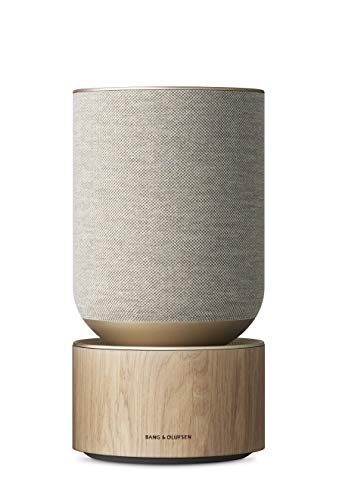


Understanding the Need for a Reset
The benefits of resetting your system are manifold. Firstly, it can improve audio quality by clearing out any glitches that may have developed over time. Secondly, a reset can restore factory settings, which is particularly useful if you’ve made changes that you can’t easily revert. Moreover, it can resolve connectivity issues that prevent your devices from pairing seamlessly. Overall, resetting serves as a vital troubleshooting step in maintaining your sound system’s performance.
Preparing for the Reset
Before proceeding with the reset, ensure that your Bang & Olufsen sound system is powered on and connected to a stable power source. A reliable power connection is crucial to prevent any interruptions during the process, which could potentially cause further issues.
Next, gather any necessary tools or remotes you might need. Depending on the model, you may require the remote control or a specific app installed on your smartphone. Additionally, it’s wise to familiarize yourself with the user manual for your specific model, as it may contain crucial information about the reset process.
Performing the Reset on Different Models
To perform a reset on various Bang & Olufsen models, follow these specific instructions tailored to popular series like the Beoplay and Beosound:
Beoplay Series
1. Beoplay H9/H8:
– Power off the headphones.
– Press and hold the “Power” button and the “Bluetooth” button simultaneously for about 5-10 seconds until you see the LED indicator flash amber.
– Release the buttons; your headphones are now reset.
2. Beoplay A9:
– Disconnect the power supply.
– Press and hold the “Play/Pause” button while reconnecting the power supply.
– Continue holding the button until the LED flashes white, indicating the unit has been reset.
Beosound Series
1. Beosound 1 and 2:
– Ensure the device is powered on.
– Press and hold the “Bluetooth” and “Volume Up” buttons simultaneously for 5 seconds.
– Wait for the speaker to reboot to confirm the reset.
2. Beosound Stage:
– Disconnect the power cord and wait for 10 seconds.
– While reconnecting the power, press and hold the “Power” button until you hear a confirmation sound.
By following these tailored steps, you can ensure a successful reset for your specific Bang & Olufsen model.
Popular Bang & Olufsen Models and Reset Methods
| # | Model | Reset Method | Notes |
|---|---|---|---|
| 1 | Beoplay H9 | Hold Power + Bluetooth | LED flashes amber |
| 2 | Beoplay A9 | Hold Play/Pause | Wait for white LED |
| 3 | Beosound 1 | Hold Bluetooth + Volume Up | Device will reboot |
| 4 | Beosound Stage | Replug power + Hold Power | Listen for reboot sound |
| 5 | Beoplay H8 | Hold Power + Bluetooth | LED indicator flashes |
| 6 | Beosound 2 | Hold Bluetooth + Volume Up | Wait for reboot |
Troubleshooting After the Reset
If the reset does not resolve the issue, there are several steps you can take to troubleshoot further. First, check your network settings, especially if you’re having connectivity issues. Ensure that your device is connected to the correct Wi-Fi network and that your router is functioning properly.
Additionally, consider checking for firmware updates. Outdated firmware can often lead to various performance problems, including connectivity issues. Most Bang & Olufsen devices come with an app that allows users to easily check and install updates.
If you have tried these steps and are still experiencing problems, it may be time to contact Bang & Olufsen customer support. Their knowledgeable staff can assist with more complex issues that may require professional intervention.
Tips for Maintaining Your Sound System
To prevent future issues with your Bang & Olufsen sound system, consider implementing the following maintenance tips:
1. Regular Software Updates: Check for updates frequently to ensure your system has the latest enhancements and bug fixes.
2. Proper Placement: Ensure your sound system is placed in an optimal location, away from obstructions and in an open space to allow for optimal sound performance.
3. Routine Cleaning: Dust and other debris can accumulate on your device, affecting performance. Regularly clean your speakers and controls with a soft, dry cloth.
4. Usage Guidelines: Refer to the user manual for specific care instructions, as different models may have unique requirements.
By adhering to these maintenance practices, you can prolong the life of your Bang & Olufsen sound system and enhance its performance.
Additional Resources
For further assistance, consider exploring the following resources:
– Online Forums and User Groups: Websites like Reddit or specialized audio forums can provide valuable insights from other Bang & Olufsen users who may have encountered similar issues.
– Official Bang & Olufsen Resources: Visit the Bang & Olufsen support page for FAQs, manuals, and troubleshooting tips.
– Video Tutorials: YouTube is a great platform to find video guides that visually demonstrate the reset process and other troubleshooting techniques.
In conclusion, resetting your Bang & Olufsen sound system can effectively troubleshoot issues and maintain optimal performance. By following the steps outlined in this guide, you can quickly restore your system’s functionality. Don’t hesitate to reach out to customer support or explore additional resources if you encounter any difficulties. Keep your sound system well-maintained, and enjoy a superior listening experience for years to come.
Frequently Asked Questions
How do I perform a factory reset on my Bang & Olufsen sound system?
To perform a factory reset on your Bang & Olufsen sound system, locate the reset button on the device, usually found in the settings menu or as a physical button. Press and hold this button for about 10 seconds until you see the indicator light flash. This process will restore the original settings, erasing all paired devices and custom configurations.
Why would I need to reset my Bang & Olufsen sound system?
You may need to reset your Bang & Olufsen sound system if you are experiencing persistent connectivity issues, unusual behavior, or if you want to clear all personalized settings before selling or giving away the device. A factory reset can help resolve software glitches and restore optimal performance.
What should I do if my Bang & Olufsen sound system won’t reset?
If your Bang & Olufsen sound system won’t reset, ensure that the device is powered on and that you are following the correct reset procedure for your specific model. If the reset still fails, try unplugging the device for a few minutes before attempting the reset again. If issues persist, consulting the user manual or contacting Bang & Olufsen customer support may be necessary.
Which Bang & Olufsen models support a factory reset?
Most Bang & Olufsen models, including the Beoplay and Beosound series, support a factory reset feature. However, the exact method may vary by model, so it’s important to refer to the specific user manual for your device. Checking the manufacturer’s website for model-specific instructions can also provide clarity.
How can I reset the Bluetooth connection on my Bang & Olufsen sound system?
To reset the Bluetooth connection on your Bang & Olufsen sound system, first, remove the device from the Bluetooth section of your phone or tablet settings. Then, initiate the pairing mode on the sound system, usually by pressing a dedicated Bluetooth button, and search for the device on your phone to reconnect. This process can resolve connectivity issues and ensure a stable connection.
References
- Bang & Olufsen
https://en.wikipedia.org/wiki/Bang_%26_Olufsen - https://www.bbc.com/news/technology-54185345
https://www.bbc.com/news/technology-54185345 - https://www.theguardian.com/technology/2020/nov/10/bang-olufsen-beoplay-h9-review
https://www.theguardian.com/technology/2020/nov/10/bang-olufsen-beoplay-h9-review - Google Scholar Google Scholar
https://scholar.google.com/scholar?q=Bang+Olufsen+Sound+System+reset - Google Scholar Google Scholar
https://scholar.google.com/scholar?q=reset+Bang+Olufsen+speaker - Google Scholar Google Scholar
https://scholar.google.com/scholar?q=Bang+Olufsen+audio+system+troubleshooting - https://www.sciencedirect.com/topics/engineering/bang-olufsen
https://www.sciencedirect.com/topics/engineering/bang-olufsen - https://www.nytimes.com/2020/09/25/technology/bang-olufsen-wireless-speakers.html
https://www.nytimes.com/2020/09/25/technology/bang-olufsen-wireless-speakers.html - https://www.mayoclinic.org/healthy-lifestyle/consumer-health/in-depth/smart-home-technology/art-20427604
https://www.mayoclinic.org/healthy-lifestyle/consumer-health/in-depth/smart-home-technology/art-20427604 - Google Scholar Google Scholar
https://scholar.google.com/scholar?q=How+to+Reset+a+Bang+&+Olufsen+Sound+System
