
Choosing the right gaming monitor is crucial for FPS and competitive gaming, as it can significantly enhance your performance. The best monitors provide essential features like high refresh rates and low response times, which are vital for fast-paced gameplay. In this article, you’ll discover top gaming monitors that can elevate your gaming experience, along with essential factors to consider when making your selection. Let’s dive in and find the perfect monitor to give you that competitive edge!




Key Features to Look For
When selecting a gaming monitor specifically for FPS and competitive gaming, certain features become non-negotiable.
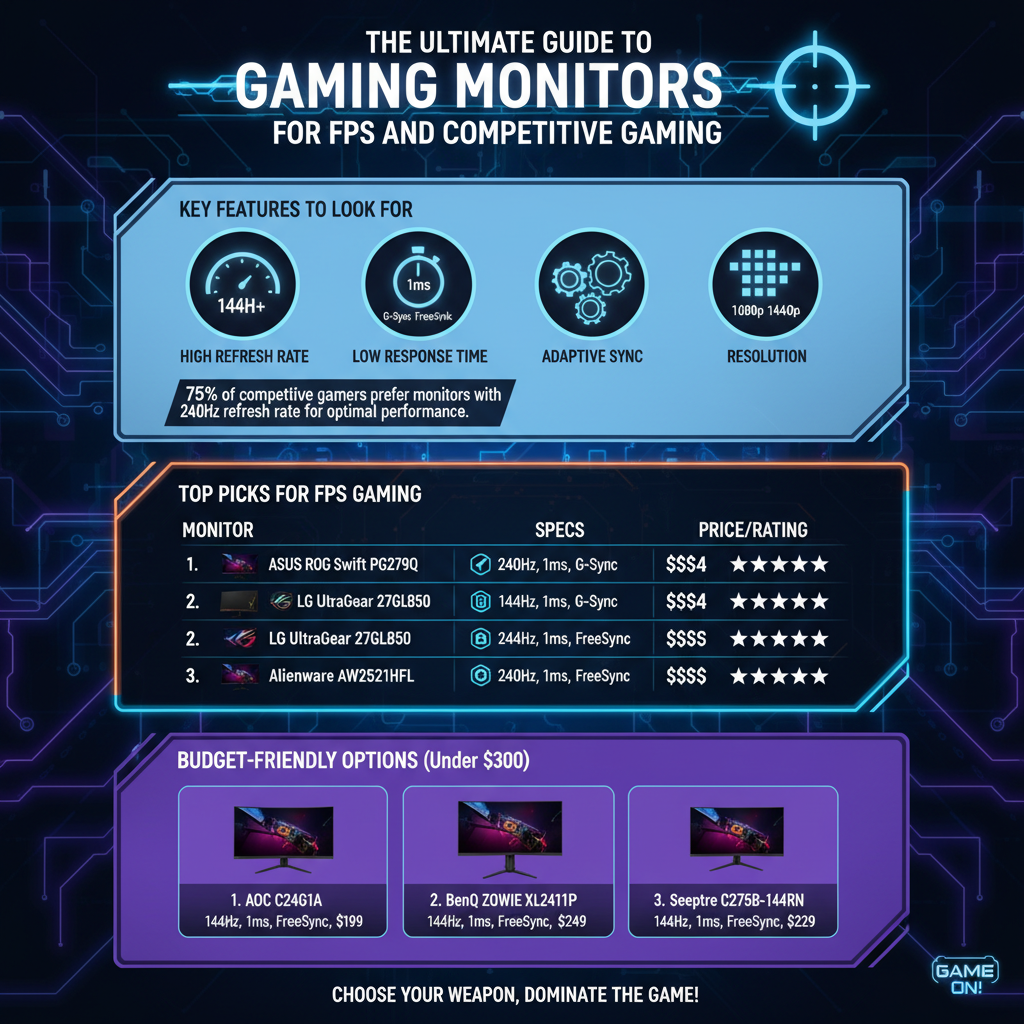
– High Refresh Rate: A refresh rate of 144Hz is the bare minimum you should consider for smooth gameplay, but many competitive gamers swear by 240Hz monitors. A higher refresh rate allows for more frames per second, resulting in smoother visuals and quicker reactions, which can be a game-changer in high-stakes matches.
– Low Response Time: Look for a response time of 1ms or lower. This spec is crucial because it reduces motion blur and ghosting, allowing you to see your opponents clearly as they move across the screen. A low response time ensures that your actions are reflected on-screen almost instantaneously, giving you a split-second advantage.
– Adaptive Sync Technologies: Gaming monitors equipped with G-Sync (for NVIDIA graphics cards) or FreeSync (for AMD graphics cards) help eliminate screen tearing and stuttering. These technologies synchronize the monitor’s refresh rate with your GPU’s output, creating a smoother gaming experience and maintaining visual integrity, especially in demanding scenarios.
Top Picks for FPS Gaming

If you’re seeking the best of the best, here are our top picks for monitors that excel in FPS gaming:
– Monitor A: The ASUS ROG Swift PG259QN is a standout with its impressive 240Hz refresh rate and lightning-fast 1ms response time. This monitor is specifically designed for competitive gaming, featuring NVIDIA G-Sync for tear-free gameplay. With its 24.5-inch screen size, you’ll enjoy crisp details and vibrant colors, making it perfect for fast-paced titles like Call of Duty and Valorant.
– Monitor B: The Acer Predator XB273U GX offers a fantastic balance between performance and color accuracy, boasting a 165Hz refresh rate and 1ms response time. This monitor is ideal for gamers who appreciate stunning visuals alongside competitive performance. It’s especially great for games where you need to spot enemies quickly, thanks to its impressive color reproduction and sharp details.
Budget-Friendly Options
Gaming doesn’t have to break the bank! Here are some excellent budget-friendly monitors that still deliver solid performance:
– Monitor C: The AOC C24G1 is a fantastic 144Hz monitor with a 1ms response time, making it an excellent choice for gamers on a budget. With its 24-inch curved screen, you’ll feel immersed in your games without spending a fortune. Plus, its FreeSync technology helps minimize screen tearing, making it suitable for competitive play.
– Monitor D: The ViewSonic XG2405 is another great option that provides a superb balance of features and cost. With a 144Hz refresh rate and 1ms response time, it’s perfect for FPS gaming while also being versatile enough for general use. Its affordability makes it a popular choice among gamers who want reliability without a hefty price tag.
Size and Resolution Considerations
When it comes to size and resolution, choosing the right specifications can greatly impact your gaming experience.
– Screen Size: For FPS gaming, a screen size between 24 to 27 inches is generally considered ideal. This range provides a balance between immersion and the ability to track fast-moving targets without moving your head too much. Larger screens can be distracting, while smaller ones might make it harder to spot distant enemies.
– Resolution: While 1080p is the standard resolution for most competitive gamers, many are making the switch to 1440p for enhanced detail, provided that their hardware can handle it. A higher resolution gives you clearer visuals, which can help in spotting opponents and appreciating finer details in-game environments.
Ergonomics and Design
Comfort is key when you’re in the zone for long gaming sessions, so consider these ergonomic features:
– Adjustable Stands: Look for monitors with height and tilt adjustments. Being able to adjust the monitor to your eye level can prevent neck strain and enhance comfort during extended play. Some models even offer swivel and pivot options, allowing you to customize the setup to your liking.
– VESA Compatibility: Ensuring your monitor is VESA compatible allows you to mount it on a wall or an adjustable arm, saving valuable desk space. This feature can also improve ergonomics by allowing you to position the monitor at the perfect height and distance.
Additional Features to Enhance Gaming Experience
Beyond the core specifications, additional features can further enhance your gaming experience:
– Built-in Speakers: While dedicated speakers or gaming headsets are recommended for serious players who want the best sound quality, built-in speakers can be convenient for casual gaming or quick sessions. They provide a decent audio output without needing extra equipment.
– RGB Lighting: For many gamers, aesthetics are just as important as performance. Monitors with RGB lighting can add an immersive atmosphere to your gaming setup, allowing you to customize colors and effects that sync with your games. This feature can also enhance the overall ambiance of your gaming environment.
User Reviews and Community Feedback
Before making a purchase, it’s wise to tap into the collective knowledge of the gaming community:
– Importance of Reviews: Checking gamer forums and online reviews can provide you with real-world performance insights. You’ll find valuable feedback on how monitors handle various games and whether they truly deliver on their promises.
– Community Recommendations: Engage with online gaming communities to gather opinions on specific models. Platforms like Reddit and Discord have active gaming groups where you can ask for recommendations and hear firsthand experiences from other gamers.
Summarizing the key elements of a great gaming monitor can help you make an informed decision tailored to FPS and competitive gaming. By considering features like refresh rate, response time, and budget, you can find the perfect monitor to enhance your gaming experience. Explore the recommended models and take your gaming to the next level today!
Frequently Asked Questions
What features should I look for in the best gaming monitors for FPS and competitive gaming?
When selecting the best gaming monitors for FPS and competitive gaming, focus on features like a high refresh rate (144Hz or higher), low response time (1ms to 3ms), and adaptive sync technology (such as G-Sync or FreeSync). Additionally, consider the resolution (1080p is standard, but 1440p offers better detail), screen size (24 to 27 inches is ideal for immersion), and panel type (IPS for color accuracy or TN for faster response times) to ensure an optimal gaming experience.
How does refresh rate impact gaming performance in FPS games?
Refresh rate, measured in Hertz (Hz), indicates how many times per second your monitor refreshes the image. A higher refresh rate (like 144Hz or 240Hz) results in smoother gameplay and reduces motion blur, which is crucial in fast-paced FPS games. This allows for more precise aiming and quicker reactions, giving competitive players an edge over their opponents, especially in high-stakes environments.
Why is response time important for competitive gaming monitors?
Response time refers to how quickly a pixel can change from one color to another, typically measured in milliseconds (ms). A lower response time (1ms to 3ms) minimizes ghosting and motion blur, ensuring that fast-moving objects appear clear and sharp. In competitive FPS gaming, this clarity is essential for spotting enemies and making split-second decisions, directly affecting your performance and enjoyment.
Which monitor size is best for competitive FPS gaming?
The best monitor size for competitive FPS gaming generally ranges from 24 to 27 inches. This size strikes a balance between screen real estate and immersion without overwhelming your field of view. Many gamers prefer 24-inch monitors for their faster response times and lower prices, while 27-inch monitors offer enhanced detail and a more immersive experience, especially at higher resolutions.
What are the best gaming monitors for FPS and competitive gaming in 2023?
Some of the best gaming monitors for FPS and competitive gaming in 2023 include the ASUS ROG Swift PG259QN for its ultra-fast 360Hz refresh rate and 1ms response time, the Dell Alienware AW2521H for its stunning visuals with G-Sync compatibility, and the Acer Nitro VG271U for a budget-friendly option with a 144Hz refresh rate and 1ms response time. These monitors offer excellent performance and features tailored specifically for competitive gaming, ensuring you stay ahead of the competition.
References
- Computer monitor
- https://www.howtogeek.com/673990/how-to-choose-the-best-gaming-monitor/
- https://www.tomshardware.com/reviews/the-best-gaming-monitors,5642.html
- The 7 best gaming monitors you can buy, according to our reviewers – Digital Trends
- The best gaming monitor in 2025: my favorite displays for gaming at your best | TechRadar
- https://www.cnet.com/tech/computing/best-gaming-monitors/
- Best gaming monitors in 2026: the pixel-perfect panels I’d buy myself | PC Gamer
25 thoughts on “The Best Gaming Monitors for FPS and Competitive Gaming”